Python Sets
Updated 6 min read Aimerscrew
Sometimes you don't care about order or how many times something appears. You only care about which items exist. That's exactly what Python sets are for. In this lesson, you'll learn how to create sets, add and remove items, combine sets with union and intersection, and use them to remove duplicates in one line.
🌍 Real-life example
A website counts unique visitors. If Maya visits the homepage five times today, she still counts as one visitor. A set behaves the same way: add the same item as often as you like, and it is stored only once.
What is a set in Python?
A set is a collection of items with two key rules:
- Unique: every item appears only once. Duplicates are removed automatically.
- Unordered: items have no position, so there is no index like
my_set[0].
You write a set with curly braces {} and separate the items with commas:
dice_rolls = {4, 2, 6, 2, 4, 4}
print(dice_rolls)
print(len(dice_rolls))
{2, 4, 6}
3Six rolls went in, but only three different numbers came out. The duplicates simply vanished.
📝 Note
Because a set is unordered, Python may print its items in any order, and the order of text items can even change between runs. In this lesson, sets of text are printed with sorted(), a built-in function that returns the items as a sorted list, so you always see the same result. You'll meet more helpers like this in Python built-in functions.
How do you create an empty set?
This catches almost everyone: {} does not make an empty set. It makes an empty dictionary. To get an empty set, call set():
empty_box = {}
real_set = set()

print(type(empty_box))
print(type(real_set))
<class 'dict'>
<class 'set'>You can also pass any collection to set(), such as a list or a string, and it keeps only the unique items:
letters = set("banana")
print(sorted(letters))
['a', 'b', 'n']Adding items to a set
Use add() to put one item in. Adding something that is already there does nothing, and no error is raised:
visitors = set()
visitors.add("maya")
visitors.add("leo")
visitors.add("maya")   # Maya visits again

print(len(visitors), "unique visitors")
2 unique visitorsTo add several items at once, use update() with any collection:
badges = {1, 2}
badges.update([3, 4, 2])
print(badges)
{1, 2, 3, 4}Removing items: remove() vs discard()
Both methods delete an item. The difference is what happens when the item is missing:
remove(x)raises aKeyErrorifxis not in the set.discard(x)quietly does nothing ifxis not in the set.
seats = {12, 14, 15}
seats.discard(14)
seats.discard(99)   # not there, no problem
print(seats)

seats.remove(99)
{12, 15}
KeyError: 99💡 Tip
Use discard() when "already gone" is fine. Use remove() when a missing item means something went wrong and you want to hear about it. You can also empty a set completely with clear().
Set operations: union, intersection and difference
Sets really shine when you compare two groups. Python borrows four operations from math:
| Operation | Operator | Method | Result |
|---|---|---|---|
| Union | a | b | a.union(b) | Everything in either set |
| Intersection | a & b | a.intersection(b) | Only items in both sets |
| Difference | a - b | a.difference(b) | Items in a but not in b |
| Symmetric difference | a ^ b | a.symmetric_difference(b) | Items in exactly one of the sets |
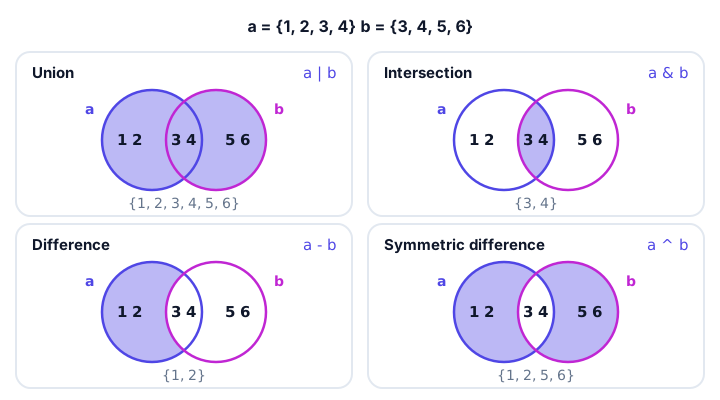
Here are the same two sets in code:
a = {1, 2, 3, 4}
b = {3, 4, 5, 6}

print(a | b)   # union
print(a & b)   # intersection
print(a - b)   # difference
print(b - a)   # difference the other way
print(a ^ b)   # symmetric difference
{1, 2, 3, 4, 5, 6}
{3, 4}
{1, 2}
{5, 6}
{1, 2, 5, 6}Notice that a - b and b - a give different answers. Difference is the only one of the four where order matters.
Real-world example: mutual friends and shared songs
Social apps show "mutual friends", and music apps build blended playlists. Both are just set operations:
ana_friends = {"Ben", "Chloe", "Dev", "Emma"}
sam_friends = {"Chloe", "Emma", "Farah"}

mutual = ana_friends & sam_friends
print("Mutual friends:", sorted(mutual))

ana_songs = {"Levitating", "Yellow", "Shallow"}
sam_songs = {"Yellow", "Halo", "Shallow"}

print("Both like:", sorted(ana_songs & sam_songs))
print("Blend playlist:", sorted(ana_songs | sam_songs))
print("Only Ana likes:", sorted(ana_songs - sam_songs))
Mutual friends: ['Chloe', 'Emma']
Both like: ['Shallow', 'Yellow']
Blend playlist: ['Halo', 'Levitating', 'Shallow', 'Yellow']
Only Ana likes: ['Levitating']How do you remove duplicates from a list?
Turn the list into a set, then turn it back into a list. This is one of the most common Python tricks:
orders = [3, 1, 3, 2, 1, 3]
unique_orders = list(set(orders))
print(unique_orders)
[1, 2, 3]The catch: a set forgets the original order. If order matters, keep a set of "seen" items while you loop and build a new list:
tags = ["travel", "food", "travel", "beach", "food"]
seen = set()
clean = []

for tag in tags:
    if tag not in seen:
        seen.add(tag)
        clean.append(tag)

print(clean)
['travel', 'food', 'beach']Why is checking membership in a set so fast?
You can test if an item is in a set with the in operator, just like with lists (see membership operators):
banned_users = {"spam_bot", "troll42"}
print("troll42" in banned_users)
print("maya" in banned_users)
True
FalseThe difference is speed. To check a list, Python looks at the items one by one. A set uses a technique called hashing: it turns each item into a number that tells Python exactly where to look. So checking a set with a million items is about as fast as checking one with ten. If you test membership often, use a set.
⚠️ Sets only hold immutable items
Because of hashing, set items must be immutable (unchangeable): numbers, strings and tuples are fine, but lists are not. {[1, 2]} raises TypeError: unhashable type: 'list'.
Common mistakes with sets
1. Using {} for an empty set
likes = {}
likes.add("pizza")
AttributeError: 'dict' object has no attribute 'add'{} is an empty dictionary. Write likes = set() instead.
2. Trying to use an index
colors = {"red", "green"}
print(colors[0])
TypeError: 'set' object is not subscriptableSets have no positions. Loop over them with for, or convert to a list first if you need indexes.
3. Expecting the original order back
list(set(items)) removes duplicates but does not keep the order you started with. Use the "seen" loop shown above when order matters.
Practice exercise
🏋️ Try it yourself
Two coffee shops list the drinks they sell. Shop A: latte, mocha, espresso, chai. Shop B: espresso, flat white, latte. Print (sorted) the drinks both shops sell, the drinks only Shop A sells, and how many different drinks there are in total.
Show solution
shop_a = {"latte", "mocha", "espresso", "chai"}
shop_b = {"espresso", "flat white", "latte"}

print("Both:", sorted(shop_a & shop_b))
print("Only A:", sorted(shop_a - shop_b))
print("Total different drinks:", len(shop_a | shop_b))
Both: ['espresso', 'latte']
Only A: ['chai', 'mocha']
Total different drinks: 5What's next?
Sets store unique items, but sometimes you need to attach information to each item, like a phone number to a name. That's the job of Python dictionaries, coming up next.
Key takeaways
- A set is an unordered collection of unique items, written like {1, 2, 3}.
- An empty set is created with set(); {} creates an empty dictionary.
- add() inserts one item, update() inserts many, and duplicates are ignored.
- remove() raises KeyError for a missing item, while discard() does nothing.
- Union |, intersection &, difference - and symmetric difference ^ compare two sets.
- list(set(items)) removes duplicates from a list but does not keep the original order.
- Membership tests with in are much faster on a set than on a list.
Frequently asked questions
What is a set in Python?
A set is a built-in collection that stores unique items with no order. It is written with curly braces, for example {1, 2, 3}, and it removes duplicates automatically.
How do you create an empty set in Python?
Use set(). Writing {} creates an empty dictionary, not a set, because curly braces were used for dictionaries first.
Are Python sets ordered?
No. Sets do not keep items in any guaranteed order and do not support indexing. If you need a sorted result, use sorted(my_set), which returns a list.
What is the difference between remove and discard in a Python set?
Both delete an item. remove() raises a KeyError if the item is not in the set, while discard() silently does nothing.
How do you remove duplicates from a list in Python?
Convert it to a set and back: list(set(my_list)). This loses the original order, so if order matters, loop through the list and keep a set of items you have already seen.
Can a Python set contain a list?
No. Set items must be hashable, which means immutable. Numbers, strings and tuples are allowed, but lists and dictionaries raise TypeError: unhashable type.