Your First Python Program: Hello, World!
Updated 6 min read Aimerscrew
The Python Hello World program is the traditional first step for every new programmer. It does one simple thing, showing the words Hello, World! on the screen, but it proves that Python is installed, that you can write code, and that you can run it. In this lesson, you'll write it in the Python shell, save it in a file, and then go further with numbers, multiple lines and a fun mini project.
🌍 Real-life example
Before a concert, a sound engineer taps the microphone and says "Testing, one, two." It isn't the show; it's a quick check that everything is connected. "Hello, World!" is a programmer's sound check: if it works, your setup is ready for the real thing.
What is a Hello, World! program?
A Hello, World! program is the smallest program that produces visible output. Programmers have used it as a first example for decades, in almost every language. In Python, it's just one line:
print("Hello, World!")Hello, World!That line has three parts:
printis a function: a named, ready-made action. This one displays things on the screen.- The parentheses
( )hold what you want to give the function. "Hello, World!"is a string: a piece of text. The quotes mark where the text starts and ends; they aren't printed.
How do you print Hello, World! in the Python shell?
The quickest way is the interactive shell you met in How to Install Python. Open a terminal, type python (Windows) or python3 (macOS and Linux), and at the >>> prompt type:
print("Hello, World!")>>> print("Hello, World!")
Hello, World!Press Enter and Python answers immediately. Congratulations, you just ran Python code! The downside is that the shell forgets everything when you close it. To keep a program, save it in a file.
How do you write Hello World in a Python file?
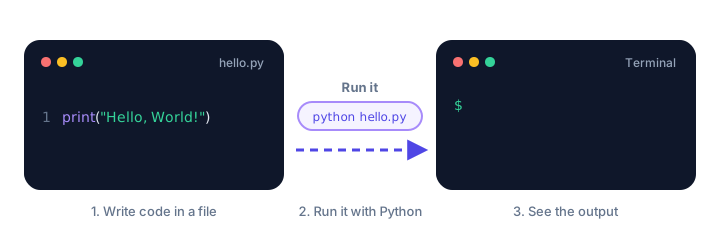
Real programs live in files that end in .py. Here's how to create and run your first one:
- Create a folder for your practice code, for example
python-practiceon your Desktop. - Open your editor (such as VS Code or IDLE) and create a new file in that folder called
hello.py. - Type the code below and save the file.
print("Hello, World!")Now open a terminal and move into your folder with the cd ("change directory") command, then run the file:
cd Desktop/python-practice
python hello.py
Hello, World!On macOS and Linux, type python3 hello.py. In VS Code, you can also click the ▷ Run button in the top-right corner, and in IDLE, press F5.
💡 Tip
Python accepts single or double quotes: print('Hello') works too. Pick one style and stick to it. Double quotes are handy when your text contains an apostrophe, like print("It's working!").
How do you print multiple lines?
Each print() starts a new line, so write one per line of output. Python runs them in order, top to bottom:
print("Good morning!")
print("Today's forecast: sunny")
print("High: 75°F / 24°C")
Good morning!
Today's forecast: sunny
High: 75°F / 24°CAn empty print() prints a blank line, which is useful for spacing:
print("Your order is ready.")
print()
print("Thanks for shopping with us!")
Your order is ready.
Thanks for shopping with us!How do you print numbers and calculations?
Numbers don't need quotes. Python can even do math inside print() and show the answer:
print(42)
print(7 + 5)
print("7 + 5")
print(10 / 4)
42
12
7 + 5
2.5Notice the difference between lines 2 and 3. Without quotes, 7 + 5 is a calculation, so Python prints 12. With quotes, it's just text, so Python prints it exactly as written.
You can print text and numbers together by separating them with commas. Python adds a space between each item:
print("Tickets:", 4)
print("Total cost:", 4 * 15, "dollars")
Tickets: 4
Total cost: 60 dollarsCommon mistakes in your first program
Errors are a normal part of programming, not a sign you're doing badly. Python's error messages tell you what went wrong; learn to read them and you'll fix problems in seconds.
1. Missing a quote
print("Hello, World!)SyntaxError: unterminated string literal (detected at line 1)The text was opened with " but never closed. Every opening quote needs a matching closing quote.
2. Missing a parenthesis
print("Hello, World!"SyntaxError: '(' was never closedBrackets come in pairs. Add the closing ) at the end. (In the interactive shell, Python shows ... instead and waits for you to finish the line.)
3. Writing Print with a capital P
Print("Hello, World!")NameError: name 'Print' is not defined. Did you mean: 'print'?Python is case-sensitive: it treats uppercase and lowercase letters as different. The function is print, all lowercase.
4. Using Python 2 style
print "Hello, World!"SyntaxError: Missing parentheses in call to 'print'. Did you mean print(...)?Old Python 2 tutorials leave out the parentheses. In Python 3, print is a function, so the parentheses are required.
5. Forgetting the quotes completely
print(Welcome)NameError: name 'Welcome' is not definedWithout quotes, Python thinks Welcome is the name of something you created earlier. Text always needs quotes.
⚠️ Watch out for curly quotes
If you copy code from a word processor or some websites, straight quotes " may turn into curly ones like “ and ”. Python only understands straight quotes, so retype them in your code editor.
Mini project: print a greeting card
Let's combine everything into something you could actually send to a friend. This program prints a birthday card using several print() lines, blank lines for spacing, and a neat trick: "=" * 30 repeats the = character 30 times to draw a border.
print("=" * 30)
print("   Happy Birthday, Jordan!")
print("=" * 30)
print()
print("  Wishing you a year full of")
print("  laughter, adventure and cake.")
print()
print("  Love,")
print("  Priya")
print("=" * 30)
==============================
Happy Birthday, Jordan!
==============================
Wishing you a year full of
laughter, adventure and cake.
Love,
Priya
==============================Change the names and the message to make it your own. Try a thank-you card or a holiday card next.
Practice exercise
🏋️ Try it yourself
Create a file called ticket.py that prints a movie ticket. It should show a title line, the movie name Space Pirates, the seat Row F, Seat 12, and the price of 2 tickets at 11 dollars each, calculated by Python (not typed in by hand).
Show solution
print("*** MOVIE TICKET ***")
print("Film: Space Pirates")
print("Seat: Row F, Seat 12")
print("Price:", 2 * 11, "dollars")
*** MOVIE TICKET ***
Film: Space Pirates
Seat: Row F, Seat 12
Price: 22 dollarsRun it with python ticket.py (or python3 ticket.py).
What's next?
You've written and run your first Python program. But what actually happens when you press Enter? Find out in How Python Runs Your Code.
Key takeaways
- The Python Hello World program is one line: print("Hello, World!").
- print() is a built-in function that shows text and numbers on the screen.
- Save programs in .py files and run them with python file.py (python3 on macOS and Linux).
- Text needs quotes; numbers and calculations do not.
- Each print() starts a new line, and an empty print() adds a blank line.
- Python is case-sensitive, so Print is not the same as print.
Frequently asked questions
How do you write Hello World in Python?
Type print("Hello, World!") in the Python shell, or save it in a file such as hello.py and run python hello.py in a terminal.
How do I run a Python file?
Open a terminal, go to the folder that contains the file with cd, then type python filename.py on Windows or python3 filename.py on macOS and Linux. Editors like VS Code also have a Run button.
Should I use single or double quotes in Python?
Both work the same way. Double quotes are convenient when the text contains an apostrophe, such as "It's sunny". Just be consistent.
Why do I get a SyntaxError with print "Hello"?
That is Python 2 syntax. In Python 3, print is a function and needs parentheses: print("Hello").
What does the print function do in Python?
print() displays the values you give it on the screen. It separates multiple values with spaces and ends with a new line.