Python Generators and yield
Updated 7 min read Aimerscrew
In the iterators lesson, you built an iterator class with __iter__() and __next__(). It worked, but it took a lot of code. Python generators give you the same result with an ordinary function and one new keyword: yield. In this lesson, you'll learn how generators work, why they save memory, how to write generator expressions, and when to use them.
🌍 Real-life example
Think of the ticket dispenser at a deli counter or a passport office. It doesn't print a thousand tickets in the morning and pile them up. It prints one ticket when someone pulls it, then waits for the next person. A generator works the same way: it makes each value only when you ask for it.
What is a generator in Python?
A generator is a special kind of iterator created by a function that contains yield. Each yield hands one value back to the caller and pauses the function, keeping all its local variables. The next time a value is requested, the function continues right after the yield.
def three_steps():
    yield "Warm up"
    yield "Run"
    yield "Stretch"

for step in three_steps():
    print(step)
Warm up
Run
StretchA function that contains yield is called a generator function. Calling it doesn't run its body; it returns a generator object, and the body runs bit by bit as you loop over it.
How does yield work, step by step?
Because a generator is an iterator, you can drive it by hand with next(). Adding a few print() calls shows exactly when the function runs and when it pauses:
def ticket_dispenser():
    print("Machine switched on")
    yield 1
    print("Printing next ticket")
    yield 2

machine = ticket_dispenser()
print("Generator created")

print(next(machine))
print(next(machine))
Generator created
Machine switched on
1
Printing next ticket
2Notice that "Machine switched on" appears only after the first next(), not when the generator was created. Each next() runs the function until it reaches a yield, then freezes it. When the function finishes, the generator raises StopIteration, just like any iterator:
def ticket_dispenser():
    yield 1
    yield 2

machine = ticket_dispenser()
print(next(machine))
print(next(machine))
print(next(machine))
1
2
StopIterationyield vs return: what's the difference?
return | yield | |
|---|---|---|
| What it does | Sends back one result and ends the function | Sends back one value and pauses the function |
| Can run many times? | No, the function is finished | Yes, once per value |
| Local variables | Lost when the function ends | Kept between values |
| Calling the function gives | The returned value | A generator object |
Here is the Countdown iterator class from the last lesson, rewritten as a generator. Compare the length:
def countdown(start):
    current = start
    while current >= 1:
        yield current
        current -= 1

for number in countdown(3):
    print(number)
print("Liftoff!")
3
2
1
Liftoff!Python writes __iter__(), __next__() and the StopIteration logic for you.
Why are generators memory efficient?
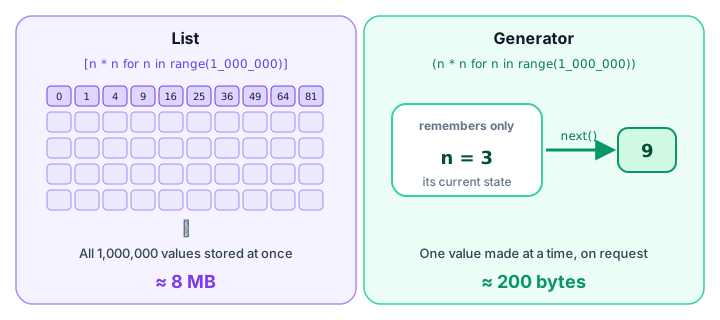
A list stores every value in memory at once. A generator stores only its current position and produces values on demand. This is called lazy evaluation: work is done only when a value is actually needed.
The sys module's getsizeof() function tells you roughly how many bytes an object takes. Compare a list of a million squares with a generator that produces the same squares:
import sys

squares_list = [n * n for n in range(1_000_000)]
squares_gen = (n * n for n in range(1_000_000))

print("List:", sys.getsizeof(squares_list) // 1_000_000, "MB")
print("Generator:", sys.getsizeof(squares_gen), "bytes")
List: 8 MB
Generator: 200 bytesThe exact numbers depend on your Python version and computer, but the difference is always huge. And the generator stays the same size whether it produces a thousand values or a billion.
What is a generator expression?
A generator expression looks like a list comprehension, but with round brackets instead of square ones. It creates a generator in a single line:
prices = [12.5, 8.0, 30.0, 4.25]

with_tax = (price * 1.1 for price in prices)

print(next(with_tax))
print(next(with_tax))
13.750000000000002
8.8(The long decimal is normal floating-point rounding; you could tidy it with round().)
Generator expressions are perfect when you pass values straight into a function like sum(), max(), min() or any(). When a generator expression is the only argument, you can even drop the extra brackets:
cart = [("coffee", 4.5, 2), ("bagel", 3.0, 3), ("juice", 5.25, 1)]

total = sum(price * qty for name, price, qty in cart)
print(total)

steps = [4200, 10350, 7800, 12010]
print(any(day >= 10000 for day in steps))
23.25
TrueNo temporary list is ever built; sum() pulls each value from the generator and adds it right away.
Real-world example: reading a huge log file line by line
Imagine a web server log with millions of lines. Loading it all into a list could use gigabytes of memory. A generator can read it one line at a time and pass along only the lines you care about. (File objects are iterators too, as you saw in reading files.)
Suppose server.log contains these lines (a real one would have millions):
INFO 10:00 Server started
ERROR 10:02 Payment service timed out
INFO 10:05 User signed in
ERROR 10:17 Disk almost full
INFO 10:20 Backup finished
def error_lines(path):
with open(path) as log:
for line in log:
if "ERROR" in line:
yield line.strip()
for problem in error_lines("server.log"):
print(problem)ERROR 10:02 Payment service timed out
ERROR 10:17 Disk almost fullAt any moment, only one line is in memory, so this works the same for a 1 KB file or a 50 GB file.
Infinite generators (use with care)
Because a generator only makes values when asked, it can describe a sequence that never ends. A ticket dispenser is a good example:
def ticket_numbers(start=1):
    number = start
    while True:
        yield number
        number += 1

tickets = ticket_numbers(101)

print("Now serving:", next(tickets))
print("Now serving:", next(tickets))
print("Now serving:", next(tickets))
Now serving: 101
Now serving: 102
Now serving: 103⚠️ Be careful
Never write for t in ticket_numbers(): without a break, and never call list() or sum() on an infinite generator. They would try to collect values forever and your program would hang. Always decide how many values you take, using next() or a loop with a clear stop.
When should you use a generator?
- When the data is large (big files, millions of records) and you only need one item at a time.
- When values are expensive to compute and you might not need all of them.
- When the sequence is endless, like ticket numbers or sensor readings.
- When you feed values straight into
sum(),max(),any()and similar functions.
Use a list instead when you need to loop over the data more than once, access items by index, or check its length with len().
Common mistakes
1. Looping over a generator twice
evens = (n for n in range(1, 7) if n % 2 == 0)

print(sum(evens))
print(sum(evens))
12
0A generator is used up after one pass. The second sum() found nothing left. Make a new generator, or use a list if you need the values again.
2. Expecting len() or indexing to work
squares = (n * n for n in range(5))
print(len(squares))
TypeError: object of type 'generator' has no len()A generator doesn't know how many values it will make. Convert it with list() if the data is small and you need the length.
3. Using square brackets by accident
[x for x in data] builds a full list; (x for x in data) creates a generator. One character makes a big memory difference.
4. Using return instead of yield
A return inside a loop ends the function after the first value. Use yield when you want to produce several values over time.
Practice exercise
🏋️ Try it yourself
Write a generator function workout_reps(start, step, sets) that yields the number of push-ups for each set: it starts at start and adds step every set, for sets sets. Print every value from workout_reps(10, 5, 4), then use sum() on a fresh generator to print the total.
Show solution
def workout_reps(start, step, sets):
    reps = start
    for _ in range(sets):
        yield reps
        reps += step

for reps in workout_reps(10, 5, 4):
    print(reps)

print("Total:", sum(workout_reps(10, 5, 4)))
10
15
20
25
Total: 70What's next?
Generators show how functions can pause and resume. Next, see how one function can wrap and enhance another in Python decorators.
Key takeaways
- A generator function uses yield to produce values one at a time; calling it returns a generator object.
- yield pauses the function and keeps its local variables; return ends the function for good.
- Generators are iterators: use them in for loops or call next(), and they raise StopIteration when done.
- Lazy evaluation means values are made only when needed, so generators use very little memory.
- A generator expression uses round brackets: (x * x for x in data), and fits nicely inside sum(), max() or any().
- A generator can be used only once and has no len() or indexing.
- Infinite generators are fine as long as you control how many values you take.
Frequently asked questions
What is a generator in Python?
A generator is an iterator created by a function that contains the yield keyword, or by a generator expression. It produces values one at a time, pausing between them, instead of building them all in memory at once.
What is the difference between yield and return in Python?
return sends back a single result and ends the function. yield sends back one value and pauses the function, keeping its state, so it can continue and produce more values later.
Why are generators faster or more memory efficient than lists?
A list stores every item in memory at once, while a generator stores only its current state and computes each item when it is requested. For large data this saves a lot of memory and lets processing start immediately.
What is the difference between a list comprehension and a generator expression?
A list comprehension uses square brackets and builds the whole list immediately. A generator expression uses round brackets and produces values lazily, one at a time, which uses far less memory.
Can you reuse a generator in Python?
No. A generator is exhausted after one full pass. To go through the values again, call the generator function again or recreate the generator expression.