Python List Methods
Updated 7 min read Aimerscrew
In the previous lesson you created lists and changed items by index. Real lists grow and shrink all the time, though: you add a task, finish another, reorder a playlist. Python list methods are the built-in tools for exactly that. In this lesson you'll learn every list method, see when to use each one, and learn the important difference between sort() and sorted().
🌍 Real-life example
Think of a music app's "Up next" queue. You tap Add to queue (the song goes to the end), Play next (it jumps to a specific spot), swipe a song away (it's removed), or hit Shuffle or Sort by title. Each of those buttons matches a Python list method.
What is a list method?
A method is a function that belongs to a particular type of value. You call it by writing the value (or variable), a dot, the method name and parentheses: my_list.method(). You already used string methods like "hi".upper() in Python string methods; list methods work the same way.
There's one big difference, though. Strings can't change, so string methods return a new string. Lists are mutable, so most list methods change the list itself (we say they work in place) and return None.
How do you add items to a list?
append(): add one item to the end
todo = ["Buy milk", "Call mom"]
todo.append("Book dentist")
print(todo)
['Buy milk', 'Call mom', 'Book dentist']insert(): add one item at a specific position
insert(index, item) puts the item before the given index. Everything after it shifts one place to the right.
todo = ["Buy milk", "Call mom", "Book dentist"]
todo.insert(0, "Pay rent")       # make it the very first task
todo.insert(2, "Water plants")
print(todo)
['Pay rent', 'Buy milk', 'Water plants', 'Call mom', 'Book dentist']extend(): add every item from another list
queue = ["Song A", "Song B"]
album = ["Track 1", "Track 2", "Track 3"]

queue.extend(album)
print(queue)
['Song A', 'Song B', 'Track 1', 'Track 2', 'Track 3']⚠️ append() vs extend()
append() always adds one item. If you append a list, the whole list becomes a single nested item. Use extend() when you want to add the items one by one.
a = [1, 2]
a.append([3, 4])
print(a)

b = [1, 2]
b.extend([3, 4])
print(b)
[1, 2, [3, 4]]
[1, 2, 3, 4]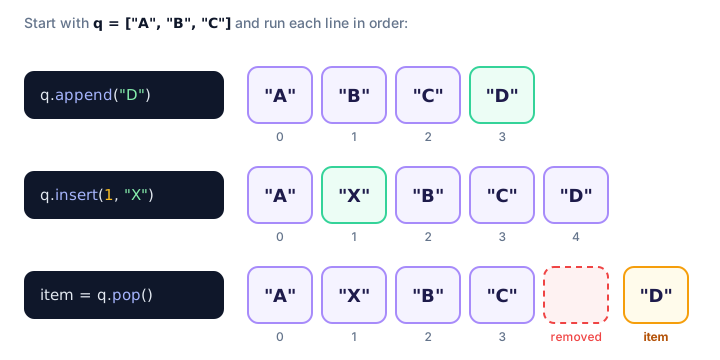
How do you remove items from a list?
remove(): delete by value
remove(value) deletes the first matching item. If the value isn't there, you get an error.
cart = ["socks", "hat", "socks", "scarf"]
cart.remove("socks")
print(cart)

cart.remove("gloves")
['hat', 'socks', 'scarf']
ValueError: list.remove(x): x not in listpop(): remove by position and get the item back
pop() removes the last item and returns it, so you can store it in a variable. Give it an index to pop a different item.
orders = ["latte", "espresso", "mocha", "tea"]

served = orders.pop()       # last item
print(served)

first = orders.pop(0)       # item at index 0
print(first)
print(orders)
tea
latte
['espresso', 'mocha']clear(): empty the whole list
notifications = ["New like", "New follower"]
notifications.clear()
print(notifications)[]📝 Note
The del keyword also removes items by index or slice: del todo[0] or del todo[1:3]. Unlike pop(), it doesn't give the item back.
How do you search a list?
index(value) returns the position of the first match, and count(value) returns how many times a value appears.
votes = ["pizza", "tacos", "pizza", "sushi", "pizza"]

print(votes.index("tacos"))
print(votes.count("pizza"))
print(votes.count("burgers"))
1
3
0Like remove(), index() raises a ValueError if the value is missing. Check with in first if you're not sure.
How do you sort a list in Python?
sort() puts the items in order, smallest to largest (or A to Z for strings), and changes the list in place.
prices = [19.99, 4.5, 12.0, 7.25]
prices.sort()
print(prices)

prices.sort(reverse=True)     # largest first
print(prices)
[4.5, 7.25, 12.0, 19.99]
[19.99, 12.0, 7.25, 4.5]Sorting with key
The key argument tells Python what to compare. You pass the name of a function (without parentheses), and Python sorts by that function's result for each item.
names = ["bob", "Alice", "dave", "Carol"]

names.sort()
print(names)            # capital letters come before lowercase

names.sort(key=str.lower)
print(names)            # case-insensitive A to Z

names.sort(key=len)
print(names)            # shortest name first
['Alice', 'Carol', 'bob', 'dave']
['Alice', 'bob', 'Carol', 'dave']
['bob', 'dave', 'Alice', 'Carol']You'll write your own small key functions later with lambda.
reverse(): flip the order
reverse() doesn't sort; it just flips the current order back to front.
steps = ["wake up", "shower", "coffee"]
steps.reverse()
print(steps)
['coffee', 'shower', 'wake up']sort() vs sorted(): what's the difference?
sorted() is a built-in function, not a method. It leaves the original list alone and returns a new sorted list. It also works on any iterable, like a string or a range.
scores = [72, 95, 88]

ranked = sorted(scores, reverse=True)
print(ranked)    # new list
print(scores)    # original is unchanged

print(sorted("python"))
[95, 88, 72]
[72, 95, 88]
['h', 'n', 'o', 'p', 't', 'y']list.sort() | sorted(list) | |
|---|---|---|
| Changes the original? | Yes, in place | No |
| Returns | None | A new list |
| Works on | Lists only | Any iterable (string, tuple, range…) |
| Use when | You don't need the old order | You want to keep the original |
copy(): make an independent copy
As you saw in the last lesson, b = a doesn't copy a list. copy() does:
original = ["red", "green"]
backup = original.copy()

backup.append("blue")
print(original)
print(backup)
['red', 'green']
['red', 'green', 'blue']copy() makes a shallow copy: nested lists inside are still shared. You'll learn the details in shallow vs deep copy.
Python list methods reference table
| Method | What it does | Returns |
|---|---|---|
append(x) | Adds x to the end | None |
extend(iterable) | Adds every item from another iterable | None |
insert(i, x) | Inserts x before index i | None |
remove(x) | Removes the first item equal to x | None |
pop(i) | Removes the item at i (last if omitted) | The removed item |
clear() | Removes every item | None |
index(x) | Finds the position of the first x | An integer |
count(x) | Counts how many times x appears | An integer |
sort(key, reverse) | Sorts the list in place | None |
reverse() | Reverses the order in place | None |
copy() | Makes a shallow copy | A new list |
Real-world example: managing a to-do list
tasks = ["Reply to emails", "Gym", "Groceries"]

tasks.append("Plan weekend trip")
tasks.insert(0, "Submit report")      # urgent, goes first

done = tasks.pop(0)
print(f"Finished: {done}")

tasks.remove("Gym")                  # skipping it today
tasks.sort()

print(f"{len(tasks)} tasks left:")
for number, task in enumerate(tasks, start=1):
    print(f"  {number}. {task}")
Finished: Submit report
3 tasks left:
1. Groceries
2. Plan weekend trip
3. Reply to emailsCommon mistakes with list methods
1. Saving the result of an in-place method
numbers = [3, 1, 2]
numbers = numbers.sort()
print(numbers)Nonesort() returns None, so this line threw your list away. Either call numbers.sort() on its own line, or write numbers = sorted(numbers). The same goes for append(), reverse() and friends.
2. Sorting a list with mixed types
mixed = [10, "apple", 3]
mixed.sort()
TypeError: '<' not supported between instances of 'str' and 'int'Python can't decide whether "apple" is bigger or smaller than 10. Keep one type per list if you plan to sort it.
3. Removing something that isn't there
Both remove() and index() crash on missing values. Guard them with in:
guests = ["Ana", "Ben"]
if "Cleo" in guests:
    guests.remove("Cleo")
print(guests)
['Ana', 'Ben']Practice exercise
🏋️ Try it yourself
Start with the playlist ["Levitate", "Golden", "Blue Sky"]. Add "Night Drive" to the end, put "Opening" at the start, remove "Golden", then pop the last song and print Now playing: .... Finally, print the remaining songs sorted A to Z without changing the original order, and print the original too.
Show solution
playlist = ["Levitate", "Golden", "Blue Sky"]

playlist.append("Night Drive")
playlist.insert(0, "Opening")
playlist.remove("Golden")

now_playing = playlist.pop()
print(f"Now playing: {now_playing}")

print(sorted(playlist))
print(playlist)
Now playing: Night Drive
['Blue Sky', 'Levitate', 'Opening']
['Opening', 'Levitate', 'Blue Sky']What's next?
You can now add, remove, search and sort list items. Next, learn Python list comprehension, a short and powerful way to build a new list from an existing one in a single line.
Key takeaways
- List methods are called with a dot, like tasks.append("x"), and most of them change the list in place.
- append() adds one item to the end, insert(i, x) adds at a position and extend() adds many items.
- remove(x) deletes by value, pop(i) deletes by position and returns the item, clear() empties the list.
- index(x) finds the position of a value and count(x) counts how often it appears.
- sort() changes the list and returns None; sorted() returns a new list and keeps the original.
- Use key=... to sort by something other than the value itself, and reverse=True for descending order.
- copy() makes an independent (shallow) copy of a list.
Frequently asked questions
What is the difference between append and extend in Python?
append() adds its argument as a single item, so appending a list creates a nested list. extend() loops over its argument and adds each item separately.
What is the difference between sort() and sorted() in Python?
list.sort() sorts the list in place and returns None. sorted() works on any iterable, leaves the original untouched and returns a new sorted list.
What is the difference between remove() and pop() in Python?
remove() deletes the first item with a given value and returns None. pop() deletes the item at a given index (the last one by default) and returns it.
Why does my list become None after sort()?
Because sort() changes the list in place and returns None. Writing my_list = my_list.sort() replaces your list with None. Call my_list.sort() on its own, or use my_list = sorted(my_list).
How do I sort a list in descending order in Python?
Pass reverse=True: my_list.sort(reverse=True) to sort in place, or sorted(my_list, reverse=True) to get a new list.
How many list methods does Python have?
Python lists have 11 public methods: append, extend, insert, remove, pop, clear, index, count, sort, reverse and copy.