Python Project: Quiz Game (JSON questions)
Updated 13 min read Aimerscrew
A Python quiz game is a fun way to bring together everything you've learned: files, JSON, lists, dictionaries, loops, functions and error handling. In this final project, you'll build a multiple-choice quiz that reads its questions from a JSON file, shuffles both the questions and the answers, keeps score, and ends with a results summary that shows what to review.
🌍 Real-life example
Apps like Kahoot!, Duolingo and pub-quiz trivia games don't hard-code their questions into the program. They load them from a data file or a database, so new questions can be added without touching the code. Your quiz works the same way: to make a new quiz about movies, geography or Python itself, you only edit the JSON file.
What you'll build
Your quiz game will:
- load multiple-choice questions from
questions.json, - skip any broken question and handle a missing or invalid file politely,
- shuffle the order of the questions and of the answer options every game,
- accept answers as letters A to D, in upper or lower case,
- show the score, a percentage, a message and the questions you got wrong.
Here's the end of a game. The order is random, so your questions will appear in a different order:
Question 5 of 5: What is the capital city of Australia?
  A) Perth
  B) Sydney
  C) Canberra
  D) Melbourne
Your answer (A-D): a
Wrong. The answer is Canberra.

========== RESULTS ==========
Score: 4/5 (80%)
Great job!

Review these:
- What is the capital city of Australia?
  You said: Perth  |  Correct: Canberra
Concepts used in this project
| Concept | Where it's used | Lesson |
|---|---|---|
| JSON files | Storing the questions | JSON |
try/except | Missing or broken file | try-except |
random.shuffle() | Random order every game | math and random |
| List copies | Shuffling options safely | shallow and deep copy |
zip() and enumerate() | Letters and question numbers | built-in functions |
| String methods | upper(), index() | string methods |
| List comprehensions | Finding missed questions | list comprehension |
How the quiz works
The program has a clear pipeline: load and check the questions, shuffle them, ask them one by one in a loop, and finally summarize the results.
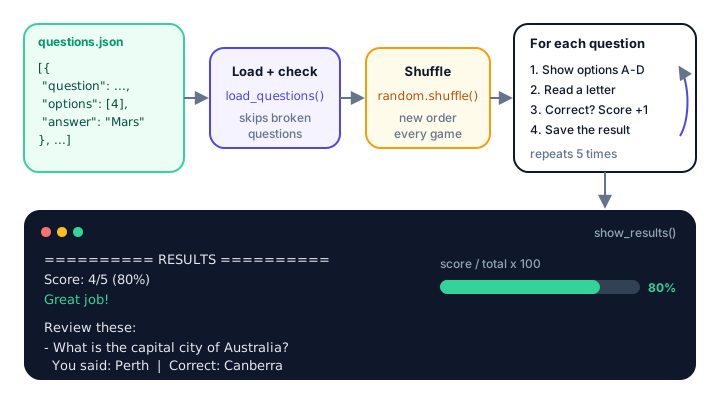
Step 1: Write the questions as JSON
Each question is a JSON object with three keys: the question text, a list of four options, and the correct answer (which must be one of the options). All questions sit inside one JSON array. Save this as questions.json:
[
  {
    "question": "Which planet is known as the Red Planet?",
    "options": ["Venus", "Mars", "Jupiter", "Mercury"],
    "answer": "Mars"
  },
  {
    "question": "What is the capital city of Australia?",
    "options": ["Sydney", "Melbourne", "Canberra", "Perth"],
    "answer": "Canberra"
  },
  {
    "question": "How many players does a soccer team have on the field?",
    "options": ["9", "10", "11", "12"],
    "answer": "11"
  },
  {
    "question": "Which is the largest ocean on Earth?",
    "options": ["Atlantic", "Indian", "Arctic", "Pacific"],
    "answer": "Pacific"
  },
  {
    "question": "In Python, what does len(\"hello\") return?",
    "options": ["4", "5", "6", "\"hello\""],
    "answer": "5"
  }
]
Storing the answer as text instead of a letter is a deliberate choice: since we'll shuffle the options, the correct answer won't always be in the same position. Notice also that quotes inside a JSON string must be escaped as \".
Loading the file takes just a few lines:
import json

with open("questions.json", encoding="utf-8") as file:
    questions = json.load(file)

print(len(questions), "questions loaded")
first = questions[0]
print(first["question"])
print(first["options"])
print("Answer:", first["answer"])
5 questions loaded
Which planet is known as the Red Planet?
['Venus', 'Mars', 'Jupiter', 'Mercury']
Answer: MarsThe JSON array became a Python list, and each question became a dictionary.
Step 2: How do you load questions safely?
Data files are often edited by hand, so expect mistakes. Two things can go wrong with the file itself: it might be missing (FileNotFoundError) or contain invalid JSON (json.JSONDecodeError). Here's how each one is reported, using a missing file and a bad.json whose last lines were accidentally deleted:
import json

for name in ["missing.json", "bad.json"]:
    try:
        with open(name, encoding="utf-8") as file:
            json.load(file)
    except FileNotFoundError:
        print(f"Error: {name} was not found.")
    except json.JSONDecodeError as error:
        print(f"Error: {name} is not valid JSON ({error}).")
Error: missing.json was not found.
Error: bad.json is not valid JSON (Expecting ',' delimiter: line 2 column 1 (char 46)).The JSONDecodeError message even tells you the line and column where Python got confused. Individual questions can be broken too: too few options, or an answer that doesn't match any option. This check catches both:
LETTERS = "ABCD"

questions = [
    {"question": "2 + 2?", "options": ["3", "4", "5", "22"], "answer": "4"},
    {"question": "Color of the sky?", "options": ["Blue", "Green"], "answer": "Blue"},
    {"question": "Largest planet?", "options": ["Mars", "Venus", "Earth", "Moon"], "answer": "Jupiter"},
]

for item in questions:
    is_valid = (
        "question" in item
        and len(item.get("options", [])) == len(LETTERS)
        and item.get("answer") in item["options"]
    )
    print(f"{item['question']:<20} valid: {is_valid}")
2 + 2? valid: True
Color of the sky? valid: False
Largest planet? valid: FalseWrapping the condition in parentheses lets you split it over several lines. Thanks to short-circuiting, if "options" is missing, item.get("options", []) returns an empty list, the length check fails, and Python never reaches item["options"]. Both checks combine into load_questions():
def load_questions(path):
    """Load questions from a JSON file and check that each one is valid."""
    try:
        with open(path, encoding="utf-8") as file:
            questions = json.load(file)
    except FileNotFoundError:
        print(f"Error: {path} was not found.")
        return []
    except json.JSONDecodeError as error:
        print(f"Error: {path} is not valid JSON ({error}).")
        return []

    valid = []
    for item in questions:
        if (
            "question" in item
            and len(item.get("options", [])) == len(LETTERS)
            and item.get("answer") in item["options"]
        ):
            valid.append(item)
        else:
            print(f"Skipping a broken question: {item}")
    return valid
Step 3: Shuffle questions and answers
random.shuffle() rearranges a list in place: it changes the list itself and returns None. To match a typed letter back to an option, LETTERS.index(choice) turns "A" into 0, "B" into 1, and so on. Here we use random.seed(3) so the "random" order is the same every time you run it:
import random

random.seed(3)
options = ["Venus", "Mars", "Jupiter", "Mercury"]
random.shuffle(options)

LETTERS = "ABCD"
for letter, option in zip(LETTERS, options):
    print(f"  {letter}) {option}")

choice = "A"
print("You picked:", options[LETTERS.index(choice)])
A) Mercury
B) Venus
C) Jupiter
D) Mars
You picked: Mercuryzip() pairs each letter with an option, stopping when the shorter one runs out. In the game, the player's letter is turned back into the option text, which is then compared with the "answer" from the JSON file.
⚠️ Shuffle a copy
In the game, we shuffle item["options"][:], a copy of the list, not the original. Shuffling the original would also work for one game, but changing data you didn't create is a common source of surprising bugs, for example if you later add a "play again" option or save the questions back to the file.
Step 4: Ask a question and read the answer
Each question is asked by its own function. It shows the numbered question, shuffles and prints the options, then loops until the player types a single valid letter. .upper() means b and B both work.
def ask_question(number, total, item):
    """Show one question with shuffled options. Return the player's choice."""
    options = item["options"][:]
    random.shuffle(options)

    print(f"\nQuestion {number} of {total}: {item['question']}")
    for letter, option in zip(LETTERS, options):
        print(f"  {letter}) {option}")

    while True:
        choice = input("Your answer (A-D): ").strip().upper()
        if len(choice) == 1 and choice in LETTERS:
            return options[LETTERS.index(choice)]
        print("Please type A, B, C or D.")
Why check len(choice) == 1? Because in also finds substrings: "AB" in "ABCD" is True, and an empty string "" in "ABCD" is True too. Requiring exactly one character closes both loopholes.
Step 5: How do you calculate a quiz score in Python?
While the game runs, each answer is saved as a small dictionary in a results list. At the end, counting the correct ones gives the score, and dividing by the total gives the percentage. A list comprehension collects the missed questions for review:
def show_results(results):
    """Print the score, the percentage and the questions that were missed."""
    total = len(results)
    score = sum(1 for result in results if result["correct"])
    percent = score / total * 100

    print("\n========== RESULTS ==========")
    print(f"Score: {score}/{total} ({percent:.0f}%)")
    if percent == 100:
        print("Perfect score! Amazing!")
    elif percent >= 70:
        print("Great job!")
    elif percent >= 40:
        print("Not bad. Keep practicing!")
    else:
        print("Keep learning, you'll get there!")

    missed = [result for result in results if not result["correct"]]
    if missed:
        print("\nReview these:")
        for result in missed:
            print(f"- {result['question']}")
            print(f"  You said: {result['given']}  |  Correct: {result['answer']}")


results = [
    {"question": "Which is the largest ocean on Earth?", "given": "Pacific",
     "answer": "Pacific", "correct": True},
    {"question": "What is the capital city of Australia?", "given": "Sydney",
     "answer": "Canberra", "correct": False},
    {"question": "Which planet is known as the Red Planet?", "given": "Mars",
     "answer": "Mars", "correct": True},
]
show_results(results)
========== RESULTS ==========
Score: 2/3 (67%)
Not bad. Keep practicing!

Review these:
- What is the capital city of Australia?
  You said: Sydney  |  Correct: Canberra
sum(1 for result in results if result["correct"])adds 1 for every correct answer. It's a compact way to count matching items with a generator expression.:.0frounds the percentage to a whole number, so 66.666... prints as67.- The
if/elifchain checks the highest band first. If>= 40came first, a perfect score would get "Not bad".
The complete Python quiz game
Put quiz.py in the same folder as questions.json from Step 1, then run python quiz.py.
import json
import random
from pathlib import Path

QUESTIONS_FILE = Path("questions.json")
LETTERS = "ABCD"


def load_questions(path):
    """Load questions from a JSON file and check that each one is valid."""
    try:
        with open(path, encoding="utf-8") as file:
            questions = json.load(file)
    except FileNotFoundError:
        print(f"Error: {path} was not found.")
        return []
    except json.JSONDecodeError as error:
        print(f"Error: {path} is not valid JSON ({error}).")
        return []

    valid = []
    for item in questions:
        if (
            "question" in item
            and len(item.get("options", [])) == len(LETTERS)
            and item.get("answer") in item["options"]
        ):
            valid.append(item)
        else:
            print(f"Skipping a broken question: {item}")
    return valid


def ask_question(number, total, item):
    """Show one question with shuffled options. Return the player's choice."""
    options = item["options"][:]
    random.shuffle(options)

    print(f"\nQuestion {number} of {total}: {item['question']}")
    for letter, option in zip(LETTERS, options):
        print(f"  {letter}) {option}")

    while True:
        choice = input("Your answer (A-D): ").strip().upper()
        if len(choice) == 1 and choice in LETTERS:
            return options[LETTERS.index(choice)]
        print("Please type A, B, C or D.")


def show_results(results):
    """Print the score, the percentage and the questions that were missed."""
    total = len(results)
    score = sum(1 for result in results if result["correct"])
    percent = score / total * 100

    print("\n========== RESULTS ==========")
    print(f"Score: {score}/{total} ({percent:.0f}%)")
    if percent == 100:
        print("Perfect score! Amazing!")
    elif percent >= 70:
        print("Great job!")
    elif percent >= 40:
        print("Not bad. Keep practicing!")
    else:
        print("Keep learning, you'll get there!")

    missed = [result for result in results if not result["correct"]]
    if missed:
        print("\nReview these:")
        for result in missed:
            print(f"- {result['question']}")
            print(f"  You said: {result['given']}  |  Correct: {result['answer']}")


def main():
    questions = load_questions(QUESTIONS_FILE)
    if not questions:
        print("No questions to ask. Add some to questions.json and try again.")
        return

    random.shuffle(questions)
    print("====== PYTHON QUIZ GAME ======")
    print(f"{len(questions)} questions. Type the letter of your answer.")

    results = []
    for number, item in enumerate(questions, start=1):
        given = ask_question(number, len(questions), item)
        correct = given == item["answer"]
        if correct:
            print("Correct!")
        else:
            print(f"Wrong. The answer is {item['answer']}.")
        results.append({
            "question": item["question"],
            "given": given,
            "answer": item["answer"],
            "correct": correct,
        })

    show_results(results)


main()
Sample run
The player typed a letter after each Your answer (A-D): prompt, including one invalid e. Your question and option order will be different.
====== PYTHON QUIZ GAME ======
5 questions. Type the letter of your answer.

Question 1 of 5: Which planet is known as the Red Planet?
  A) Mars
  B) Mercury
  C) Jupiter
  D) Venus
Your answer (A-D): a
Correct!

Question 2 of 5: How many players does a soccer team have on the field?
  A) 11
  B) 9
  C) 10
  D) 12
Your answer (A-D): a
Correct!

Question 3 of 5: Which is the largest ocean on Earth?
  A) Atlantic
  B) Pacific
  C) Arctic
  D) Indian
Your answer (A-D): b
Correct!

Question 4 of 5: In Python, what does len("hello") return?
  A) 6
  B) 4
  C) 5
  D) "hello"
Your answer (A-D): e
Please type A, B, C or D.
Your answer (A-D): c
Correct!

Question 5 of 5: What is the capital city of Australia?
  A) Perth
  B) Sydney
  C) Canberra
  D) Melbourne
Your answer (A-D): a
Wrong. The answer is Canberra.

========== RESULTS ==========
Score: 4/5 (80%)
Great job!

Review these:
- What is the capital city of Australia?
  You said: Perth  |  Correct: Canberra
And if questions.json isn't in the folder you run the game from:
Error: questions.json was not found.
No questions to ask. Add some to questions.json and try again.
💡 Testing tip
To get exactly the order shown in the sample run, add random.seed(3) right after import random (in Python 3.12, with the five questions above). A fixed seed is perfect for testing because you know where every correct answer will be. Remove it when you're done, or the quiz will never change.
Common mistakes in this project
1. Using the result of random.shuffle()
shuffle() changes the list in place and returns None, so this loses your list:
import random

questions = ["Q1", "Q2", "Q3"]
questions = random.shuffle(questions)
print(questions)NoneJust call random.shuffle(questions) on its own line.
2. Comparing the letter with the answer
After shuffling, "B" means a different option every time. Always turn the letter back into the option text with options[LETTERS.index(choice)] before comparing it with item["answer"].
3. A typo in the answer field
If the JSON says "answer": "Canbera", no option can ever match and the question is impossible. The validation in load_questions() catches this and skips the question with a message, instead of silently marking every player wrong.
4. Dividing by zero with an empty quiz
If no valid questions are loaded, score / total would raise ZeroDivisionError: division by zero. That's why main() stops early when the list is empty.
Ideas to extend it
🏋️ Challenges
- Categories. Add a
"category"key (Science, Geography, Sports) and let the player choose which category to play. - Quick round. Ask only 3 random questions per game with
random.sample(questions, 3). - High scores. Ask for the player's name and save the best scores to
scores.json, then show the top 5 at the end. - Time limit. Use
time.perf_counter()to measure how long each answer takes, and give a bonus point for answers under 5 seconds. - Explanations. Add an optional
"explanation"key and show it after a wrong answer, so the quiz teaches as well as tests.
Show a hint for challenge 2
import random

random.seed(1)
questions = ["Mars", "Canberra", "Soccer", "Pacific", "len()"]
round_questions = random.sample(questions, 3)
print(round_questions)
print(len(questions))
['Canberra', 'Mars', 'len()']
5Unlike shuffle(), random.sample() returns a new list and leaves the original unchanged.
What's next?
Congratulations on finishing all six projects! You've built games, tools and apps that use files, JSON, CSV and even a live web API. Now sharpen your skills with Python exercises: short practice problems with solutions, grouped by topic.
Key takeaways
- Keep quiz questions in a JSON file so you can change the quiz without changing the code.
- Store the correct answer as text, not a letter, so you can shuffle the options safely.
- Catch FileNotFoundError and json.JSONDecodeError, and validate each question before using it.
- random.shuffle() changes a list in place and returns None; shuffle a copy when you do not own the data.
- Turn a typed letter into an option with options[LETTERS.index(choice)] and compare the text with the answer.
- Count correct answers with sum(1 for r in results if r["correct"]) and compute the percentage as score / total * 100.
Frequently asked questions
How do you make a quiz game in Python?
Store questions as dictionaries with a question, a list of options and the correct answer. Loop over them, print the options with letters, read the player's answer with input(), compare it with the correct answer and count the score.
How do I load quiz questions from a JSON file in Python?
Open the file with open("questions.json", encoding="utf-8") inside a with statement and call json.load(file). A JSON array of objects becomes a Python list of dictionaries.
How do I shuffle quiz questions in Python?
Call random.shuffle(questions). It reorders the list in place and returns None. To keep the original order, shuffle a copy such as questions[:] or use random.sample(questions, len(questions)).
How do you calculate a percentage score in Python?
Divide the number of correct answers by the total and multiply by 100: percent = score / total * 100. Format it with f"{percent:.0f}%" to show a whole number.
Should quiz questions be in JSON or CSV?
JSON is usually better for quizzes, because each question has a list of options, which JSON stores naturally. CSV works for simple question-and-answer pairs but gets awkward with lists.