Python while Loops
Updated 8 min read Aimerscrew
A Python while loop repeats a block of code for as long as a condition is True. In the previous lesson, a for loop walked through a fixed collection of items. A while loop is different: it keeps going until something changes, which makes it perfect when you can't know the number of repeats ahead of time.
🌍 Real-life example
Think about filling a glass from a water jug. You don't decide "I'll pour for exactly 4 seconds." You keep pouring while the glass is not full, checking as you go, and you stop the moment it is. That "keep doing it while something is true" idea is exactly what a while loop does.
What is a while loop in Python?
A while loop is a statement that runs its indented block again and again while a condition is True. Each full run of the block is called an iteration. The syntax has three parts: the keyword while, a condition, and a colon, followed by the indented body.
count = 1
while count <= 5:
    print("Lap", count)
    count += 1
print("Race finished!")
Lap 1
Lap 2
Lap 3
Lap 4
Lap 5
Race finished!The condition count <= 5 is a normal comparison. The line count += 1 adds 1 to the counter each time (you met += in assignment operators). Without it, count would stay at 1 forever.
How does a while loop work?
Python follows the same cycle every time:
- Check the condition. If it is
False, skip the body and jump to the first line after the loop. - If it is
True, run the whole body, top to bottom. - Go back to step 1 and check the condition again.
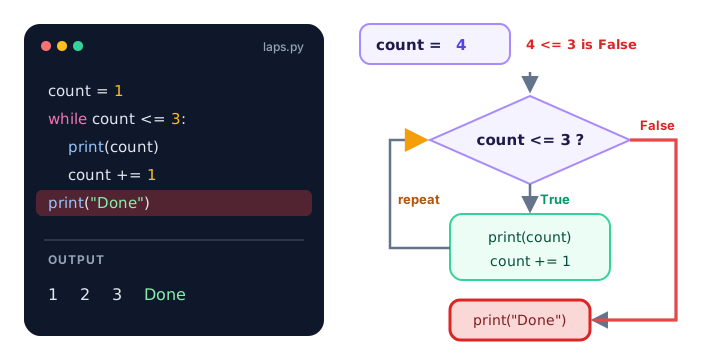
Notice that the condition is only checked at the top. If it becomes false halfway through the body, the rest of the body still runs, and the loop ends at the next check.
A loop whose condition is false at the start
Because the check happens first, a while loop might run zero times:
fuel = 0
while fuel > 0:
    print("Driving...")
    fuel -= 1
print("Out of fuel.")
Out of fuel.The body never ran because 0 > 0 was already False.
Counter loops: a countdown timer
A counter loop uses a variable that goes up or down by a fixed amount each time. Here's a rocket countdown that counts down with -=:
seconds = 5
while seconds > 0:
    print(f"{seconds}...")
    seconds -= 1
print("Liftoff!")
5...
4...
3...
2...
1...
Liftoff!💡 Tip
To make a real timer that waits one second between numbers, add import time at the top and time.sleep(1) inside the loop. You'll learn how importing works in Python modules.
Looping until a goal is reached
This is where while loops really shine. Say you save $75 every week and want to know how long it takes to reach $500. You don't know the number of weeks in advance, so you let the loop find out:
balance = 0
weekly_saving = 75
goal = 500
weeks = 0

while balance < goal:
    balance += weekly_saving
    weeks += 1

print(f"Goal reached in {weeks} weeks.")
print(f"Balance: ${balance}")
Goal reached in 7 weeks.
Balance: $525After 6 weeks the balance is $450, still below the goal, so the loop runs once more. After week 7 the balance is $525, the condition 525 < 500 is False, and the loop stops.
How do you validate user input with a while loop?
People type unexpected things. An input validation loop keeps asking until the answer is acceptable. Here, isdigit() (from string methods) returns True only if the text is made of digits:
age = input("Enter your age: ")
while not age.isdigit():
    print("Please type a whole number.")
    age = input("Enter your age: ")

print(f"Thanks! You are {int(age)}.")
In this run, the user typed twenty, then 2O (with a letter O), then 25:
Enter your age: twenty
Please type a whole number.
Enter your age: 2O
Please type a whole number.
Enter your age: 25
Thanks! You are 25.
The program asks once before the loop, then asks again at the end of every iteration, so the condition always tests the newest answer.
Real-world example: retrying a password
A login screen usually gives you a limited number of tries. A while loop can combine two conditions with and: keep asking while the password is wrong and attempts remain.
correct_password = "sunflower42"
max_attempts = 3
attempts = 0
password = ""

while password != correct_password and attempts < max_attempts:
    password = input("Password: ")
    attempts += 1

if password == correct_password:
    print("Welcome back!")
else:
    print("Too many attempts. Account locked.")
Here the user typed daisy, then rose42, then sunflower42:
Password: daisy
Password: rose42
Password: sunflower42
Welcome back!
If all three guesses had been wrong, attempts would reach 3, the loop would stop, and the program would print Too many attempts. Account locked.
What is an infinite loop?
An infinite loop is a loop whose condition never becomes False, so it never ends on its own. The most common cause is forgetting to update the variable in the condition:
count = 1
while count <= 3:
    print(count)
    # oops: count never changes
This prints 1 over and over, forever, because count <= 3 is always true.
How do you stop an infinite loop?
Press Ctrl+C in the terminal (on macOS too; it's Control, not Command). Python stops the program and reports:
KeyboardInterruptIn an editor like VS Code you can also click the stop button, and in IDLE you can close the shell window.
Intentional infinite loops with while True
Sometimes you want a loop that runs until the user decides to quit, like a menu or a chatbot. Programmers write while True: and leave the loop from inside with the break keyword, which you'll learn properly in break, continue and pass:
while True:
    order = input("Add a coffee (or type done): ")
    if order == "done":
        break
    print(f"Added {order} to your order.")
print("Order sent to the barista!")
The user typed latte, espresso and then done:
Add a coffee (or type done): latte
Added latte to your order.
Add a coffee (or type done): espresso
Added espresso to your order.
Add a coffee (or type done): done
Order sent to the barista!
while loop vs for loop: which should you use?
Both repeat code, but they answer different questions. A rule of thumb: if you know what you're looping over, use for; if you're waiting for something to happen, use while.
for loop | while loop | |
|---|---|---|
| Repeats | Once for each item in a sequence | As long as a condition is True |
| Number of repeats | Known in advance (the length of the sequence) | Often unknown until it happens |
| Counter variable | Handled for you | You create and update it yourself |
| Risk of an infinite loop | Very low | Real, if the condition never turns False |
| Typical uses | Every song in a playlist, every letter in a word | Input validation, games, retries, reaching a goal |
Many counter loops are shorter as for loops. The lap example from the start becomes for count in range(1, 6):, which you'll learn about in the next lesson.
Common mistakes with while loops
1. Forgetting to update the condition variable
As you saw above, if nothing inside the body changes the condition, the loop never ends. Before running a while loop, ask yourself: "Which line makes the condition eventually False?"
2. Putting the update outside the body
count = 1
while count <= 3:
    print(count)
count += 1
The last line isn't indented, so it isn't part of the loop. It would only run after the loop ends, which never happens. Indent it so it belongs to the body.
3. Off-by-one: using < when you meant <=
count = 1
while count < 5:
    print(count)
    count += 1
1
2
3
4If you wanted 1 to 5, the condition must be count <= 5. Always check the last value your loop produces.
4. Using = instead of == in the condition
answer = "yes"
while answer = "yes":
    answer = input("Again? ")
SyntaxError: invalid syntax. Maybe you meant '==' or ':=' instead of '='?A single = assigns; the condition needs == to compare.
Practice exercise
🏋️ Try it yourself
Your phone starts at 100% battery, and each hour of video uses 15%. Write a while loop that keeps playing video while the battery is at least 20%. After each hour, print a line like After hour 1: 85%. When the loop ends, print how many hours you watched.
Show solution
battery = 100
hours = 0

while battery >= 20:
    battery -= 15
    hours += 1
    print(f"After hour {hours}: {battery}%")

print(f"Plug in! You watched for {hours} hours.")
After hour 1: 85%
After hour 2: 70%
After hour 3: 55%
After hour 4: 40%
After hour 5: 25%
After hour 6: 10%
Plug in! You watched for 6 hours.What's next?
You've seen that many counter loops are easier with a for loop and a range of numbers. Next, learn exactly how to build those ranges with the Python range() function.
Key takeaways
- A while loop repeats its indented body as long as its condition is True.
- Python checks the condition before every iteration, so the body can run zero times.
- Something inside the body must eventually make the condition False, or you get an infinite loop.
- Press Ctrl+C to stop a program stuck in an infinite loop.
- while loops are ideal for input validation, retries and reaching a goal when the number of repeats is unknown.
- Use a for loop when you know what you are looping over, and a while loop when you are waiting for something to happen.
Frequently asked questions
What is a while loop in Python?
A while loop repeats a block of code as long as a condition is True. Python checks the condition before each pass and stops the loop as soon as the condition becomes False.
How do you stop an infinite while loop in Python?
Press Ctrl+C in the terminal to raise a KeyboardInterrupt and stop the program. Inside your code, make sure the loop changes its condition, or use break to leave the loop.
What is the difference between a for loop and a while loop in Python?
A for loop runs once for each item in a sequence, so the number of repeats is known. A while loop runs as long as a condition is True, which suits situations where you do not know how many repeats you need.
Can a while loop run zero times?
Yes. If the condition is False the first time Python checks it, the body is skipped completely and the program continues after the loop.
What does while True mean in Python?
while True creates a loop whose condition is always true, so it runs until something inside it, usually a break statement, ends it. It is common for menus, games and programs that wait for the user to quit.