pip and Virtual Environments in Python
Updated 8 min read Aimerscrew
Python's standard library is big, but the real superpower is the hundreds of thousands of free packages other developers share online. pip and virtual environments are the two tools that let you use them safely: pip downloads and installs packages, and a virtual environment keeps each project's packages in its own separate box. In this lesson, you'll learn the pip commands you'll use every day, how requirements.txt works, and how to create and activate a virtual environment on Windows, macOS and Linux.
🌍 Real-life example
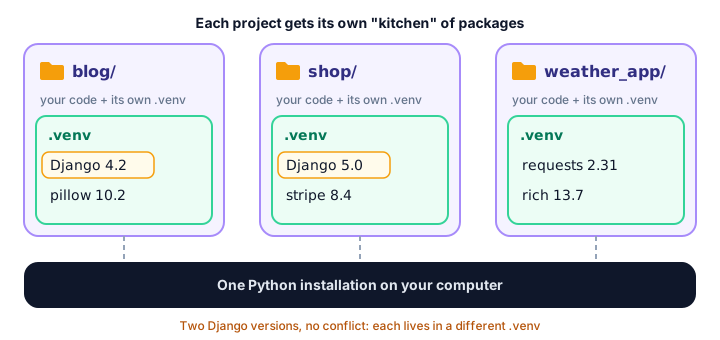
Imagine three chefs sharing one kitchen. The baker needs the oven at 180°C, the pizza chef needs it at 300°C, and someone keeps swapping the salt for sugar. Chaos. Now give each chef their own kitchen with their own oven and ingredients. Nobody gets in anyone's way. A virtual environment is a separate kitchen for each of your Python projects.
What is pip?
pip is Python's package installer. It downloads packages from the Python Package Index (PyPI, at pypi.org), the official online library of free Python packages, and installs them so you can import them like any built-in module. pip comes with Python, so you already have it.
Check that it works by opening a terminal (Command Prompt, PowerShell or Terminal) and running:
python -m pip --versionYou'll see something like this (your versions and path will differ):
pip 24.0 from C:\Users\sam\AppData\Local\Programs\Python\Python312\Lib\site-packages\pip (python 3.12)💡 Tip
On macOS and Linux, use python3 instead of python. On Windows, py also works. Writing python -m pip instead of just pip guarantees you're using the pip that belongs to that exact Python, which avoids a lot of confusion.
How do you install a package with pip?
Use pip install followed by the package name. Here we install requests, a popular package for downloading data from websites:
python -m pip install requestspip also installs any packages that requests itself depends on. Other useful variations:
# Install an exact version
python -m pip install requests==2.31.0

# Upgrade to the newest version
python -m pip install --upgrade requests

# Install several packages at once
python -m pip install requests rich
Listing, inspecting and removing packages
# Show every installed package and its version
python -m pip list

# Show details about one package
python -m pip show requests

# Remove a package (-y skips the "are you sure?" question)
python -m pip uninstall -y requests
Here's the kind of output pip list gives you (your list and versions will differ):
Package            Version
------------------ --------
certifi            2024.2.2
charset-normalizer 3.3.2
idna               3.6
pip                24.0
requests           2.31.0
urllib3            2.2.1
You asked for one package but got five more. Those are dependencies: packages that requests needs in order to work.
What is requirements.txt?
When you share a project, other people need the same packages. The convention is a text file called requirements.txt that lists them. pip freeze prints your installed packages in exactly the right format, and > saves that output to a file:
python -m pip freeze > requirements.txtThe file looks something like this:
certifi==2024.2.2
charset-normalizer==3.3.2
idna==3.6
requests==2.31.0
urllib3==2.2.1
Anyone can then recreate your setup with one command:
python -m pip install -r requirements.txtWhy do you need virtual environments?
By default, pip installs packages into one shared, global location for your whole computer. That causes trouble fast:
- Your old blog project needs version 4 of a web framework, but your new project needs version 5. Only one can be installed globally.
- Upgrading a package for one project can silently break another.
pip freezelists every package you've ever installed, not just the ones this project uses.
A virtual environment (often called a "venv") fixes all three. It's a folder inside your project that points to your installed Python and has its own site-packages folder. While it's active, pip install puts packages there and nowhere else.
How to create a virtual environment
Go to your project folder in the terminal and run the built-in venv module. The last word is the folder name; .venv is the most common choice.
Windows:
cd weather_app
python -m venv .venv
macOS and Linux:
cd weather_app
python3 -m venv .venv
Nothing is printed, but a new .venv folder appears in your project.
How to activate a virtual environment
Creating the environment isn't enough; you must activate it in each new terminal window. Activating tells your terminal to use the environment's Python and pip.
| System / terminal | Activate command |
|---|---|
| Windows, Command Prompt | .venv\Scripts\activate |
| Windows, PowerShell | .venv\Scripts\Activate.ps1 |
| macOS / Linux (bash, zsh) | source .venv/bin/activate |
Windows (PowerShell):
.venv\Scripts\Activate.ps1macOS and Linux:
source .venv/bin/activateWhen it works, the environment's name appears at the start of your prompt:
(.venv) C:\Users\sam\weather_app>Now python and pip point inside .venv, even on macOS and Linux, so plain python is fine while it's active. To leave the environment, type:
deactivateYou can check from Python itself which environment is running. sys.prefix is the folder of the active Python:
import sys

print(sys.prefix)
Inside an active venv, this prints a path ending in .venv, such as C:\Users\sam\weather_app\.venv. The exact path depends on your computer.
The everyday workflow, step by step
Here's the full routine for a new project on macOS or Linux (on Windows, swap in the activate command from the table above):
# 1. Create the project folder and a virtual environment
mkdir weather_app
cd weather_app
python3 -m venv .venv

# 2. Activate it
source .venv/bin/activate

# 3. Install what you need
pip install requests

# 4. Save the list for others (and future you)
pip freeze > requirements.txt

# 5. Work on your code, then leave when you're done
deactivate
When a teammate downloads your project, they do steps 1 and 2, then run pip install -r requirements.txt.
📝 Note
Never share or commit the .venv folder itself. It's large and tied to your computer. Share requirements.txt instead, and if you use Git, add .venv/ to your .gitignore file. If an environment ever gets messy, just delete the folder and create a fresh one.
pip commands cheat sheet
| Command | What it does |
|---|---|
pip install name | Install a package |
pip install name==1.2.3 | Install an exact version |
pip install --upgrade name | Upgrade to the latest version |
pip uninstall name | Remove a package |
pip list | List installed packages |
pip show name | Show details about a package |
pip freeze > requirements.txt | Save exact versions to a file |
pip install -r requirements.txt | Install everything in the file |
python -m venv .venv | Create a virtual environment |
deactivate | Leave the active environment |
Common mistakes with pip and venv
1. "pip is not recognized" or "command not found"
Your terminal can't find the pip program. Use python -m pip (or py -m pip on Windows, python3 -m pip on macOS and Linux) instead. It always works if Python itself works.
2. Forgetting to activate the environment
If you open a new terminal and run pip install without activating, the package goes into your global Python. Then your project says ModuleNotFoundError. Look for (.venv) in your prompt before installing.
3. PowerShell blocks the activate script
On Windows you may see an error saying running scripts is disabled on this system. Allow local scripts for your user account once, then activate again:
Set-ExecutionPolicy -ExecutionPolicy RemoteSigned -Scope CurrentUser4. Your code editor uses a different Python
Editors like VS Code pick a Python interpreter on their own. If imports fail in the editor but work in the terminal, choose the interpreter inside your project's .venv folder in the editor's settings.
Practice exercise
🏋️ Try it yourself
Create a project folder called quotes_app with its own virtual environment. Activate it, install the package rich (it prints colorful text in the terminal), check that it appears in pip list, save a requirements.txt, and deactivate. Write down the commands for your own operating system.
Show solution
Windows (PowerShell):
mkdir quotes_app
cd quotes_app
python -m venv .venv
.venv\Scripts\Activate.ps1
pip install rich
pip list
pip freeze > requirements.txt
deactivate
macOS and Linux:
mkdir quotes_app
cd quotes_app
python3 -m venv .venv
source .venv/bin/activate
pip install rich
pip list
pip freeze > requirements.txt
deactivate
Open requirements.txt and you'll see rich plus its dependencies, each pinned with == and a version number.
What's next?
You can now install any package you need, safely. Next, get to know two standard library modules you'll use constantly, no installing required: Python math and random modules.
Key takeaways
- pip installs third-party packages from PyPI: python -m pip install requests.
- Use pip list, pip show, pip uninstall and pip install --upgrade to manage packages.
- pip freeze > requirements.txt saves exact versions; pip install -r requirements.txt restores them.
- A virtual environment is a private folder of packages for one project, created with python -m venv .venv.
- Activate it with .venv\Scripts\activate on Windows or source .venv/bin/activate on macOS and Linux; leave with deactivate.
- Share requirements.txt, never the .venv folder itself.
Frequently asked questions
What is pip in Python?
pip is the standard package installer for Python. It downloads packages from the Python Package Index (PyPI) and installs them so you can import them in your code.
How do I create a virtual environment in Python?
Open a terminal in your project folder and run python -m venv .venv (python3 on macOS and Linux). Then activate it with .venv\Scripts\activate on Windows or source .venv/bin/activate on macOS and Linux.
Why should I use a virtual environment?
It keeps each project's packages separate, so projects can use different versions of the same package, upgrades cannot break other projects, and requirements.txt lists only what the project needs.
What is the difference between pip freeze and pip list?
pip list shows installed packages in a readable table. pip freeze prints them as name==version lines, the format used in requirements.txt.
Why does it say pip is not recognized?
Your terminal cannot find the pip program on its path. Run python -m pip instead (py -m pip on Windows or python3 -m pip on macOS and Linux).
Should I commit my venv folder to Git?
No. The folder is large and specific to your computer. Add .venv/ to .gitignore and commit requirements.txt so others can recreate the environment.