Python Dates and Times with datetime
Updated 8 min read Aimerscrew
Birthdays, delivery estimates, subscription renewals, flight countdowns: dates and times are everywhere in real programs. Python datetime is the standard library module that handles them. It knows how many days are in February, how to subtract one date from another, and how to print a date in any format you like. In this lesson, you'll create dates, format and parse them, and do date arithmetic with timedelta.
🌍 Real-life example
A streaming service gives you a 30-day free trial starting today. To show "Your trial ends on December 14" and "12 days left", the app has to add 30 days to a date and count the days between two dates. You'll write exactly that code later in this lesson.
What is the datetime module?
datetime is a module, and it contains several types (classes) with confusingly similar names. Here are the four you'll use:
| Type | Stores | Example |
|---|---|---|
date | A calendar day: year, month, day | 2026-07-04 |
time | A time of day: hour, minute, second | 14:30:00 |
datetime | A date and a time together | 2026-12-20 18:45:00 |
timedelta | A length of time (a duration) | 30 days |
The easiest way to avoid confusion is to import the types you need by name:
from datetime import date, time, datetime, timedeltaHow do you create a date in Python?
Pass the year, month and day, in that order:
from datetime import date

independence_day = date(2026, 7, 4)

print(independence_day)
print(independence_day.year)
print(independence_day.month)
print(independence_day.day)
2026-07-04
2026
7
4Python prints dates in the international ISO format, YYYY-MM-DD, which sorts correctly and isn't ambiguous (is 04/07 April 7 or July 4? Depends on the country!).
A time works the same way with hours (0 to 23), minutes and seconds, and a datetime takes all of them:
from datetime import time, datetime

lunch = time(12, 30)
flight = datetime(2026, 12, 20, 18, 45)

print(lunch)
print(flight)
print(flight.hour, flight.minute)
12:30:00
2026-12-20 18:45:00
18 45Getting today's date and the current time
date.today() gives today's date, and datetime.now() gives the current date and time, right down to the microsecond:
from datetime import date, datetime

print(date.today())
print(datetime.now())
Your output depends on when you run it, so it will differ from this example:
2026-10-25
2026-10-25 09:41:27.318204
💡 Tip
When you write code that depends on "today", pass the date into your functions as a parameter instead of calling date.today() deep inside them. Then you can test them with fixed dates and always get the same answer, which is exactly what the examples below do.
How do you format a date with strftime()?
strftime() ("string format time") turns a date or datetime into text, using format codes that start with %:
from datetime import datetime

flight = datetime(2026, 12, 20, 18, 45)

print(flight.strftime("%d/%m/%Y"))
print(flight.strftime("%m/%d/%Y"))
print(flight.strftime("%A, %B %d, %Y"))
print(flight.strftime("Boarding at %I:%M %p"))
20/12/2026
12/20/2026
Sunday, December 20, 2026
Boarding at 06:45 PMThe same date can look British (day first), American (month first) or friendly, just by changing the format string. Here are the most useful codes:
| Code | Meaning | Example |
|---|---|---|
%Y | Year, 4 digits | 2026 |
%y | Year, 2 digits | 26 |
%m | Month number, 2 digits | 12 |
%B | Full month name | December |
%b | Short month name | Dec |
%d | Day of the month, 2 digits | 20 |
%A | Full weekday name | Sunday |
%a | Short weekday name | Sun |
%H | Hour, 24-hour clock | 18 |
%I | Hour, 12-hour clock | 06 |
%M | Minute | 45 |
%S | Second | 00 |
%p | AM or PM | PM |
📝 Note
Lowercase %m is the month, but uppercase %M is the minute. Mixing them up is the most common strftime bug. Also, month and weekday names follow your computer's language settings, so they may appear in another language on some systems.
How do you convert a string to a date with strptime()?
Dates often arrive as text: from a form, a file or a website. datetime.strptime() ("string parse time") does the reverse of strftime(). You give it the text and a format string describing what the text looks like:
from datetime import datetime

booking = datetime.strptime("2026-03-15 09:05", "%Y-%m-%d %H:%M")
print(booking)
print(booking.strftime("%B %d at %H:%M"))

uk_style = datetime.strptime("28/11/2026", "%d/%m/%Y")
print(uk_style.date())
2026-03-15 09:05:00
March 15 at 09:05
2026-11-28The .date() method keeps just the date part of a datetime. For text already in ISO format, there's a shortcut: date.fromisoformat("2026-11-28").
Date math with timedelta
A timedelta is a length of time, like "30 days" or "2 hours". Add it to a date to move forward, or subtract it to move back:
from datetime import date, timedelta

order_date = date(2026, 10, 25)
delivery = order_date + timedelta(days=5)
return_by = delivery + timedelta(weeks=2)

print("Delivery:", delivery)
print("Return by:", return_by)
print("A week before:", order_date - timedelta(days=7))
Delivery: 2026-10-30
Return by: 2026-11-13
A week before: 2026-10-18Python handles month lengths and leap years for you:
from datetime import date, timedelta

print(date(2028, 2, 28) + timedelta(days=1))
print(date(2027, 2, 28) + timedelta(days=1))
2028-02-29
2027-03-01Subtracting one date from another gives you a timedelta, and its .days attribute is the number of days between them:
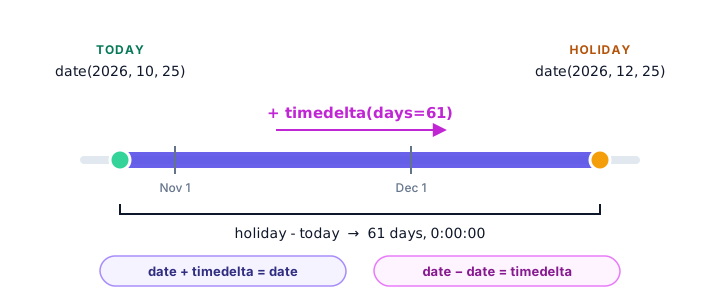
from datetime import date

today = date(2026, 10, 25)
holiday = date(2026, 12, 25)

gap = holiday - today
print(gap)
print("Days until the holiday:", gap.days)
61 days, 0:00:00
Days until the holiday: 61Real-world example: countdown to a flight
With datetimes, the gap includes hours and minutes too. A timedelta stores days plus leftover seconds, so we convert the seconds into hours and minutes with // and %:
from datetime import datetime

departure = datetime(2026, 12, 20, 18, 45)
right_now = datetime(2026, 12, 18, 9, 15)

time_left = departure - right_now
hours = time_left.seconds // 3600
minutes = (time_left.seconds % 3600) // 60

print(time_left)
print(f"Your flight leaves in {time_left.days} days, {hours} hours and {minutes} minutes.")
2 days, 9:30:00
Your flight leaves in 2 days, 9 hours and 30 minutes.Real-world example: days until your next birthday
If this year's birthday has already passed, the next one is next year. The replace() method makes a copy of a date with one part changed:
from datetime import date


def days_until_birthday(birthday, today):
    next_birthday = birthday.replace(year=today.year)
    if next_birthday < today:
        next_birthday = next_birthday.replace(year=today.year + 1)
    return (next_birthday - today).days


today = date(2026, 10, 25)
print(days_until_birthday(date(1995, 12, 3), today))
print(days_until_birthday(date(2001, 4, 18), today))
print(days_until_birthday(date(1988, 10, 25), today))
39
175
0How do you compare dates in Python?
Dates work with the normal comparison operators. "Smaller" means earlier:
Real-world example: is a subscription still active?
from datetime import date, timedelta

trial_start = date(2026, 11, 14)
trial_end = trial_start + timedelta(days=30)
today = date(2026, 12, 2)

print("Trial ends:", trial_end.strftime("%B %d, %Y"))

if today <= trial_end:
    days_left = (trial_end - today).days
    print(f"Active: {days_left} days left")
else:
    print("Expired: please subscribe")
Trial ends: December 14, 2026
Active: 12 days leftBecause dates can be compared, you can also sort a list of them with sorted(), or find the earliest with min().
Common mistakes with datetime
1. Calling now() on the module
import datetime

print(datetime.now())
AttributeError: module 'datetime' has no attribute 'now'With import datetime, the module and the class share a name, so you'd need datetime.datetime.now(). Writing from datetime import datetime avoids the confusion.
2. A format string that doesn't match the text
from datetime import datetime

datetime.strptime("15/03/2026", "%Y-%m-%d")
ValueError: time data '15/03/2026' does not match format '%Y-%m-%d'The format must describe the text exactly, slashes and all: "%d/%m/%Y".
3. Creating a date that doesn't exist
from datetime import date

meeting = date(2026, 2, 30)
ValueError: day is out of range for month4. Comparing a date with a datetime
from datetime import date, datetime

print(date(2026, 1, 1) < datetime(2026, 1, 5, 10, 0))
TypeError: can't compare datetime.datetime to datetime.dateConvert first so both sides match, for example with .date() on the datetime.
Practice exercise
🏋️ Try it yourself
A library lends books for 21 days. A book was borrowed on "2026-10-02" (a string). Parse it, work out the due date, and print it like Due: Friday, October 23. Then, if today is date(2026, 10, 27), print how many days overdue the book is and the fine at $0.25 per day.
Show solution
from datetime import date, datetime, timedelta

borrowed = datetime.strptime("2026-10-02", "%Y-%m-%d").date()
due = borrowed + timedelta(days=21)
print(due.strftime("Due: %A, %B %d"))

today = date(2026, 10, 27)
if today > due:
    days_late = (today - due).days
    print(f"{days_late} days overdue. Fine: ${days_late * 0.25:.2f}")
else:
    print("Not due yet")
Due: Friday, October 23
4 days overdue. Fine: $1.00What's next?
That wraps up the Modules and Packages chapter. So far you've seen error messages like ValueError and TypeError stop your programs. Next, learn what they mean and how to read them in Python errors.
Key takeaways
- The datetime module has four main types: date, time, datetime and timedelta.
- Create fixed dates with date(2026, 7, 4); get the current moment with date.today() or datetime.now().
- strftime() turns a date into text using format codes like %Y, %m, %d, %B and %H:%M.
- strptime() turns text into a datetime; the format string must match the text exactly.
- Add or subtract a timedelta to move a date; subtract two dates to get a timedelta and use .days.
- Dates compare with <, > and ==, where earlier dates are smaller.
- Use from datetime import datetime to avoid mixing up the module and the class.
Frequently asked questions
How do I get the current date and time in Python?
Use from datetime import date, datetime, then date.today() for today's date or datetime.now() for the current date and time.
What is the difference between strftime and strptime?
strftime() formats a date or datetime as a string. strptime() parses a string into a datetime. Both use the same % format codes, such as %Y-%m-%d.
How do I calculate the number of days between two dates in Python?
Subtract the earlier date from the later one to get a timedelta, then read its .days attribute, for example (date(2026, 12, 25) - date(2026, 10, 25)).days gives 61.
How do I add days to a date in Python?
Import timedelta and add it to the date, for example my_date + timedelta(days=30). Python handles month lengths and leap years automatically.
Why does datetime.now() give an AttributeError?
You wrote import datetime, so datetime refers to the module, not the class. Use datetime.datetime.now(), or import the class with from datetime import datetime.
How do I format a date as DD/MM/YYYY in Python?
Call strftime with the matching codes: my_date.strftime("%d/%m/%Y"). For the American month-first style, use "%m/%d/%Y".