Python Cheat Sheet (Quick Reference)
Updated 8 min read Aimerscrew
You don't need to memorize every method name to write Python. Professional developers look things up all the time. This Python cheat sheet puts the syntax you use most on one page, in short tables and code snippets, so you can find what you need in seconds. Every section links to the full lesson if you want the details.
🌍 Real-life example
A cheat sheet is like the laminated card next to a café's coffee machine. The barista already knows how to make a flat white, but a quick glance at "18 g, 25 seconds, 120 ml milk" saves time and avoids mistakes. Keep this page open in a tab while you code and use it the same way.
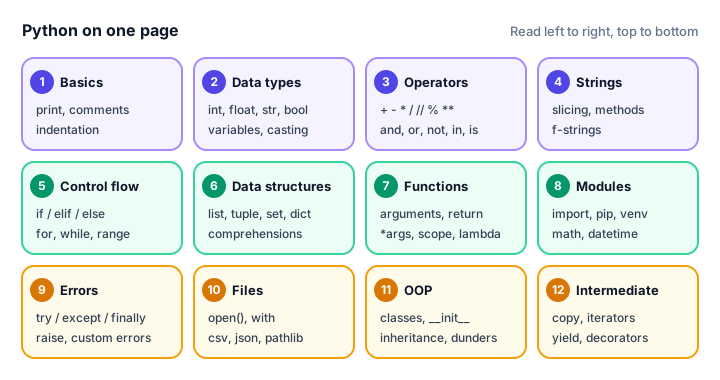
Syntax basics and data types
# A comment starts with #
name = "Ava"            # str
age = 29                # int
height = 1.68           # float
is_member = True        # bool
nothing = None          # no value

x, y = 3, 4             # multiple assignment
x, y = y, x             # swap
MAX_USERS = 100         # constant by convention

if age >= 18:           # a colon starts a block
print("Adult") # blocks are indented 4 spaces| Type | Example | Mutable? |
|---|---|---|
int, float | 42, 3.14 | No |
str | "hello" | No |
bool | True, False | No |
list | [1, 2, 3] | Yes |
tuple | (1, 2, 3) | No |
set | {1, 2, 3} | Yes |
dict | {"a": 1} | Yes |
NoneType | None | No |
Convert types with int("5"), float("2.5"), str(10), list("abc"); check them with type(x) or isinstance(x, int). Read input with input("Prompt: ") (always returns a string). Full lessons: syntax, variables, data types, type conversion.
Operators
| Kind | Operators | Example → result |
|---|---|---|
| Arithmetic | + - * / // % ** | 7 // 2 → 3, 7 % 2 → 1, 2 ** 3 → 8 |
| Assignment | = += -= *= /= | score += 10 |
| Comparison | == != < > <= >= | 5 != 3 → True |
| Logical | and or not | True and not False → True |
| Identity | is, is not | x is None |
| Membership | in, not in | "a" in "cat" → True |
Precedence from high to low: **, then * / // %, then + -, then comparisons, then not, and, or. When in doubt, use parentheses. See arithmetic operators and operator precedence.
Strings and f-string formatting
s = "Hello, World"
print(s[0], s[-1], s[0:5], s[::-1])
print(len(s), s.upper(), s.lower())
print(s.replace("World", "Python"))
print(s.split(", "))
print("-".join(["a", "b", "c"]))
H d Hello dlroW ,olleH
12 HELLO, WORLD hello, world
Hello, Python
['Hello', 'World']
a-b-c| Method | What it does |
|---|---|
strip(), lstrip(), rstrip() | Remove spaces (or given characters) from the ends |
startswith(x), endswith(x) | Check the beginning or end |
find(x), count(x) | Position of x (or -1), number of times it appears |
title(), capitalize() | Capitalize each word, or only the first letter |
isdigit(), isalpha() | Check if all characters are digits or letters |
f-string formats:
price, item, n = 1234.5, "tea", 7
print(f"{price:.2f}")      # 2 decimal places
print(f"{price:,.2f}")     # thousands separator
print(f"{0.256:.1%}")      # percentage
print(f"{n:03d}")          # pad with zeros
print(f"[{item:>6}]")      # right-align in 6 characters
print(f"{item=}")          # name and value, for debugging
1234.50
1,234.50
25.6%
007
[ tea]
item='tea'Escape characters: \n new line, \t tab, \\ backslash, \" quote. Full lessons: strings, slicing, string methods, f-strings, escape characters.
Lists, tuples, sets and dictionaries
| List method | What it does |
|---|---|
append(x) / extend(items) | Add one item / several items to the end |
insert(i, x) | Add x at position i |
remove(x) / pop(i) | Remove the first x / remove and return item i (last by default) |
sort() / sorted(lst) | Sort in place / return a new sorted list |
reverse(), index(x), count(x) | Reverse in place, find position, count |
cart = ["milk", "eggs"]
cart.append("bread")
cart.insert(0, "apples")
cart.remove("eggs")
print(cart, len(cart))

point = (3, 4)                 # tuple: fixed
x, y = point                   # unpacking

tags = {"red", "blue"}         # set: unique items
tags.add("red")
print(sorted(tags))

user = {"name": "Ava", "age": 29}
user["city"] = "Lisbon"        # add or update
print(user.get("email", "n/a"))
for key, value in user.items():
    print(key, value)
['apples', 'milk', 'bread'] 3
['blue', 'red']
n/a
name Ava
age 29
city Lisbon| Dict / set method | What it does |
|---|---|
d.keys(), d.values(), d.items() | Views of keys, values, key-value pairs |
d.get(k, default) | Value for k, or default if missing |
d.update(other), d.pop(k) | Merge another dict, remove a key |
a | b, a & b, a - b | Set union, intersection, difference |
Full lessons: list methods, tuples, sets, dictionary methods, which one to use.
Control flow
temp = 23
if temp > 30:
    print("Hot")
elif temp > 15:
    print("Mild")
else:
    print("Cold")

label = "even" if temp % 2 == 0 else "odd"   # one-line if

for i in range(1, 3):           # 1, 2 (stop is excluded)
    print("Round", i)

for i, fruit in enumerate(["kiwi", "fig"], start=1):
    print(i, fruit)

count = 3
while count > 0:
    count -= 1
    if count == 1:
        continue                # skip the rest of this round
    print("count", count)
Mild
Round 1
Round 2
1 kiwi
2 fig
count 2
count 0Also: break leaves a loop, pass does nothing, range(start, stop, step) never includes stop, and match/case compares one value against several patterns. Full lessons: if-else, match-case, for loop, while loop, break, continue, pass.
Functions and comprehensions
def greet(name, greeting="Hello"):     # default argument
    """Return a friendly greeting."""  # docstring
    return f"{greeting}, {name}!"

print(greet("Leo"))
print(greet("Leo", greeting="Hi"))     # keyword argument

def total(*prices, **options):         # any number of arguments
    return sum(prices) * (1 - options.get("discount", 0))

print(total(10, 20, discount=0.1))

square = lambda n: n * n               # small anonymous function
print(square(5))

nums = [1, 2, 3, 4, 5]
print([n * 2 for n in nums if n % 2])         # list comprehension
print({n: n * n for n in nums[:3]})           # dict comprehension
print({len(w) for w in ["hi", "yo", "hey"]})  # set comprehension
Hello, Leo!
Hi, Leo!
27.0
25
[2, 6, 10]
{1: 1, 2: 4, 3: 9}
{2, 3}Scope follows the LEGB rule (Local, Enclosing, Global, Built-in). Full lessons: functions, *args and **kwargs, scope, lambda, comprehensions.
Exceptions and files
try:
    amount = int("12a")
except ValueError as error:
    print("Bad number:", error)
else:
    print("Parsed!")          # only if no error
finally:
    print("Always runs")

def withdraw(balance, amount):
    if amount > balance:
        raise ValueError("Insufficient funds")
    return balance - amount
Bad number: invalid literal for int() with base 10: '12a'
Always runs| File mode | Meaning |
|---|---|
"r" | Read (default); error if the file doesn't exist |
"w" | Write; creates the file or erases it first |
"a" | Append to the end |
"x" | Create; error if the file already exists |
with open("notes.txt", "w", encoding="utf-8") as f:
    f.write("First line\n")

with open("notes.txt", encoding="utf-8") as f:
    for line in f:
        print(line.strip())
First lineCommon errors: NameError, TypeError, ValueError, KeyError, IndexError, ZeroDivisionError, FileNotFoundError. Full lessons: try-except, raise, reading files, writing files, JSON, pathlib.
Classes
class Pet:
    species = "animal"                  # class attribute

    def __init__(self, name):
        self.name = name                # instance attribute

    def speak(self):
        return "..."

    def __str__(self):
        return f"{self.name} the {self.species}"

class Dog(Pet):                         # inheritance
    species = "dog"

    def speak(self):                    # override
        return "Woof!"

rex = Dog("Rex")
print(rex, "-", rex.speak())
print(isinstance(rex, Pet))
Rex the dog - Woof!
Truefrom dataclasses import dataclass
@dataclass
class Point:
x: int
y: int = 0
print(Point(3))Point(x=3, y=0)Also: super().__init__(...) calls the parent's constructor, @classmethod receives cls, @staticmethod receives nothing, and a leading underscore (_balance) marks an attribute as internal. Full lessons: classes and objects, inheritance, magic methods, dataclasses.
Built-in functions and useful modules
| Built-in | Example → result |
|---|---|
len, sum, min, max | sum([1, 2, 3]) → 6 |
round, abs | round(3.14159, 2) → 3.14 |
sorted, reversed | sorted("cab") → ['a', 'b', 'c'] |
enumerate, zip | list(zip("ab", [1, 2])) → [('a', 1), ('b', 2)] |
map, filter | list(map(str, [1, 2])) → ['1', '2'] |
any, all | any([False, True]) → True |
range, type, isinstance, help | list(range(3)) → [0, 1, 2] |
| Module | Use it for | Example |
|---|---|---|
math | Math functions | math.sqrt(16), math.pi |
random | Random choices | random.randint(1, 6), random.choice(items) |
datetime | Dates and times | datetime.date.today() |
json | Read and write JSON | json.dumps(data), json.loads(text) |
csv | Spreadsheet-style files | csv.reader(f), csv.DictWriter(f, fields) |
pathlib | File paths | Path("data") / "notes.txt" |
copy | Shallow and deep copies | copy.deepcopy(grid) |
re | Regular expressions | re.findall(r"\d+", text) |
Install third-party packages with pip install package-name, ideally inside a virtual environment. Full lessons: built-in functions, modules, math and random, datetime, pip and virtual environments, regex.
Common mistakes to double-check
| Mistake | Fix |
|---|---|
if x = 5: | Compare with ==: if x == 5: |
"Age: " + 30 | Convert or use an f-string: f"Age: {30}" |
input() used as a number | Wrap it: int(input("Age: ")) |
new = old to copy a list | Use old.copy() or copy.deepcopy(old) |
def f(items=[]) | Use items=None, then create the list inside |
| Missing colon or wrong indentation | End if/for/def/class lines with : and indent 4 spaces |
Practice exercise
🏋️ Try it yourself
Use only things from this cheat sheet. Given a list of orders [("latte", 4.5), ("muffin", 3.25), ("latte", 4.5), ("tea", 2.0)], print how many of each item was sold (as a dictionary) and the total revenue with two decimal places.
Show solution
orders = [("latte", 4.5), ("muffin", 3.25), ("latte", 4.5), ("tea", 2.0)]

counts = {}
for item, price in orders:
    counts[item] = counts.get(item, 0) + 1

revenue = sum(price for item, price in orders)
print(counts)
print(f"Revenue: ${revenue:.2f}")
{'latte': 2, 'muffin': 1, 'tea': 1}
Revenue: $14.25Congratulations: you've completed the Python tutorial!
🎉 You made it to the end. You started with your first print() call and now you can work with data structures, write functions and classes, handle errors, read and write files, and build complete projects. That's a real foundation, and every Python library you'll use next is built on exactly these ideas.
Here's how to keep the momentum going:
- Test what you remember with the practice quizzes.
- Revisit the Python exercises and interview questions in a week; you'll be surprised how much easier they feel.
- Build something of your own: a habit tracker, a budget script or a tiny game. Real projects teach you the most.
- Explore more topics in our other tutorials.
Thanks for learning with us, and happy coding!
Key takeaways
- Python blocks start with a colon and are indented 4 spaces; comments start with #.
- Lists, sets and dictionaries are mutable; numbers, strings and tuples are immutable.
- f-strings format values inline: f"{price:.2f}" gives two decimal places and f"{x:,}" adds thousands separators.
- Use try/except/else/finally for errors and with open(...) for files so they close automatically.
- Comprehensions build lists, dicts and sets in one readable line.
- Built-ins like len, sum, sorted, enumerate and zip, plus modules like math, random, json and pathlib, cover most everyday tasks.
Frequently asked questions
What should a Python cheat sheet include?
A useful Python cheat sheet covers basic syntax, data types, operators, string and f-string formatting, list, tuple, set and dictionary methods, loops and conditions, functions, comprehensions, exceptions, file handling, classes and the most common built-in functions and modules.
Is it okay to use a cheat sheet while coding?
Yes. Professional developers look up syntax and method names all the time. A cheat sheet helps you remember quickly, and over time you will need it less and less.
What are the most important Python built-in functions?
The ones you will use daily are print, input, len, type, int, str, float, range, sum, min, max, sorted, enumerate, zip and round.
How do I format numbers in Python?
Use f-strings with a format spec: f"{value:.2f}" for two decimal places, f"{value:,.2f}" for a thousands separator, f"{ratio:.1%}" for a percentage and f"{n:03d}" to pad with zeros.
What should I learn after the basics of Python?
Practice with exercises and small projects, then choose a direction such as web development, data analysis or automation, and learn the libraries used in that area.