Python Lists
Updated 8 min read Aimerscrew
So far, every variable you have created held one value: one name, one price, one score. But real programs deal with many values at once: all the songs in a playlist, every item in a cart, the top ten players in a game. Python lists let you store all of those values together under a single name. In this lesson, you'll learn how to create a list, read items by their position, slice a list, change items, and loop through every item.
🌍 Real-life example
Picture a shopping list stuck on your fridge: milk, eggs, bread, apples. It has an order (what you wrote first is at the top), you can cross something out, add something at the bottom, or swap "bread" for "bagels". A Python list works exactly like that piece of paper, just inside your program.
What is a list in Python?
A list is an ordered collection of values stored in one variable. You write a list with square brackets [] and separate the items with commas. Each value inside a list is called an item (or an element).
groceries = ["milk", "eggs", "bread", "apples"]
print(groceries)
print(type(groceries))
['milk', 'eggs', 'bread', 'apples']
<class 'list'>Notice that Python prints the whole list, brackets and all. The type of a list is list.
How do you create a list?
There are a few common ways to make a list:
scores = [88, 92, 79]          # a list of numbers
empty_cart = []                 # an empty list, ready to fill later
letters = list("cat")           # list() turns a string into a list of characters
numbers = list(range(1, 6))     # list() also works with range()

print(scores)
print(empty_cart)
print(letters)
print(numbers)
[88, 92, 79]
[]
['c', 'a', 't']
[1, 2, 3, 4, 5]The built-in list() function builds a list from anything you can loop over, such as a string or a range.
Lists can mix types (and allow duplicates)
A single list can hold strings, numbers, booleans, even other lists. Items can also repeat.
profile = ["Maya", 29, True, 1.68]
rolls = [6, 2, 6, 6, 1]

print(profile)
print(rolls)
['Maya', 29, True, 1.68]
[6, 2, 6, 6, 1]💡 Tip
Mixing types is allowed, but most real lists hold one kind of thing: a list of prices, a list of names, a list of scores. That makes them much easier to sort, total and loop over. For a "record" with different fields (name, age, height), a dictionary is usually a better fit.
How does list indexing work?
Every item in a list has a position number called an index. Indexing starts at 0, not 1, exactly like the characters in a string. You read an item by putting its index in square brackets after the list name.
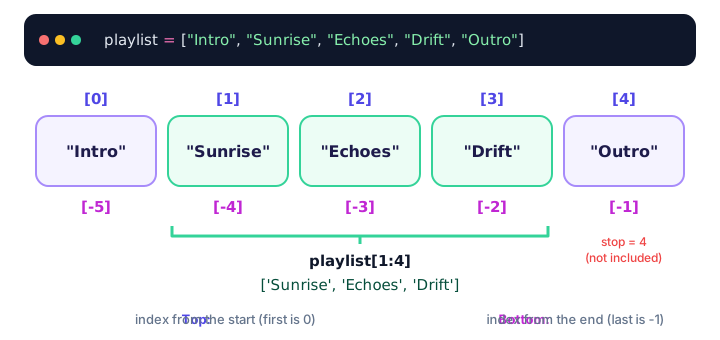
playlist = ["Intro", "Sunrise", "Echoes", "Drift", "Outro"]

print(playlist[0])   # first item
print(playlist[2])   # third item
print(playlist[4])   # fifth (last) item
Intro
Echoes
OutroIf you ask for an index that doesn't exist, Python stops with an error:
playlist = ["Intro", "Sunrise", "Echoes", "Drift", "Outro"]
print(playlist[5])
IndexError: list index out of rangeNegative indexes: counting from the end
A negative index counts backward from the end of the list. -1 is the last item, -2 the second to last, and so on. This is handy when you want "the latest" or "the last" item without knowing how long the list is.
temperatures = [14, 16, 15, 19, 21]

print(temperatures[-1])   # most recent reading
print(temperatures[-2])   # the one before it
21
19How do you slice a list?
Slicing takes a section of a list and gives you a new list. The syntax is list[start:stop], and it works the same way as string slicing: the start index is included, the stop index is not.
playlist = ["Intro", "Sunrise", "Echoes", "Drift", "Outro"]

print(playlist[1:4])    # items at index 1, 2 and 3
print(playlist[:2])     # from the start up to (not including) index 2
print(playlist[3:])     # from index 3 to the end
print(playlist[-2:])    # the last two items
print(playlist[::2])    # every second item
print(playlist[::-1])   # the whole list, reversed
['Sunrise', 'Echoes', 'Drift']
['Intro', 'Sunrise']
['Drift', 'Outro']
['Drift', 'Outro']
['Intro', 'Echoes', 'Outro']
['Outro', 'Drift', 'Echoes', 'Sunrise', 'Intro']Unlike indexing, slicing never raises an error for out-of-range numbers. playlist[2:100] simply gives you everything from index 2 to the end.
Lists are mutable: changing items
Mutable means "can be changed after it's created". Strings are immutable (you can't change one letter in place), but lists are mutable. You can replace an item by assigning to its index:
groceries = ["milk", "eggs", "bread", "apples"]

groceries[2] = "bagels"      # swap bread for bagels
groceries[-1] = "bananas"    # change the last item

print(groceries)
['milk', 'eggs', 'bagels', 'bananas']You can even replace a whole slice at once. The new section doesn't have to be the same length:
week = ["Mon", "Tue", "Wed", "Thu", "Fri"]
week[1:3] = ["Holiday"]
print(week)
['Mon', 'Holiday', 'Thu', 'Fri']📝 Note
Adding and removing items (like append() and remove()) is covered in the next lesson, Python list methods.
How do you count items and check membership?
Counting items with len()
The built-in len() function tells you how many items a list has. The last valid index is always len(list) - 1.
cart = ["T-shirt", "Sneakers", "Cap"]
print(len(cart))
print(len([]))
3
0Checking if an item is in a list
Use the in operator (you met it in membership operators) to check whether a value is in a list. It returns True or False.
allergies = ["peanuts", "shellfish"]

print("peanuts" in allergies)
print("gluten" in allergies)
print("gluten" not in allergies)
True
False
TrueHow do you loop through a list?
A for loop visits every item in order, one at a time. This is the most common thing you'll do with a list.
guests = ["Liam", "Sofia", "Kenji"]

for guest in guests:
    print(f"Welcome, {guest}!")
Welcome, Liam!
Welcome, Sofia!
Welcome, Kenji!If you also need the position, loop over range(len(...)), or use the cleaner built-in enumerate(), which gives you the index and the item together:
leaderboard = ["Ava", "Noah", "Zara"]

for position, player in enumerate(leaderboard, start=1):
    print(position, player)
1 Ava
2 Noah
3 ZaraNested lists: a list inside a list
An item in a list can itself be a list. This is called a nested list, and it's a simple way to store rows of data, like a table or a game board. Use one index to pick the inner list, then a second index to pick an item inside it.
board = [
    ["X", "O", "X"],
    ["O", "X", "O"],
    ["O", "X", "X"],
]

print(board[0])       # the first row
print(board[1][2])    # row 1, column 2
board[2][0] = "X"     # change one square
print(board[2])
['X', 'O', 'X']
O
['X', 'X', 'X']Real-world example: a game leaderboard
Here's a small program that keeps the top scores of a game, then prints the winner, the runner-up and the average score.
players = ["Ava", "Noah", "Zara", "Leo"]
scores = [1250, 980, 1430, 1100]

best = max(scores)
winner = players[scores.index(best)]

print(f"Players: {len(players)}")
print(f"Winner: {winner} with {best} points")
print(f"Average score: {sum(scores) / len(scores)}")

for i in range(len(players)):
    print(f"{players[i]:<6}{scores[i]:>6}")
Players: 4
Winner: Zara with 1430 points
Average score: 1190.0
Ava 1250
Noah 980
Zara 1430
Leo 1100The built-in functions max(), min() and sum() work on any list of numbers, and scores.index(best) finds the position of the best score (you'll see index() again in the next lesson).
Common mistakes with lists
1. Forgetting that indexes start at 0
colors = ["red", "green", "blue"]
print(colors[3])
IndexError: list index out of rangeA list with 3 items has indexes 0, 1 and 2. Use colors[-1] or colors[len(colors) - 1] for the last item.
2. Expecting the stop index to be included in a slice
days = ["Mon", "Tue", "Wed", "Thu"]
print(days[1:3])
['Tue', 'Wed']The slice stops before index 3, so "Thu" is not included.
3. Thinking two names mean two lists
original = [1, 2, 3]
backup = original      # NOT a copy: both names point to the same list
backup[0] = 99
print(original)
[99, 2, 3]Assignment never copies a list; it just adds another label to it (just like the variable labels you saw earlier). To make a real copy, use original[:] or original.copy().
Practice exercise
🏋️ Try it yourself
Create a list of five cities you'd like to visit. Then: print the first and last city, change the third city to "Lisbon", print the middle three cities using a slice, and finally loop through the list to print each city with its number, like 1. Tokyo.
Show solution
cities = ["Tokyo", "Paris", "Cairo", "Sydney", "Toronto"]

print(cities[0], cities[-1])
cities[2] = "Lisbon"
print(cities[1:4])

for number, city in enumerate(cities, start=1):
    print(f"{number}. {city}")
Tokyo Toronto
['Paris', 'Lisbon', 'Sydney']
1. Tokyo
2. Paris
3. Lisbon
4. Sydney
5. TorontoWhat's next?
You can now create lists, read and change items, slice them and loop through them. Next, learn the built-in Python list methods for adding, removing, sorting and searching items.
Key takeaways
- A list is an ordered collection of values written in square brackets, like [1, 2, 3].
- Indexes start at 0; negative indexes count from the end, so list[-1] is the last item.
- Slicing with list[start:stop] returns a new list and never includes the stop index.
- Lists are mutable: you can change an item in place with list[index] = new_value.
- Use len() to count items, in to check membership and a for loop to visit every item.
- A list can hold mixed types and even other lists (nested lists).
- Assigning a list to a new name does not copy it; use list.copy() or list[:] for a copy.
Frequently asked questions
What is a list in Python?
A list is a built-in data type that stores an ordered collection of items in one variable. You write it with square brackets, for example fruits = ["apple", "banana"], and you can change it after creating it.
Why do Python list indexes start at 0?
The index measures how far an item is from the start of the list. The first item is zero steps away, so its index is 0. Python uses the same rule for strings and other sequences.
How do I get the last item of a list in Python?
Use the negative index -1, for example my_list[-1]. It always returns the last item, no matter how long the list is.
Can a Python list contain different data types?
Yes. A single list can hold strings, numbers, booleans and even other lists. In practice, most lists hold one kind of value because that makes them easier to work with.
What is the difference between a list and an array in Python?
Python lists are flexible, built in and can hold any mix of types. Arrays, from the array module or the NumPy library, store values of a single type and are used mainly for fast number crunching.