Python Modules and import
Updated 7 min read Aimerscrew
Python modules let you use code that someone else already wrote, tested and packaged for you. Instead of writing your own square root function or random number generator, you load a module with the import statement and start using its tools straight away. In this lesson, you'll learn every common way to import a module, how to explore what's inside one, and which modules from Python's standard library are worth knowing first.
🌍 Real-life example
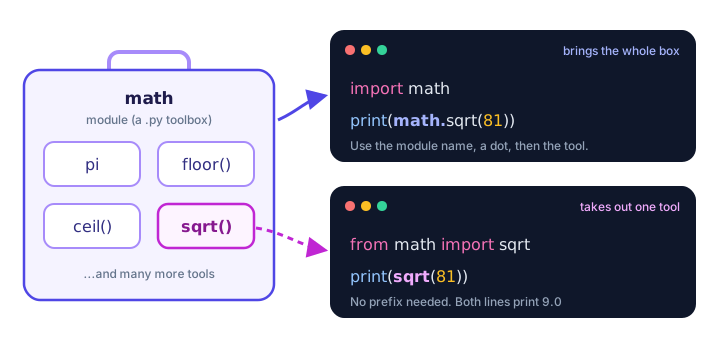
Think of a toolbox in your garage. You don't forge a new hammer every time you hang a picture; you open the box and grab the hammer. A module is a toolbox of code. import is you carrying the box to your workbench, and the functions inside are the tools.
What is a module in Python?
A module is simply a Python file (ending in .py) that contains functions, variables and other code you can reuse. When you import a module, Python runs that file once and gives you access to everything it defines.
Modules come from three places:
- The standard library: modules that come with Python, like
math,randomanddatetime. Nothing to install. - Your own files: any
.pyfile you write can be imported. You'll do this in How to Create Your Own Python Module. - Third-party packages: code shared by other developers, installed with
pip. See pip and Virtual Environments.
How do you import a module in Python?
The simplest form is import followed by the module name. After that, you reach the module's tools with a dot: module_name.tool_name.
import math

print(math.sqrt(81))
print(math.pi)
9.0
3.141592653589793The dot is like saying "the sqrt function from math". It keeps names organized: you always know where a function came from, and a module's sqrt can never clash with a variable called sqrt in your own code.
💡 Tip
Put all your import lines at the very top of the file. It's the standard Python style, and anyone reading your code can see at a glance which modules it depends on.
How Python imports work
When Python reaches an import line, it finds the module, runs it once, and creates a module object that holds all its names. Your program then gets a name pointing to that object (with import math) or names pointing straight at the tools you picked (with from math import sqrt).
Importing specific names with from ... import
If you only need one or two tools, use from module import name. The names land directly in your program, so you use them without the module prefix:
from math import sqrt, pi

print(sqrt(49))
print(round(pi, 2))
7.0
3.14This is shorter to type, but you lose the reminder of where sqrt came from. A good rule: use import module for modules you use a lot, and from ... import for a few well-known names.
Giving a module a nickname with as
Some module names are long, or clash with your own names. The as keyword creates an alias (a nickname):
import statistics as stats

test_scores = [72, 85, 90, 64]
print(stats.mean(test_scores))
print(stats.median(test_scores))
77.75
78.5You can alias single names too:
from statistics import mean as average

daily_steps = [8200, 10450, 6900]
print(average(daily_steps))8516.666666666666In real projects you'll see popular aliases everywhere, such as import numpy as np and import pandas as pd. Those are third-party libraries, but the as trick is exactly the same.
What does import * do?
from module import * copies every public name from the module into your program:
from math import *

print(floor(2.7))
print(ceil(2.1))
2
3⚠️ Avoid import * in real code
It dumps dozens of names into your file without telling you which ones. If two modules both have a function with the same name, the second import silently replaces the first, and readers can't tell where a name came from. It's fine for a quick experiment in the interactive shell, but name what you need in real programs.
How do you see what's inside a module?
The built-in dir() function lists all the names a module contains. The math module has a lot, so here we keep only the names that start with "f" using a list comprehension:
import math

f_names = [name for name in dir(math) if name.startswith("f")]
print(f_names)
['fabs', 'factorial', 'floor', 'fmod', 'frexp', 'fsum']To read what one of those tools does, call help() on it, for example help(math.floor). It prints the function's built-in documentation right in your terminal.
A quick tour of the Python standard library
Python is famous for coming "with batteries included". Here are standard library modules you'll use again and again:
| Module | What it's for | Example use |
|---|---|---|
math | Square roots, rounding, pi, factorials | math.ceil(4.2) → 5 |
random | Random numbers and random picks | Rolling dice, shuffling a playlist |
datetime | Dates, times and durations | Days until a flight |
statistics | Mean, median, mode | Average test score |
string | Handy groups of characters | All letters for a password generator |
os | Talking to the operating system | Reading environment settings |
sys | Info about the running Python | Python version, command-line arguments |
json | Reading and writing JSON data | Saving app settings |
csv | Spreadsheet-style files | Importing a bank statement |
pathlib | Working with files and folders | Listing photos in a folder |
You'll dig into math and random and datetime later in this chapter, and json and csv in the File Handling chapter.
Real-world example: picking a password alphabet
Here, two modules work together. string provides ready-made groups of characters, and math helps calculate how many possible 8-character passwords those characters allow:
import math
import string

alphabet = string.ascii_letters + string.digits
print("Characters available:", len(alphabet))

combinations = math.pow(len(alphabet), 8)
print("8-character passwords possible:", f"{combinations:,.0f}")
Characters available: 62
8-character passwords possible: 218,340,105,584,896Without modules, you'd have to type out all 62 characters yourself. With them, it takes one line.
Common mistakes with Python modules
1. Forgetting the import
print(math.sqrt(16))NameError: name 'math' is not defined. Did you forget to import 'math'?Every file must import the modules it uses, even if another file already imported them.
2. Misspelling the module name
import mathsModuleNotFoundError: No module named 'maths'3. Using the prefix after from ... import
from math import sqrt

print(math.sqrt(25))
NameError: name 'math' is not defined. Did you forget to import 'math'?from math import sqrt gives you the name sqrt only, not math. Call it as sqrt(25).
4. Naming your own file after a module
If you save your practice script as random.py or math.py, then import random loads your file instead of the real module, and you'll get confusing errors like AttributeError: module 'random' has no attribute 'randint'. Give your files unique names like dice_game.py.
Practice exercise
🏋️ Try it yourself
A pizza has a diameter of 30 cm. Import pi from the math module and calculate the pizza's area (pi × radius × radius), rounded to 1 decimal place. Then import the statistics module with the alias st and print the average of these slice prices: [2.5, 3.0, 3.5, 4.0].
Show solution
from math import pi
import statistics as st

radius = 30 / 2
area = pi * radius * radius
print("Pizza area:", round(area, 1), "sq cm")

slice_prices = [2.5, 3.0, 3.5, 4.0]
print("Average slice price:", st.mean(slice_prices))
Pizza area: 706.9 sq cm
Average slice price: 3.25What's next?
You can now use any module that comes with Python. Next, learn how to create your own Python module and share code between your own files.
Key takeaways
- A module is a .py file of reusable code, such as functions and variables.
- import math loads the whole module; use its tools with a dot, like math.sqrt(9).
- from math import sqrt brings in just one name, so you call sqrt(9) directly.
- The as keyword creates an alias, for example import statistics as stats.
- Avoid from module import * in real code because it hides where names come from.
- dir(module) lists what a module contains, and help(name) explains a tool.
- Never name your own file after a module you import, such as random.py.
Frequently asked questions
What is a module in Python?
A module is a Python file that contains code, such as functions, variables and classes, that other programs can load with the import statement and reuse.
What is the difference between import and from import in Python?
import math loads the module and you write math.sqrt() to use it. from math import sqrt copies just the sqrt name into your file, so you call sqrt() without the prefix.
Why is import * considered bad practice?
It brings every public name from a module into your file without listing them, which can silently overwrite your own names and makes it hard to tell where a function came from.
How do I see all functions in a Python module?
Import the module and call dir() on it, for example dir(math). For details about one function, use help(), such as help(math.floor).
What is the Python standard library?
It is the large collection of modules that comes with every Python installation, including math, random, datetime, json, csv and os. You can import them without installing anything.
Why do I get ModuleNotFoundError in Python?
Python could not find a module with that name. Usually the name is misspelled, or it is a third-party package that you need to install with pip first.