Python Class vs Instance Attributes
Updated 7 min read Aimerscrew
Some information is different for every object, like the color of each car. Other information is the same for all of them, like the fact that every car has four wheels. Understanding Python class vs instance attributes means knowing where each kind of data belongs. In this lesson, you'll learn how the two differ, how Python looks them up, and one sneaky bug that catches almost every beginner.
🌍 Real-life example
Picture a soccer team. Every player wears the same team name and badge: change the badge once and everyone's kit changes. But each player also has their own name and shirt number, and changing one player's number doesn't affect anyone else. The team badge is like a class attribute (shared); the name and number are like instance attributes (one per object).
What is the difference between class and instance attributes?
- A class attribute is a variable written directly inside the class body, outside any method. There's only one copy, and every object shares it.
- An instance attribute is a variable set on
self, usually inside__init__. Each object gets its own separate copy.
class Car:
    wheels = 4                    # class attribute: shared by all cars

    def __init__(self, color):
        self.color = color        # instance attribute: one per car

red_car = Car("red")
blue_car = Car("blue")

print(red_car.color, red_car.wheels)
print(blue_car.color, blue_car.wheels)
print(Car.wheels)
red 4
blue 4
4You can read a class attribute through an object (red_car.wheels) or directly through the class (Car.wheels). An instance attribute, however, only exists on objects: Car.color would raise an AttributeError.
How does Python find an attribute?
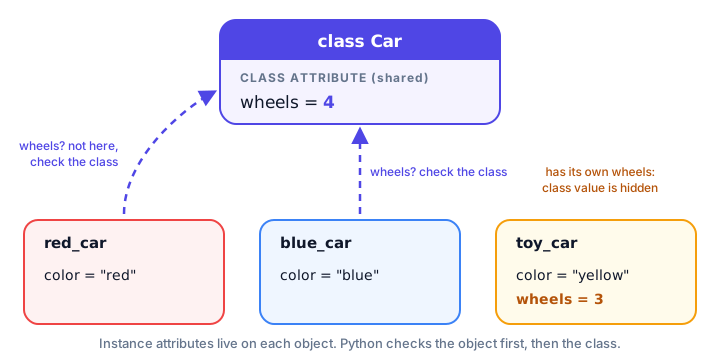
When you write red_car.wheels, Python follows a simple rule:
- Look on the object itself. If the name is there, use it.
- If not, look on the class. If the name is there, use it.
- If it's in neither place, raise an
AttributeError.
You can peek at an object's own attributes with the special __dict__ attribute, which shows them as a dictionary:
class Car:
    wheels = 4

    def __init__(self, color):
        self.color = color

red_car = Car("red")
print(red_car.__dict__)
print("wheels" in Car.__dict__)
{'color': 'red'}
TrueThe object only stores color. It finds wheels by falling back to the class.
Changing a class attribute
If you change a class attribute through the class, every object sees the new value immediately, because they all share the same one:
class Product:
    tax_rate = 0.08

    def __init__(self, name, price):
        self.name = name
        self.price = price

    def total(self):
        return round(self.price * (1 + self.tax_rate), 2)

shirt = Product("T-shirt", 20)
mug = Product("Mug", 10)
print(shirt.total(), mug.total())

Product.tax_rate = 0.10        # the tax rate changes for the whole store
print(shirt.total(), mug.total())
21.6 10.8
22.0 11.0One line updated the tax for every product. That's exactly what class attributes are for: settings and constants that apply to the whole class.
What is attribute shadowing?
Here's the twist: if you assign to a class attribute through an object, Python doesn't change the class. It creates a new instance attribute with the same name on that one object. The new value "hides", or shadows, the class value for that object only.
class Car:
    wheels = 4

    def __init__(self, color):
        self.color = color

family_car = Car("silver")
toy_car = Car("yellow")

toy_car.wheels = 3          # creates an instance attribute on toy_car only

print(family_car.wheels)
print(toy_car.wheels)
print(Car.wheels)
print(toy_car.__dict__)
4
3
4
{'color': 'yellow', 'wheels': 3}The class still says 4, and family_car still uses it. Only toy_car has its own wheels. If you later run del toy_car.wheels, the instance attribute is removed and toy_car.wheels goes back to showing 4 from the class.
⚠️ Be careful
To change a shared value, always assign through the class name (Car.wheels = 6), not through self or an object. Assigning through an object only changes that one object.
Using a class attribute as a counter
A classic use of a class attribute is counting how many objects have been created. Notice that the counter is updated with the class name:
class Ticket:
    sold = 0

    def __init__(self, event):
        Ticket.sold += 1
        self.event = event
        self.number = Ticket.sold

a = Ticket("Concert")
b = Ticket("Concert")
c = Ticket("Museum")

print("Tickets sold:", Ticket.sold)
print(c.event, "ticket number", c.number)
Tickets sold: 3
Museum ticket number 3If you wrote self.sold += 1 instead, each ticket would read the class value 0, add 1, and save its own instance attribute. Ticket.sold would stay at 0 forever.
The mutable class attribute trap
This is the bug that surprises almost everyone. If a class attribute holds a mutable object (one that can be changed in place, like a list or dictionary), every object shares that same list:
class Dog:
    tricks = []                     # shared by ALL dogs!

    def __init__(self, name):
        self.name = name

    def learn(self, trick):
        self.tricks.append(trick)

rex = Dog("Rex")
bella = Dog("Bella")

rex.learn("sit")
bella.learn("roll over")

print(rex.tricks)
['sit', 'roll over']Rex never learned to roll over! append() doesn't assign a new value, so no shadowing happens. Both dogs modify the single list stored on the class. The fix is to create the list in __init__, so each dog gets its own:
class Dog:
    def __init__(self, name):
        self.name = name
        self.tricks = []            # a new list for each dog

    def learn(self, trick):
        self.tricks.append(trick)

rex = Dog("Rex")
bella = Dog("Bella")

rex.learn("sit")
bella.learn("roll over")

print(rex.tricks)
print(bella.tricks)
['sit']
['roll over']You'll learn more about why this happens in Python mutable vs immutable types.
When should you use each one?
| Class attribute | Instance attribute | |
|---|---|---|
| Where it's defined | In the class body | On self, usually in __init__ |
| How many copies | One, shared by all objects | One per object |
| Access | ClassName.attr or obj.attr | obj.attr only |
| Good for | Constants, settings, defaults, counters | Data that differs per object: name, balance, color |
| Examples | wheels = 4, tax_rate = 0.08 | self.color, self.owner |
A good rule of thumb: if the value would be identical for every object, make it a class attribute. If it's different for each object, or it's a list or dictionary that each object will change, make it an instance attribute.
Common mistakes
1. Reading an instance attribute from the class
class Car:
    wheels = 4

    def __init__(self, color):
        self.color = color

print(Car.color)
AttributeError: type object 'Car' has no attribute 'color'Instance attributes only exist on objects created from the class, after __init__ runs.
2. Updating a shared value through self
As you saw with the ticket counter, self.count += 1 creates a separate instance attribute. Use ClassName.count += 1 to change the shared value.
3. Using a list or dictionary as a class attribute for per-object data
Every object will share and change the same container. Create lists and dictionaries in __init__ unless you truly want them shared.
Practice exercise
🏋️ Try it yourself
Create a Student class with a class attribute school = "Riverside High" and instance attributes name and an empty grades list. Add a method add_grade(grade). Create two students, give each a different grade, print each student's school and grades, then change the school for everyone to "Riverside Academy" and print one student's school again.
Show solution
class Student:
    school = "Riverside High"

    def __init__(self, name):
        self.name = name
        self.grades = []

    def add_grade(self, grade):
        self.grades.append(grade)

mia = Student("Mia")
leo = Student("Leo")
mia.add_grade(92)
leo.add_grade(85)

print(mia.name, mia.school, mia.grades)
print(leo.name, leo.school, leo.grades)

Student.school = "Riverside Academy"
print(leo.school)
Mia Riverside High [92]
Leo Riverside High [85]
Riverside AcademyWhat's next?
Attributes can belong to objects or to the class, and so can methods. Next, learn the difference between Python instance, class and static methods.
Key takeaways
- Class attributes are defined in the class body and shared by every object of the class.
- Instance attributes are set on self, usually in __init__, and belong to one object only.
- Python looks up obj.attr on the object first, then on the class.
- Assigning through an object creates an instance attribute that shadows the class attribute for that object only.
- Change a shared value through the class name, such as Car.wheels = 6 or Ticket.sold += 1.
- Never use a list or dictionary class attribute for per-object data; create it in __init__ instead.
Frequently asked questions
What is a class attribute in Python?
A class attribute is a variable defined directly inside the class body, outside any method. All objects of the class share the same value, and you can read it with ClassName.attr or obj.attr.
What is an instance attribute in Python?
An instance attribute is a variable stored on a single object, usually created in __init__ with self.name = value. Each object has its own copy.
Can an instance change a class attribute?
Assigning through an instance, like obj.attr = 5, does not change the class attribute. It creates a new instance attribute on that object that hides the class value. To change it for everyone, assign through the class name.
Why is my list shared between all objects in Python?
Because the list was defined as a class attribute, so there is only one list for the whole class. Create the list inside __init__ with self.items = [] so each object gets its own.
How do I see all attributes of a Python object?
Use obj.__dict__ to see the object's own instance attributes as a dictionary, or dir(obj) to see every attribute and method it can access, including those from the class.