Python Syntax and Indentation
Updated 7 min read Aimerscrew
Every language has grammar rules, and programming languages are no different. Python syntax is the set of rules that tells you how to write code Python can understand. The good news: Python's rules are short and clean. In this lesson, you'll learn how statements are written, why indentation matters so much, and how to fix the errors beginners run into most.
🌍 Real-life example
Think of a to-do list with sub-bullets. "Get ready for work" is a main item. Under it, slightly pushed to the right, you write "Shower", "Make coffee" and "Pack lunch". The push to the right tells you those steps belong to "Get ready for work". Python reads code exactly the same way: lines pushed to the right belong to the line above them.
What is syntax in Python?
Syntax means the rules for arranging words and symbols so they make sense. In English, "the cat sat" is correct, but "sat cat the" is not. In Python, print("Hi") is correct, but print "Hi" is not.
When your code breaks a syntax rule, Python stops before running anything and shows a SyntaxError (or its cousin, IndentationError). Don't worry, these errors are normal, and the message usually points right at the problem.
One statement per line
A statement is a single instruction, like "store this value" or "print this text". In Python, you normally write one statement per line. There's no semicolon at the end, unlike JavaScript, Java or C.
print("Welcome to the store")
items = 3
print("Items in cart:", items)
Welcome to the store
Items in cart: 3Python runs these lines from top to bottom, one at a time. The end of the line is the end of the statement.
How does indentation work in Python?
Indentation means the spaces at the start of a line. In many languages, indentation is just for looks, and curly braces { } mark which lines belong together. Python doesn't use braces for this. Instead, indentation itself defines a code block. A code block is a group of lines that run together, for example the lines inside a loop or inside an if.
cart = ["milk", "bread", "apples"]

for item in cart:
    if item == "milk":
        print("Fridge")
    else:
        print("Shelf")
print("Done")
Fridge
Shelf
Shelf
DoneDon't worry about for and if yet; you'll learn them later. Just look at the shape. The lines indented under for repeat for every item. The lines indented under if and else run only when that branch is chosen. The last line has no indent, so it runs once, after the loop finishes.
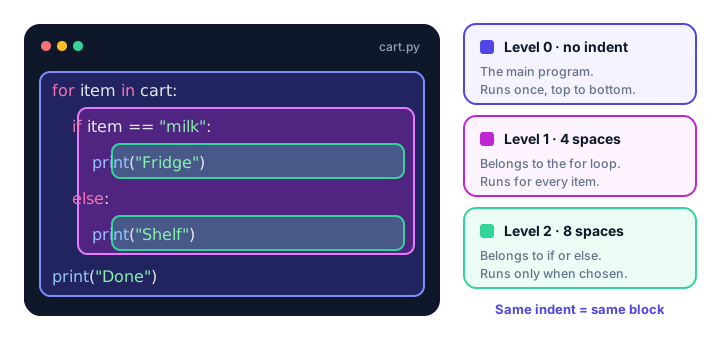
Indentation changes what your code does
Because indentation decides which block a line belongs to, moving one line left or right can change the result. Compare these two workout plans:
for day in ["Mon", "Tue"]:
    print("Workout on", day)
    print("Stretch")
Workout on Mon
Stretch
Workout on Tue
Stretchfor day in ["Mon", "Tue"]:
print("Workout on", day)
print("Stretch")Workout on Mon
Workout on Tue
StretchIn the first version, "Stretch" is inside the loop, so it runs every day. In the second, it's outside, so it runs once at the end. Same words, different meaning.
Why does the colon matter?
A line that starts a block always ends with a colon :. You'll see it after if, else, for, while, def and class. Read the colon as "here comes the block". The very next line must be indented.
temperature = 31
if temperature > 30:
    print("It's a hot day. Grab some water!")
It's a hot day. Grab some water!Forget the colon and Python tells you exactly what's missing:
temperature = 31
if temperature > 30
    print("It's a hot day. Grab some water!")
SyntaxError: expected ':'How many spaces should you use for indentation?
The official Python style guide, called PEP 8, recommends 4 spaces per level. Python technically accepts any number, as long as every line in the same block uses the same amount. But 4 spaces is what nearly every Python developer uses, so stick with it.
💡 Tip
You don't have to press the space bar four times. Editors like VS Code and PyCharm insert 4 spaces when you press Tab in a Python file, and they indent automatically after you type a colon and press Enter.
⚠️ Don't mix tabs and spaces
A tab character and four spaces can look identical on screen, but Python sees them as different. Mixing them in the same block causes TabError: inconsistent use of tabs and spaces in indentation. Let your editor convert tabs to spaces.
What causes an IndentationError?
An IndentationError means the spaces at the start of a line don't follow the rules. Here are the three versions you'll see most.
1. Forgetting to indent after a colon
if True:
print("Hello")
IndentationError: expected an indented block after 'if' statement on line 12. Indenting a line for no reason
print("Order placed")
    print("Thank you!")
IndentationError: unexpected indent3. Lining up with a level that doesn't exist
if True:
        print("Eight spaces")
    print("Four spaces")
IndentationError: unindent does not match any outer indentation levelThe fix is always the same: make every line in a block start at exactly the same column, and use 4 spaces per level.
Is Python case-sensitive?
Case-sensitive means uppercase and lowercase letters count as different characters. print works, but Print doesn't:
Print("Hello")NameError: name 'Print' is not defined. Did you mean: 'print'?The same goes for values: True and False start with a capital letter in Python, so true causes an error too.
How do you split a long line in Python?
PEP 8 suggests keeping lines under about 79 characters so code stays easy to read. When a line gets too long, wrap it in parentheses. Inside ( ), [ ] or { }, Python lets you continue on the next line freely:
monthly_bills = (1200    # rent
                 + 45    # phone
                 + 60    # internet
                 + 15)   # streaming
print(monthly_bills)1320The text after each # is a comment, a note Python ignores. You will learn about comments in the next lesson.
You can also end a line with a backslash \ to say "this continues on the next line". It works, but it breaks easily (even a space after the backslash causes an error), so parentheses are the preferred choice.
total_steps = 8200 + 9100 + \
              7600
print(total_steps)24900Other syntax rules: semicolons, spaces and keywords
Can you put multiple statements on one line?
Yes, by separating them with a semicolon ;. Python allows it, but PEP 8 discourages it because it makes code harder to scan.
city = "Paris"; temp = 21; print(city, temp)Paris 21The clearer way is three separate lines. Save semicolons for quick experiments in the terminal.
Does whitespace inside a line matter?
Only the spaces at the start of a line matter. Spaces in the middle are up to you, so these two lines do the same thing:
price=5+3
price = 5 + 3
The second one is much easier to read, and it's the style PEP 8 recommends: one space around = and around math operators like +.
What are Python keywords?
Keywords are words Python reserves for its own grammar, such as if, else, for, while, def, return, import, True, False and None. You'll learn what each one does as you go. For now, remember one rule: you can't use a keyword as a variable name. You'll see the full list in the lesson on Python variable names.
Common mistakes with Python syntax
- Missing colon after
if,for,elseand similar lines givesSyntaxError: expected ':'. - Inconsistent indentation, such as 4 spaces on one line and 3 on the next, gives an
IndentationError. - Wrong capitalization, like
Printortrue, gives aNameError. - Adding semicolons or braces out of habit from other languages. Semicolons are harmless but unnecessary; braces don't create blocks in Python.
- Copying code from websites that turns spaces into tabs or odd characters. If an indentation error makes no sense, delete the indentation and retype it.
Practice exercise
🏋️ Try it yourself
This coffee-order program has three syntax problems. Find and fix them so it prints the message.
size = "large"
if size == "large"
print("That will be $5.")
    Print("Enjoy your coffee!")
Show solution
Add the colon after the if line, indent the first print by 4 spaces, and change Print to lowercase print on the last line.
size = "large"
if size == "large":
    print("That will be $5.")
    print("Enjoy your coffee!")
That will be $5.
Enjoy your coffee!What's next?
You now know the basic shape of Python code. Next, learn how to leave notes for yourself and your teammates with Python comments.
Key takeaways
- Python syntax is the set of rules for writing code Python can understand.
- Write one statement per line; no semicolon is needed at the end.
- A colon ends any line that starts a block, and the next line must be indented.
- Indentation, not curly braces, decides which lines belong to a block. Use 4 spaces per level.
- IndentationError and TabError mean the spaces at the start of a line are inconsistent.
- Python is case-sensitive: print works, Print does not.
- Split long lines with parentheses; a backslash also works but is easier to break.
Frequently asked questions
Does Python use curly braces?
Not for code blocks. Python uses indentation to show which lines belong together. Curly braces in Python are used for dictionaries and sets instead.
How many spaces is a Python indent?
The PEP 8 style guide recommends 4 spaces per indentation level. Python accepts other amounts as long as a block is consistent, but 4 spaces is the standard.
How do I fix "IndentationError: unexpected indent"?
A line is indented when it should not be. Move it back so it starts at the same column as the lines in its block, and make sure you are not mixing tabs and spaces.
Do you need semicolons in Python?
No. The end of a line ends the statement. You can use a semicolon to put several statements on one line, but the style guide discourages it.
Is Python case-sensitive?
Yes. Names like score, Score and SCORE are all different, and built-in names such as print and True must be written with the exact capitalization.