Python Magic (Dunder) Methods
Updated 7 min read Aimerscrew
Python magic methods are special methods that let your own classes work with Python's built-in syntax: print(), len(), ==, <, +, in and square brackets. Their names start and end with double underscores, like __len__, which is why people also call them dunder methods ("double underscore"). You already know one: __init__. In this lesson, you'll learn the most useful ones and build classes that feel just like Python's own types.
🌍 Real-life example
A music app's playlist feels natural to use: you ask "how many songs?", "is this song in it?", "what's the first song?". If you build a Playlist class, magic methods let you ask the same questions in plain Python: len(playlist), "Yellow" in playlist and playlist[0].
What are magic methods in Python?
A magic method is a method Python calls for you when you use a certain feature. You almost never call it directly. Instead, Python translates your code behind the scenes:
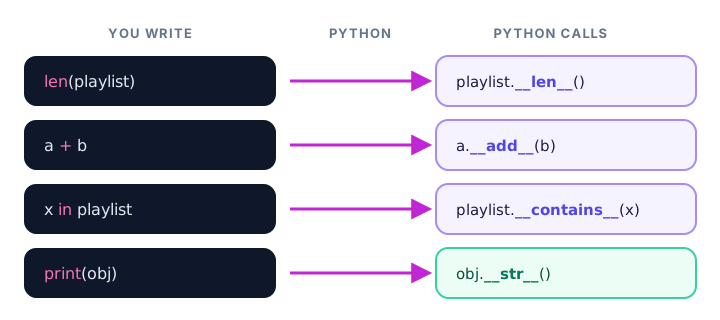
This is the polymorphism you saw in the last lesson: len() works on strings, lists and dictionaries because each of those types defines __len__. Define it on your class, and len() works there too.
__str__ vs __repr__: how should your object print?
If you print an object without any magic methods, Python shows something unhelpful like <__main__.Money object at 0x...>, with a memory address that changes every run. Two magic methods fix that:
__str__returns a friendly, readable string for users.print()andstr()use it.__repr__returns an exact, developer-focused string, ideally one that looks like the code to recreate the object.repr(), the interactive shell, and lists of objects use it.
class Money:
    def __init__(self, amount, currency="USD"):
        self.amount = amount
        self.currency = currency

    def __str__(self):
        return f"{self.amount:.2f} {self.currency}"

    def __repr__(self):
        return f"Money({self.amount}, '{self.currency}')"

price = Money(19.5)
print(price)
print(repr(price))
print([Money(5), Money(3, "EUR")])
19.50 USD
Money(19.5, 'USD')
[Money(5, 'USD'), Money(3, 'EUR')]Notice that printing a list uses __repr__ for each item, not __str__.
💡 Tip
If you only write one, write __repr__. When a class has no __str__, Python falls back to __repr__ for print() too.
__eq__: comparing objects with ==
By default, == on your objects only checks whether both names point to the very same object, so two objects with identical data are "not equal":
class Money:
    def __init__(self, amount):
        self.amount = amount

print(Money(10) == Money(10))FalseDefine __eq__ to say what "equal" means for your class:
class Money:
    def __init__(self, amount, currency="USD"):
        self.amount = amount
        self.currency = currency

    def __eq__(self, other):
        return self.amount == other.amount and self.currency == other.currency

print(Money(10) == Money(10))
print(Money(10) == Money(10, "EUR"))
print(Money(10) != Money(12))
True
False
TruePython works out != for you from __eq__, so you don't need to write it.
__lt__: making objects sortable
__lt__ means "less than" and powers the < operator. Once it exists, sorted(), min() and max() can work with your objects, because they compare items with <.
class Runner:
    def __init__(self, name, minutes):
        self.name = name
        self.minutes = minutes

    def __lt__(self, other):
        return self.minutes < other.minutes

    def __repr__(self):
        return f"{self.name} ({self.minutes} min)"

race = [Runner("Lena", 52), Runner("Kofi", 47), Runner("Ravi", 49)]
print(sorted(race))
print("Winner:", min(race))
[Kofi (47 min), Ravi (49 min), Lena (52 min)]
Winner: Kofi (47 min)__add__: using + with your objects
__add__ runs when you write a + b. It should return a new object rather than change either side.
class Money:
    def __init__(self, amount, currency="USD"):
        self.amount = amount
        self.currency = currency

    def __add__(self, other):
        if self.currency != other.currency:
            raise ValueError("Cannot add different currencies")
        return Money(self.amount + other.amount, self.currency)

    def __str__(self):
        return f"{self.amount:.2f} {self.currency}"

coffee = Money(3.75)
muffin = Money(2.50)
print(coffee + muffin)
print(coffee + Money(1, "GBP"))
6.25 USD
ValueError: Cannot add different currencies__len__, __contains__ and __getitem__: container behavior
These three make a class act like a collection:
__len__runs forlen(obj)and must return a whole number.__contains__runs foritem in objand should returnTrueorFalse.__getitem__runs forobj[key], so you can use indexes (and even slices).
class Playlist:
    def __init__(self, name):
        self.name = name
        self.songs = []

    def add(self, song):
        self.songs.append(song)

    def __len__(self):
        return len(self.songs)

    def __contains__(self, song):
        return song in self.songs

    def __getitem__(self, index):
        return self.songs[index]

road_trip = Playlist("Road Trip")
road_trip.add("Yellow")
road_trip.add("Africa")
road_trip.add("Shut Up and Dance")

print(len(road_trip))
print("Africa" in road_trip)
print("Hello" in road_trip)
print(road_trip[0])
print(road_trip[-1])
print(road_trip[0:2])
3
True
False
Yellow
Shut Up and Dance
['Yellow', 'Africa']As a bonus, defining __getitem__ also lets you loop over the playlist with for song in road_trip:. You'll learn the full story in Python iterators.
Table of common magic methods
| You write | Python calls | Use it for |
|---|---|---|
Money(5) | __init__(self, ...) | Setting up a new object |
print(obj), str(obj) | __str__(self) | Friendly text for users |
repr(obj) | __repr__(self) | Exact text for developers |
len(obj) | __len__(self) | Size of a collection |
a == b | __eq__(self, other) | Equality |
a < b | __lt__(self, other) | Ordering and sorting |
a > b | __gt__(self, other) | Greater than |
a + b | __add__(self, other) | Adding or combining |
a - b | __sub__(self, other) | Subtracting |
a * b | __mul__(self, other) | Multiplying |
x in obj | __contains__(self, x) | Membership test |
obj[key] | __getitem__(self, key) | Indexing and slicing |
bool(obj), if obj: | __bool__(self) | Truthiness |
📝 Note
You never invent new dunder names. Python has a fixed list of them, and each one is tied to a specific feature. Writing __total__ won't make anything magic happen.
Real-world example: a shopping cart
Here's how a few magic methods combine to make a class pleasant to use:
class Cart:
    def __init__(self):
        self.items = {}

    def add(self, name, price):
        self.items[name] = price

    def __len__(self):
        return len(self.items)

    def __contains__(self, name):
        return name in self.items

    def __bool__(self):
        return len(self.items) > 0

    def __str__(self):
        total = sum(self.items.values())
        return f"Cart with {len(self)} items, total ${total:.2f}"

cart = Cart()
if not cart:
    print("Your cart is empty")

cart.add("Sneakers", 89.99)
cart.add("Socks", 7.50)
print(cart)
print("Socks" in cart)
Your cart is empty
Cart with 2 items, total $97.49
TrueCommon mistakes with magic methods
1. Printing instead of returning in __str__
__str__ and __repr__ must return a string. If you print() inside them, they return None:
class Song:
    def __str__(self):
        print("Yellow")

print(Song())
Yellow
TypeError: __str__ returned non-string (type NoneType)2. Sorting without __lt__
class Runner:
    def __init__(self, minutes):
        self.minutes = minutes

print(sorted([Runner(52), Runner(47)]))
TypeError: '<' not supported between instances of 'Runner' and 'Runner'3. Misspelling the name
Writing _len_ (one underscore) or __length__ creates an ordinary method that Python never calls. The names must match exactly, with two underscores on each side.
Practice exercise
🏋️ Try it yourself
Create a Recipe class that stores a name and a list of ingredients. Make len(recipe) return the number of ingredients, "eggs" in recipe check for an ingredient, and print(recipe) show something like Pancakes (3 ingredients).
Show solution
class Recipe:
    def __init__(self, name, ingredients):
        self.name = name
        self.ingredients = ingredients

    def __len__(self):
        return len(self.ingredients)

    def __contains__(self, ingredient):
        return ingredient in self.ingredients

    def __str__(self):
        return f"{self.name} ({len(self)} ingredients)"

pancakes = Recipe("Pancakes", ["flour", "milk", "eggs"])
print(pancakes)
print(len(pancakes))
print("eggs" in pancakes)
print("butter" in pancakes)
Pancakes (3 ingredients)
3
True
FalseWhat's next?
Writing __init__, __repr__ and __eq__ by hand for every class gets repetitive. Next, let Python write them for you with Python dataclasses.
Key takeaways
- Magic (dunder) methods have double underscores on both sides, like __len__, and Python calls them automatically.
- __str__ gives friendly text for print(); __repr__ gives exact text for developers and is used inside lists.
- Without __eq__, == only checks whether two names point to the same object.
- Defining __lt__ makes < work, which lets sorted(), min() and max() handle your objects.
- __add__ powers + and should return a new object.
- __len__, __contains__ and __getitem__ make a class behave like a collection with len(), in and [].
- __str__ and __repr__ must return a string, never print it.
Frequently asked questions
What are magic methods in Python?
Magic methods are special methods whose names start and end with double underscores, such as __init__, __str__ and __len__. Python calls them automatically when you use built-in features like print(), len(), + or ==.
Why are they called dunder methods?
Dunder is short for "double underscore". A method like __len__ is read aloud as "dunder len". Magic methods and dunder methods mean the same thing.
What is the difference between __str__ and __repr__?
__str__ returns a readable string for end users and is used by print() and str(). __repr__ returns an unambiguous string for developers, ideally valid code to recreate the object, and is used by repr(), the interactive shell and when objects appear inside lists.
How do I make my class sortable in Python?
Define the __lt__ method so Python knows how to compare two objects with <. After that, sorted(), list.sort(), min() and max() work on your objects. You can also pass a key function to sorted() instead.
Should I call magic methods directly?
Usually no. Write len(obj) instead of obj.__len__() and a + b instead of a.__add__(b). The built-in syntax is shorter and lets Python handle extra cases for you.