Python Type Hints
Updated 8 min read Aimerscrew
Python type hints are small labels you add to your code to say what kind of value a variable or function expects, such as int, str or list[float]. They don't change how your program runs, but they make code easier to read and let your editor spot mistakes early. In this lesson, you'll learn how to write type hints for variables, functions and collections, and why they're so popular in modern Python.
🌍 Real-life example
Think of the labels on the storage containers in a kitchen: "Sugar", "Rice", "Coffee beans". The labels don't physically stop anyone from pouring salt into the sugar jar. But they tell everyone what belongs inside, and a careful cook notices right away when something's wrong. Type hints are labels for your code: Python won't stop a wrong value, but you, your teammates and your tools will notice.
What are type hints in Python?
A type hint (also called a type annotation) is a note in your code that says which type a value should have. Python is dynamically typed, as you learned in Python variables, so you never have to declare types. Type hints are an optional extra that make your intentions clear.
How do you add type hints to variables?
Write a colon and the type after the variable name, then assign the value as usual:
player: str = "Jordan"
level: int = 3
health: float = 87.5
is_online: bool = True

print(player, level, health, is_online)
Jordan 3 87.5 TrueRead level: int = 3 as "level is an int, and it starts at 3". For simple variables like these, the type is obvious from the value, so many programmers skip the hint. Variable hints are most useful when the value is empty at first, like orders: list[str] = [].
How do you add type hints to functions?
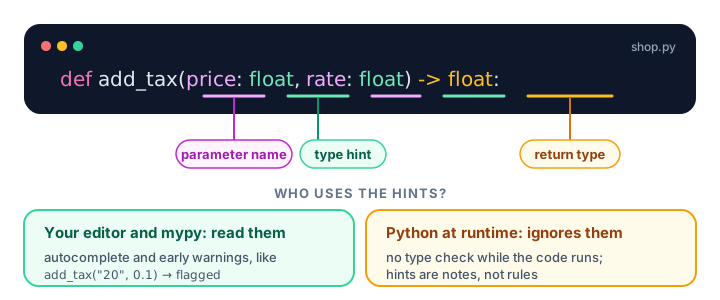
Function hints are where type hints really shine. Put a type after each parameter name, and put -> plus the return type before the colon at the end of the def line:
def add_tax(price: float, rate: float) -> float:
    return round(price * (1 + rate), 2)

def greet(name: str) -> str:
    return f"Welcome back, {name}!"

print(add_tax(20.0, 0.1))
print(greet("Sofia"))
22.0
Welcome back, Sofia!Just by reading the first line of add_tax, you know it takes two decimal numbers and gives one back. You don't need to read the body or guess.
A function that doesn't return anything useful gets the return type None:
def print_receipt(total: float) -> None:
    print(f"You paid ${total:.2f}")

print_receipt(18.5)
You paid $18.50Are type hints enforced in Python?
No. This surprises a lot of beginners. Python stores the hints but doesn't check them when your program runs. Watch what happens when we pass the "wrong" types:
def double(number: int) -> int:
    return number * 2

print(double(4))
print(double("ha"))
print(double([1, 2]))
8
haha
[1, 2, 1, 2]No error at all. The hint says int, but Python happily doubles a string and a list. The hints are only stored as information, which you can see in the function's __annotations__ attribute:
def double(number: int) -> int:
    return number * 2

print(double.__annotations__)
{'number': <class 'int'>, 'return': <class 'int'>}📝 Note
If you need to really stop wrong values, you still check them yourself (for example with isinstance()) and raise an error. Type hints are documentation plus tool support, not a security guard.
Type hints for lists, dictionaries and other collections
For collections, put the type of the items in square brackets. Since Python 3.9, you can use the built-in names directly:
| Hint | Meaning | Example value |
|---|---|---|
list[int] | A list of integers | [90, 75, 88] |
dict[str, float] | Keys are strings, values are floats | {"latte": 4.5} |
tuple[str, int] | Exactly a string, then an int | ("Lions", 3) |
set[str] | A set of strings | {"red", "blue"} |
int | float | Either an int or a float | 7 or 7.5 |
str | None | A string, or nothing | "SAVE10" or None |
def average(scores: list[int]) -> float:
    return sum(scores) / len(scores)

def cheapest(menu: dict[str, float]) -> str:
    return min(menu, key=menu.get)

print(average([90, 75, 88, 97]))
print(cheapest({"latte": 4.5, "tea": 3.0, "mocha": 5.25}))
87.5
teaHow do you hint a value that might be None?
Many functions return a value or None when nothing is found. Write that with the | symbol, which means "or":
def find_price(menu: dict[str, float], item: str) -> float | None:
    if item in menu:
        return menu[item]
    return None

menu = {"latte": 4.5, "tea": 3.0}
print(find_price(menu, "tea"))
print(find_price(menu, "smoothie"))
3.0
NoneIn older code (before Python 3.10) you'll see the same idea written with the typing module: Optional[float] means exactly float | None.
from typing import Optional

def find_seat(row: str) -> Optional[int]:
    seats = {"A": 12, "B": 7}
    return seats.get(row)

print(find_seat("A"))
print(find_seat("Z"))
12
NoneType hints in classes
Methods take hints just like functions. The self parameter doesn't need one, and __init__ returns None. You've already seen this style in Python dataclasses, which use type hints to define their fields.
class BankAccount:
    def __init__(self, owner: str, balance: float = 0.0) -> None:
        self.owner = owner
        self.balance = balance

    def deposit(self, amount: float) -> float:
        self.balance += amount
        return self.balance

account = BankAccount("Noah")
print(account.deposit(250.0))250.0Why use type hints if Python ignores them?
- Readable code. The function signature tells you what goes in and what comes out.
- Better editor help. Editors such as VS Code and PyCharm use hints for autocomplete. Type
name.and they suggest string methods because they knownameis astr. - Catch bugs before running. Editors underline mistakes, and a free tool called mypy checks a whole project for type errors.
- Safer changes. In a big project, hints show you every place that breaks when you change a function.
To try mypy, install it with pip (see pip and virtual environments) and point it at a file. For a file that calls double("ha") on line 4, mypy reports something like this, without ever running your code:
pip install mypy
mypy shop.py
shop.py:4: error: Argument 1 to "double" has incompatible type "str"; expected "int" [arg-type]
Found 1 error in 1 file (checked 1 source file)Real-world example: shopping cart functions
Here's a small online-store module with full type hints. Each signature documents exactly what it expects:
def line_total(price: float, quantity: int) -> float:
    return price * quantity

def cart_total(cart: dict[str, tuple[float, int]]) -> float:
    total = 0.0
    for price, quantity in cart.values():
        total += line_total(price, quantity)
    return round(total, 2)

def apply_coupon(total: float, code: str | None = None) -> float:
    if code == "SAVE10":
        return round(total * 0.9, 2)
    return total

cart: dict[str, tuple[float, int]] = {
    "notebook": (3.5, 4),
    "pen": (1.25, 10),
    "backpack": (29.99, 1),
}

total = cart_total(cart)
print("Total:", total)
print("With coupon:", apply_coupon(total, "SAVE10"))
print("No coupon:", apply_coupon(total))
Total: 56.49
With coupon: 50.84
No coupon: 56.49A teammate who has never seen this code can tell from dict[str, tuple[float, int]] that the cart maps product names to a (price, quantity) pair.
Common mistakes with type hints
1. Expecting Python to block wrong types
As you saw, double("ha") runs without complaint. Use mypy or your editor to check hints, and validate input yourself when it matters.
2. Using = instead of : in a hint
def greet(name=str):
    return "Hi " + name

print(greet("Ana"))
print(greet())
Hi Ana
TypeError: can only concatenate str (not "type") to strname=str sets a default value (the str type itself), not a hint. The correct form is name: str.
3. Calling the type in a hint
Write list[int], not list(int). Square brackets describe the item type; round brackets would try to call list on int and fail with TypeError: 'type' object is not iterable.
4. Forgetting that a value can be None
If a function can return None, say so with | None. Otherwise anyone reading -> float will assume they always get a number.
Practice exercise
🏋️ Try it yourself
Write a fully type-hinted function longest_song(playlist: dict[str, int]) -> str | None. The dictionary maps song titles to their length in seconds. Return the title of the longest song, or None if the playlist is empty. Test it with a playlist and with {}.
Show solution
def longest_song(playlist: dict[str, int]) -> str | None:
    if not playlist:
        return None
    return max(playlist, key=playlist.get)

road_trip: dict[str, int] = {"Open Road": 214, "Night Drive": 251, "Home": 187}
print(longest_song(road_trip))
print(longest_song({}))
Night Drive
NoneWhat's next?
Type hints make your code clearer and safer. Next, you'll learn a powerful tool for searching and cleaning text: Python regular expressions.
Key takeaways
- Type hints are optional labels that describe the expected type of a variable, parameter or return value.
- Annotate parameters with name: type and return values with -> type before the colon.
- Use list[int], dict[str, float], tuple[str, int] and set[str] to describe collection contents.
- Write X | None (or Optional[X] in older code) for a value that might be None.
- Python does not enforce type hints at runtime; wrong types still run.
- Editors and tools like mypy use hints to give autocomplete and catch bugs before you run the code.
Frequently asked questions
What are type hints in Python?
Type hints are optional annotations that state which type a value should have, such as age: int or def total(prices: list[float]) -> float. They make code easier to read and let tools check it.
Does Python enforce type hints?
No. Python stores type hints but ignores them while running, so passing a string to a parameter hinted as int does not raise an error. Use a type checker like mypy or your editor to find such mistakes.
What is the difference between Optional[int] and int | None?
They mean the same thing: the value is an int or None. Optional comes from the typing module and works in older Python versions; the int | None form needs Python 3.10 or newer.
Do type hints make Python faster?
No. Standard Python ignores hints at runtime, so they do not speed up or slow down your program. Their benefits are readability, editor support and catching bugs early.
What is mypy?
mypy is a free static type checker for Python. You install it with pip and run mypy file.py; it reads your type hints and reports mismatches without running the program.
Should beginners use type hints?
Adding hints to function parameters and return values is a great habit once you are comfortable with functions. You can skip them on obvious variables like count = 0.