Python Comments
Updated 6 min read Aimerscrew
Code tells the computer what to do, but it doesn't always tell a human why. That's the job of Python comments: short notes inside your code that Python skips completely. In this lesson, you'll learn how to write comments, when to use them, and how to tell a helpful comment from a useless one.
🌍 Real-life example
Imagine a family recipe card with a note scribbled in the margin: "Use less sugar, Grandpa is diabetic." The note isn't part of the recipe, and the oven doesn't care about it. But the next person who bakes the cake is very glad it's there. Comments are those margin notes for your code.
What is a comment in Python?
A comment is any text that starts with a hash sign # (also called a pound sign or number sign). When Python reads your file, it ignores everything from the # to the end of that line.
# Work out a 20% tip for a restaurant bill
bill = 50
tip = bill * 0.2
print("Tip:", tip)
Tip: 10.0The first line has no effect on the program at all. It's there only to help whoever reads the code, which is often you, a few months from now.
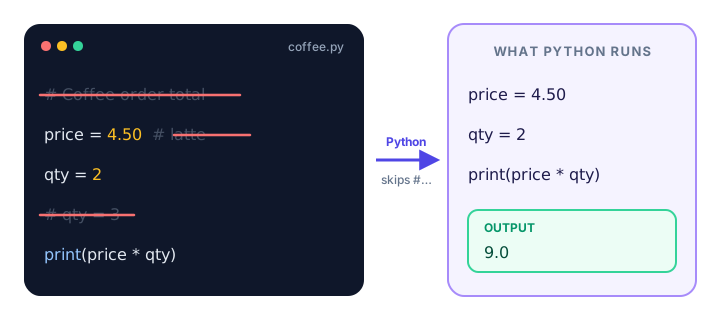
#. Only the real code lines are run.How do you write a single-line comment?
Type #, a space, and your note. The space isn't required, but the style guide (PEP 8) recommends it because it's easier to read.
# Prices are in US dollars
latte = 4.50
muffin = 3.00

# Show the total for one latte and one muffin
print(latte + muffin)7.5A comment goes on its own line, usually just above the code it describes, and it uses the same indentation as that code.
What is an inline comment?
An inline comment sits at the end of a line of code. Python runs the code part and ignores everything after the #.
speed_limit = 65  # miles per hour, US highway
max_bags = 2      # checked bags included in the ticket
print(speed_limit, max_bags)
65 2PEP 8 suggests at least two spaces before the #. Inline comments are great for short facts like units, but keep them brief. If you need a full sentence, put the comment on its own line above.
📝 Note
A # inside quotes is just a normal character, not a comment. print("Use #summer for 10% off") prints the whole text, hashtag included.
How do you write multi-line comments in Python?
Python has no special symbol for a multi-line comment like /* ... */ in JavaScript or C. Instead, you start every line with #:
# Weekly allowance calculator.
# Kids get $5 a week, plus $1 for every
# chore they finish.
allowance = 5
chores_done = 3
print(allowance + chores_done)8Are triple-quoted strings comments?
You'll often see people use triple quotes (""" or ''') to write notes across several lines:
"""
This looks like a comment,
but it's actually a string.
"""
print("Hello")HelloHere's the honest truth: this is not a real comment. It's a string value that isn't stored in any variable, so it has no visible effect. It works, but there are two differences you should know about:
- A string must follow indentation rules; a comment doesn't. Python skips
#lines completely, but a string is real code. - In certain places, a string has a special job. As the first line inside a function, it becomes a docstring, which is official documentation Python stores and shows in
help().
This works fine, because a # comment can sit at any indentation:
if True:
# check the weather later
print("Sunny")SunnyBut the same note written as a string breaks the program:
if True:
"""check the weather later"""
    print("Sunny")
IndentationError: expected an indented block after 'if' statement on line 1Here's a quick preview of a docstring. You'll learn about functions (def) later in the course:
def greet(name):
    """Return a friendly greeting for the given name."""
    return "Hi, " + name + "!"

print(greet("Maya"))
print(greet.__doc__)
Hi, Maya!
Return a friendly greeting for the given name.💡 Tip
Use # for comments and triple-quoted strings for docstrings. That's what PEP 8 recommends, and it's what experienced Python developers expect to see.
Commenting out code for debugging
Comments aren't only for notes. You can put a # in front of a line of code to switch it off temporarily. This is called commenting out code, and it's a handy way to test what happens without a line, without deleting it.
price = 20
discount = 5
# price = price - discount
print(price)20Remove the # and the discount line runs again. Once you've found the problem, clean up: don't leave large blocks of dead code commented out forever.
Keyboard shortcut to comment lines
Most editors can comment or uncomment several lines at once. Select the lines and press:
- Ctrl + / on Windows and Linux
- Cmd + / on macOS
This works in VS Code, PyCharm and many other editors. Press it again to remove the # signs.
What makes a good comment?
The code already says what it does. A good comment explains why: the reason, the business rule, or the surprise a reader wouldn't guess.
| Bad comment (repeats the code) | Good comment (explains why) |
|---|---|
retries = 3 # set retries to 3 | retries = 3 # the payment API sometimes times out |
age = age + 1 # add 1 to age | age = age + 1 # birthday passed, update before saving |
shipping = 0 # shipping is 0 | shipping = 0 # free shipping promo until Dec 31 |
A few more habits help:
- Prefer clear names over comments.
minutes_left = 15needs no comment;m = 15 # minutes leftdoes. - Keep comments up to date. A comment that no longer matches the code is worse than no comment.
- Write in plain, short sentences so anyone on your team can follow.
The TODO comment convention
Developers often mark unfinished work with # TODO:. Many editors highlight these comments and can list them all for you, so nothing gets forgotten.
subtotal = 120
# TODO: add sales tax for orders outside the US
print("Total:", subtotal)
Total: 120You may also see # FIXME: for a known bug that still needs fixing.
Common mistakes with comments
1. Forgetting the #
Calculate the total price
total = 10 + 5
SyntaxError: invalid syntaxWithout the #, Python tries to run your note as code.
2. Using comment symbols from other languages
// total price
total = 10 + 5
SyntaxError: invalid syntax// starts a comment in JavaScript, Java and C, but in Python it's the floor division operator. Python comments always use #.
3. Commenting every single line
Too many comments bury the useful ones. If every line needs explaining, try clearer variable names first.
Practice exercise
🏋️ Try it yourself
Here's a tiny gym-membership program. Add a comment at the top that says what it does, add an inline comment explaining the 0.9 (members get 10% off), and comment out the last line so it doesn't run.
monthly_fee = 40
member_price = monthly_fee * 0.9
print("Member price:", member_price)
print("Debug: fee was", monthly_fee)
Show solution
# Show the monthly gym price for members
monthly_fee = 40
member_price = monthly_fee * 0.9  # members get 10% off
print("Member price:", member_price)
# print("Debug: fee was", monthly_fee)
Member price: 36.0What's next?
Now your code can explain itself. Next, learn how to store and reuse values with Python variables.
Key takeaways
- A Python comment starts with # and runs to the end of the line; Python ignores it.
- Inline comments go after code on the same line, with at least two spaces before the #.
- For multi-line comments, start each line with #. Python has no block comment symbol.
- Triple-quoted strings are not real comments; inside functions they become docstrings.
- Comment out a line to switch it off while debugging. Use Ctrl+/ or Cmd+/ in most editors.
- Good comments explain why the code does something, not what it does.
Frequently asked questions
How do you comment in Python?
Put a # symbol before your note. Python ignores everything from the # to the end of the line.
How do you comment multiple lines in Python?
Start each line with #. In VS Code and most editors you can select several lines and press Ctrl+/ (Cmd+/ on a Mac) to add or remove the # signs at once.
Are triple quotes a comment in Python?
Not officially. Triple-quoted text is a string; if it is not stored anywhere it does nothing, but it must follow indentation rules. Inside a function it becomes a docstring.
Do comments slow down Python code?
No. Python throws comments away before running your program, so they have no effect on speed.
What is the difference between a comment and a docstring?
A comment starts with # and is ignored completely. A docstring is a triple-quoted string at the start of a function, class or module that Python keeps as documentation and shows in help().