Python Functions
Updated 8 min read Aimerscrew
As your programs grow, you'll notice yourself writing the same few lines again and again. Python functions solve this: you write the code once, give it a name, and run it whenever you need it. In this lesson, you'll learn how to define and call functions, pass information into them with parameters, document them with docstrings, and avoid the mistakes beginners make most often.
🌍 Real-life example
Think of a coffee machine. You don't grind beans, heat water and froth milk by hand every morning. You press one button labeled Latte, and the machine runs all the steps for you. You can also give it inputs, like "large" or "oat milk". A function is that button: a name for a set of steps you can run again and again, with different inputs each time.
What is a function in Python?
A function is a named block of code that does one job and runs only when you call it. You've already used many built-in functions, such as print(), len() and input(). Someone else wrote those. Now you'll write your own.
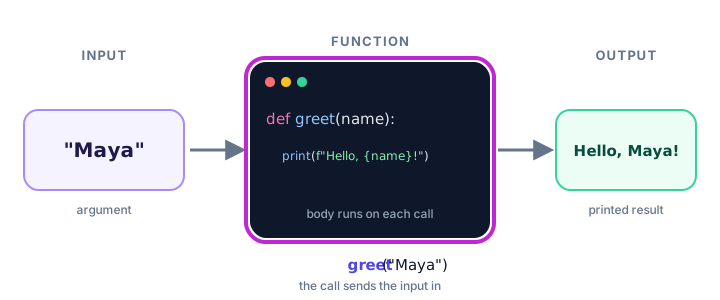
Every function has three parts:
- Input: the values you pass in (optional).
- Body: the steps the function runs.
- Output: what it prints or gives back (optional).
Why use functions? The DRY principle
Programmers follow a rule called DRY: Don't Repeat Yourself. Look at this code that prints the same receipt header for two orders:
print("=" * 20)
print("Corner Cafe")
print("=" * 20)

print("=" * 20)
print("Corner Cafe")
print("=" * 20)
If the cafe changes its name, you have to fix every copy, and it's easy to miss one. With a function, the steps live in one place:
def print_header():
    print("=" * 20)
    print("Corner Cafe")
    print("=" * 20)

print_header()
print_header()
====================
Corner Cafe
====================
====================
Corner Cafe
====================Now a change to the header means editing one line, and every receipt updates. Functions also make code easier to read, because a good name like print_header() tells you what happens without reading every line.
How do you define a function in Python?
You create a function with the def keyword (short for "define"). The pattern is:
def function_name():
    # the body: indented code that runs when the function is called
    print("Hello from inside the function!")
Here's what each part does:
| Part | Meaning |
|---|---|
def | Tells Python you're defining a function. |
function_name | The name you'll use to call it. Same rules as variable names: lowercase words joined by underscores. |
() | Parentheses that hold the parameters (empty if there are none). |
: | A colon that starts the body. |
| Indented body | The lines that belong to the function, indented 4 spaces, just like an if block. |
Defining a function does not run it. Python just remembers the steps under that name. If you run the example above, nothing is printed at all.
How do you call a function?
To run a function, call it: write its name followed by parentheses.
def say_good_morning():
    print("Good morning!")
    print("Have a great day.")

say_good_morning()
print("---")
say_good_morning()
Good morning!
Have a great day.
---
Good morning!
Have a great day.Each call jumps into the function, runs its body from top to bottom, then comes back to the line after the call and carries on.
💡 Tip
Name functions with a verb that says what they do: send_email(), calculate_total(), show_menu(). When you read the code later, the name alone explains the step.
Function parameters: passing information in
A function that always does exactly the same thing is useful, but a function that adapts to its input is much more powerful. A parameter is a variable listed inside the parentheses of the definition. The value you pass when calling is called an argument.
def greet(name):
    print(f"Hello, {name}! Welcome back.")

greet("Maya")
greet("Kenji")
Hello, Maya! Welcome back.
Hello, Kenji! Welcome back.In greet("Maya"), the argument "Maya" is stored in the parameter name for that call. The next call stores "Kenji" instead.
A function can have several parameters, separated by commas. The arguments are matched to them in order:
def order_coffee(size, drink):
    print(f"One {size} {drink} coming up!")

order_coffee("large", "latte")
order_coffee("small", "espresso")
One large latte coming up!
One small espresso coming up!📝 Note
Parameter vs argument: the parameter is the name in the definition (name); the argument is the actual value in the call ("Maya"). People often mix the two words up, and that's fine, but knowing the difference helps when reading error messages. The next lesson covers function arguments in depth.
Real-world example: an area calculator
Say you're planning new flooring and need the area of a few rooms. Instead of repeating the math, put it in a function:
def print_area(room, length, width):
    area = length * width
    print(f"{room}: {length} m x {width} m = {area} square meters")

print_area("Kitchen", 4, 3)
print_area("Bedroom", 5, 4.5)
print_area("Hallway", 6, 1.2)
Kitchen: 4 m x 3 m = 12 square meters
Bedroom: 5 m x 4.5 m = 22.5 square meters
Hallway: 6 m x 1.2 m = 7.199999999999999 square metersThe last result shows a tiny floating-point rounding error, which you met in Python numbers. Formatting with {area:.2f} in the f-string would print 7.20 instead.
Right now print_area() prints its result. Often you want a function to give back a value you can store in a variable. That's what return does, and you'll learn it in the return statement lesson.
What is a docstring?
A docstring is a string written as the first line of a function's body that explains what the function does. It uses triple quotes, and Python stores it so tools (and people) can read it later.
def convert_to_fahrenheit(celsius):
    """Print a Celsius temperature converted to Fahrenheit."""
    fahrenheit = celsius * 9 / 5 + 32
    print(f"{celsius}°C is {fahrenheit}°F")

convert_to_fahrenheit(25)
print(convert_to_fahrenheit.__doc__)
25°C is 77.0°F
Print a Celsius temperature converted to Fahrenheit.Unlike a comment, a docstring is kept when the program runs. Calling help(convert_to_fahrenheit) shows it too, and code editors display it when you hover over the function name.
Functions must be defined before they are called
Python reads your file from top to bottom. When it reaches a function call, the def for that function must already have run. Otherwise, the name doesn't exist yet:
show_score()

def show_score():
    print("Score: 100")
NameError: name 'show_score' is not definedMove the definition above the call and it works. A common habit is to put all your function definitions at the top of the file and the code that uses them at the bottom.
Can a function call another function?
Yes. Functions can call other functions, which lets you build big tasks out of small, simple steps:
def boil_water():
    print("Boiling water...")

def brew_tea(flavor):
    boil_water()
    print(f"Steeping {flavor} tea for 3 minutes...")
    print("Your tea is ready!")

brew_tea("green")
Boiling water...
Steeping green tea for 3 minutes...
Your tea is ready!Notice that brew_tea() calls boil_water() even though both are defined in the same file. The rule "define before calling" is about when the call actually runs. By the time brew_tea("green") runs on the last line, both functions have been defined, so everything works.
Functions with loops and lists
Everything you've learned so far works inside a function body, including loops and lists:
def show_playlist(songs):
    """Print each song with its position number."""
    print(f"Playlist ({len(songs)} songs):")
    for number, song in enumerate(songs, start=1):
        print(f"  {number}. {song}")

road_trip = ["Highway Song", "Blue Skies", "Open Road"]
show_playlist(road_trip)
Playlist (3 songs):
1. Highway Song
2. Blue Skies
3. Open RoadCommon mistakes with functions
1. Forgetting the parentheses when calling
def say_hi():
    print("Hi!")

say_hi
This prints nothing. Without (), you're only mentioning the function, not calling it. Write say_hi().
2. Forgetting the colon or the indentation
def say_hi()
    print("Hi!")
SyntaxError: expected ':'Like if and for, a def line must end with a colon, and the body must be indented.
3. Passing the wrong number of arguments
def greet(name):
    print(f"Hello, {name}!")

greet()
TypeError: greet() missing 1 required positional argument: 'name'Every parameter needs a value unless it has a default. You'll learn about defaults in the next lesson.
4. Calling a function before defining it
As you saw above, this causes a NameError. Keep your def blocks above the code that calls them.
Practice exercise
🏋️ Try it yourself
Write a function called print_ticket() that takes a passenger's name, a flight number and a seat, and prints a small boarding pass. Add a docstring. Then call it for two passengers: Lena on flight BA117 in seat 14C, and Omar on flight QF2 in seat 3A.
Show solution
def print_ticket(name, flight, seat):
    """Print a simple boarding pass."""
    print("-- BOARDING PASS --")
    print(f"Passenger: {name}")
    print(f"Flight: {flight}  Seat: {seat}")
    print()

print_ticket("Lena", "BA117", "14C")
print_ticket("Omar", "QF2", "3A")
-- BOARDING PASS --
Passenger: Lena
Flight: BA117 Seat: 14C
-- BOARDING PASS --
Passenger: Omar
Flight: QF2 Seat: 3AWhat's next?
You can now define functions, call them and pass in values. Next, dig deeper into Python function arguments: keyword arguments, default values and the one pitfall that surprises almost every beginner.
Key takeaways
- A function is a named block of reusable code that runs only when you call it.
- Define a function with def, a name, parentheses and a colon, then indent the body.
- Call a function by writing its name followed by parentheses, such as greet("Maya").
- Parameters are the names in the definition; arguments are the values you pass in a call.
- A docstring in triple quotes, placed first in the body, documents what the function does.
- A function must be defined before the line that calls it runs, or you get a NameError.
- Functions follow the DRY principle: write the steps once and reuse them everywhere.
Frequently asked questions
How do you define a function in Python?
Use the def keyword, then the function name, parentheses with any parameters, and a colon. Indent the lines of the body underneath, for example: def greet(name): followed by an indented print(name).
What is the difference between a parameter and an argument?
A parameter is the variable name listed in the function definition. An argument is the actual value you pass in when you call the function. In def greet(name), name is the parameter; in greet("Maya"), "Maya" is the argument.
Why does my Python function not run?
Defining a function only stores it. The code inside runs when you call it with parentheses, like my_function(). Writing the name without parentheses does not call it.
Do you have to define a function before calling it in Python?
Yes. Python runs code from top to bottom, so the def statement must run before the call. Calling it first raises a NameError saying the name is not defined.
What is a docstring in Python?
A docstring is a triple-quoted string placed as the first statement in a function body. It describes what the function does, and you can read it with help(function_name) or function_name.__doc__.