Python Project: Weather App with a Free API
Updated 16 min read Aimerscrew
So far, every program in this tutorial has worked with data you typed in or stored yourself. In this project, you'll build a Python weather app that pulls live data from the internet. You type a city, and the app shows the current temperature, wind and a three-day forecast. Along the way, you'll learn what an API is, how to make web requests with Python's built-in urllib, and how to turn a JSON reply into dictionaries you already know how to use.
🌍 Real-life example
The weather widget on your phone doesn't measure the weather itself. It asks a weather service over the internet, "What's the forecast for Chicago?", and gets back raw numbers that the app turns into icons and text. Flight trackers, currency converters and sports score apps all work the same way. Your Python app will do exactly this.
What you'll build
A command-line app that:
- asks for a city name and your preferred units (Celsius or Fahrenheit),
- finds the city's location with a geocoding API,
- downloads current weather and a 3-day forecast from a forecast API,
- prints a tidy report with descriptions like "Light rain",
- handles unknown cities and lost internet connections without crashing.
Here's an example. The user typed London and c. Weather data changes every few minutes, so this is example output; your numbers will be different:
City name (or press Enter to quit): London
Units - (C)elsius or (F)ahrenheit? c

Weather for London, England, United Kingdom
----------------------------------------
Now:         Clear sky
Temperature: 13.1°C
Feels like:  7.5°C
Humidity:    48%
Wind:        26.3 km/h

Next 3 days:
  Sun 25 Oct    9.2°C to  13.6°C  rain 100%  Light drizzle
  Mon 26 Oct    9.1°C to  16.5°C  rain 100%  Light rain
  Tue 27 Oct   10.3°C to  16.6°C  rain  73%  Drizzle
Concepts used in this project
| Concept | Where it's used | Lesson |
|---|---|---|
JSON and json.load() | Reading the API's reply | JSON |
| Nested dictionaries and lists | Pulling values out of the reply | dictionaries |
with statement | Opening the web response | with statement |
try/except | Network and server errors | try-except |
dict.get() | Optional fields and weather codes | dictionary methods |
date.fromisoformat() | Turning dates into day names | datetime |
| f-string alignment | The forecast table | f-strings |
What is an API?
An API (Application Programming Interface) is a way for one program to ask another program for data or to do something. A web API works over the internet: you visit a special URL, and instead of a web page, you get back raw data, usually in JSON format.
Think of it like ordering at a restaurant counter. You don't walk into the kitchen; you give your order (the request) in a format the staff understand, and you get your food back (the response). The API is the counter.
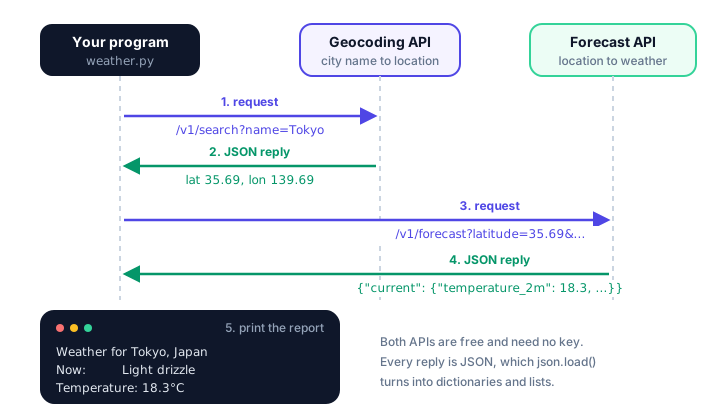
We'll use Open-Meteo, a free weather service that's perfect for learning: it needs no account and no API key for non-commercial use. It offers two endpoints (URLs that answer a specific kind of question) that we need:
| Endpoint | You send | You get back |
|---|---|---|
geocoding-api.open-meteo.com/v1/search | A place name, like Tokyo | Matching places with latitude, longitude, country |
api.open-meteo.com/v1/forecast | Latitude, longitude, the values you want | Current weather and a daily forecast |
Step 1: Build a URL with query parameters
APIs read your request from the URL. Everything after the ? is the query string: key=value pairs joined with &. Spaces and special characters must be encoded, so instead of building the string by hand, let urllib.parse.urlencode() do it from a dictionary:
import urllib.parse

params = {"name": "New York", "count": 1, "language": "en"}
print(urllib.parse.urlencode(params))name=New+York&count=1&language=enThe space in "New York" became a +, which is how URLs represent spaces in a query string.
Step 2: How do you call an API in Python?
Python's built-in urllib.request.urlopen() sends a request and returns the response, which you can read like a file. Because the response is JSON, json.load() converts it straight into Python dictionaries and lists. Here's a reusable helper and a first real request:
import json
import urllib.parse
import urllib.request

GEOCODING_URL = "https://geocoding-api.open-meteo.com/v1/search"


def fetch_json(url, params):
    """Send a GET request and return the JSON reply as Python data."""
    full_url = url + "?" + urllib.parse.urlencode(params)
    with urllib.request.urlopen(full_url, timeout=10) as response:
        return json.load(response)


data = fetch_json(GEOCODING_URL, {"name": "Toronto", "count": 1, "language": "en"})
city = data["results"][0]
print(city["name"], city["country"])
print(city["latitude"], city["longitude"])
print(city["timezone"])
Output (needs an internet connection):
Toronto Canada
43.70643 -79.39864
America/Toronto- A GET request is the simplest kind of web request: "please give me this". It's what your browser does when you open a page.
timeout=10gives up after 10 seconds instead of waiting forever if the server doesn't answer.- The
withstatement closes the connection automatically, just like it closes files. count=1asks for only the best match. Without it, you'd get up to 10 places, such as Toronto in Ohio and in New South Wales.
💡 Tip: look at the raw reply
Paste a request URL into your browser, for example https://geocoding-api.open-meteo.com/v1/search?name=Toronto&count=1. You'll see the exact JSON your program receives. It's the fastest way to learn which keys an API returns.
Step 3: Read values out of the JSON reply
JSON maps neatly onto Python: JSON objects become dictionaries, arrays become lists, and numbers, strings, true/false and null become numbers, strings, True/False and None. To practice without the internet, here's a shortened forecast reply stored in a string. json.loads() (with an s, for "string") parses it:
import json

reply = """
{
  "current_units": {"temperature_2m": "C", "wind_speed_10m": "km/h"},
  "current": {"temperature_2m": 18.3, "weather_code": 51, "wind_speed_10m": 3.1},
  "daily": {
    "time": ["2026-10-26", "2026-10-27", "2026-10-28"],
    "temperature_2m_max": [19.2, 23.7, 17.8]
  }
}
"""

data = json.loads(reply)
print(type(data))
print(data["current"]["temperature_2m"])
print(data["current_units"]["wind_speed_10m"])
print(data["daily"]["time"][1], data["daily"]["temperature_2m_max"][1])
<class 'dict'>
18.3
km/h
2026-10-27 23.7Notice how the daily part is organized: one list per value, all in the same order. Index 1 in time belongs with index 1 in temperature_2m_max. That's why the finished app loops over positions with enumerate().
Step 4: Find the city, then fetch its forecast
Now the two API calls become two functions. find_city() returns None when the geocoding API finds nothing; in that case, the reply has no "results" key at all, which is why we use data.get("results") instead of data["results"].
FORECAST_URL = "https://api.open-meteo.com/v1/forecast"


def find_city(name):
    """Look up a city name. Return the best match as a dict, or None."""
    data = fetch_json(GEOCODING_URL, {"name": name, "count": 1, "language": "en"})
    results = data.get("results")
    if not results:
        return None
    return results[0]


def get_forecast(city, use_fahrenheit):
    """Ask the forecast API for current weather plus 3 days ahead."""
    params = {
        "latitude": city["latitude"],
        "longitude": city["longitude"],
        "current": "temperature_2m,apparent_temperature,relative_humidity_2m,"
                   "weather_code,wind_speed_10m",
        "daily": "weather_code,temperature_2m_max,temperature_2m_min,"
                 "precipitation_probability_max",
        "timezone": "auto",
        "forecast_days": 3,
    }
    if use_fahrenheit:
        params["temperature_unit"] = "fahrenheit"
        params["wind_speed_unit"] = "mph"
    return fetch_json(FORECAST_URL, params)
The forecast API only sends the values you ask for, listed with commas:
temperature_2mis the air temperature 2 meters above the ground (the standard height for weather stations), andapparent_temperatureis the "feels like" value.weather_codeis a number that describes the sky, like 0 for clear or 61 for light rain."timezone": "auto"makes the daily dates match the city's local time.- Adding
temperature_unitandwind_speed_unitlets the API do the unit conversion for you.
Step 5: Turn weather codes into words
Open-Meteo describes conditions with standard WMO (World Meteorological Organization) weather codes. A dictionary translates them, and .get() with a default handles any code we didn't list:
WEATHER_CODES = {0: "Clear sky", 3: "Overcast", 61: "Light rain"}


def describe(code):
    return WEATHER_CODES.get(code, f"Unknown (code {code})")


print(describe(61))
print(describe(3))
print(describe(42))
Light rain
Overcast
Unknown (code 42)The finished app has a fuller table with the most common codes (fog, drizzle, snow, showers and thunderstorms).
Step 6: Format the weather report
This function takes the city and forecast dictionaries and prints them nicely. The unit symbol comes from the reply's current_units, so the same code works for both Celsius and Fahrenheit:
def show_weather(city, forecast):
    current = forecast["current"]
    units = forecast["current_units"]
    degree = units["temperature_2m"]
    place = city["name"]
    for extra in (city.get("admin1"), city.get("country")):
        if extra and extra != city["name"]:
            place += f", {extra}"

    print(f"\nWeather for {place}")
    print("-" * 40)
    print(f"Now:         {describe(current['weather_code'])}")
    print(f"Temperature: {current['temperature_2m']}{degree}")
    print(f"Feels like:  {current['apparent_temperature']}{degree}")
    print(f"Humidity:    {current['relative_humidity_2m']}%")
    print(f"Wind:        {current['wind_speed_10m']} {units['wind_speed_10m']}")

    daily = forecast["daily"]
    print("\nNext 3 days:")
    for i, day_text in enumerate(daily["time"]):
        day_name = date.fromisoformat(day_text).strftime("%a %d %b")
        low = daily["temperature_2m_min"][i]
        high = daily["temperature_2m_max"][i]
        rain = daily["precipitation_probability_max"][i]
        summary = describe(daily["weather_code"][i])
print(f" {day_name} {low:>5}{degree} to {high:>5}{degree} rain {rain:>3}% {summary}")admin1is the state, province or region. Some places don't have one, so we usecity.get(), which returnsNoneinstead of crashing. We also skip it when it repeats the city name (Tokyo is in Tokyo prefecture).date.fromisoformat("2026-10-26").strftime("%a %d %b")turns a date string intoMon 26 Oct.:>5right-aligns numbers in 5 characters so the forecast columns line up.
You can test the formatting without the internet by passing in sample dictionaries. Add this below the function (with from datetime import date and describe() defined above it):
city = {"name": "Tokyo", "admin1": "Tokyo", "country": "Japan"}
forecast = {
    "current_units": {"temperature_2m": "°C", "wind_speed_10m": "km/h"},
    "current": {"temperature_2m": 18.3, "apparent_temperature": 20.5,
                "relative_humidity_2m": 94, "weather_code": 51, "wind_speed_10m": 3.3},
    "daily": {
        "time": ["2026-10-26", "2026-10-27", "2026-10-28"],
        "weather_code": [63, 63, 51],
        "temperature_2m_max": [19.2, 23.7, 17.8],
        "temperature_2m_min": [14.7, 14.8, 10.8],
        "precipitation_probability_max": [100, 55, 22],
    },
}
show_weather(city, forecast)
Output (with codes 51 and 63 described as "Light drizzle" and "Rain"):
Weather for Tokyo, Japan
----------------------------------------
Now:         Light drizzle
Temperature: 18.3°C
Feels like:  20.5°C
Humidity:    94%
Wind:        3.3 km/h

Next 3 days:
  Mon 26 Oct   14.7°C to  19.2°C  rain 100%  Rain
  Tue 27 Oct   14.8°C to  23.7°C  rain  55%  Rain
  Wed 28 Oct   10.8°C to  17.8°C  rain  22%  Light drizzle
Step 7: How do you handle API errors in Python?
Network code can fail in ways your own code can't control: the Wi-Fi drops, the server is busy, or a request is rejected. urllib raises different exceptions for each:
| Exception | What it means | Example |
|---|---|---|
urllib.error.HTTPError | The server answered, but with an error status code | 400 Bad Request, 429 Too Many Requests |
urllib.error.URLError | The server couldn't be reached at all | No internet, wrong address |
TimeoutError | The server took too long to answer | Very slow connection |
HTTPError is a special kind (a subclass) of URLError, so it must be caught first; otherwise the URLError branch would catch it too. Here's the request part of the main loop:
        try:
            city = find_city(name)
            if city is None:
                print(f"Sorry, I couldn't find a place called '{name}'.")
                continue
            forecast = get_forecast(city, use_fahrenheit)
        except urllib.error.HTTPError as error:
            print(f"The weather service returned an error: {error.code} {error.reason}")
            continue
        except (urllib.error.URLError, TimeoutError):
            print("Couldn't reach the weather service. Check your internet connection.")
            continue

        show_weather(city, forecast)
An unknown city isn't an error from the API's point of view: it answers normally with no results. That's why it's handled with an if, not an except.
The complete Python weather app
Save this as weather.py and run python weather.py. It uses only Python's standard library, so there's nothing to install.
import json
import urllib.error
import urllib.parse
import urllib.request
from datetime import date

GEOCODING_URL = "https://geocoding-api.open-meteo.com/v1/search"
FORECAST_URL = "https://api.open-meteo.com/v1/forecast"

WEATHER_CODES = {
    0: "Clear sky", 1: "Mainly clear", 2: "Partly cloudy", 3: "Overcast",
    45: "Fog", 48: "Freezing fog",
    51: "Light drizzle", 53: "Drizzle", 55: "Heavy drizzle",
    61: "Light rain", 63: "Rain", 65: "Heavy rain",
    71: "Light snow", 73: "Snow", 75: "Heavy snow",
    80: "Rain showers", 81: "Heavy showers", 82: "Violent showers",
    95: "Thunderstorm", 96: "Thunderstorm with hail", 99: "Thunderstorm with hail",
}


def fetch_json(url, params):
    """Send a GET request and return the JSON reply as Python data."""
    full_url = url + "?" + urllib.parse.urlencode(params)
    with urllib.request.urlopen(full_url, timeout=10) as response:
        return json.load(response)


def find_city(name):
    """Look up a city name. Return the best match as a dict, or None."""
    data = fetch_json(GEOCODING_URL, {"name": name, "count": 1, "language": "en"})
    results = data.get("results")
    if not results:
        return None
    return results[0]


def get_forecast(city, use_fahrenheit):
    """Ask the forecast API for current weather plus 3 days ahead."""
    params = {
        "latitude": city["latitude"],
        "longitude": city["longitude"],
        "current": "temperature_2m,apparent_temperature,relative_humidity_2m,"
                   "weather_code,wind_speed_10m",
        "daily": "weather_code,temperature_2m_max,temperature_2m_min,"
                 "precipitation_probability_max",
        "timezone": "auto",
        "forecast_days": 3,
    }
    if use_fahrenheit:
        params["temperature_unit"] = "fahrenheit"
        params["wind_speed_unit"] = "mph"
    return fetch_json(FORECAST_URL, params)


def describe(code):
    return WEATHER_CODES.get(code, f"Unknown (code {code})")


def show_weather(city, forecast):
    current = forecast["current"]
    units = forecast["current_units"]
    degree = units["temperature_2m"]
    place = city["name"]
    for extra in (city.get("admin1"), city.get("country")):
        if extra and extra != city["name"]:
            place += f", {extra}"

    print(f"\nWeather for {place}")
    print("-" * 40)
    print(f"Now:         {describe(current['weather_code'])}")
    print(f"Temperature: {current['temperature_2m']}{degree}")
    print(f"Feels like:  {current['apparent_temperature']}{degree}")
    print(f"Humidity:    {current['relative_humidity_2m']}%")
    print(f"Wind:        {current['wind_speed_10m']} {units['wind_speed_10m']}")

    daily = forecast["daily"]
    print("\nNext 3 days:")
    for i, day_text in enumerate(daily["time"]):
        day_name = date.fromisoformat(day_text).strftime("%a %d %b")
        low = daily["temperature_2m_min"][i]
        high = daily["temperature_2m_max"][i]
        rain = daily["precipitation_probability_max"][i]
        summary = describe(daily["weather_code"][i])
        print(f"  {day_name}  {low:>5}{degree} to {high:>5}{degree}  rain {rain:>3}%  {summary}")


def main():
    print("=== Python Weather App ===")
    print("(Data by Open-Meteo.com)")
    while True:
        name = input("\nCity name (or press Enter to quit): ").strip()
        if not name:
            print("Goodbye!")
            break
        unit = input("Units - (C)elsius or (F)ahrenheit? ").strip().lower()
        use_fahrenheit = unit.startswith("f")

        try:
            city = find_city(name)
            if city is None:
                print(f"Sorry, I couldn't find a place called '{name}'.")
                continue
            forecast = get_forecast(city, use_fahrenheit)
        except urllib.error.HTTPError as error:
            print(f"The weather service returned an error: {error.code} {error.reason}")
            continue
        except (urllib.error.URLError, TimeoutError):
            print("Couldn't reach the weather service. Check your internet connection.")
            continue

        show_weather(city, forecast)


main()
Sample run
The user looked up London in Celsius, Chicago in Fahrenheit, then a made-up place, and finally pressed Enter on an empty line to quit. This is example output captured on October 25, 2026; live weather will be different when you run it.
=== Python Weather App ===
(Data by Open-Meteo.com)

City name (or press Enter to quit): London
Units - (C)elsius or (F)ahrenheit? c

Weather for London, England, United Kingdom
----------------------------------------
Now:         Clear sky
Temperature: 13.1°C
Feels like:  7.5°C
Humidity:    48%
Wind:        26.3 km/h

Next 3 days:
  Sun 25 Oct    9.2°C to  13.6°C  rain 100%  Light drizzle
  Mon 26 Oct    9.1°C to  16.5°C  rain 100%  Light rain
  Tue 27 Oct   10.3°C to  16.6°C  rain  73%  Drizzle

City name (or press Enter to quit): Chicago
Units - (C)elsius or (F)ahrenheit? f

Weather for Chicago, Illinois, United States
----------------------------------------
Now:         Partly cloudy
Temperature: 59.8°F
Feels like:  58.5°F
Humidity:    77%
Wind:        4.9 mp/h

Next 3 days:
  Sun 25 Oct   47.6°F to  70.8°F  rain   1%  Overcast
  Mon 26 Oct   51.5°F to  58.6°F  rain   5%  Overcast
  Tue 27 Oct   52.6°F to  65.6°F  rain   0%  Overcast

City name (or press Enter to quit): Atlantis123
Units - (C)elsius or (F)ahrenheit? c
Sorry, I couldn't find a place called 'Atlantis123'.

City name (or press Enter to quit):
Goodbye!
The wind unit mp/h is printed exactly as the API sends it in current_units. And here's what happens with the Wi-Fi switched off (the user typed Paris and c):
City name (or press Enter to quit): Paris
Units - (C)elsius or (F)ahrenheit? c
Couldn't reach the weather service. Check your internet connection.
📝 Note: be a polite API user
Free APIs have fair-use limits (Open-Meteo allows up to 10,000 requests a day for non-commercial use at the time of writing). Never call an API in a tight loop, and credit the data source, as our app does with "Data by Open-Meteo.com". For a commercial product, check the provider's terms and plans.
Common mistakes in this project
1. Assuming a key is always there
When a city isn't found, the geocoding reply has no "results" key, so data["results"] crashes:
data = {"generationtime_ms": 0.2}
print(data["results"])
KeyError: 'results'Use data.get("results") and check for None.
2. Building the URL by hand
url + "?name=" + name breaks for names with spaces or accents, like "São Paulo" or "Los Angeles". urllib.parse.urlencode() encodes them correctly.
3. Catching URLError before HTTPError
Because HTTPError is a subclass of URLError, putting except URLError first means the HTTPError branch never runs. Always order except clauses from most specific to most general.
4. Forgetting the timeout
Without timeout=, a request to a server that never answers can freeze your program indefinitely. Ten seconds is a sensible limit for a command-line app.
Ideas to extend it
🏋️ Challenges
- Pick the right city. Ask for
count=5, show a numbered list (name, region, country), and let the user choose. There are several Springfields! - Weekly forecast. Let the user choose 1 to 7 days and pass it as
forecast_days. - Clothing advice. Based on the temperature and rain chance, print a tip like "Take an umbrella" or "Wear a warm jacket".
- Favorite cities. Save favorite city names in a JSON file (like the to-do app) and show the weather for all of them at once.
- Emoji icons. Add an icon to each description, such as a sun for code 0 and a cloud with rain for codes 61 to 65.
Show a hint for challenge 3
def clothing_tip(temperature_c, rain_chance):
    if rain_chance >= 50:
        return "Take an umbrella."
    if temperature_c < 10:
        return "Wear a warm jacket."
    return "Enjoy the day!"


print(clothing_tip(13.1, 100))
print(clothing_tip(4.5, 10))
print(clothing_tip(22.0, 5))
Take an umbrella.
Wear a warm jacket.
Enjoy the day!What's next?
You've connected Python to the internet. For the final project, you'll build a quiz game that loads its questions from a JSON file, shuffles them, and shows a score report at the end.
Key takeaways
- An API lets one program request data from another; a web API returns data (usually JSON) from a URL.
- Open-Meteo is free and needs no API key: the geocoding endpoint finds coordinates, the forecast endpoint returns the weather.
- Build query strings with urllib.parse.urlencode() and send requests with urllib.request.urlopen(url, timeout=10).
- json.load() turns the JSON reply into dictionaries and lists you can index like any other Python data.
- Use dict.get() for keys that might be missing, such as "results" when a city is not found.
- Catch urllib.error.HTTPError before URLError, and handle TimeoutError, so network problems never crash the app.
Frequently asked questions
How do I make a weather app in Python?
Send the city name to a geocoding API to get its latitude and longitude, request the forecast for those coordinates from a weather API, parse the JSON reply with the json module, and print the values you need.
Is there a free weather API without an API key?
Yes. Open-Meteo offers free geocoding and forecast APIs for non-commercial use with no account or key. You can call them directly with a URL such as https://api.open-meteo.com/v1/forecast?latitude=51.5&longitude=-0.13¤t=temperature_2m.
Do I need the requests library to call an API in Python?
No. The built-in urllib.request module can send GET requests and read responses. The third-party requests library is popular because it is shorter to write, but you need to install it with pip first.
How do you read JSON from an API in Python?
Open the URL with urllib.request.urlopen() and pass the response to json.load(), or call json.loads() on the response text. You get dictionaries and lists that you access with keys and indexes.
Why does my API request fail with HTTPError 400?
A 400 Bad Request means the server did not accept your parameters, for example a misspelled variable name or a latitude outside -90 to 90. Print the full URL, paste it into a browser, and read the error message the API returns.