Python Tuples
Updated 7 min read Aimerscrew
Some groups of values belong together and should never change: the latitude and longitude of a city, the red, green and blue parts of a color, the year, month and day of a birthday. Python tuples are made for exactly this. A tuple is like a list that is locked after you create it. In this lesson you'll learn how to create tuples, why the comma matters more than the parentheses, how to unpack a tuple into variables, and when to pick a tuple over a list.
🌍 Real-life example
Your boarding pass shows a flight number, a date and a seat: BA117, 2026-11-03, 14C. Those three details travel together, and nobody should edit just one of them halfway through the trip. In Python, that's a perfect tuple: ("BA117", "2026-11-03", "14C").
What is a tuple in Python?
A tuple is an ordered, immutable collection of values. "Ordered" means each item has a fixed position (an index). "Immutable" means the tuple can't be changed once it exists. You write a tuple with parentheses () and commas between the items.
location = (48.8584, 2.2945)     # latitude, longitude
color = (255, 165, 0)            # red, green, blue

print(location)
print(color)
print(type(color))
(48.8584, 2.2945)
(255, 165, 0)
<class 'tuple'>How do you create a tuple?
empty = ()
date = (2026, 10, 25)
mixed = ("Ana", 31, True)
no_brackets = 1, 2, 3            # the commas make the tuple
from_list = tuple(["a", "b"])    # convert a list to a tuple

print(empty)
print(date)
print(mixed)
print(no_brackets)
print(from_list)
()
(2026, 10, 25)
('Ana', 31, True)
(1, 2, 3)
('a', 'b')Notice no_brackets: it's a tuple even without parentheses. In Python, it's really the commas that create a tuple. The parentheses just make it easier to read.
The single-item tuple needs a comma
This trips up almost everyone once. Parentheses around one value are just grouping, like in math. To make a one-item tuple, add a trailing comma:
not_a_tuple = ("pizza")
real_tuple = ("pizza",)

print(type(not_a_tuple))
print(type(real_tuple))
print(real_tuple)
<class 'str'>
<class 'tuple'>
('pizza',)Reading items: indexing, slicing and looping
Everything you learned about reading lists works the same way on tuples: indexes start at 0, negative indexes count from the end, slicing returns a new tuple, and len(), in and for loops all work.
week = ("Mon", "Tue", "Wed", "Thu", "Fri", "Sat", "Sun")

print(week[0])
print(week[-1])
print(week[5:])
print(len(week))
print("Fri" in week)

for day in week[:3]:
    print(day)
Mon
Sun
('Sat', 'Sun')
7
True
Mon
Tue
WedWhy are tuples immutable?
Try to change an item in a tuple and Python refuses:
rgb = (255, 165, 0)
rgb[0] = 200
TypeError: 'tuple' object does not support item assignmentTuples also have no append(), remove() or sort() methods. That's on purpose. Immutability gives you some real benefits:
- Safety: data that shouldn't change (like coordinates or settings) can't be changed by accident somewhere else in your program.
- Clear intent: when other programmers see a tuple, they know it's a fixed record.
- Usable as dictionary keys: tuples can be keys in a dictionary, lists can't.
- Slightly faster and smaller than an equal list.
If you really need a different value, build a new tuple instead:
rgb = (255, 165, 0)
rgb = (200,) + rgb[1:]     # a brand-new tuple, assigned to the same name
print(rgb)
(200, 165, 0)📝 Note
A tuple can't change, but if it holds a mutable object like a list, that inner list can still be changed. You'll explore this in mutable vs immutable.
Tuple packing and unpacking
Packing means putting several values into one tuple. Unpacking means pulling them back out into separate variables in one line. You've actually used this already in variables when you wrote x, y = 4, 7.
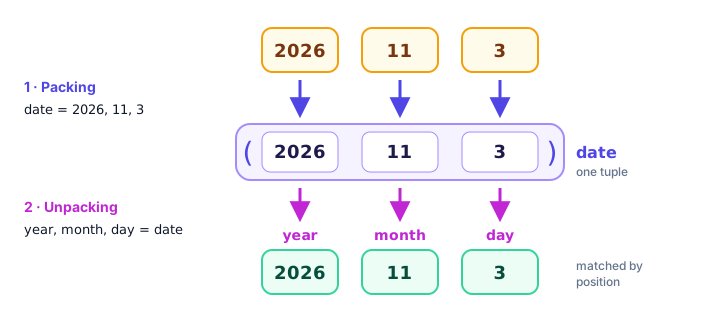
trip = "Rome", 4, 899.99        # packing

city, nights, price = trip      # unpacking
print(city)
print(nights)
print(price)
Rome
4
899.99The number of variables must match the number of items, or you'll get an error:
city, nights = ("Rome", 4, 899.99)ValueError: too many values to unpack (expected 2)Add a star * before one name to collect "everything else" into a list:
finish_order = ("Kipchoge", "Bekele", "Kamworor", "Lelisa", "Tola")

gold, silver, *others = finish_order
print(gold)
print(silver)
print(others)
Kipchoge
Bekele
['Kamworor', 'Lelisa', 'Tola']Unpacking in a for loop
Unpacking really shines when you loop over a list of tuples:
cities = [("Tokyo", 35.7, 139.7), ("Lagos", 6.5, 3.4), ("Lima", -12.0, -77.0)]

for name, lat, lon in cities:
    print(f"{name}: {lat}, {lon}")
Tokyo: 35.7, 139.7
Lagos: 6.5, 3.4
Lima: -12.0, -77.0Returning multiple values (a preview)
A function can hand back several values at once by returning a tuple. Here's a sneak peek; you'll learn to write functions in Python functions and return values.
def min_max(numbers):
    return min(numbers), max(numbers)    # packs two values into a tuple

low, high = min_max([18, 24, 15, 21])    # unpacks them again
print(low, high)
15 24Some built-in functions already do this. divmod() returns the whole-number result and the remainder of a division as a tuple:
minutes = 135
hours, mins = divmod(minutes, 60)
print(f"{hours}h {mins}m")
2h 15mTuple methods: count() and index()
Because tuples can't change, they have only two methods, both for searching:
dice = (4, 6, 2, 6, 1, 6)

print(dice.count(6))    # how many sixes?
print(dice.index(2))    # position of the first 2
3
2Built-in functions like len(), min(), max(), sum() and sorted() also work on tuples. (sorted() returns a list.)
Tuple vs list: when should you use each?
| List | Tuple | |
|---|---|---|
| Syntax | [1, 2, 3] | (1, 2, 3) |
| Can change? | Yes (mutable) | No (immutable) |
| Methods | 11, including append() and sort() | 2: count() and index() |
| Dictionary key? | No | Yes |
| Typical use | A collection of similar items that grows or shrinks | A fixed record whose positions mean something |
| Example | Songs in a playlist | A GPS point (lat, lon) |
💡 Tip
A handy rule: if you'd describe the data as "a bunch of things" (songs, orders, scores), use a list. If you'd describe it as "one thing made of parts" (a date, a color, a coordinate), use a tuple.
Real-world example: a color palette
palette = [
    ("Sky", (135, 206, 235)),
    ("Coral", (255, 127, 80)),
    ("Mint", (152, 255, 152)),
]

for name, (r, g, b) in palette:
    brightness = round((r + g + b) / 3)
    print(f"{name:<6} rgb{(r, g, b)}  brightness {brightness}")
Sky rgb(135, 206, 235) brightness 192
Coral rgb(255, 127, 80) brightness 154
Mint rgb(152, 255, 152) brightness 186Each color is a tuple because a color's three channels belong together and shouldn't be edited one by one. Notice how for name, (r, g, b) in palette unpacks a tuple inside a tuple in one go.
Common mistakes with tuples
1. Forgetting the comma in a one-item tuple
sizes = ("XL")
print(len(sizes))2Without a comma, sizes is the string "XL", so len() counts its 2 characters. Write ("XL",).
2. Trying to add items
coords = (51.5, -0.1)
coords.append(20)
AttributeError: 'tuple' object has no attribute 'append'If the data needs to grow, it should be a list. Convert with list(coords) if you must.
3. Unpacking the wrong number of items
r, g, b = (10, 20)ValueError: not enough values to unpack (expected 3, got 2)Practice exercise
🏋️ Try it yourself
Store three flights as tuples in a list, each with a flight code, a departure city and a duration in minutes: ("UA901", "Chicago", 495), ("AF22", "Paris", 455), ("QF1", "Sydney", 1350). Loop through the list, unpack each tuple, and use divmod() to print lines like UA901 from Chicago: 8h 15m. Finally print the code of the longest flight.
Show solution
flights = [("UA901", "Chicago", 495), ("AF22", "Paris", 455), ("QF1", "Sydney", 1350)]

longest = flights[0]
for code, city, minutes in flights:
    hours, mins = divmod(minutes, 60)
    print(f"{code} from {city}: {hours}h {mins}m")
    if minutes > longest[2]:
        longest = (code, city, minutes)

print("Longest flight:", longest[0])
UA901 from Chicago: 8h 15m
AF22 from Paris: 7h 35m
QF1 from Sydney: 22h 30m
Longest flight: QF1What's next?
You've met two ordered collections: lists and tuples. Next, learn Python sets, an unordered collection that automatically removes duplicates and makes "is this in here?" checks lightning fast.
Key takeaways
- A tuple is an ordered, immutable collection written with parentheses, like (40.7, -74.0).
- The commas create a tuple; a single-item tuple needs a trailing comma: ("pizza",).
- Indexing, slicing, len(), in and for loops work on tuples exactly like on lists.
- You cannot change, add or remove items in a tuple; build a new tuple instead.
- Unpacking assigns each item to its own variable: year, month, day = date. Use *rest to collect extras.
- Tuples have just two methods: count() and index().
- Use a list for a changing collection of similar items, and a tuple for a fixed record whose positions have meaning.
Frequently asked questions
What is the difference between a list and a tuple in Python?
Lists are mutable and written with square brackets, so you can add, remove and change items. Tuples are immutable and written with parentheses, so they stay the same after creation. Tuples can also be used as dictionary keys.
How do you create a tuple with one item in Python?
Add a trailing comma: single = ("apple",). Without the comma, ("apple") is just the string "apple" in parentheses.
Can you change a tuple in Python?
No. Tuples are immutable, so item assignment, append() and remove() are not available. To get a different value, create a new tuple, for example by concatenating slices, or convert it to a list, change it and convert it back.
What is tuple unpacking in Python?
Tuple unpacking assigns each item of a tuple to its own variable in one line, such as lat, lon = (51.5, -0.1). The number of variables must match the number of items unless you use a starred name like *rest.
Why use a tuple instead of a list?
Use a tuple when the data is a fixed group of related values that should not change, such as coordinates, RGB colors or dates. Tuples protect the data from accidental edits, signal intent and can be dictionary keys.