Python Dictionary Methods
Updated 6 min read Aimerscrew
In the last lesson, you learned how to create and use dictionaries. Now it's time to meet the tools that come with them. Python dictionary methods are functions built into every dictionary that help you read, change, merge and copy data with very little code. By the end, you'll also know the classic "count the words" pattern and how to write a dictionary comprehension.
🌍 Real-life example
A coffee shop tracks today's orders in a dictionary: {"latte": 14, "mocha": 6}. When a new order comes in, it needs to add 1 to the right drink, or start at 1 if nobody has ordered that drink yet. When the shift ends, it merges the totals into the weekly report. Dictionary methods make each of those jobs a single line.
Quick reference: all common dictionary methods
| Method | What it does | Returns |
|---|---|---|
d.keys() | All keys | A view of the keys |
d.values() | All values | A view of the values |
d.items() | All pairs as (key, value) tuples | A view of the pairs |
d.get(k, default) | Value for k, or default if missing | The value or default |
d.setdefault(k, default) | Value for k; inserts default first if missing | The value |
d.update(other) | Adds or overwrites pairs from another dict | None |
d.pop(k, default) | Removes k | The removed value |
d.popitem() | Removes the last inserted pair | The pair as a tuple |
d.clear() | Removes everything | None |
d.copy() | Makes a shallow copy | A new dict |
dict.fromkeys(keys, value) | Builds a dict from a list of keys | A new dict |
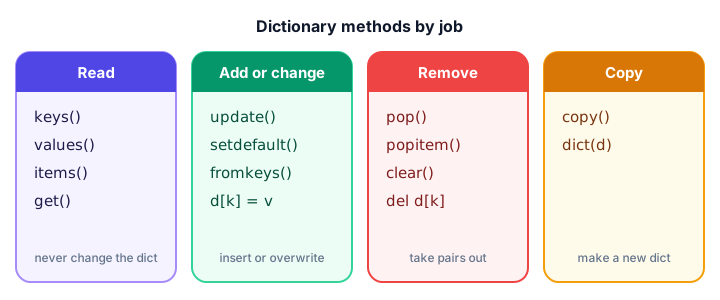
keys(), values() and items()
These three return views: live windows into the dictionary. If the dictionary changes, the view shows the change too. Wrap one in list() when you need a real list.
menu = {"pasta": 12, "pizza": 10, "salad": 8}

print(list(menu.keys()))
print(list(menu.values()))
print(list(menu.items()))

prices = menu.values()
menu["soup"] = 6
print(list(prices))     # the view sees the new item
['pasta', 'pizza', 'salad']
[12, 10, 8]
[('pasta', 12), ('pizza', 10), ('salad', 8)]
[12, 10, 8, 6]Views work great with built-in functions too, for example sum(menu.values()) or max(menu.values()).
get() and setdefault(): reading with a fallback
get() with a default value
get() reads a value without crashing when the key is missing. The optional second argument is what you get back instead of None:
inventory = {"apples": 5}
print(inventory.get("apples", 0))
print(inventory.get("kiwis", 0))
print(inventory)   # get() never changes the dict
5
0
{'apples': 5}setdefault(): get, or insert if missing
setdefault() is like get(), but if the key is missing it also stores the default. It's ideal for grouping items into lists:
songs = [("Pop", "Flowers"), ("Rock", "Creep"), ("Pop", "Anti-Hero")]
by_genre = {}

for genre, title in songs:
    by_genre.setdefault(genre, []).append(title)

print(by_genre)
{'Pop': ['Flowers', 'Anti-Hero'], 'Rock': ['Creep']}The first time "Pop" appears, setdefault() creates an empty list for it and returns that list, so append() has somewhere to go.
update(): merge one dictionary into another
update() copies every pair from another dictionary. New keys are added and existing keys are overwritten:
profile = {"name": "Leo", "city": "Berlin"}
changes = {"city": "Lisbon", "job": "designer"}

profile.update(changes)
print(profile)
{'name': 'Leo', 'city': 'Lisbon', 'job': 'designer'}Python 3.9+ also has the | operator, which merges two dictionaries into a new one: merged = profile | changes.
pop(), popitem() and clear()
cart = {"book": 15.0, "pen": 2.0, "mug": 9.5}

price = cart.pop("pen")
print("Removed pen:", price)
print(cart.pop("lamp", "not in cart"))

last = cart.popitem()
print("Last added:", last)
print(cart)

cart.clear()
print(cart)
Removed pen: 2.0
not in cart
Last added: ('mug', 9.5)
{'book': 15.0}
{}popitem() always removes the most recently added pair, which makes a dictionary handy as an "undo" history. On an empty dictionary it raises KeyError.
copy(): why = is not a copy
Writing b = a doesn't copy anything; both names point to the same dictionary, just like the labels you saw in Python variables. Use copy() to get an independent dictionary:
original = {"wifi": "on", "sound": "off"}
same = original
backup = original.copy()

original["sound"] = "on"

print(same)
print(backup)
{'wifi': 'on', 'sound': 'on'}
{'wifi': 'on', 'sound': 'off'}⚠️ copy() is shallow
copy() copies only the top level. If a value is a list or another dictionary, both copies still share it. You'll learn how to deal with that in shallow vs deep copy.
fromkeys(): start many keys with the same value
dict.fromkeys() is called on dict itself and builds a fresh dictionary from a list of keys:
players = ["Ana", "Ben", "Cai"]
scores = dict.fromkeys(players, 0)
print(scores)
{'Ana': 0, 'Ben': 0, 'Cai': 0}Stick to immutable starting values like 0 or "". With dict.fromkeys(players, []), every key would share one list.
How do you count words with a dictionary?
Counting how often each item appears is one of the most common dictionary jobs. The trick is get(word, 0) + 1: start at 0 for new words, add 1 for words you've seen.
review = "great coffee great service slow wifi great coffee"
counts = {}

for word in review.split():
    counts[word] = counts.get(word, 0) + 1

print(counts)
print("Most common:", max(counts, key=counts.get))
{'great': 3, 'coffee': 2, 'service': 1, 'slow': 1, 'wifi': 1}
Most common: greatsplit() breaks the text into words (see string methods), and max(counts, key=counts.get) finds the key with the biggest value.
Dictionary comprehension
Just like a list comprehension, a dictionary comprehension builds a dictionary in one line. The pattern is {key_expr: value_expr for item in collection}, with an optional if filter:
prices_usd = {"latte": 4.0, "muffin": 3.0, "bagel": 2.5}

prices_eur = {item: round(price * 0.92, 2) for item, price in prices_usd.items()}
print(prices_eur)

cheap = {item: price for item, price in prices_usd.items() if price < 3.5}
print(cheap)

squares = {n: n * n for n in range(1, 5)}
print(squares)
{'latte': 3.68, 'muffin': 2.76, 'bagel': 2.3}
{'muffin': 3.0, 'bagel': 2.5}
{1: 1, 2: 4, 3: 9, 4: 16}Common mistakes with dictionary methods
1. Saving the result of update()
settings = {"theme": "light"}
settings = settings.update({"theme": "dark"})
print(settings)Noneupdate() changes the dictionary in place and returns None. Just call settings.update(...) on its own line.
2. Changing a dictionary while looping over it
stock = {"milk": 0, "eggs": 12, "bread": 0}
for item in stock:
    if stock[item] == 0:
        del stock[item]
RuntimeError: dictionary changed size during iterationLoop over a copy of the keys instead, for item in list(stock):, or build a new dictionary with a comprehension: {k: v for k, v in stock.items() if v > 0}.
3. Indexing a view
menu.keys()[0] raises TypeError: 'dict_keys' object is not subscriptable. Convert first: list(menu.keys())[0].
Practice exercise
🏋️ Try it yourself
A gym logs each visit by member name: ["sam", "ria", "sam", "tom", "ria", "sam"]. Count the visits per member with get(), then use a dictionary comprehension to keep only members with 2 or more visits, and print both dictionaries.
Show solution
visits = ["sam", "ria", "sam", "tom", "ria", "sam"]
counts = {}

for member in visits:
    counts[member] = counts.get(member, 0) + 1

regulars = {name: n for name, n in counts.items() if n >= 2}

print(counts)
print(regulars)
{'sam': 3, 'ria': 2, 'tom': 1}
{'sam': 3, 'ria': 2}What's next?
You've now met all four of Python's core collections. Next, put them side by side in Python list vs tuple vs set vs dictionary and learn exactly when to use each one.
Key takeaways
- keys(), values() and items() return live views; wrap them in list() to get a list.
- get(key, default) reads safely without changing the dictionary.
- setdefault(key, default) returns the value and inserts the default if the key is missing.
- update() merges another dictionary in place and returns None.
- pop() removes a key and returns its value; popitem() removes the last inserted pair.
- Use copy() for an independent dictionary; b = a only creates a second name.
- counts[x] = counts.get(x, 0) + 1 is the classic counting pattern, and {k: v for ...} is a dictionary comprehension.
Frequently asked questions
What are the most used Python dictionary methods?
The everyday ones are get(), keys(), values(), items(), update(), pop() and setdefault(). Together they cover reading, looping, merging and removing data.
What is the difference between get() and setdefault() in Python?
Both return a default when the key is missing. get() leaves the dictionary unchanged, while setdefault() also inserts the key with that default value.
How do you merge two dictionaries in Python?
Call a.update(b) to merge b into a in place, or in Python 3.9 and later use merged = a | b to create a new dictionary. Keys in b overwrite matching keys in a.
What is the difference between pop() and popitem()?
pop(key) removes the pair with that key and returns its value. popitem() takes no key; it removes and returns the most recently inserted pair as a tuple.
How do you copy a dictionary in Python?
Use new_dict = old_dict.copy() or dict(old_dict). Assigning new_dict = old_dict does not copy; both names refer to the same dictionary.
What is a dictionary comprehension in Python?
It is a one-line way to build a dictionary, written as {key: value for item in collection}, optionally with an if filter, for example {n: n * n for n in range(5)}.