Python String Methods
Updated 7 min read Aimerscrew
Text from the real world is messy. People type their email with extra spaces, write their name in ALL CAPS or enter a phone number with dashes. Python string methods are the built-in tools that clean up, search and reshape that text. In this lesson, you'll learn the methods you'll use every week, see how to chain them, and get a reference table to come back to.
🌍 Real-life example
When you type Sam@Example.COM into a sign-up form, a good website still recognizes you. Behind the scenes, it removes the spaces around the text and turns it to lowercase, so it matches sam@example.com in the database. That cleanup takes two string methods.
What is a string method?
A method is a function that belongs to a value. You call it by writing the value, a dot, the method name and parentheses:
city = "paris"
print(city.upper())
print(city.title())
PARIS
ParisRead city.upper() as "ask the string in city to give me an uppercase version". Some methods need extra information inside the parentheses, called arguments. You'll learn to write your own functions in Python functions.
Do string methods change the original string?
No. Strings are immutable (they can't be changed), as you learned in Python strings. Every method returns a new string and leaves the original alone:
name = "olivia"
name.upper()
print(name)

name = name.upper()
print(name)
olivia
OLIVIAThe second line created "OLIVIA" but threw it away. To keep the result, assign it to a variable, as the fourth line does.
Changing case: upper, lower, title, capitalize
song = "bohemian rhapsody by QUEEN"
print(song.upper())
print(song.lower())
print(song.title())
print(song.capitalize())
BOHEMIAN RHAPSODY BY QUEEN
bohemian rhapsody by queen
Bohemian Rhapsody By Queen
Bohemian rhapsody by queentitle() capitalizes the first letter of every word, while capitalize() capitalizes only the first letter of the whole string and lowercases the rest.
lower() is also the standard way to compare text without caring about case:
answer = "YES"
print(answer == "yes")
print(answer.lower() == "yes")
False
TrueRemoving spaces: strip, lstrip, rstrip
strip() removes whitespace (spaces, tabs and line breaks) from both ends of a string. lstrip() only cleans the left side and rstrip() only the right. Spaces in the middle are kept.
raw = " Sam Lee "
print("[" + raw.strip() + "]")
print("[" + raw.lstrip() + "]")
print("[" + raw.rstrip() + "]")[Sam Lee]
[Sam Lee ]
[ Sam Lee]You can also tell strip() which characters to remove:
price = "$$49.99$$"
print(price.strip("$"))49.99Replacing text with replace()
replace(old, new) swaps every occurrence of old with new:
phone = "555-0142-889"
print(phone.replace("-", ""))
message = "I love tea. Tea is the best."
print(message.replace("tea", "coffee"))5550142889
I love coffee. Tea is the best.Notice that "Tea" with a capital T was not replaced. Like ==, replace() is case-sensitive.
How do you split a string in Python?
split() cuts a string into pieces and returns them as a list, a collection of values in square brackets. (You'll study lists in Python lists.) With no argument, it splits on any whitespace:
sentence = "pack my bag now"
print(sentence.split())
line = "Lena,29,Berlin"
print(line.split(","))['pack', 'my', 'bag', 'now']
['Lena', '29', 'Berlin']How do you join strings in Python?
join() is the opposite of split(). You call it on the separator and pass the pieces:
words = ["red", "green", "blue"]
print(", ".join(words))
print("-".join(words))
print("".join(words))red, green, blue
red-green-blue
redgreenblue📝 Note
It looks backward at first: it's ", ".join(words), not words.join(", "). Think of it as "glue these pieces together with this string".
Searching: find, index, count
find() returns the index where some text first appears, or -1 if it isn't there. index() does the same but raises an error when the text is missing. count() tells you how many times the text appears.
email = "maya.chen@example.com"
print(email.find("@"))
print(email.find("#"))
print(email.count("."))9
-1
2email = "maya.chen@example.com"
print(email.index("#"))ValueError: substring not foundCombine find() with slicing to cut a string at a character you can't predict the position of:
email = "maya.chen@example.com"
at = email.find("@")
print(email[:at])
print(email[at + 1:])maya.chen
example.comChecking the start and end: startswith, endswith
url = "https://shop.example.com"
file = "invoice_march.pdf"
print(url.startswith("https://"))
print(file.endswith(".pdf"))
print(file.endswith(".PDF"))True
True
FalseChecking content: isdigit, isalpha, isalnum
These methods answer yes/no questions about every character in the string and return True or False:
print("2026".isdigit())
print("12.5".isdigit())
print("Oslo".isalpha())
print("New York".isalpha())
print("player42".isalnum())True
False
True
False
True"12.5" fails because . isn't a digit, and "New York" fails because a space isn't a letter. isdigit() is a great check before converting input with int().
Chaining string methods
Because each method returns a new string, you can call another method on the result straight away. This is called method chaining, and Python runs it from left to right.
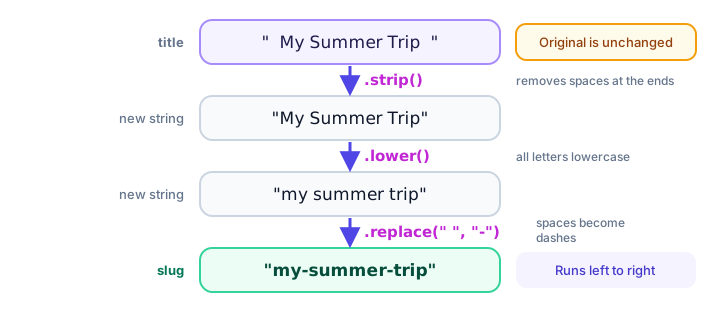
title = "  My Summer Trip  "
slug = title.strip().lower().replace(" ", "-")
print(slug)
print("[" + title + "]")
my-summer-trip
[ My Summer Trip ]That result is a slug, the readable part of a web address, like example.com/blog/my-summer-trip.
Python string methods reference table
| Method | What it does | Example | Result |
|---|---|---|---|
upper() | All letters uppercase | "hi".upper() | 'HI' |
lower() | All letters lowercase | "Hi".lower() | 'hi' |
title() | First letter of each word uppercase | "new york".title() | 'New York' |
capitalize() | First letter uppercase, rest lowercase | "hELLO".capitalize() | 'Hello' |
strip() | Remove whitespace from both ends | " hi ".strip() | 'hi' |
replace(a, b) | Replace every a with b | "a-b".replace("-", "+") | 'a+b' |
split(sep) | Cut into a list of pieces | "a,b".split(",") | ['a', 'b'] |
join(items) | Glue pieces with the string | "/".join(["a", "b"]) | 'a/b' |
find(x) | First index of x, or -1 | "hello".find("l") | 2 |
index(x) | First index of x, or ValueError | "hello".index("o") | 4 |
count(x) | How many times x appears | "banana".count("a") | 3 |
startswith(x) | Does it begin with x? | "photo.png".startswith("ph") | True |
endswith(x) | Does it end with x? | "photo.png".endswith(".png") | True |
isdigit() | Only digits? | "42".isdigit() | True |
isalpha() | Only letters? | "abc".isalpha() | True |
isalnum() | Only letters and digits? | "abc123".isalnum() | True |
💡 Tip
To see every string method, run print(dir(str)) in Python, or help(str.split) for details on one method.
Real-world example: cleaning a form entry and a data line
email_input = "  Sam.Rivera@Example.COM  "
clean_email = email_input.strip().lower()
print(clean_email)
print("Valid-looking?", "@" in clean_email and clean_email.endswith(".com"))

row = " Espresso ; 3.50 ; hot "
parts = row.split(";")
drink = parts[0].strip()
price = float(parts[1].strip())
print(drink, "costs", price)
sam.rivera@example.com
Valid-looking? True
Espresso costs 3.5parts[0] picks the first piece from the list that split() returned, using the same index idea you learned for strings.
Common mistakes with string methods
1. Forgetting to save the result
color = "  blue  "
color.strip()
print(len(color))8The spaces are still there. Write color = color.strip() to keep the cleaned version.
2. Forgetting the parentheses
print("hello".upper)This prints something like <built-in method upper of str object at 0x7f3a...> (the number differs on every computer). Without (), you get the method itself, not its result. Always call it: "hello".upper().
3. Calling join on the list
words = ["a", "b"]
print(words.join("-"))
AttributeError: 'list' object has no attribute 'join'The separator comes first: "-".join(words).
4. Checking find() as if it were True or False
"cat".find("c") returns 0, which is a valid position, not "not found". Not found is -1. If you just want yes or no, use "c" in "cat".
Practice exercise
🏋️ Try it yourself
A user typed their full name as " aDA lOVELACE ". Clean it so it prints Ada Lovelace, then print their initials as A.L. and the number of letters in the name (not counting the space).
Show solution
raw_name = "   aDA   lOVELACE "
name = " ".join(raw_name.split()).title()
print(name)

parts = name.split()
print(parts[0][0] + "." + parts[1][0] + ".")
print(len(name.replace(" ", "")))
Ada Lovelace
A.L.
11split() with no argument throws away all the extra spaces, and " ".join(...) puts back exactly one space between the words.
What's next?
You can now clean and search text. Next, learn the modern way to build strings that mix text and values in Python f-strings.
Key takeaways
- A string method is called with a dot after the string, like text.upper(); it returns a result without changing the original.
- upper(), lower(), title() and capitalize() change letter case; lower() is the usual way to compare text without caring about case.
- strip(), lstrip() and rstrip() remove whitespace (or chosen characters) from the ends of a string.
- replace() swaps text, split() cuts a string into a list, and join() glues a list back into one string.
- find() returns an index or -1, index() raises ValueError when the text is missing, and count() counts occurrences.
- startswith(), endswith(), isdigit(), isalpha() and isalnum() return True or False.
- Methods can be chained, like title.strip().lower(), because each one returns a new string.
Frequently asked questions
Do Python string methods modify the original string?
No. Strings are immutable, so every method returns a new value. Save it with an assignment, for example name = name.strip().
What is the difference between find() and index() in Python?
Both return the position of the first match. When the text is not found, find() returns -1 while index() raises a ValueError.
How do you remove spaces from a string in Python?
Use strip() to remove spaces from both ends, lstrip() or rstrip() for one end, and replace(" ", "") to remove every space, including those in the middle.
How do you split a string into words in Python?
Call split() with no argument, for example "a b c".split() returns ['a', 'b', 'c']. Pass a separator such as split(",") to split on a specific character.
How do you convert a string to lowercase in Python?
Call the lower() method: "HELLO".lower() returns "hello". Use upper() for uppercase and title() to capitalize each word.