Useful Python Built-in Functions: map, filter, zip, enumerate, sorted
Updated 8 min read Aimerscrew
Python comes with dozens of functions that are always available, no imports needed. You've already used some of them, like print(), len() and range(). In this lesson, you'll learn the Python built-in functions that make working with lists much easier: map(), filter(), zip(), enumerate() and sorted(), plus a few quick helpers like sum(), any() and all(). They often replace a whole loop with a single, readable line.
🌍 Real-life example
Think of a game leaderboard. You have a list of player names and a separate list of scores. You need to pair each name with its score, sort them from best to worst, and show them numbered 1, 2, 3. That's zip(), sorted() and enumerate(), working together. You'll build this exact leaderboard below.
What are built-in functions in Python?
A built-in function is a function that Python provides automatically. It lives in the built-in scope (the "B" in the LEGB rule), so you can call it from anywhere in your program. Python 3.12 has around 70 of them. This lesson covers the ones you'll use most when working with collections of data.
enumerate(): numbering items in a loop
enumerate() gives you each item and its position at the same time. Without it, you'd need a separate counter variable.
playlist = ["Blinding Lights", "Levitating", "Shape of You"]

for number, song in enumerate(playlist, start=1):
    print(f"{number}. {song}")
1. Blinding Lights
2. Levitating
3. Shape of YouBy default, counting starts at 0 (like list indexes). The start=1 argument makes it start at 1, which is what people expect to see in a numbered list.
zip(): pairing items from several lists
zip() takes two or more lists and walks through them side by side, giving you one tuple per position: the first items together, then the second items, and so on. It works like a zipper joining two sides, tooth by tooth.
players = ["Ava", "Ben", "Cleo"]
scores = [920, 1150, 870]

for name, score in zip(players, scores):
    print(f"{name}: {score} points")
Ava: 920 points
Ben: 1150 points
Cleo: 870 points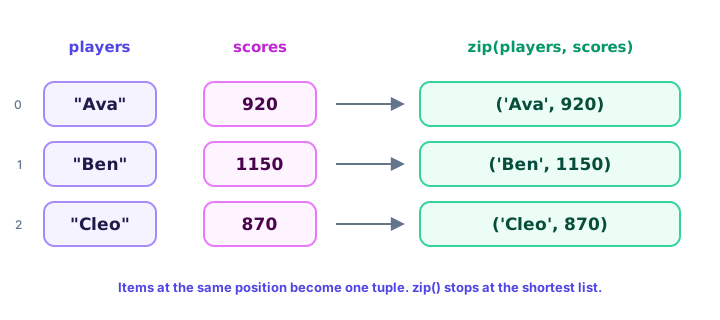
You can turn the pairs into a list, or even straight into a dictionary:
players = ["Ava", "Ben", "Cleo"]
scores = [920, 1150, 870]

print(list(zip(players, scores)))
print(dict(zip(players, scores)))
[('Ava', 920), ('Ben', 1150), ('Cleo', 870)]
{'Ava': 920, 'Ben': 1150, 'Cleo': 870}⚠️ Be careful
If the lists have different lengths, zip() stops at the shortest one and silently drops the extra items. list(zip([1, 2, 3], ["a", "b"])) gives [(1, 'a'), (2, 'b')]. If the lengths must match, pass strict=True and Python raises a ValueError when they don't.
sorted(): ordering items with a key
sorted() returns a new sorted list and leaves the original unchanged (unlike the list.sort() method, which changes the list in place). Use reverse=True for descending order and key= to choose what to sort by.
temperatures = [18, 25, 12, 30, 21]

print(sorted(temperatures))
print(sorted(temperatures, reverse=True))
print(temperatures)          # unchanged
[12, 18, 21, 25, 30]
[30, 25, 21, 18, 12]
[18, 25, 12, 30, 21]The key argument takes a function, often a lambda, that is applied to each item before comparing:
cities = ["Rome", "Amsterdam", "Lima", "Oslo", "Barcelona"]

print(sorted(cities, key=len))
print(sorted(cities, key=lambda city: city[-1]))
['Rome', 'Lima', 'Oslo', 'Amsterdam', 'Barcelona']
['Lima', 'Barcelona', 'Rome', 'Amsterdam', 'Oslo']The second line sorts by the last letter of each city. When two items have the same key (like "Rome", "Lima" and "Oslo", all 4 letters), sorted() keeps them in their original order.
Building a leaderboard with zip, sorted and enumerate
Here's the leaderboard from the real-life example. Each function does one small job:
players = ["Ava", "Ben", "Cleo", "Dev"]
scores = [920, 1150, 870, 1010]

pairs = zip(players, scores)
ranked = sorted(pairs, key=lambda pair: pair[1], reverse=True)

for rank, (name, score) in enumerate(ranked, start=1):
    print(f"#{rank} {name:<5} {score}")
#1 Ben 1150
#2 Dev 1010
#3 Ava 920
#4 Cleo 870zip() pairs names with scores, sorted() orders the pairs by score from highest to lowest, and enumerate() adds the rank. The (name, score) part unpacks each pair, and :<5 pads the name to 5 characters so the scores line up (see f-strings).
map(): applying a function to every item
map(function, items) calls the function on every item and gives back the results. It returns a lazy map object that produces values only when asked, so wrap it in list() to see them all.
prices_text = ["4.99", "12.50", "3.25"]
prices = list(map(float, prices_text))
print(prices)

euros = [10, 25, 40]
dollars = list(map(lambda amount: round(amount * 1.08, 2), euros))
print(dollars)
[4.99, 12.5, 3.25]
[10.8, 27.0, 43.2]A common use is converting text to numbers, for example when a user types several values separated by spaces: list(map(int, "3 7 9".split())) gives [3, 7, 9].
filter(): keeping only matching items
filter(function, items) keeps each item for which the function returns True (or a truthy value) and drops the rest. Like map(), it returns a lazy object.
ratings = [4.8, 3.2, 4.5, 2.9, 5.0]
top_rated = list(filter(lambda stars: stars >= 4.5, ratings))
print(top_rated)

usernames = ["sam", "", "lee", "", "kai"]
print(list(filter(None, usernames)))
[4.8, 4.5, 5.0]
['sam', 'lee', 'kai']Passing None as the function keeps only the truthy items, which is a quick way to remove empty strings.
💡 Tip
map() and filter() can usually be written as a list comprehension: [s for s in ratings if s >= 4.5]. Many Python programmers find comprehensions easier to read, especially when you'd otherwise need a lambda. Both are correct.
Other handy built-ins: sum, min, max, any, all and reversed
sum(), min() and max()
These three answer the most common questions about a list of numbers. min() and max() also accept a key, just like sorted().
cart = [19.99, 5.49, 42.00, 8.25]
print(sum(cart))
print(min(cart), max(cart))

runners = {"Kim": 52.3, "Luis": 49.8, "Nora": 50.6}
print(min(runners, key=lambda name: runners[name]))
75.73
5.49 42.0
LuisThe last line finds the runner with the fastest (smallest) time by comparing each name's value in the dictionary.
any() and all()
any() returns True if at least one item is true. all() returns True only if every item is true. They pair nicely with a generator expression, which looks like a list comprehension without the square brackets (you'll learn more in Python generators).
stock = {"milk": 4, "eggs": 0, "bread": 7}

print(any(count == 0 for count in stock.values()))
print(all(count > 0 for count in stock.values()))
True
FalseRead them as questions: "Is any product sold out?" Yes. "Are all products in stock?" No.
reversed(): looping backwards
reversed() gives you the items of a sequence from last to first without changing the original. Like map(), it's lazy, so use list() to see the result at once.
launch_steps = ["fuel", "check systems", "ignite"]
print(list(reversed(launch_steps)))

for number in reversed(range(1, 4)):
    print(number)
['ignite', 'check systems', 'fuel']
3
2
1Python built-in functions reference table
| Function | What it does | Example | Result |
|---|---|---|---|
enumerate() | Numbers each item | list(enumerate("ab", start=1)) | [(1, 'a'), (2, 'b')] |
zip() | Pairs items by position | list(zip([1, 2], "xy")) | [(1, 'x'), (2, 'y')] |
sorted() | New sorted list | sorted([3, 1, 2]) | [1, 2, 3] |
map() | Applies a function to each item | list(map(str.upper, ["a", "b"])) | ['A', 'B'] |
filter() | Keeps items where the function is true | list(filter(lambda n: n > 1, [1, 2, 3])) | [2, 3] |
sum() | Adds up numbers | sum([4, 5, 6]) | 15 |
min() / max() | Smallest / largest item | max([4, 9, 2]) | 9 |
any() | True if at least one item is true | any([False, True]) | True |
all() | True if every item is true | all([True, False]) | False |
reversed() | Items from last to first | list(reversed([1, 2, 3])) | [3, 2, 1] |
Common mistakes with built-in functions
1. Printing a map, filter or zip object directly
print(map(float, prices_text)) shows something like <map object at 0x...>, not the values. Wrap the result in list(), or loop over it.
2. Using a map or zip object twice
These lazy objects can be used only once. After you loop over them, they're empty:
pairs = zip(["Ava", "Ben"], [920, 1150])
print(list(pairs))
print(list(pairs))
[('Ava', 920), ('Ben', 1150)]
[]If you need the results more than once, store them in a list first: pairs = list(zip(...)).
3. Expecting sorted() to change the original list
sorted(scores) returns a new list. If you don't save the result (scores = sorted(scores)), nothing changes.
4. Hiding a built-in with your own variable
A variable called sum, max or list hides the built-in function, and calling it later gives TypeError: 'int' object is not callable. Use names like total or highest.
Practice exercise
🏋️ Try it yourself
A coffee shop has these lists: drinks = ["Latte", "Espresso", "Mocha", "Cold brew"] and prices = [4.50, 3.00, 5.25, 4.75]. Write a program that:
- Pairs each drink with its price using
zip()and sorts the pairs from cheapest to most expensive withsorted(). - Prints a numbered menu with
enumerate(), like1. Espresso - $3.00. - Prints the average price using
sum()andlen(). - Prints whether
all()drinks cost less than $6.
Show solution
drinks = ["Latte", "Espresso", "Mocha", "Cold brew"]
prices = [4.50, 3.00, 5.25, 4.75]

menu = sorted(zip(drinks, prices), key=lambda item: item[1])

for number, (drink, price) in enumerate(menu, start=1):
    print(f"{number}. {drink} - ${price:.2f}")

print(f"Average price: ${sum(prices) / len(prices):.2f}")
print("All under $6:", all(price < 6 for price in prices))
1. Espresso - $3.00
2. Latte - $4.50
3. Cold brew - $4.75
4. Mocha - $5.25
Average price: $4.38
All under $6: TrueWhat's next?
Congratulations, you've finished the Functions chapter! Built-in functions are always available, but Python has thousands more tools waiting in its standard library. Next, learn how to use them with Python modules.
Key takeaways
- Built-in functions are always available in Python without any import.
- enumerate() gives each item with its position; use start=1 for human-friendly numbering.
- zip() pairs items from several lists by position and stops at the shortest list.
- sorted() returns a new sorted list and accepts key= and reverse=True.
- map() transforms every item and filter() keeps matching items; both return lazy objects you wrap in list().
- sum(), min(), max(), any(), all() and reversed() handle other everyday list jobs in one call.
- Never name your variables sum, max, list or other built-in names.
Frequently asked questions
What are built-in functions in Python?
Built-in functions are functions Python provides automatically, such as print(), len(), sorted(), zip() and enumerate(). You can call them anywhere without importing a module.
What does zip() do in Python?
zip() takes two or more iterables and returns tuples that group the items at the same position, for example zip(["Ava", "Ben"], [90, 85]) gives ("Ava", 90) and ("Ben", 85). It stops at the shortest iterable.
What is the difference between map() and filter()?
map() applies a function to every item and returns all the results. filter() applies a function that returns True or False and keeps only the items where it is True.
How do I start enumerate() at 1 instead of 0?
Pass the start argument: enumerate(items, start=1). The first item is then numbered 1, which is handy for numbered lists and leaderboards.
What is the difference between sorted() and sort()?
sorted() is a built-in function that returns a new sorted list and works on any iterable. list.sort() is a list method that sorts the list in place and returns None.
Why does print(map(...)) show a map object?
map(), filter() and zip() return lazy objects that produce values only when needed. Wrap them in list() to see all the values, or loop over them with for.