C Variables
Updated 7 min read Aimerscrew
Every useful program has to remember things: a player's score, the items in a cart, the temperature a thermostat should hold. C variables are how a program remembers. In this lesson, you'll learn how to declare a variable, give it a value, change that value, and name your variables so the compiler (and other people) understand them.
🌍 Real-life example
Picture a warehouse full of shelves. Each box on a shelf has a label ("Blue mugs"), a size that decides what fits inside, and some contents (48 mugs). Workers never say "the box on shelf 7, position 3". They just say "Blue mugs". A C variable is exactly that: a labeled box in the computer's memory, with a size set by its type and a value inside.
What is a variable in C?
A variable is a named location in memory that stores one value of a specific type. The name lets you reach the value, and the type (such as int for whole numbers) tells C how much memory to reserve and what kind of value goes in it.
#include <stdio.h>

int main(void) {
    int score = 10;

    printf("Score: %d\n", score);
    return 0;
}
Score: 10Here, int is the type, score is the name and 10 is the value. Inside printf(), the %d is a placeholder that means "put a whole number here", and the number comes from score. You'll learn all the placeholders in C format specifiers.
How do you declare a variable in C?
Declaring a variable means telling the compiler its type and name. The pattern is type name;
int age;          /* a whole number */
double price;     /* a number with decimals */
char grade;       /* a single character */
A declaration reserves a box in memory and labels it, but it doesn't put a value in the box yet. To store a value, you assign one with =:
#include <stdio.h>

int main(void) {
    int age;      /* declaration: reserve a box named age */
    age = 30;     /* assignment: put 30 in the box */

    printf("Age: %d\n", age);
    return 0;
}
Age: 30💡 Tip
Read age = 30; as "age gets 30". In C, a single = stores a value. It doesn't compare anything. Comparing uses ==, which you'll meet in C comparison operators.
Declaring and initializing in one step
Giving a variable its first value is called initializing it. You can declare and initialize on the same line, and most of the time you should:
#include <stdio.h>

int main(void) {
    int quantity = 3;
    double price = 4.50;
    char size = 'M';

    printf("Quantity: %d\n", quantity);
    printf("Price: %.2f\n", price);
    printf("Size: %c\n", size);
    return 0;
}
Quantity: 3
Price: 4.50
Size: MEach type uses its own placeholder: %d for int, %.2f for a double with two decimal places, and %c for a char. The next lesson, C data types, explains each type in detail.
How a variable lives in memory
When your program runs int score;, C sets aside a small box of memory (usually 4 bytes for an int) and remembers that this box is called score. Assigning a value writes into that box. Assigning again overwrites the old value in the same box; the old value is gone.
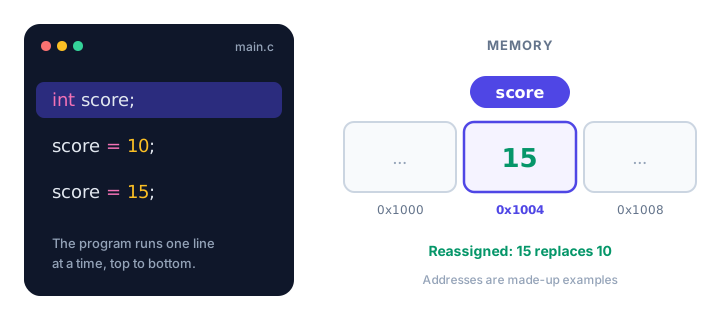
Changing the value of a variable
A variable's value can change as often as you like, as long as the new value fits its type:
#include <stdio.h>

int main(void) {
    int lives = 3;
    printf("Lives: %d\n", lives);

    lives = 2;              /* the player lost a life */
    printf("Lives: %d\n", lives);

    lives = lives + 5;      /* bonus: five extra lives */
    printf("Lives: %d\n", lives);
    return 0;
}
Lives: 3
Lives: 2
Lives: 7The line lives = lives + 5; reads the current value (2), adds 5, and stores the result (7) back in the same box.
Copying one variable into another
When you assign one variable to another, C copies the value. The two boxes stay separate, so changing one later doesn't affect the other:
#include <stdio.h>

int main(void) {
    int original = 5;
    int copy = original;   /* copy gets the value 5 */

    original = 9;          /* only original changes */

    printf("original = %d\n", original);
    printf("copy = %d\n", copy);
    return 0;
}
original = 9
copy = 5Declaring multiple variables at once
You can declare several variables of the same type on one line by separating them with commas. You can also chain assignments to give several variables the same value:
#include <stdio.h>

int main(void) {
    int width = 8, height = 5;
    int area = width * height;

    int wins, losses, draws;
    wins = losses = draws = 0;

    printf("Area: %d\n", area);
    printf("%d %d %d\n", wins, losses, draws);
    return 0;
}
Area: 40
0 0 0⚠️ Watch out
In int x, y = 7; only y gets the value 7. The variable x is declared but has no value. If you want both to start at 7, write int x = 7, y = 7;.
Rules for naming variables in C
A variable name (also called an identifier) must follow these rules, or the program won't compile:
- It can contain letters, digits and the underscore
_. - It must not start with a digit.
- It cannot contain spaces or symbols like
-,$or!. - It cannot be a keyword such as
int,returnorwhile. - It is case-sensitive:
total,TotalandTOTALare three different variables.
| Name | Valid? | Why |
|---|---|---|
seats_left | ✅ Yes | Letters and underscore |
player2 | ✅ Yes | A digit is fine after the first character |
2nd_place | ❌ No | Starts with a digit |
flight number | ❌ No | Contains a space |
total-cost | ❌ No | The - is read as minus |
return | ❌ No | A C keyword |
Beyond the rules, choose names that describe the value. seats_left tells the reader far more than s or x1. Most C programmers write names in lowercase with underscores (called snake_case).
Why must variables be declared before use?
C is a statically typed language: the compiler must know the type of every variable before it sees the variable used. That's how it knows how much memory to reserve and which machine instructions to generate. If you use a name the compiler hasn't seen declared above it, compilation stops with an error. This is different from Python, where variables are created on first assignment.
Real-world example: warehouse stock
Here's a tiny inventory program. Each number gets a clear name, and the stock count is updated as boxes leave and arrive:
#include <stdio.h>

int main(void) {
    int boxes_in_stock = 120;
    int boxes_shipped = 45;
    int boxes_received = 30;

    boxes_in_stock = boxes_in_stock - boxes_shipped;
    boxes_in_stock = boxes_in_stock + boxes_received;

    printf("Boxes shipped: %d\n", boxes_shipped);
    printf("Boxes received: %d\n", boxes_received);
    printf("Boxes in stock now: %d\n", boxes_in_stock);
    return 0;
}
Boxes shipped: 45
Boxes received: 30
Boxes in stock now: 105120 minus 45 is 75, and 75 plus 30 is 105. If tomorrow's shipment changes, you edit one number and every calculation follows.
Common mistakes with C variables
1. Using a variable before declaring it
total = 100;
int total;
GCC stops with a message like this:
error: 'total' undeclared (first use in this function)Move the declaration above the first line that uses the variable.
2. Reading a variable that was never given a value
int count;
printf("%d\n", count);   /* count was never assigned */
This compiles, but count holds whatever leftover bits happened to be in that memory. The program might print 0, a huge random-looking number, or something different each run. Reading an uninitialized variable is undefined behavior in C, which means anything can happen. GCC with -Wall often warns that the variable "is used uninitialized". Always initialize your variables, even if only to 0.
3. Declaring the same name twice
int score = 1;
int score = 2;
error: redefinition of 'score'Declare a variable once, then change it with a plain assignment: score = 2;.
4. Forgetting the semicolon
Every declaration and assignment ends with ;. Leaving it out of int speed = 60 gives an error such as expected ',' or ';' before ... pointing at the next line, which can be confusing at first.
Practice exercise
🏋️ Try it yourself
A game character starts at level 1 with 250 coins and 100 health. They open a treasure chest worth 75 coins and level up to 2. Create the three variables, update them, and print each one on its own line.
Show solution
#include <stdio.h>

int main(void) {
    int level = 1;
    int coins = 250;
    int health = 100;

    coins = coins + 75;
    level = 2;

    printf("Level: %d\n", level);
    printf("Coins: %d\n", coins);
    printf("Health: %d\n", health);
    return 0;
}
Level: 2
Coins: 325
Health: 100What's next?
You've been using int, double and char already. Next, find out exactly what each one can hold, and which to pick, in C data types.
Key takeaways
- A C variable is a named box in memory that holds one value of a fixed type.
- Declare a variable with type name; for example int age; and initialize it with int age = 30;.
- Every variable must be declared before the line that uses it.
- Assigning a new value overwrites the old one in the same memory box.
- Names may use letters, digits and underscores, cannot start with a digit, and are case-sensitive.
- Reading a variable that was never given a value is undefined behavior, so always initialize.
Frequently asked questions
What is the difference between declaring and initializing a variable in C?
Declaring tells the compiler the type and name, for example int age;. Initializing gives the variable its first value, for example int age = 30;. You can do both in one line.
What value does an uninitialized variable have in C?
A local variable that is never assigned holds an unpredictable leftover value. Reading it is undefined behavior, so always give variables a starting value before using them.
Can a C variable change its type?
No. C is statically typed, so a variable keeps the type it was declared with for its whole life. You can change its value, but only to values of that type.
Are C variable names case-sensitive?
Yes. total, Total and TOTAL are three separate variables. Most C programmers use lowercase names with underscores, such as seats_left.
Can I declare a variable in the middle of a function in C?
Yes. Since the C99 standard you can declare variables anywhere inside a block, as long as each one is declared before it is used.