C Data Types
Updated 7 min read Aimerscrew
Every variable in C has a type, and that type decides what the variable can hold. C data types tell the compiler two things: what kind of value lives in a variable (a whole number, a decimal, a character) and how much memory to set aside for it. In this lesson, you'll meet all the basic types, see their typical sizes and ranges, and learn how to choose the right one.
🌍 Real-life example
An online store keeps lots of facts about each order. The price of a jacket (59.99) has decimals. The customer's age (34) is a whole number. The size printed on the label ('M') is a single letter. Whether the customer has a membership is just yes or no. Each fact is a different kind of value, so each one needs a different data type.
What are data types in C?
A data type is a label that describes a kind of value and how it's stored in memory. Because C is statically typed, you choose the type when you declare a variable, and it never changes afterward.
| Type | Holds | Example | printf placeholder |
|---|---|---|---|
int | Whole numbers | int age = 34; | %d |
float | Decimal numbers (less precise) | float temp = 21.5f; | %f |
double | Decimal numbers (more precise) | double balance = 1520.75; | %f |
char | A single character | char grade = 'A'; | %c |
bool | true or false | bool is_member = true; | %d |
The basic C data types in action
#include <stdio.h>
#include <stdbool.h>

int main(void) {
    int age = 34;
    float temperature = 21.5f;
    double balance = 1520.75;
    char grade = 'A';
    bool is_member = true;

    printf("Age: %d\n", age);
    printf("Temperature: %.1f\n", temperature);
    printf("Balance: %.2f\n", balance);
    printf("Grade: %c\n", grade);
    printf("Member: %d\n", is_member);
    return 0;
}
Age: 34
Temperature: 21.5
Balance: 1520.75
Grade: A
Member: 1Notice that true prints as 1. In C, a bool is really a tiny number: 1 means true and 0 means false.
int: whole numbers
int (short for integer) stores whole numbers with no decimal part, like 7, -40 or 2026. It's the type you'll use most: counters, ages, scores, quantities. On most systems an int takes 4 bytes and can hold roughly −2.1 billion to +2.1 billion.
float vs double: decimal numbers
Numbers with a decimal point are called floating-point numbers. C has two main kinds:
float: usually 4 bytes, about 6 to 7 significant digits of precision.double: usually 8 bytes, about 15 to 16 significant digits. "Double" means double precision.
Let's divide 1 by 3 with each type and print ten decimal places:
#include <stdio.h>

int main(void) {
    float f = 1.0f / 3.0f;
    double d = 1.0 / 3.0;

    printf("float:  %.10f\n", f);
    printf("double: %.10f\n", d);
    return 0;
}
float: 0.3333333433
double: 0.3333333333The float runs out of precision after about seven digits and starts showing noise. That's why double is the default choice for decimals in C. The f at the end of 21.5f or 1.0f marks the number as a float; without it, a decimal literal is a double.
char: single characters
A char holds exactly one character, written in single quotes: 'A', '7', '?'. Behind the scenes, a char is a small number (its character code), so you can print it as a letter or as a number:
#include <stdio.h>

int main(void) {
    char size = 'M';

    printf("Size: %c\n", size);
    printf("Code: %d\n", size);
    return 0;
}
Size: M
Code: 7777 is the ASCII code for M. You'll use this trick in type conversion. Whole words like "Medium" are strings, which you'll learn in C strings.
bool: true or false
Early C had no boolean type; programmers used int with 0 and 1. The C99 standard added _Bool, and the header <stdbool.h> gives it the friendlier names bool, true and false. Include that header whenever you want to use bool.
#include <stdbool.h>

bool door_locked = true;
bool alarm_on = false;
📝 Note
In the newest standard, C23, bool, true and false are built-in keywords, so the header isn't needed. Including <stdbool.h> still works everywhere, so it's the safe habit.
short, long and long long
Size modifiers change how much memory an integer uses, and therefore how big a number it can hold:
short(orshort int): smaller, usually 2 bytes.long(orlong int): at least 4 bytes; 8 bytes on 64-bit Linux and macOS, but 4 bytes on Windows.long long: at least 8 bytes on every system. Use it for really big whole numbers.
signed vs unsigned
By default, integer types are signed: they can be negative or positive. Adding unsigned removes the negative half and doubles the positive range. That's useful for values that can never be below zero, like a seat count.
#include <stdio.h>

int main(void) {
    unsigned int seats = 180;
    short floor_number = -2;
    long long world_population = 8100000000LL;

    printf("Seats: %u\n", seats);
    printf("Floor: %hd\n", floor_number);
    printf("World population: %lld\n", world_population);
    return 0;
}
Seats: 180
Floor: -2
World population: 8100000000The world population is too big for a 4-byte int, so it needs long long. The LL suffix marks the literal as a long long. Each type has its own placeholder: %u for unsigned, %hd for short and %lld for long long.
C data type sizes and ranges
The C standard only sets minimum sizes, so exact sizes depend on your computer and compiler. The table shows typical values on most 64-bit systems:
| Type | Typical size | Typical range |
|---|---|---|
char | 1 byte | −128 to 127 (or 0 to 255) |
unsigned char | 1 byte | 0 to 255 |
bool | 1 byte | 0 (false) or 1 (true) |
short | 2 bytes | −32,768 to 32,767 |
unsigned short | 2 bytes | 0 to 65,535 |
int | 4 bytes | −2,147,483,648 to 2,147,483,647 |
unsigned int | 4 bytes | 0 to 4,294,967,295 |
long | 8 bytes (4 on Windows) | Same as long long (or int on Windows) |
long long | 8 bytes | About ±9.2 quintillion (9.2 × 10¹⁸) |
float | 4 bytes | About ±3.4 × 1038, ~7 digits |
double | 8 bytes | About ±1.8 × 10308, ~15 digits |
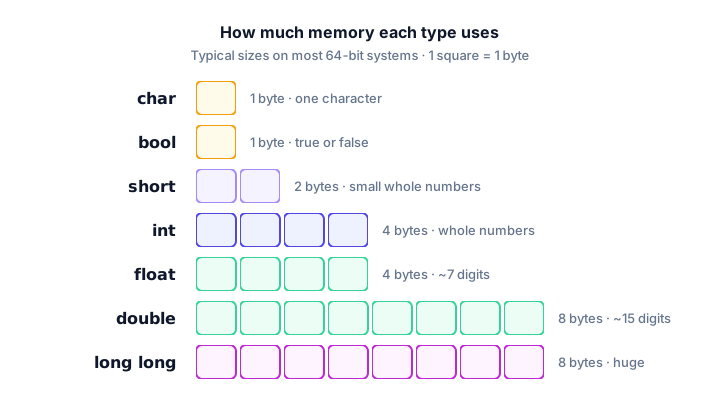
You can check the sizes on your own machine with the sizeof operator.
How do you choose the right data type?
Ask yourself two questions: Does the value have decimals? and How big can it get? Then pick from this table:
| Value | Good type | Why |
|---|---|---|
| A person's age | int | Whole number, small |
| A product price | double | Has decimals |
| A grade letter | char | One character |
| Is the parking spot free? | bool | Only yes or no |
| Seats on a plane | unsigned int or int | Never negative |
| Bytes downloaded this year | long long | Can exceed 2 billion |
💡 Tip
When in doubt, use int for whole numbers and double for decimals. Reach for the other types only when you have a reason: a value that's too big, or memory that's very tight.
Common mistakes with C data types
1. Storing a decimal in an int
int price = 9.99; /* price becomes 9 */An int can't hold decimals, so C silently drops the .99 and price holds 9. Use double for prices.
2. Using double quotes for a char
char grade = "A"; is wrong. Double quotes make a string, not a single character. GCC warns about converting a pointer to an integer. Use single quotes: char grade = 'A';.
3. Forgetting <stdbool.h>
Before C23, using bool without the header gives error: unknown type name 'bool'. Add #include <stdbool.h> at the top.
4. Picking a type that's too small
Storing 3 billion in an int doesn't fit in its range. For signed types this is overflow, which is undefined behavior: you usually get a wrong, often negative, number. Use long long for big counts.
Practice exercise
🏋️ Try it yourself
Create a student record with the best type for each value: age 19, GPA 3.85, final grade B, and whether the student is enrolled (true). Print each one on its own line, with the GPA showing two decimals.
Show solution
#include <stdio.h>
#include <stdbool.h>

int main(void) {
    int age = 19;
    double gpa = 3.85;
    char grade = 'B';
    bool enrolled = true;

    printf("Age: %d\n", age);
    printf("GPA: %.2f\n", gpa);
    printf("Grade: %c\n", grade);
    printf("Enrolled: %d\n", enrolled);
    return 0;
}
Age: 19
GPA: 3.85
Grade: B
Enrolled: 1What's next?
Some values, like a tax rate or the number of seats in a theater, should never change while a program runs. Learn how to lock them in with constants in C.
Key takeaways
- A data type tells C what kind of value a variable holds and how much memory it needs.
- Use int for whole numbers, double for decimals, char for one character and bool for true or false.
- double is more precise than float (about 15 digits versus about 7), so prefer double.
- short, long and long long change an integer's size; unsigned removes negative values and doubles the positive range.
- Sizes vary by system; on most 64-bit systems int is 4 bytes and double is 8 bytes, but long is 4 bytes on Windows.
- Include stdbool.h to use bool, true and false.
Frequently asked questions
What are the basic data types in C?
The basic C data types are int for whole numbers, float and double for decimal numbers, char for single characters and _Bool (bool with stdbool.h) for true or false values.
What is the difference between float and double in C?
Both store decimal numbers. A float usually uses 4 bytes and keeps about 7 significant digits, while a double usually uses 8 bytes and keeps about 15 to 16 digits, so double is more precise.
How big is an int in C?
The standard only guarantees at least 2 bytes, but on almost every modern computer an int is 4 bytes, holding values from -2,147,483,648 to 2,147,483,647.
Does C have a boolean type?
Yes. C99 added _Bool, and including stdbool.h lets you write bool, true and false. In C23 these became built-in keywords.
When should I use unsigned int in C?
Use unsigned int for values that can never be negative, such as counts or sizes, when you need the extra positive range. For everyday counting, a plain int is usually fine.