Memory Leaks in C (and How to Find Them)
Updated 9 min read Aimerscrew
Memory leaks in C are one of the most common bugs in real-world software, and they're sneaky: a leaking program usually prints exactly the right output. A memory leak is heap memory that your program allocated but never released, so it stays reserved and useless until the program ends. In this lesson, you'll learn what causes leaks, how they differ from double frees and use-after-free bugs, and how to find them with free tools.
🌍 Real-life example
A memory leak is like leaving a tap running in an empty building. One dripping tap doesn't seem to matter, and nobody notices at first. But leave it running all night, or leave a tap open in every room, and you'll eventually flood the place or run the tank dry. A program that leaks a little memory every time it handles a request does the same thing to a server's RAM.
What is a memory leak in C?
A memory leak occurs when a block from malloc(), calloc() or realloc() is never passed to free(). In most cases, the program has also lost every pointer to the block, so it can't free it anymore. The memory stays reserved but unreachable.
When a program exits, modern operating systems reclaim all of its memory. So a short program that leaks a few bytes does no lasting harm. The real damage happens in programs that run for a long time, such as servers, games, phone apps and embedded devices, where small leaks pile up until the program slows down or runs out of memory.
A leak that looks perfectly fine
This program allocates a buffer for each day's orders but never frees it:
#include <stdio.h>
#include <stdlib.h>

int main(void) {
    for (int day = 1; day <= 3; day++) {
        int *orders = malloc(10 * sizeof *orders);
        if (orders == NULL) {
            return 1;
        }
        orders[0] = day * 7;
        printf("Day %d: first order #%d\n", day, orders[0]);
        /* forgot free(orders); */
    }
    return 0;
}
Day 1: first order #7
Day 2: first order #14
Day 3: first order #21The output is correct, and the compiler gives no warning. Yet each pass of the loop reserves 40 bytes (on systems where an int is 4 bytes), and when orders goes out of scope at the end of the loop body, the address is gone. After three days, 120 bytes have leaked. Run that loop a million times and it's 40 MB.
What causes memory leaks?
1. Forgetting to call free()
The simplest cause, as in the program above. Every allocation needs a matching free() on every path through the code.
2. Losing the only pointer
If you overwrite a pointer that holds the only copy of a block's address, that block can never be freed:
int *p = malloc(10 * sizeof *p);
p = malloc(10 * sizeof *p);   /* the first block is now unreachable */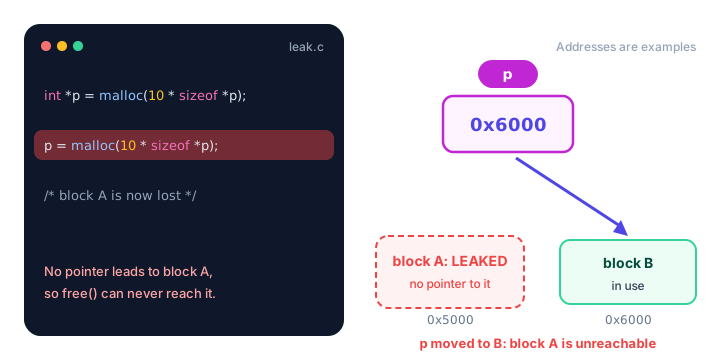
The same thing happens with p = realloc(p, size) when realloc() fails, which is why you learned the temporary-pointer pattern in calloc() and realloc().
3. Early returns
A function that bails out halfway can skip the free() at the bottom:
int save_report(int rows) {
    int *data = malloc(rows * sizeof *data);
    if (data == NULL) {
        return -1;
    }
    if (rows > 1000) {
        return -1;      /* LEAK: data is never freed */
    }
    /* ... fill and save data ... */
    free(data);
    return 0;
}
The fix is to free before every return that happens after a successful allocation, or better, to check rows before calling malloc().
Double free and use-after-free
Leaks happen when you free too little. Two other bugs happen when you free at the wrong time:
- Double free: calling
free()twice on the same block. This can corrupt the heap's internal records. Often the program aborts on the spot with a message like "free(): double free detected"; sometimes it carries on and fails much later in a confusing way. - Use-after-free: reading or writing a block after freeing it. The memory may already belong to something else, so you might see old values, garbage, or a crash, and the result can change between runs. Attackers can even exploit this bug to take over programs.
free(cart);
free(cart);          /* double free */
printf("%f", cart[0]);   /* use-after-free */
Setting a pointer to NULL right after freeing it protects against both: free(NULL) does nothing, and using a NULL pointer fails fast instead of silently reading stale data. You saw these alongside other traps in common pointer mistakes.
Who should free the memory? Ownership rules
In bigger programs, the hard question isn't how to free memory, it's who frees it. Programmers answer that with ownership: exactly one part of the code owns each block and is responsible for freeing it.
- Whoever mallocs, frees, unless ownership is handed over on purpose.
- If a function returns heap memory, ownership passes to the caller. Say so in a comment.
- If a function only borrows a pointer (reads or changes the data), it must not free it.
- Free each block exactly once, then set the pointer to
NULL.
Here a function creates a name badge on the heap and hands ownership to main, which frees each one:
#include <stdio.h>
#include <stdlib.h>
#include <string.h>

/* Returns a new string on the heap. The caller owns it and must free() it. */
char *make_badge(const char *name) {
    size_t length = strlen("Guest: ") + strlen(name) + 1;
    char *badge = malloc(length);
    if (badge == NULL) {
        return NULL;
    }
    strcpy(badge, "Guest: ");
    strcat(badge, name);
    return badge;
}

int main(void) {
    const char *guests[] = {"Amara", "Diego", "Mei"};

    for (int i = 0; i < 3; i++) {
        char *badge = make_badge(guests[i]);
        if (badge == NULL) {
            return 1;
        }
        printf("%s\n", badge);
        free(badge);   /* main owns the badge, so main frees it */
    }
    return 0;
}
Guest: Amara
Guest: Diego
Guest: MeiThe + 1 makes room for the string's closing '\0' character, as covered in strings in C. Since a char is always 1 byte, malloc(length) is exactly right here.
How do you find memory leaks in C?
Reading code carefully helps, but tools are far more reliable. Two free ones are standard in the C world.
Valgrind (Linux)
Valgrind runs your program inside a virtual machine that watches every allocation. Compile with -g so it can show line numbers, then run your program through it:
gcc -g -o orders orders.c
valgrind --leak-check=full ./orders
Your program runs normally (just slower), then Valgrind prints a leak summary. For the orders program above, it reports 120 bytes "definitely lost" in 3 blocks and shows the line where those blocks were allocated with malloc(). "Definitely lost" means no pointer to the block exists anymore: a true leak.
AddressSanitizer (GCC and Clang)
AddressSanitizer (ASan) is built into GCC and Clang. You turn it on with a compiler flag, and it adds checks to your program:
gcc -g -fsanitize=address -o orders orders.c
./orders
When the program exits, its leak checker prints a report headed "detected memory leaks", listing each leak with its size and the chain of function calls that allocated it. ASan also stops the program immediately on a double free, a use-after-free or an out-of-bounds access, and names the exact line. It works best on Linux; on Windows, WSL is the easiest way to use it.
💡 Tip
Make -fsanitize=address part of your normal debug build. Catching a leak the day you write it takes seconds; hunting it down months later can take days.
Memory safety checklist
| Check | Why it matters |
|---|---|
Every malloc/calloc/realloc has one matching free | Prevents leaks |
Every early return frees what was allocated | Prevents leaks on error paths |
| Never overwrite the only pointer to a block | Prevents lost blocks |
realloc goes through a temporary pointer | Keeps the old block if resizing fails |
Set pointers to NULL after free | Stops double free and use-after-free |
| Document who owns returned memory | Everyone knows who must free it |
Test with Valgrind or -fsanitize=address | Catches what your eyes miss |
Common mistakes
1. Thinking "it works, so it's fine"
Leaks don't change your output. Only a tool, or a crash weeks later, will tell you. Test with a leak checker even when everything looks right.
2. Freeing only the outer block
If a heap block holds pointers to other heap blocks (like an array of strings), freeing the outer block leaks all the inner ones. Free the inner blocks first, then the outer one. You'll meet this again in linked lists.
3. Freeing memory you only borrowed
If a function frees a pointer its caller still uses, the caller ends up with a dangling pointer and, often, a double free. Stick to the ownership rules.
Practice exercise
🏋️ Try it yourself
This function counts words longer than 5 letters, but it leaks memory on both of its successful return paths. Find the leaks, fix them, and call it from main with the words "apple", "banana", "kiwi", "cherry" and "fig" to print Long words: 2.
int count_long_words(const char *words[], int n) {
    int *lengths = malloc(n * sizeof *lengths);
    if (lengths == NULL) {
        return -1;
    }
    for (int i = 0; i < n; i++) {
        lengths[i] = (int)strlen(words[i]);
    }
    int count = 0;
    for (int i = 0; i < n; i++) {
        if (lengths[i] > 5) {
            count++;
        }
    }
    if (count == 0) {
        return 0;
    }
    return count;
}
Show solution
Both return 0; and return count; skip free(lengths). Since the result is the same either way, the cleanest fix is to free once and return once. (Returning -1 when malloc() fails is fine: nothing was allocated.)
#include <stdio.h>
#include <stdlib.h>
#include <string.h>

int count_long_words(const char *words[], int n) {
    int *lengths = malloc(n * sizeof *lengths);
    if (lengths == NULL) {
        return -1;
    }
    for (int i = 0; i < n; i++) {
        lengths[i] = (int)strlen(words[i]);
    }
    int count = 0;
    for (int i = 0; i < n; i++) {
        if (lengths[i] > 5) {
            count++;
        }
    }
    free(lengths);
    lengths = NULL;
    return count;
}

int main(void) {
    const char *words[] = {"apple", "banana", "kiwi", "cherry", "fig"};
    printf("Long words: %d\n", count_long_words(words, 5));
    return 0;
}
Long words: 2What's next?
You've finished the memory management chapter: you know where data lives, how to allocate and resize it, and how to keep it leak-free. Next, learn to group related data together with structs in C, the building block for records, lists and much more.
Key takeaways
- A memory leak is heap memory that is never freed, usually because free() was forgotten or the only pointer was lost.
- Leaks rarely change a program's output, but they make long-running programs slow down or run out of memory.
- Common causes are forgetting free(), overwriting the only pointer, and early returns that skip cleanup.
- A double free releases the same block twice; use-after-free touches a block after releasing it. Both can corrupt memory or crash.
- Follow ownership rules: whoever allocates frees, unless ownership is clearly handed to the caller.
- Valgrind (valgrind --leak-check=full) and AddressSanitizer (-fsanitize=address) find leaks and memory errors automatically.
Frequently asked questions
What is a memory leak in C?
A memory leak is a block of heap memory that a program allocated with malloc(), calloc() or realloc() but never released with free(). The memory stays reserved and unusable until the program ends.
Does the operating system free leaked memory when a program exits?
On modern desktop and server operating systems, yes, all of a process's memory is reclaimed when it exits. Leaks still matter because long-running programs keep leaking while they run, and some embedded systems never reclaim memory.
How do I check for memory leaks in C?
Compile with -g and run your program under Valgrind with valgrind --leak-check=full ./program, or compile with gcc -g -fsanitize=address and run it normally. Both report each leaked block and where it was allocated.
What is the difference between a memory leak and a double free?
A memory leak means memory is never freed. A double free means the same block is freed twice, which can corrupt the heap and usually crashes the program. Setting pointers to NULL after free() prevents double frees.
What is use-after-free in C?
Use-after-free means reading or writing memory through a pointer after that memory has been freed. The result is unpredictable: old values, garbage or a crash, and it is a common source of security vulnerabilities.