Stack vs Heap: How C Programs Use Memory
Updated 8 min read Aimerscrew
When people talk about stack vs heap in C, they mean the two main places where a running program keeps its data. Every variable you create lives somewhere in memory, and where it lives decides how long it lasts and how big it can be. In this lesson, you'll see the full memory layout of a C program, learn what happens on the stack when functions call each other, and find out when you need the heap instead.
🌍 Real-life example
Think of the stack as a stack of plates in a café kitchen. You put a plate on top, use it, and take it off again. It's fast and tidy, but the pile can't grow very tall. The heap is more like a storage warehouse you rent: you can ask for as much space as you need, for as long as you need, but nobody empties it for you. When you're done, you must hand the keys back yourself.
What is the memory layout of a C program?
When your program starts, the operating system gives it a block of memory split into a few regions (also called segments). Each region has its own job:
- Text (code): the compiled machine instructions of your functions. It's usually read-only.
- Data: global and
staticvariables that start with a non-zero value, likeint store_id = 7;. - BSS: global and
staticvariables that start at zero or have no initial value. C sets them all to 0 beforemainruns. - Heap: memory you request while the program runs, using
malloc(). It stays until you release it withfree(). - Stack: local variables and the bookkeeping for function calls. It's cleaned up automatically.
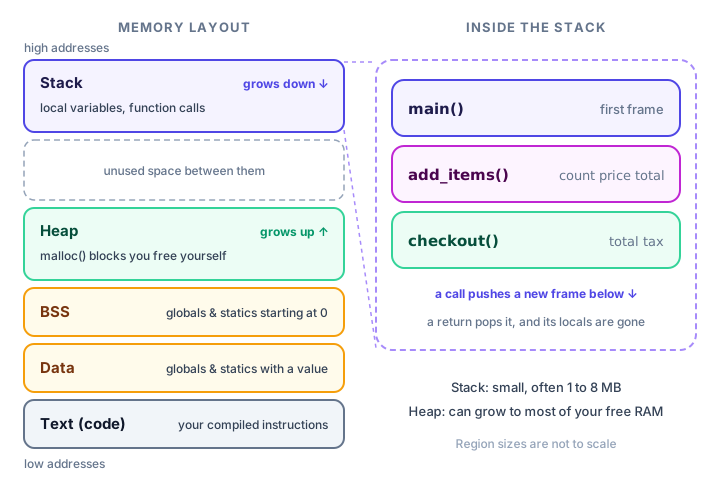
The exact order and addresses depend on the operating system, but this picture is a good mental model for Linux, macOS and Windows alike.
Globals and statics: the data and BSS regions
Variables declared outside every function (globals) and variables marked static live in the data or BSS region. They are created once, before main starts, and live until the program ends. You met them in scope and storage classes; here's where they actually sit.
#include <stdio.h>

int visitors = 0;              /* global: BSS (starts at 0) */

void greet(void) {
    static int calls = 0;      /* static: BSS, keeps its value */
    int local = 0;             /* local: stack, fresh every call */

    calls++;
    local++;
    visitors++;
    printf("calls=%d local=%d visitors=%d\n", calls, local, visitors);
}

int main(void) {
    greet();
    greet();
    greet();
    return 0;
}
calls=1 local=1 visitors=1
calls=2 local=1 visitors=2
calls=3 local=1 visitors=3calls and visitors remember their values between calls because they live outside the stack. local is created fresh on the stack each time greet() runs, so it's always 1.
What is the stack in C?
The stack is a region of memory that stores local variables, function parameters and the return address for every function call that is currently running. Each call gets its own slice of the stack called a stack frame. When the function returns, its frame is removed and all its local variables disappear. That automatic cleanup is why local variables are also called automatic variables.
Watch the frames come and go in this small checkout program:
#include <stdio.h>

void checkout(double total) {
    double tax = total * 0.10;
    printf("  checkout: total=%.2f tax=%.2f\n", total, tax);
}

void add_items(int count, double price) {
    double total = count * price;
    printf(" add_items: total=%.2f\n", total);
    checkout(total);
    printf(" add_items: back from checkout\n");
}

int main(void) {
    printf("main: start\n");
    add_items(3, 4.50);
    printf("main: done\n");
    return 0;
}
main: start
add_items: total=13.50
checkout: total=13.50 tax=1.35
add_items: back from checkout
main: doneWhen main calls add_items, a frame holding count, price and total is pushed. When add_items calls checkout, another frame holding checkout's own total and tax is pushed. As each function returns, its frame is popped in reverse order: last in, first out. It's the same call stack you saw in recursion.
📝 Note
The two variables named total are completely separate. Each lives in its own stack frame, so changing one would never affect the other.
Why is the stack size limited?
The stack is fast because it's simple: making room for a frame just means moving a marker. The price is that it's small, often around 1 MB on Windows and 8 MB on Linux by default. If you create a huge local array or recurse too deeply, you run out of stack, and the program crashes with a stack overflow, usually reported as a "segmentation fault" on Linux or macOS.
What is the heap in C?
The heap is a large pool of memory that your program requests at run time, as much as it needs, whenever it needs it. You ask for a block with malloc(), get back a pointer to it, and the block stays valid until you call free(). Nothing is cleaned up automatically. Here's a first peek; you'll learn the details in the next lesson:
int *scores = malloc(1000 * sizeof *scores);   /* room for 1000 ints */
/* ... use scores[0] to scores[999] ... */
free(scores);                                  /* hand the memory back */
The heap is a little slower than the stack, because the system has to find a free block that fits. In exchange, you get two superpowers: size chosen at run time and a lifetime you control.
Seeing where variables live
You can print addresses with %p to see the regions for yourself:
#include <stdio.h>

int total_sales;          /* BSS  */
int store_id = 7;         /* data */

int main(void) {
    static int open_days = 30;   /* data  */
    int today = 12;              /* stack */

    printf("store_id    %p\n", (void *)&store_id);
    printf("total_sales %p\n", (void *)&total_sales);
    printf("open_days   %p\n", (void *)&open_days);
    printf("today       %p\n", (void *)&today);
    return 0;
}
Your addresses will differ on every run. On a typical 64-bit Linux system, the first three come out close together (something like 0x55d1c3a7e010), while today shows a much larger number such as 0x7ffe2b9c4a1c. That big gap is the distance between the data regions near the bottom and the stack near the top.
Stack vs heap in C: comparison table
| Stack | Heap | |
|---|---|---|
| What goes there | Local variables, parameters, call info | Blocks from malloc, calloc, realloc |
| Who cleans up | Automatic, when the function returns | You, by calling free() |
| Size | Small (often 1 to 8 MB) | Large (limited by available memory) |
| Speed | Very fast | A bit slower |
| Lifetime | Until the function returns | Until you free it |
| Size known | Usually at compile time | Can be decided at run time |
When should you use the stack or the heap?
| Situation | Best choice |
|---|---|
| A counter, a total, a small fixed array | Stack (a normal local variable) |
| A value that must survive after the function returns | Heap (or a static/global if there's only ever one) |
| The size depends on user input or a file | Heap |
| Very large data (millions of items, an image) | Heap |
| A list that grows and shrinks over time | Heap |
| A setting shared by the whole program | Global or static (data/BSS) |
💡 Tip
Start with the stack. It's simpler and can't leak. Reach for the heap only when you need a size chosen at run time, a lot of memory, or data that outlives the function that created it.
Common mistakes
1. Putting a huge array on the stack
int main(void) {
    int pixels[10000000];   /* about 40 MB of local variables */
    pixels[0] = 255;
    return 0;
}
This compiles fine, but on most systems it crashes immediately with a stack overflow. Make big arrays static or allocate them on the heap with malloc().
2. Returning the address of a local variable
A local variable's frame disappears when the function returns, so a pointer to it points at memory that's no longer yours. Reading it gives garbage or crashes. You saw this in common pointer mistakes; the heap is the proper fix.
3. Expecting a local variable to keep its value
Without static, a local variable starts over on every call, as local did in the greet() example. If you need the value to stick around, use static.
Practice exercise
🏋️ Try it yourself
A deli hands out numbered tickets. Write a function int next_ticket(void) that returns 101 the first time it's called, then 102, then 103. Call it three times from main and print each ticket. Then answer: which memory region holds your counter, and which holds the variable in main that receives the result?
Show solution
#include <stdio.h>

int next_ticket(void) {
    static int last = 100;   /* data region: lives for the whole program */
    last++;
    return last;
}

int main(void) {
    for (int i = 0; i < 3; i++) {
        int ticket = next_ticket();   /* stack: a new local each time */
        printf("Ticket %d\n", ticket);
    }
    return 0;
}
Ticket 101
Ticket 102
Ticket 103last is a static with a non-zero starting value, so it lives in the data region. ticket and i are locals on the stack.
What's next?
You now know where every kind of variable lives. Next, learn to request and release heap memory yourself with malloc() and free() in C.
Key takeaways
- A running C program uses several memory regions: text (code), data, BSS, heap and stack.
- Globals and static variables live in data or BSS and last for the whole program.
- Local variables and function calls live on the stack, in frames that are removed automatically when a function returns.
- The stack is fast but small, so huge local arrays or very deep recursion cause a stack overflow.
- The heap is large and flexible; you request memory with malloc() and must release it with free().
- Use the stack by default, and the heap when the size is decided at run time, the data is large, or it must outlive a function.
Frequently asked questions
What is the difference between stack and heap in C?
The stack holds local variables and function calls and is cleaned up automatically when a function returns, but it is small. The heap holds memory you request with malloc() at run time; it is much larger, but you must release it yourself with free().
Where are global variables stored in C?
Global and static variables are stored in the data segment if they start with a non-zero value, or in the BSS segment if they start at zero or have no initializer. Either way, they exist for the whole run of the program.
Is the stack faster than the heap?
Yes, usually. Making room on the stack just moves a pointer, while a heap allocation has to search for a free block. The difference only matters when you allocate very often.
What causes a stack overflow in C?
A stack overflow happens when the stack runs out of space, most often because of a very large local array or recursion that goes too deep or never stops. The program usually crashes with a segmentation fault.
How big is the stack in C?
It depends on the system. Common defaults are about 1 MB per thread on Windows and 8 MB on Linux. The heap can grow much larger, up to the memory the system has available.