C Project: Simple Calculator
Updated 11 min read Aimerscrew
A calculator program in C is the classic first project: it's short, useful, and it uses the core tools you've learned so far, including functions, switch, loops and scanf(). In this project, you'll build a menu-driven calculator one small step at a time. It will add, subtract, multiply and divide, refuse to divide by zero, and survive typos without crashing or looping forever.
🌍 Real-life example
Think of the calculator at a supermarket self-checkout or a currency exchange booth at an airport. The person picks an action, types some numbers, and gets an answer, over and over, until they walk away. If someone presses a wrong button, the machine shows a friendly message instead of breaking. That's exactly the behavior you'll build.
What you'll build
Your finished calculator will:
- show a small menu of operations:
+,-,*and/, - read two decimal numbers and print the result with two decimal places,
- print an error instead of dividing by zero,
- reject unknown operations and input that isn't a number,
- keep running until the user types
q.
Here's a short session. The user typed the character or numbers after each prompt's colon (+, 12.5 4, q):
=== Simple Calculator ===

Operations: +  -  *  /   (q to quit)
Choose an operation: +
Enter two numbers: 12.5 4
12.50 + 4.00 = 16.50

Operations: +  -  *  /   (q to quit)
Choose an operation: q
Goodbye!
Concepts used in this project
Every piece of this program comes from an earlier lesson. If a step feels unfamiliar, revisit the linked lesson:
| Concept | Where it's used | Lesson |
|---|---|---|
| Functions and return values | One function per operation | functions, return values |
switch | Choosing the operation | switch |
scanf() and its return value | Reading the operator and numbers safely | user input |
%lf and %.2f | Reading and printing doubles | format specifiers |
while, break, continue | The menu loop | while loop, break and continue |
| Pointers as output parameters | Returning a result and a success flag | pass by reference |
How the calculator works (program flow)
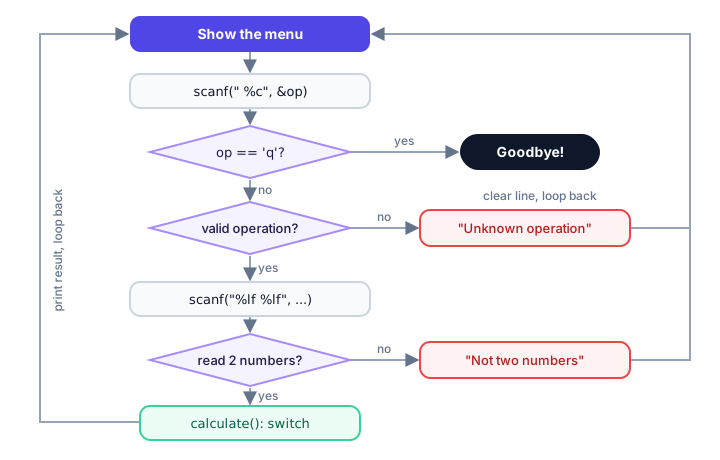
The whole program is one loop. Each pass shows the menu, reads an operation, checks it, reads two numbers, checks them, and prints a result. Any problem sends the user straight back to the menu.
Step 1: One function per operation
Start with the math. Giving each operation its own small function keeps main() tidy and makes each piece easy to test. All three take two double values and return a double:
#include <stdio.h>

double add(double a, double b) {
    return a + b;
}

double subtract(double a, double b) {
    return a - b;
}

double multiply(double a, double b) {
    return a * b;
}

int main(void) {
    printf("%.2f\n", add(12.5, 4));
    printf("%.2f\n", subtract(12.5, 4));
    printf("%.2f\n", multiply(12.5, 4));
    return 0;
}
16.50
8.50
50.00We use double instead of int so the calculator handles prices like 19.99. The 4 passed as an argument is converted to 4.0 automatically, because the function's parameter type is double. The format %.2f prints exactly two digits after the decimal point.
Step 2: How do you handle division by zero in C?
Division needs extra care. With whole numbers, dividing by zero is undefined behavior and often crashes the program. With double values it doesn't crash, but you get a meaningless answer such as inf (infinity). Either way, a good calculator should refuse.
The problem is that divide() now has two things to report: the answer and whether it worked. A common C pattern is to return a success flag (1 or 0) and write the actual answer through a pointer parameter:
#include <stdio.h>

/* Stores a / b in *result. Returns 1 on success, 0 if b is zero. */
int divide(double a, double b, double *result) {
    if (b == 0.0) {
        return 0;
    }
    *result = a / b;
    return 1;
}

int main(void) {
    double answer = 0.0;

    if (divide(10, 4, &answer)) {
        printf("10 / 4 = %.2f\n", answer);
    }
    if (!divide(7, 0, &answer)) {
        printf("7 / 0 is not allowed.\n");
    }
    return 0;
}
10 / 4 = 2.50
7 / 0 is not allowed.When b is zero, the function returns 0 before doing any division, and *result is left untouched. The caller passes &answer, the address of its own variable, so divide() can fill it in. You saw this trick in pass by reference.
📝 Note
The same "return a status, write the result through a pointer" pattern appears all over the C standard library. scanf() itself works this way: it returns how many values it read and stores the values through the addresses you pass.
Step 3: Pick the operation with switch
Now a function that takes the operator character and two numbers, and prints the result. A switch on a char is a natural fit, because each operator is a single character constant like '+':
void calculate(char op, double a, double b) {
    double result = 0.0;

    switch (op) {
        case '+':
            printf("%.2f + %.2f = %.2f\n", a, b, add(a, b));
            break;
        case '-':
            printf("%.2f - %.2f = %.2f\n", a, b, subtract(a, b));
            break;
        case '*':
            printf("%.2f * %.2f = %.2f\n", a, b, multiply(a, b));
            break;
        case '/':
            if (divide(a, b, &result)) {
                printf("%.2f / %.2f = %.2f\n", a, b, result);
            } else {
                printf("Error: you can't divide by zero.\n");
            }
            break;
        default:
            printf("Unknown operation '%c'.\n", op);
            break;
    }
}
Each case ends with break, so only one result is printed. The default branch catches anything unexpected. We'll also add a tiny helper, is_valid_operation(), so the program can reject a bad operator before asking for numbers:
int is_valid_operation(char op) {
    return op == '+' || op == '-' || op == '*' || op == '/';
}
A comparison with || already produces 1 (true) or 0 (false), so the function can return it directly. See logical operators.
Step 4: The menu loop and input validation
The last piece is main(): a loop that runs until the user types q. The tricky part is bad input. If scanf("%lf", ...) sees abc, it fails and leaves abc sitting in the input buffer. If you don't remove it, the next scanf() fails on the same abc, and the loop spins forever. This helper throws away everything up to the end of the line:
/* Throw away the rest of the current input line. */
void clear_input(void) {
    int ch;
    while ((ch = getchar()) != '\n' && ch != EOF) {
    }
}
getchar() reads one character. The loop stops at the newline (the Enter key) or at EOF, the special value that means "no more input". ch is an int, not a char, because EOF doesn't fit in a char. The body is empty on purpose: all the work happens in the condition.
Inside the loop, every scanf() result is checked:
scanf(" %c", &op)returns 1 when it reads a character. The space before%cskips the newline left over from the previous line. If it returns anything else, the input has ended, so webreak.scanf("%lf %lf", &a, &b)must return 2, one for each number. Anything less means the user typed something that isn't a number, so we print a message, clear the line andcontinueback to the menu.
The complete calculator program in C
Here's everything combined. Save it as calculator.c, then compile and run it:
gcc -std=c17 -Wall -Wextra calculator.c -o calculator
./calculator
#include <stdio.h>
double add(double a, double b) {
return a + b;
}
double subtract(double a, double b) {
return a - b;
}
double multiply(double a, double b) {
return a * b;
}
/* Stores a / b in *result. Returns 1 on success, 0 if b is zero. */
int divide(double a, double b, double *result) {
if (b == 0.0) {
return 0;
}
*result = a / b;
return 1;
}
int is_valid_operation(char op) {
return op == '+' || op == '-' || op == '*' || op == '/';
}
/* Throw away the rest of the current input line. */
void clear_input(void) {
int ch;
while ((ch = getchar()) != '\n' && ch != EOF) {
}
}
void calculate(char op, double a, double b) {
double result = 0.0;
switch (op) {
case '+':
printf("%.2f + %.2f = %.2f\n", a, b, add(a, b));
break;
case '-':
printf("%.2f - %.2f = %.2f\n", a, b, subtract(a, b));
break;
case '*':
printf("%.2f * %.2f = %.2f\n", a, b, multiply(a, b));
break;
case '/':
if (divide(a, b, &result)) {
printf("%.2f / %.2f = %.2f\n", a, b, result);
} else {
printf("Error: you can't divide by zero.\n");
}
break;
default:
printf("Unknown operation '%c'.\n", op);
break;
}
}
int main(void) {
char op;
double a = 0.0;
double b = 0.0;
printf("=== Simple Calculator ===\n");
while (1) {
printf("\nOperations: + - * / (q to quit)\n");
printf("Choose an operation: ");
if (scanf(" %c", &op) != 1) {
break; /* no more input */
}
clear_input();
if (op == 'q' || op == 'Q') {
break;
}
if (!is_valid_operation(op)) {
printf("Unknown operation '%c'. Try again.\n", op);
continue;
}
printf("Enter two numbers: ");
if (scanf("%lf %lf", &a, &b) != 2) {
printf("Those weren't two numbers. Try again.\n");
clear_input();
continue;
}
clear_input();
calculate(op, a, b);
}
printf("Goodbye!\n");
return 0;
}Sample run
This session tries every path: all four operations, a division by zero, an unknown operator and a typo. Everything after a prompt's colon was typed by the user, followed by Enter.
=== Simple Calculator ===

Operations: +  -  *  /   (q to quit)
Choose an operation: +
Enter two numbers: 12.5 4
12.50 + 4.00 = 16.50

Operations: +  -  *  /   (q to quit)
Choose an operation: -
Enter two numbers: 5 8.25
5.00 - 8.25 = -3.25

Operations: +  -  *  /   (q to quit)
Choose an operation: /
Enter two numbers: 10 4
10.00 / 4.00 = 2.50

Operations: +  -  *  /   (q to quit)
Choose an operation: /
Enter two numbers: 7 0
Error: you can't divide by zero.

Operations: +  -  *  /   (q to quit)
Choose an operation: x
Unknown operation 'x'. Try again.

Operations: +  -  *  /   (q to quit)
Choose an operation: *
Enter two numbers: 3 abc
Those weren't two numbers. Try again.

Operations: +  -  *  /   (q to quit)
Choose an operation: *
Enter two numbers: 19.99 3
19.99 * 3.00 = 59.97

Operations: +  -  *  /   (q to quit)
Choose an operation: q
Goodbye!
Look at the 3 abc line: scanf() read the 3, failed on abc and returned 1 instead of 2. The program noticed, cleared the line and went back to the menu.
💡 Tip
If you type only one number and press Enter, the program seems to freeze. It's actually waiting: %lf skips whitespace, including newlines, so scanf() keeps reading until it gets a second number. Type it and press Enter again.
Common mistakes in this project
1. Reading a double with %f
In printf(), %f works for double. In scanf(), it doesn't: %f expects a float *, and double needs %lf. With the wrong one, your variable ends up holding a garbage value. GCC with -Wall warns you about it, so never ignore that warning.
2. Forgetting break in a case
Without break, execution "falls through" into the next case. Leave it out after case '+': and typing + prints both the sum and the difference. See switch for more on fall-through.
3. Using %c without the leading space
scanf("%c", &op) happily reads the newline left from the previous Enter key. The program then complains about an unknown operation you never typed. Writing " %c" with a space skips that whitespace first.
4. Not clearing the line after a failed scanf()
If you remove the clear_input() call after the numbers check, typing abc makes the program print the menu and error message endlessly. The bad characters stay in the buffer, so every scanf() fails on them again.
5. Using int for the numbers
With int variables, 7 / 2 gives 3, because whole-number division drops the remainder. A calculator should use double.
Ideas to extend it
🏋️ Challenges
- More operations. Add
^for powers usingpow()and%for remainders usingfmod(), both from<math.h>(see math functions). On Linux, compile with-lm. - Remember the last answer. Store the previous result and let the user type
ato reuse it as the first number. - History. Keep the last five results in an array and add an
hoption that prints them. - One-line input. Read a whole calculation such as
12 + 4withscanf("%lf %c %lf", ...)and check that it returns 3. - Function pointers. Replace the switch with a lookup table of function pointers, as shown in function pointers.
Show a hint for challenge 4
#include <stdio.h>

int main(void) {
    double a = 0.0;
    double b = 0.0;
    char op;

    printf("Calculation: ");
    if (scanf("%lf %c %lf", &a, &op, &b) == 3) {
        printf("You asked for %.2f %c %.2f\n", a, op, b);
    } else {
        printf("Please type something like 12 + 4\n");
    }
    return 0;
}
Typing 12 + 4:
Calculation: 12 + 4
You asked for 12.00 + 4.00
What's next?
You've built a complete interactive tool. Next, you'll add randomness and build a game the computer can play with you: the C number guessing game.
Key takeaways
- A calculator program in C reads an operator with scanf(" %c") and two numbers with scanf("%lf %lf"), then uses switch to choose the operation.
- Putting each operation in its own function keeps main() short and makes each part easy to test.
- Check for division by zero before dividing; returning a success flag and writing the answer through a pointer reports both results.
- Always check the value scanf() returns: it tells you how many values were actually read.
- After a failed scanf(), clear the rest of the line with a getchar() loop, or the program loops forever on the same bad input.
- Use %lf to read a double with scanf() and %.2f to print it with two decimal places.
Frequently asked questions
How do you make a simple calculator in C?
Read an operator character and two numbers with scanf(), then use a switch statement on the operator to add, subtract, multiply or divide, and print the result with printf("%.2f"). Wrap it in a loop to perform several calculations.
How do you handle division by zero in a C calculator?
Check whether the divisor equals zero before dividing. If it does, print an error message instead of computing the result. Integer division by zero is undefined behavior, and double division by zero gives inf, so the check is needed in both cases.
Why does my C calculator loop forever when I type a letter?
scanf() fails on the letter and leaves it in the input buffer, so every later scanf() fails on it too. Check the return value of scanf() and clear the rest of the line with a getchar() loop before asking again.
Should a calculator in C use int or double?
Use double. With int, 7 / 2 gives 3 because integer division drops the remainder, and you cannot enter decimal values such as 19.99. Read doubles with %lf and print them with %f or %.2f.
Can I use if-else instead of switch for the calculator?
Yes. An if-else if chain comparing op with each character works the same way. A switch is often easier to read when you compare one variable against several constant values like operator characters.