C String Functions (string.h)
Updated 10 min read Aimerscrew
In the strings lesson, you counted characters with a loop and saw that = can't copy text. Writing those loops every time would be tiring, so C's standard library includes ready-made C string functions in the string.h header. In this lesson, you'll measure, copy, join, compare and search strings, change their letter case, and learn how to do all of it without overflowing your arrays.
🌍 Real-life example
When you create an account on a website, the code behind the form does a lot of string work: it joins your first and last name into a display name, checks that your password is long enough and contains a digit, checks that "confirm password" matches exactly, and converts your email to lowercase. Every one of those steps is a C string function (or a small loop around one).
Add #include <string.h> at the top of your file. The letter-case functions such as toupper live in a different header, ctype.h. All of these functions work on char arrays that end with '\0'.
strlen: how long is a string?
strlen(s) returns the number of characters before the '\0'. Its result is a size_t, so print it with %zu. Compare it with sizeof, which measures the whole array:
#include <stdio.h>
#include <string.h>

int main(void) {
    char city[20] = "Tokyo";

    printf("strlen(city) = %zu\n", strlen(city));
    printf("sizeof city = %zu\n", sizeof city);
    return 0;
}
strlen(city) = 5
sizeof city = 20The array has room for 20 bytes, but only 5 characters are in use. strlen counts the text; sizeof counts the box.
strcpy: copying a string
strcpy(dest, src) copies src, including its '\0', into dest. It's the answer to "how do I assign a string?":
#include <stdio.h>
#include <string.h>

int main(void) {
    char message[] = "Meeting moved to 3 PM";
    char backup[30];

    strcpy(backup, message);
    printf("Backup: %s\n", backup);
    return 0;
}
Backup: Meeting moved to 3 PMNote the order: destination first, source second, just like dest = src.
⚠️ strcpy doesn't check sizes
strcpy has no idea how big dest is. If the source is longer, it keeps writing past the end of the array. strncpy(dest, src, n) copies at most n characters, but it has its own trap: if the source is too long, it does not add the '\0'. If you use it, terminate the string yourself:
strncpy(dest, src, sizeof dest - 1);
dest[sizeof dest - 1] = '\0';
In new code, snprintf (shown below) is usually the simpler, safer choice.
strcat: joining two strings
strcat(dest, src) appends src to the end of dest. It finds the '\0' in dest, writes the new characters starting there, and adds a fresh '\0'. Here's how to build a full name:
#include <stdio.h>
#include <string.h>

int main(void) {
    char first[] = "Grace";
    char last[] = "Hopper";
    char full[16];

    strcpy(full, first);
    strcat(full, " ");
    strcat(full, last);

    printf("Full name: %s\n", full);
    printf("Length: %zu\n", strlen(full));
    return 0;
}
Full name: Grace Hopper
Length: 12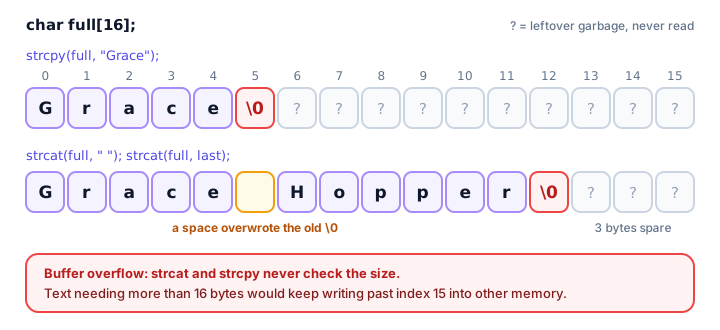
"Grace Hopper" needs 12 characters + 1 terminator = 13 bytes, and full has 16, so it fits. Always do this math before calling strcat. Also make sure dest already holds a valid string (here, strcpy set it up first); strcat on an uninitialized array would hunt for a '\0' in garbage.
strcmp: comparing two strings
strcmp(a, b) compares two strings letter by letter, using each character's numeric code. It returns an int:
- less than 0 if
acomes beforeb, - 0 if they are exactly equal,
- greater than 0 if
acomes afterb.
The exact number varies between systems (it might be -1 or -25), so only ever test its sign:
#include <stdio.h>
#include <string.h>

void describe_result(int result) {
    if (result < 0) {
        printf("negative\n");
    } else if (result > 0) {
        printf("positive\n");
    } else {
        printf("zero\n");
    }
}

int main(void) {
    printf("strcmp(\"apple\", \"banana\"): ");
    describe_result(strcmp("apple", "banana"));

    printf("strcmp(\"banana\", \"apple\"): ");
    describe_result(strcmp("banana", "apple"));

    printf("strcmp(\"apple\", \"apple\"): ");
    describe_result(strcmp("apple", "apple"));

    printf("strcmp(\"Zebra\", \"apple\"): ");
    describe_result(strcmp("Zebra", "apple"));
    return 0;
}
strcmp("apple", "banana"): negative
strcmp("banana", "apple"): positive
strcmp("apple", "apple"): zero
strcmp("Zebra", "apple"): negativeThe last line surprises people. Uppercase letters have smaller codes than lowercase ones ('Z' is 90, 'a' is 97), so "Zebra" sorts before "apple". strcmp is case-sensitive.
💡 Tip
To check whether two strings are equal, write if (strcmp(a, b) == 0). It reads backwards at first ("zero means equal"), but you'll get used to it. Never write if (a == b) for strings.
strchr and strstr: searching inside a string
strchr(s, c) looks for a single character, and strstr(s, word) looks for a whole piece of text. Both return NULL when there's no match. (When there is a match, they return the position as a pointer, which you'll learn about next chapter. For now, just compare with NULL.)
#include <stdio.h>
#include <string.h>

int main(void) {
    char email[] = "sam.lee@example.com";
    char subject[] = "Big summer sale starts today";

    if (strchr(email, '@') != NULL) {
        printf("The email contains an @\n");
    }
    if (strstr(subject, "sale") != NULL) {
        printf("The subject mentions a sale\n");
    }
    if (strstr(subject, "refund") == NULL) {
        printf("No mention of a refund\n");
    }
    return 0;
}
The email contains an @
The subject mentions a sale
No mention of a refundtoupper and tolower: changing letter case
ctype.h gives you toupper(c) and tolower(c), which convert one character. Non-letters come back unchanged. To convert a whole string, loop until '\0':
#include <stdio.h>
#include <ctype.h>

int main(void) {
    char gate[] = "gate b12";
    char user[] = "PixelFox";

    for (size_t i = 0; gate[i] != '\0'; i++) {
        gate[i] = (char)toupper((unsigned char)gate[i]);
    }
    for (size_t i = 0; user[i] != '\0'; i++) {
        user[i] = (char)tolower((unsigned char)user[i]);
    }

    printf("Boarding: %s\n", gate);
    printf("Username: %s\n", user);
    return 0;
}
Boarding: GATE B12
Username: pixelfoxThe (unsigned char) cast keeps the functions safe for characters outside plain English letters. ctype.h also has handy tests such as isdigit, isupper, isalpha and isspace, which return non-zero (true) or 0 (false).
What is a buffer overflow, and how does snprintf help?
A buffer is just an array used to hold data, and a buffer overflow happens when a program writes more bytes than the buffer holds. With strcpy or strcat, the extra bytes land in whatever memory comes next. That's undefined behavior: it can corrupt other variables, crash the program, or, in the worst case, let an attacker take control. Buffer overflows are one of the most famous sources of security bugs in C software.
snprintf from stdio.h works like printf, but writes into an array and never writes more than the size you give it. It always adds the '\0', and it returns how many characters the full text needed, so you can detect when it was cut short:
#include <stdio.h>

int main(void) {
    char badge[10];

    int needed = snprintf(badge, sizeof badge, "%s %s", "Grace", "Hopper");

    printf("Badge: %s\n", badge);
    if (needed >= (int)sizeof badge) {
        printf("Name was cut short (needed %d characters)\n", needed);
    }
    return 0;
}
Badge: Grace Hop
Name was cut short (needed 12 characters)The badge has 10 bytes: 9 characters plus '\0'. Instead of overflowing, snprintf stopped safely. GCC even spots this at compile time and prints warning: ... output truncated, which is exactly the point of this demo. A bonus: one snprintf call can replace a strcpy plus several strcat calls.
C string functions reference table
| Function | Header | What it does |
|---|---|---|
strlen(s) | string.h | Number of characters before '\0' |
strcpy(dest, src) | string.h | Copies src into dest (no size check) |
strncpy(dest, src, n) | string.h | Copies at most n chars; may leave no '\0' |
strcat(dest, src) | string.h | Appends src to dest (no size check) |
strcmp(a, b) | string.h | < 0, 0 or > 0 depending on order |
strncmp(a, b, n) | string.h | Compares only the first n chars |
strchr(s, c) | string.h | Finds a character; NULL if absent |
strstr(s, t) | string.h | Finds text t inside s; NULL if absent |
strcspn(s, set) | string.h | Position of the first char from set |
snprintf(buf, size, fmt, ...) | stdio.h | Formats text into buf, never overflowing |
toupper(c) / tolower(c) | ctype.h | Converts one character's case |
isdigit(c), isalpha(c), isupper(c) | ctype.h | Tests one character |
Real-world example: a password check
A sign-up form checks that a password is at least 8 characters, contains a digit and an uppercase letter, and matches the "confirm password" field:
#include <stdio.h>
#include <string.h>
#include <ctype.h>

int main(void) {
    char password[] = "Garden2024";
    char confirm[] = "garden2024";

    size_t length = strlen(password);
    int has_digit = 0;
    int has_upper = 0;

    for (size_t i = 0; i < length; i++) {
        if (isdigit((unsigned char)password[i])) {
            has_digit = 1;
        }
        if (isupper((unsigned char)password[i])) {
            has_upper = 1;
        }
    }

    printf("Length: %zu\n", length);
    printf("Has a digit: %s\n", has_digit ? "yes" : "no");
    printf("Has an uppercase letter: %s\n", has_upper ? "yes" : "no");

    if (length >= 8 && has_digit && has_upper) {
        printf("Password is strong enough\n");
    }
    if (strcmp(password, confirm) == 0) {
        printf("Passwords match\n");
    } else {
        printf("Passwords do not match\n");
    }
    return 0;
}
Length: 10
Has a digit: yes
Has an uppercase letter: yes
Password is strong enough
Passwords do not matchThe confirmation fails because of a single letter: "G" versus "g". That's strcmp being case-sensitive, which is exactly what you want for passwords.
Common mistakes with C string functions
1. Destination too small
char name[5]; strcpy(name, "Alexander"); writes 10 bytes into a 5-byte array. That's a buffer overflow: the program may crash or quietly corrupt other data. Size the destination for the text plus 1, or use snprintf.
2. Treating strcmp's result as true/false
if (strcmp(a, b)) is true when the strings are different, the opposite of what most beginners expect. Always write == 0 for "equal".
3. Confusing strlen and sizeof
strlen gives the text length (without '\0'); sizeof gives the array's capacity. Allocate space with strlen(s) + 1.
4. Forgetting #include <string.h> or <ctype.h>
Without the header, GCC reports an "implicit declaration of function" error or warning. Include the right header for each function.
5. Calling strcat on an uninitialized array
char out[20]; strcat(out, "Hi"); searches garbage for a '\0'. Start with char out[20] = ""; or a strcpy.
Practice exercise
🏋️ Try it yourself
Build a username from a first and last name: the first letter of the first name followed by the whole last name, all in lowercase. For "Ada" and "Lovelace", print Username: alovelace and its length. Use snprintf and tolower.
Show solution
#include <stdio.h>
#include <string.h>
#include <ctype.h>

int main(void) {
    char first[] = "Ada";
    char last[] = "Lovelace";
    char username[20];

    snprintf(username, sizeof username, "%c%s", first[0], last);

    for (size_t i = 0; username[i] != '\0'; i++) {
        username[i] = (char)tolower((unsigned char)username[i]);
    }

    printf("Username: %s\n", username);
    printf("Length: %zu\n", strlen(username));
    return 0;
}
Username: alovelace
Length: 9%c with first[0] grabs just the initial, and snprintf joins it to the last name in one safe step.
What's next?
You've passed strings into strlen and strcpy without thinking about how a function receives a whole array. Next, learn what really happens in passing arrays to functions in C.
Key takeaways
- Include string.h for strlen, strcpy, strcat, strcmp, strchr and strstr, and ctype.h for toupper, tolower and isdigit.
- strlen counts characters before '\0'; sizeof gives the size of the whole array.
- strcpy and strcat never check the destination size, so it must hold the text plus one byte for '\0'.
- strcmp returns a negative value, 0 or a positive value; test equality with strcmp(a, b) == 0.
- strchr and strstr return NULL when there is no match.
- snprintf never writes past the size you give it and always adds '\0', making it the safest way to build strings.
Frequently asked questions
Which header file contains string functions in C?
string.h contains strlen, strcpy, strcat, strcmp, strchr, strstr and related functions. Character functions such as toupper, tolower and isdigit are in ctype.h, and snprintf is in stdio.h.
What does strcmp return in C?
A negative value if the first string sorts before the second, 0 if they are equal, and a positive value if it sorts after. The exact number varies, so only check whether it is less than, equal to or greater than 0.
What is the difference between strlen and sizeof in C?
strlen counts the characters in a string up to, but not including, the null terminator. sizeof gives the total size of the array in bytes, including unused space.
Why is strcpy considered unsafe?
strcpy does not know the size of the destination array. If the source string is longer, it writes past the end of the array, causing a buffer overflow. Check sizes first or use snprintf.
How do I join two strings in C?
Use strcat(dest, src) when dest is large enough, or more safely snprintf(dest, sizeof dest, "%s%s", a, b), which never writes past the end of dest.