C Syntax Basics
Updated 7 min read Aimerscrew
Every language has grammar. In English, sentences end with a period and names start with a capital letter. C syntax is the grammar of C: the rules that decide whether the compiler understands your code or rejects it. The good news is that C's rules are few and consistent. In this lesson, you'll learn about statements, semicolons, blocks, whitespace, case sensitivity, keywords and the rules for naming things.
🌍 Real-life example
Think of a recipe card. Each instruction ("Preheat the oven", "Mix the flour") is a separate step, and the steps for the sauce are grouped under a heading. In C, each instruction is a statement ending in a semicolon, and related statements are grouped into a block inside curly braces. The compiler is a very strict cook: it follows the card exactly, and a missing period confuses it completely.
What is C syntax?
C syntax is the set of rules for how C code must be written: where semicolons go, how braces pair up, which words are reserved and how names are formed. Code that breaks these rules causes a syntax error, and the compiler refuses to build the program until you fix it.
Here's a small program that uses every rule in this lesson:
#include <stdio.h>

int main(void) {
    printf("Thermostat on\n");
    printf("Target: 21 degrees\n");
    return 0;
}
Thermostat on
Target: 21 degreesStatements and semicolons
A statement is one complete instruction, like "print this" or "return 0". In C, every statement ends with a semicolon ;. The semicolon is how the compiler knows where one instruction stops and the next begins; it doesn't look at line breaks at all.
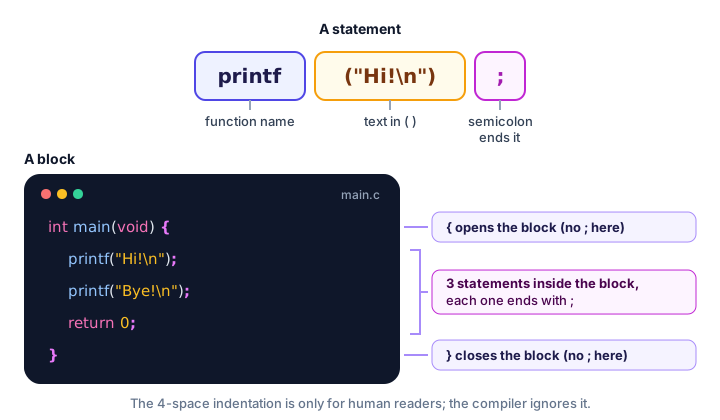
Not every line needs a semicolon. Lines that start with # (like #include) are instructions for the preprocessor, not statements, and lines that open or close a block with { or } don't take one either.
Blocks and curly braces
A block is a group of statements wrapped in curly braces { }. The body of main is a block. Later, you'll use blocks to group the statements inside if conditions and loops. A block can even contain another block:
#include <stdio.h>

int main(void) {
    printf("Outside the inner block\n");
    {
        printf("Inside the inner block\n");
    }
    printf("Outside again\n");
    return 0;
}
Outside the inner block
Inside the inner block
Outside againThe inner block doesn't change what is printed here, but blocks matter a lot once you learn about if-else and variable scope. The key rule: every { must have a matching }.
Does whitespace matter in C?
Mostly, no. Whitespace means spaces, tabs and line breaks, and the compiler ignores the extra ones. Indentation in C is purely for humans (unlike Python, where it's part of the grammar). This program is ugly, but it's valid C:
#include <stdio.h>
int main(void){printf("Cramped but valid\n");return 0;}
Cramped but validAnd so is this very spread-out version:
#include <stdio.h>

int    main  (  void  )
{
    printf(  "Spacious but valid\n"  )  ;

    return    0 ;
}
Spacious but validThere are three exceptions. Spaces inside quotes are printed exactly as typed. You can't put a space inside a name or keyword (ret urn is not return). And each #include must be on its own line.
💡 Tip
Indent the inside of every block by 4 spaces, as in this tutorial. Your editor can do it for you: in VS Code, right-click and choose Format Document. Consistent indentation makes missing braces easy to spot.
Is C case-sensitive?
Yes. C treats uppercase and lowercase letters as completely different. printf works, but Printf and PRINTF are unknown names. All of C's keywords are lowercase, and so is main.
The same applies to your own names. In the next program, score and Score are two separate variables. (You'll learn about variables properly in C Variables; for now, int score = 90; stores the whole number 90 under the name score, and %d prints it.)
#include <stdio.h>

int main(void) {
    int score = 90;
    int Score = 75;
    printf("score = %d\n", score);
    printf("Score = %d\n", Score);
    return 0;
}
score = 90
Score = 75It works, but don't do this in real code: names that differ only by capital letters are very easy to mix up.
What are keywords in C?
Keywords are words that have a fixed meaning in C, so you can't use them as names. C17 has 44 keywords (C23 adds a few more, such as true, false and bool). Here are the ones you'll use most, grouped by job:
| Purpose | Keywords |
|---|---|
| Data types | int, char, float, double, void, short, long, unsigned, signed |
| Decisions | if, else, switch, case, default |
| Loops | for, while, do, break, continue |
| Functions | return |
| Building your own types | struct, union, enum, typedef |
| Other | const, sizeof, static, extern |
You'll meet each of these in later chapters. You don't need to memorize the list; your editor colors keywords so you can spot them.
Rules for identifiers (names) in C
An identifier is a name you choose for something, such as a variable or a function. C identifiers must follow these rules:
- Use only letters (
a–z,A–Z), digits (0–9) and underscores (_). - Don't start with a digit.
- No spaces, hyphens or other symbols.
- Don't use a keyword such as
intorreturn. - Avoid names that start with an underscore followed by a capital letter (like
_Total) or with two underscores; C reserves those for itself.
| Name | Valid? | Why |
|---|---|---|
cart_total | ✅ Yes | Letters and an underscore |
player2 | ✅ Yes | Digits are fine after the first character |
2player | ❌ No | Starts with a digit |
cart-total | ❌ No | A hyphen is the minus sign |
flight seat | ❌ No | Contains a space |
return | ❌ No | It's a keyword |
Most C programmers write names in snake_case: lowercase words joined by underscores, like seats_left.
The structure of a C program
Put everything together and almost every C program you write in this tutorial has the same skeleton:
#include <stdio.h>      /* 1. preprocessor lines */

int main(void) {        /* 2. main function starts the block */
    /* 3. your statements go here, each ending in ; */
    return 0;           /* 4. report success */
}                       /* 5. close the block */
The text between /* and */ is a comment, ignored by the compiler; you'll learn more in the next lesson. Start every new program from this skeleton and fill in step 3.
Common C syntax mistakes
1. A missing semicolon
printf("Ready\n")
printf("Go\n");
GCC says something like error: expected ';' before 'printf'. The error points at the next line, because that's where the compiler realized the statement never ended.
2. A missing closing brace
int main(void) {
    printf("Hello\n");
    return 0;
GCC reports error: expected declaration or statement at end of input: it reached the end of the file still waiting for }. Consistent indentation makes this easy to see.
3. A semicolon after main(void)
int main(void); {
    return 0;
}
Semicolons end statements, not the line that opens a block. This gives an error such as expected identifier or '(' before '{' token. Remove the semicolon before {.
4. Capital letters in keywords
Return 0; or Int main(void) fail, because C keywords are all lowercase.
Practice exercise
🏋️ Try it yourself
This program for a parking lot sign has four syntax mistakes. Find and fix them all, then compile and run it.
#include <stdio.h>

Int main(void) {
    Printf("Parking lot B\n");
    printf("12 spaces free\n")
    return 0;
Show solution
#include <stdio.h>

int main(void) {
    printf("Parking lot B\n");
    printf("12 spaces free\n");
    return 0;
}
Parking lot B
12 spaces freeThe fixes: Int becomes int, Printf becomes printf, a semicolon is added after the second printf, and the missing closing brace } is added at the end.
What's next?
You know the grammar of C. Next, learn how to leave notes for yourself and other programmers in Comments in C.
Key takeaways
- C syntax is the set of grammar rules the compiler checks before building your program.
- Every statement ends with a semicolon; # lines and lines that open or close a block do not.
- Curly braces { } group statements into a block, and every { needs a matching }.
- Extra whitespace and indentation are ignored by the compiler; they are there for humans.
- C is case-sensitive: printf works, Printf does not, and score and Score are different names.
- Keywords such as int, if, for and return are reserved and cannot be used as names.
- Identifiers use letters, digits and underscores, and cannot start with a digit.
Frequently asked questions
Why does C need semicolons?
C ignores line breaks, so the semicolon is the only way the compiler knows where one statement ends and the next begins. A missing semicolon is the most common syntax error in C.
Is indentation required in C?
No. Unlike Python, C uses curly braces to group code and ignores indentation. You should still indent the inside of every block, because it makes code much easier to read.
Is C case-sensitive?
Yes. C treats uppercase and lowercase letters as different, so main, Main and MAIN are three different names. All C keywords are lowercase.
How many keywords are there in C?
C89 has 32 keywords, and C11 and C17 have 44. C23 adds a few more, such as bool, true, false and nullptr.
Can a variable name start with a number in C?
No. An identifier must start with a letter or an underscore. Digits are allowed after the first character, so player2 is valid but 2player is not.