C Assignment Operators
Updated 6 min read Aimerscrew
A program that never changes its variables can't do much. Bank balances go up and down, scores grow, timers count. C assignment operators are how you store and update those values. In this lesson, you'll learn the basic = operator, the handy shortcuts +=, -=, *=, /= and %=, and a few traps to avoid.
🌍 Real-life example
Your banking app never says "your balance is now 500 + 200 - 150". It just shows one number that keeps changing: deposit, and it goes up; pay a bill, and it goes down. Each update takes the current balance, does a bit of math, and saves the new result. That is exactly what balance += 200 and balance -= 150 do in C.
What is the assignment operator in C?
The assignment operator = stores the value on its right into the variable on its left. The old value is thrown away.
#include <stdio.h>

int main(void) {
    int score;

    score = 10;
    printf("Score: %d\n", score);

    score = 25;
    printf("Score: %d\n", score);

    return 0;
}
Score: 10
Score: 25Read score = 10 as "score gets 10". The left side must be something that can hold a value, like a variable. The right side can be any expression: a number, another variable, or a whole calculation such as price * quantity.
📝 Note
int score = 10; (giving a value while declaring) is called initialization. score = 10; on a variable that already exists is assignment. Both use the = sign and both store a value.
Updating a variable using its own value
Often the new value depends on the old one. The right side is always calculated first, using the current value, and only then is the result stored:
int likes = 120;
likes = likes + 1;   /* read 120, add 1, store 121 */
This pattern is so common that C has a shorter way to write it.
What are compound assignment operators?
A compound assignment operator combines an arithmetic operator with =. Instead of repeating the variable name, you write the operator right before the equals sign:
| Operator | Example | Same as | Result if x is 10 |
|---|---|---|---|
= | x = 3 | x = 3 | 3 |
+= | x += 3 | x = x + 3 | 13 |
-= | x -= 3 | x = x - 3 | 7 |
*= | x *= 3 | x = x * 3 | 30 |
/= | x /= 3 | x = x / 3 | 3 |
%= | x %= 3 | x = x % 3 | 1 |
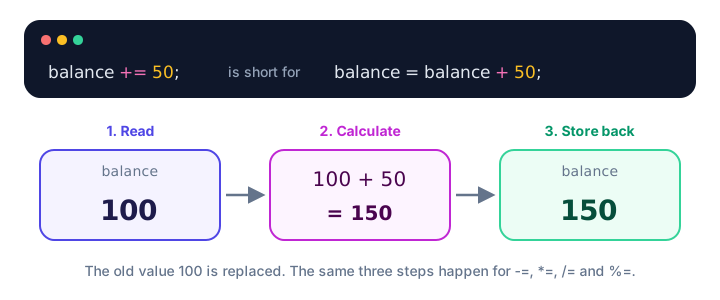
Using += and -= (a bank balance)
#include <stdio.h>

int main(void) {
    int balance = 500;

    balance += 200;     /* deposit a paycheck */
    printf("After deposit:    %d\n", balance);

    balance -= 150;     /* pay the electricity bill */
    printf("After withdrawal: %d\n", balance);

    return 0;
}
After deposit: 700
After withdrawal: 550+= is also the standard way to build a running total, such as adding each item's price to a cart total.
Using *=, /= and %= (a game score and a timer)
#include <stdio.h>

int main(void) {
    int score = 40;

    score *= 3;     /* triple-points power-up */
    printf("Power-up:  %d\n", score);

    score /= 2;     /* penalty: lose half your points */
    printf("Penalty:   %d\n", score);

    int seconds = 200;
    seconds %= 60;  /* seconds past the last full minute */
    printf("Seconds:   %d\n", seconds);

    return 0;
}
Power-up: 120
Penalty: 60
Seconds: 20200 seconds is 3 full minutes and 20 seconds, so seconds %= 60 leaves 20.
/= follows the same division rules
Compound operators behave exactly like their long forms, including integer division:
#include <stdio.h>

int main(void) {
    int pages = 7;
    pages /= 2;

    double distance = 7.0;
    distance /= 2;

    printf("pages = %d\n", pages);
    printf("distance = %.1f\n", distance);

    return 0;
}
pages = 3
distance = 3.5The right side is calculated first
With a compound operator, the whole right side is worked out before the operator is applied. x *= 2 + 3 means x = x * (2 + 3), not x = x * 2 + 3.
#include <stdio.h>

int main(void) {
    int price = 4;
    price *= 2 + 3;

    printf("%d\n", price);

    return 0;
}20Chained assignment: one value, many variables
You can assign the same value to several variables in one statement. Assignment works from right to left: draws = 0 happens first, its value (0) goes to losses, then to wins.
#include <stdio.h>

int main(void) {
    int wins, losses, draws;

    wins = losses = draws = 0;
    losses += 2;

    printf("W %d  L %d  D %d\n", wins, losses, draws);

    return 0;
}
W 0 L 2 D 0This works because in C an assignment is itself an expression with a value: the value that was stored. You'll see how this "right to left" rule fits with other operators in the operator precedence lesson.
💡 Tip
C also has compound versions of the bitwise operators: &=, |=, ^=, <<= and >>=. They work the same way, and you'll use them in the bitwise operators lesson.
Why use compound assignment?
- Shorter and clearer:
player_one_total_score += 10is easier to read than repeating that long name. - Fewer typos: you can't accidentally write
score = scroe + 10when the name appears only once. - Shows intent:
+=tells the reader "this updates the value", not "this replaces it".
Common mistakes with assignment operators
1. Writing =+ instead of +=
#include <stdio.h>

int main(void) {
    int total = 10;
    total =+ 5;

    printf("%d\n", total);

    return 0;
}5C reads total =+ 5 as total = +5: a plain assignment of positive 5. The program compiles without complaint and silently loses the 10. The operator symbol always comes before the equals sign.
2. Updating a variable that has no starting value
int sum;
sum += 10;   /* sum had no value yet */
sum was never initialized, so it holds a leftover garbage value from memory, and adding 10 to garbage gives garbage. This is undefined behavior. Always start totals at a known value: int sum = 0;.
3. Putting a value on the left side
10 = count; /* error */GCC reports error: lvalue required as left operand of assignment. An lvalue is something that has a place in memory, like a variable. A plain number has nowhere to store anything.
4. Using = when you mean ==
= stores a value; == compares two values. Mixing them up is one of the most famous bugs in C. You'll learn all about it in the next lesson.
Practice exercise
🏋️ Try it yourself
A piggy bank starts empty. Store money as cents in an int. Add 250 cents three times using +=, then spend 120 cents using -=. Print the result in dollars and cents, like Savings: $6.30.
Show solution
#include <stdio.h>

int main(void) {
    int savings = 0;

    savings += 250;
    savings += 250;
    savings += 250;
    savings -= 120;

    printf("Savings: $%d.%02d\n", savings / 100, savings % 100);

    return 0;
}
Savings: $6.30750 - 120 = 630 cents. 630 / 100 is 6 dollars and 630 % 100 is 30 cents; %02d pads it to two digits.
What's next?
You can store and update values. Next, learn how to compare them with ==, <, > and friends in C comparison operators.
Key takeaways
- The = operator stores the value on its right into the variable on its left, replacing the old value.
- Compound operators +=, -=, *=, /= and %= update a variable using its current value: x += 3 means x = x + 3.
- The whole right side is calculated first, so x *= 2 + 3 means x = x * (2 + 3).
- /= with integers still drops the decimal part, just like /.
- Chained assignment such as a = b = c = 0 works right to left.
- Watch out for =+ (which assigns a positive number) and for updating variables that were never initialized.
Frequently asked questions
What does += mean in C?
x += y adds y to x and stores the result back in x. It is a shorter way to write x = x + y and is often used for running totals.
What is the difference between = and += in C?
The = operator replaces the old value with a new one. The += operator adds to the old value, so the previous value is kept as part of the result.
Can you assign the same value to multiple variables in C?
Yes. Write a = b = c = 0; assignment works from right to left, and each assignment passes the stored value on to the next variable.
Why does x =+ 5 not add 5 in C?
C reads it as x = +5, which assigns positive 5 to x. The compound operator must be written with the symbol first: x += 5.
What does lvalue required as left operand of assignment mean?
The left side of = is not something that can store a value, such as a number or a calculation. Put a variable on the left side instead.