Comments in C
Updated 7 min read Aimerscrew
Code tells the computer what to do. Comments tell people why. C comments are notes you write inside your code that the compiler completely ignores. They help you remember your own thinking weeks later, and they help teammates understand your code. In this lesson, you'll learn both kinds of comments in C, how to temporarily switch off code, a trap that catches many beginners, and what makes a comment genuinely useful.
🌍 Real-life example
Imagine sticky notes on a shared office fridge: "Oat milk is for the Friday meeting, please don't open." The fridge doesn't care about the note, but the people using it do. Comments are sticky notes on your code: the compiler skips them, and every human reader is grateful for them.
What is a comment in C?
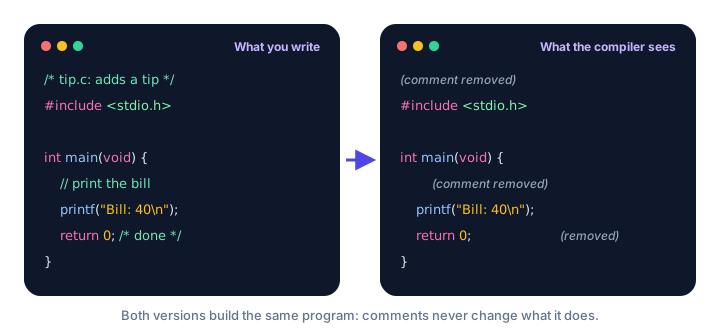
A comment is text in a C source file that the compiler ignores. During the preprocessing stage you met in How C Programs Are Compiled, every comment is replaced by a single space, so comments never reach the compiler proper and never make your program bigger or slower.
C has two styles of comments:
| Style | Starts with | Ends at | Best for |
|---|---|---|---|
| Single-line | // | The end of the line | Short notes |
| Multi-line | /* | */ | Longer explanations and file headers |
Single-line comments with //
Two forward slashes // start a comment that runs to the end of the line. You can put one on its own line or after a statement:
#include <stdio.h>

int main(void) {
    // Show the current room temperature
    printf("Room: 19 C\n");
    printf("Target: 22 C\n"); // the user turned the heat up
    return 0;
}
Room: 19 C
Target: 22 CNeither comment appears in the output. The code before // on the same line still runs normally.
📝 Note
// comments were officially added to C in the C99 standard (they were borrowed from C++). Every modern compiler supports them. You'd only have trouble if you forced the ancient C89 mode with strict settings, which you won't need to do.
Multi-line comments with /* */
A comment that starts with /* continues, across as many lines as you like, until the first */:
#include <stdio.h>

/* This program prints a short
   playlist summary for the
   home screen of a music app. */
int main(void) {
    printf("Playlist: Morning Run\n");
    printf("Tracks: 12\n");
    return 0;
}
Playlist: Morning Run
Tracks: 12Because a /* */ comment has a clear end, you can also put one in the middle of a line, such as return 0; /* success */.
Can you nest comments in C?
No. A /* */ comment always ends at the first */, even if there's another /* inside it. This is one of the classic C traps:
/* Turned off for now:
   printf("Total\n"); /* old total line */
*/
The comment ends right after old total line. The last line, */, is then treated as code, and GCC reports an error such as expected ... before '/' token. With -Wall, GCC also warns "/*" within comment, which is a big hint. Single-line // comments inside a /* */ comment are fine, though, because they're simply part of the comment text.
How to comment out code
"Commenting out" means turning a line of code into a comment so it doesn't run, without deleting it. It's handy when you're testing or hunting for a bug:
#include <stdio.h>

int main(void) {
    printf("Track 1: Sunrise Drive\n");
    // printf("Track 2: Rainy Window\n");
    printf("Track 3: City Lights\n");
    return 0;
}
Track 1: Sunrise Drive
Track 3: City LightsTrack 2 is skipped because its whole line is now a comment. Remove the // to bring it back.
💡 Tip
Most editors have a shortcut that comments or uncomments the selected lines. In VS Code it's Ctrl + / on Windows and Linux, or Cmd + / on macOS. It adds // to every line, which avoids the nesting problem entirely.
Slashes inside quotes are not comments
Comment markers only count in code, not inside text in double quotes. That's lucky, because web addresses contain //:
#include <stdio.h>

int main(void) {
    printf("Website: https://example.com\n");
    printf("/* this is printed too */\n");
    return 0;
}
Website: https://example.com
/* this is printed too */How to write a file header comment
Many teams start every C file with a header comment that says what the file is for. A common style lines up a * at the start of each line:
/*
 * File:    parking.c
 * Purpose: Shows how many spaces are free on each level.
 * Author:  Sam Lee
 * Date:    2026-10-26
 */
#include <stdio.h>

int main(void) {
    printf("Level 1: 14 free\n");
    printf("Level 2: 3 free\n");
    return 0;
}
Level 1: 14 free
Level 2: 3 freeThe extra stars are just decoration inside one big /* */ comment. They make the block easy to spot when scrolling.
What makes a good comment?
A good comment explains something the code can't say by itself: the reason behind a choice, a warning, or a unit of measurement. A bad comment repeats the code word for word.
/* Bad: just repeats the code */
printf("Seats: 180\n"); // print seats

/* Good: explains what the code alone can't */
printf("Seats: 180\n"); // the Airbus A320 layout this airline uses| Good comments | Bad comments |
|---|---|
| Explain why | Repeat what the code already says |
| Mention units, limits and surprises ("prices are in cents") | Describe obvious lines ("return zero") |
| Are updated when the code changes | Are out of date and now wrong |
| Are short and clear | Are long stories or old code nobody needs |
While you're learning, it's fine to write extra comments that explain each new idea to yourself. As you get more experienced, let clear names and simple code do most of the talking.
Common mistakes with C comments
1. Forgetting to close a /* comment
If you write /* and never write */, the rest of the file becomes one giant comment. GCC reports error: unterminated comment, plus other errors because your code has "disappeared". Many editors show the swallowed code in comment color, which is a quick way to spot it.
2. Nesting /* */ comments
As shown above, the first */ ends the comment. Use // on each line (or your editor's shortcut) when you need to comment out code that already contains comments.
3. Using # for comments, like in Python
# Print the welcome message
printf("Welcome!\n");
In C, # starts a preprocessor directive, not a comment. GCC replies with error: invalid preprocessing directive #Print. Use // instead.
4. Leaving comments that lie
A comment saying // 10% discount above code that now gives 15% is worse than no comment at all. When you change code, update its comments too.
Practice exercise
🏋️ Try it yourself
Take the program below and (1) add a header comment with the file name scores.c and a one-line purpose, (2) add a // comment explaining that the high score resets every Monday, and (3) comment out the line that prints Debug: loaded so it no longer appears.
#include <stdio.h>

int main(void) {
    printf("Debug: loaded\n");
    printf("Player: Nova\n");
    printf("High score: 4200\n");
    return 0;
}
Debug: loaded
Player: Nova
High score: 4200Show solution
/*
 * File:    scores.c
 * Purpose: Shows the current player and the weekly high score.
 */
#include <stdio.h>

int main(void) {
    // printf("Debug: loaded\n");
    printf("Player: Nova\n");
    // The high score resets every Monday
    printf("High score: 4200\n");
    return 0;
}
Player: Nova
High score: 4200What's next?
That completes the Getting Started chapter. You can write, compile, structure and comment a C program. Next, start storing data with C Variables.
Key takeaways
- Comments are notes for humans; the preprocessor removes them before compiling, so they never affect the program.
- A single-line comment starts with // and runs to the end of the line (standard since C99).
- A multi-line comment starts with /* and ends at the first */.
- /* */ comments cannot be nested: the first */ always ends the comment.
- Commenting out a line with // is an easy way to switch code off without deleting it.
- Comment markers inside double quotes are ordinary text, so "https://..." is printed normally.
- Good comments explain why; they do not repeat what the code already says.
Frequently asked questions
How do you write a comment in C?
Use // for a comment that runs to the end of the line, or /* and */ around a comment that can span several lines. The compiler ignores both.
Can you nest comments in C?
No. A /* comment ends at the first */ it meets, so a second /* inside it has no effect and the leftover */ causes an error. You can, however, use // inside a /* */ comment.
Do comments slow down a C program?
No. Comments are removed during preprocessing, before the code is compiled, so they have no effect on the size or speed of the final program.
Are // comments allowed in C?
Yes. Single-line // comments became part of standard C in C99, and every modern compiler supports them by default.
What is the shortcut to comment out code in VS Code?
Select the lines and press Ctrl + / on Windows and Linux, or Cmd + / on macOS. Press it again to uncomment them.