C while Loop
Updated 7 min read Aimerscrew
Some jobs repeat until something changes, not a fixed number of times. You keep saving until you reach your goal; a phone keeps running until the battery gets low. The C while loop is built for exactly this: it repeats a block of code while a condition stays true. In this lesson, you'll learn how a while loop works, how to write counter loops, how to keep asking for input until it's valid, and how to recognize (and stop) an infinite loop.
🌍 Real-life example
Imagine a savings jar. Every week you drop in $45, and before each deposit you ask yourself one question: "Have I reached $300 yet?" As long as the answer is no, you keep going. The moment it's yes, you stop. You never decided "I'll do this 7 times"; the condition decided for you. That's a while loop.
What is a while loop in C?
A while loop repeats a statement or block of code as long as a condition is true (non-zero). Its shape is simple:
while (condition) {
    // loop body: runs again and again while condition is true
}
Here's a complete program: a rocket countdown.
#include <stdio.h>

int main(void) {
    int seconds = 5;

    while (seconds > 0) {
        printf("%d...\n", seconds);
        seconds--;
    }

    printf("Liftoff!\n");
    return 0;
}
5...
4...
3...
2...
1...
Liftoff!Each run of the body is called an iteration. The line seconds--; uses the decrement operator to subtract 1. Without it, seconds would stay 5 forever and the loop would never end.
How does a while loop work step by step?
A while loop always follows the same cycle:
- Check the condition.
- If it's true, run the body, then go back to step 1.
- If it's false, skip the body and continue with the code after the loop.
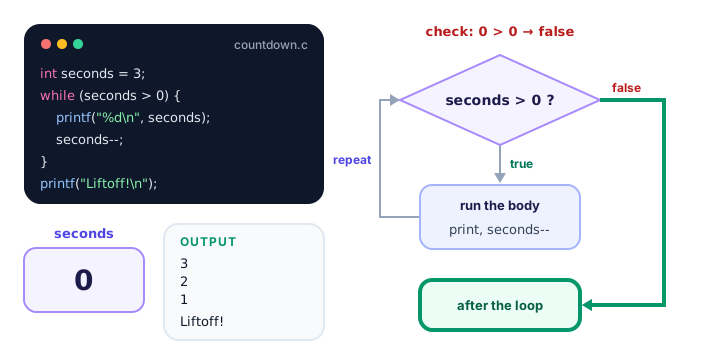
Because the check happens before the body, a while loop is called an entry-controlled loop (or a pre-test loop).
What happens if the condition is false at the start?
Then the body runs zero times. Picture a shop selling items while there's stock left, but the shelf is already empty:
#include <stdio.h>

int main(void) {
    int stock = 0;

    while (stock > 0) {
        printf("Selling one item...\n");
        stock--;
    }

    printf("Loop finished. Stock: %d\n", stock);
    return 0;
}
Loop finished. Stock: 0This is usually what you want: if there's nothing to do, do nothing. (If you need the body to run at least once, use the do-while loop from the next lesson.)
Writing a counter loop with while
A counter is a variable that counts how many times something happened. Here's the savings jar from the start of the lesson. We don't know how many weeks it will take, so the loop counts them for us.
#include <stdio.h>

int main(void) {
    double savings = 0.0;
    double weekly_deposit = 45.0;
    double goal = 300.0;
    int weeks = 0;

    while (savings < goal) {
        savings += weekly_deposit;
        weeks++;
    }

    printf("Goal reached after %d weeks.\n", weeks);
    printf("Saved: $%.2f\n", savings);
    return 0;
}
Goal reached after 7 weeks.
Saved: $315.00After 6 weeks you have $270, which is still less than $300, so the loop runs a 7th time and you end at $315. Every while loop needs these three parts working together:
- Setup before the loop (
savings = 0.0,weeks = 0). - A condition that will eventually become false (
savings < goal). - An update inside the body that moves toward that moment (
savings += weekly_deposit).
Loops that stop on a condition, not a count
A while loop shines when the number of repetitions depends on the data. A phone loses 15% of its battery every 30 minutes, and warns you once it drops to 20% or below:
#include <stdio.h>

int main(void) {
    int battery = 100;
    int minutes = 0;

    while (battery > 20) {
        battery -= 15;
        minutes += 30;
        printf("After %d minutes: %d%%\n", minutes, battery);
    }

    printf("Low battery! Plug in your phone.\n");
    return 0;
}
After 30 minutes: 85%
After 60 minutes: 70%
After 90 minutes: 55%
After 120 minutes: 40%
After 150 minutes: 25%
After 180 minutes: 10%
Low battery! Plug in your phone.In printf, %% prints a single percent sign. Notice that the battery was 25% when the condition was last checked, which is still above 20, so one more drain happened.
Another classic: counting the digits of a number by chopping off its last digit with integer division until nothing is left.
#include <stdio.h>

int main(void) {
    int zip = 90210;
    int remaining = zip;
    int digits = 0;

    while (remaining > 0) {
        remaining = remaining / 10;
        digits++;
    }

    printf("%d has %d digits.\n", zip, digits);
    return 0;
}
90210 has 5 digits.remaining goes 90210 → 9021 → 902 → 90 → 9 → 0: five divisions, five digits.
How do you validate user input with a while loop?
Users make typos. A while loop can keep asking until the answer makes sense:
#include <stdio.h>

int main(void) {
    int age = 0;

    printf("Enter your age (1-120): ");
    scanf("%d", &age);

    while (age < 1 || age > 120) {
        printf("Invalid age. Try again (1-120): ");
        scanf("%d", &age);
    }

    printf("Thanks! You are %d years old.\n", age);
    return 0;
}
In this run, the user typed 0, then 150, then 34:
Enter your age (1-120): 0
Invalid age. Try again (1-120): 150
Invalid age. Try again (1-120): 34
Thanks! You are 34 years old.
The condition uses the logical OR operator: the age is invalid if it's too small or too large.
📝 Note
If the user types letters instead of a number, scanf fails and leaves those letters waiting in the input, so this simple version would ask forever. Real programs also check what scanf returns. For now, just type numbers when testing. (You met scanf in C user input.)
What is an infinite loop?
An infinite loop is a loop whose condition never becomes false. Sometimes it's a bug; sometimes it's on purpose. Programs like games, servers and thermostats run "forever" until something tells them to stop:
while (1) {
    // read the temperature
    // turn the heating on or off
}
In C, any non-zero value counts as true, so while (1) never stops by itself. In the break and continue lesson you'll learn how to exit such a loop from the inside.
💡 Tip
If your program gets stuck in an infinite loop, press Ctrl+C in the terminal. It stops the running program immediately, on Windows, macOS and Linux alike.
while vs for: which loop should you use?
Anything a for loop does, a while loop can do too. These two fragments print 1, 2 and 3:
for (int i = 1; i <= 3; i++) {
    printf("%d\n", i);
}

int i = 1;
while (i <= 3) {
    printf("%d\n", i);
    i++;
}
The for loop puts setup, condition and update on one line; the while loop spreads them out. Choose the one that reads best:
for loop | while loop | |
|---|---|---|
| Best when | You know how many times to repeat | You repeat until something happens |
| Setup, check, update | All in the loop header | Setup before, update inside the body |
| Typical use | Counting 1 to 10, going through items | Waiting for valid input, reaching a goal |
| Condition checked | Before each iteration | Before each iteration |
| Can run zero times? | Yes | Yes |
Common mistakes with while loops
1. Forgetting the update
int count = 1;
while (count <= 5) {
    printf("%d\n", count);
}
count never changes, so this prints 1 forever. Always make sure something in the body moves the condition toward false.
2. A semicolon right after the condition
int count = 1;
while (count <= 5);
{
    printf("%d\n", count);
    count++;
}
The lone ; is an empty loop body. The loop repeats "nothing" forever, and the block below it never gets a chance to run. The program just hangs. Never put a semicolon after while (...) when a body follows.
3. Using = instead of ==
while (answer = 1) assigns 1 to answer every time, and 1 is true, so the loop never ends. To compare, use ==. GCC warns about this with -Wall ("suggest parentheses around assignment used as truth value").
4. Off-by-one conditions
while (i < 10) stops before 10; while (i <= 10) includes it. When a loop runs one time too many or too few, check the comparison operator first.
Practice exercise
🏋️ Try it yourself
A new video gets 100 views on day 1, and its views double every day after that. Write a while loop that finds the first day on which the video has more than 10,000 views, then prints the day and the view count, like Day 8: 12800 views.
Show solution
#include <stdio.h>

int main(void) {
    int views = 100;
    int day = 1;

    while (views <= 10000) {
        views *= 2;
        day++;
    }

    printf("Day %d: %d views\n", day, views);
    return 0;
}
Day 8: 12800 viewsThe views go 100, 200, 400, 800, 1600, 3200, 6400, 12800. Day 7 has 6400 (not enough), so the loop runs once more and stops on day 8.
What's next?
A while loop may skip its body entirely. When you need the body to run at least once, like showing a menu before asking for a choice, use the C do-while loop.
Key takeaways
- A while loop repeats its body as long as the condition is true (non-zero).
- The condition is checked before every iteration, so the body can run zero times.
- Every while loop needs setup before it, a condition, and an update inside the body that eventually makes the condition false.
- Use while when the number of repetitions depends on data or user input; use for when you know the count.
- while (1) creates an intentional infinite loop; press Ctrl+C to stop a program stuck in one.
- Never put a semicolon right after while (condition) when a body follows.
Frequently asked questions
What is a while loop in C?
A while loop repeats a block of code as long as its condition is true. C checks the condition before every iteration and stops looping as soon as it becomes false (zero).
Can a while loop run zero times?
Yes. Because the condition is checked first, a while loop whose condition is false at the start skips its body completely. Use a do-while loop if the body must run at least once.
How do I stop an infinite loop in C?
Press Ctrl+C in the terminal to stop the running program. To fix the bug, make sure the loop body changes a variable in the condition so that the condition eventually becomes false.
What is the difference between while and for loops in C?
They can do the same work. A for loop keeps the setup, condition and update in one header, which suits counting a known number of times. A while loop suits repeating until something happens, such as valid input or reaching a goal.
What does while (1) mean in C?
In C, any non-zero value is true, so while (1) is a loop whose condition is always true. It runs forever unless the body exits it, for example with break.