Pointers in C
Updated 8 min read Aimerscrew
Pointers in C have a scary reputation, but the idea behind them is simple: a pointer is a variable that holds the address of another variable. In this lesson, you'll learn what a memory address is, how to create pointers in C with & and *, and how to read and change a value from a distance. We'll go slowly, with pictures, so every step makes sense.
🌍 Real-life example
Imagine a friend's house and a sticky note with the house's address written on it. The sticky note is not the house; it's tiny, and you can copy it, pass it around or throw it away. But if you follow the address on the note, you arrive at the real house, and you can paint the front door. A pointer is that sticky note. The variable it points to is the house.
A hotel key card works the same way. The card is not your room, but it "knows" which room is yours. Anyone holding the card can walk into room 214 and rearrange the furniture.
What is a memory address?
Your computer's memory is like a very long street of numbered boxes, one box per byte. Every box has a number called its address. When you declare a variable such as int score = 42;, C reserves a few boxes for it (usually 4 for an int, as you saw in the sizeof lesson) and stores 42 there.
So every variable has two things:
- a value: what is inside the box (42)
- an address: where the box is in memory (for example,
0x1000)
Addresses are usually written in hexadecimal (base 16), which is why they start with 0x.
The address-of operator (&)
Put & in front of a variable to get its address. You print an address with the %p format specifier, and you should convert it to (void *) first, which is the "generic address" type that %p expects.
#include <stdio.h>

int main(void) {
    int score = 42;

    printf("value:   %d\n", score);
    printf("address: %p\n", (void *)&score);
    return 0;
}
The first line always prints value: 42. The second line is different on every computer, and often on every run. On a 64-bit Linux system it might look like address: 0x7ffd3b2c9a4c. Your address will differ, and that's fine: the operating system decides where your variables live.
You've actually used & before: scanf("%d", &age) in the user input lesson passes the address of age so scanf() knows where to store the number.
What is a pointer in C?
A pointer is a variable whose value is a memory address. You declare one by writing the type it points to, then a star, then a name:
int *p;        /* p can hold the address of an int    */
double *price; /* price can hold the address of a double */
char *letter;  /* letter can hold the address of a char  */
Read int *p from right to left: "p is a pointer to an int". Then store an address in it with &:
int age = 30;
int *p = &age;   /* p now holds the address of age */
We say "p points to age". On most 64-bit systems a pointer takes 8 bytes, no matter what type it points to, because every address has the same size.
Dereferencing: using * to reach the value
Following the address to the real variable is called dereferencing. You do it by putting * in front of the pointer. *p means "the thing p points to". You can read it and you can write to it:
#include <stdio.h>

int main(void) {
    int age = 30;
    int *p = &age;

    printf("age  = %d\n", age);
    printf("*p   = %d\n", *p);

    *p = 31;   /* follow the address and change the value there */
    printf("age is now %d\n", age);
    return 0;
}
age = 30
*p = 30
age is now 31We never wrote age = 31, yet age changed. That's because *p and age are the same box in memory. Writing through the pointer is like walking to the house on the sticky note and painting the door.
Here's a picture of what happens in memory, step by step. The addresses are made-up examples to keep things readable.
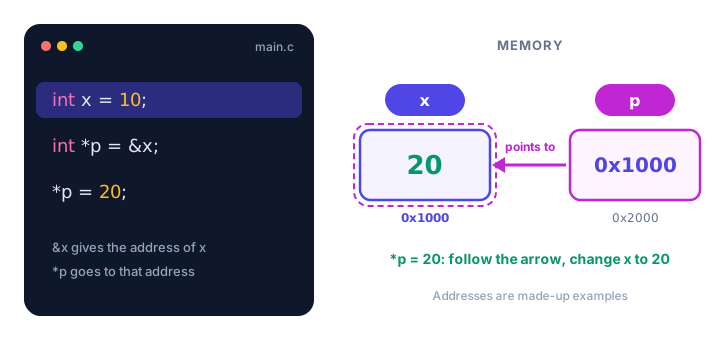
Notice that p is a variable too. It has its own box and its own address (0x2000 in the picture). The value stored in p's box is simply a number: the address of x.
The two jobs of the * symbol
The star confuses almost every beginner because it does two different jobs depending on where it appears:
| Where you see it | Example | Meaning |
|---|---|---|
| In a declaration | int *p; | "p is a pointer to an int" |
| In an expression | *p = 20; | "go to the address in p" (dereference) |
| Between two values | a * b | plain multiplication |
And here is a quick summary of the three things you can write with a pointer:
| Expression | What it gives you | Sticky-note version |
|---|---|---|
&x | the address of x | write the house's address on a note |
p | the address stored in p | read the note |
*p | the value at that address | go to the house |
Pointing at a different variable
A pointer is a variable, so you can change which address it holds. Think of a laser pointer in a meeting: the same pointer can highlight one slide, then another.
#include <stdio.h>

int main(void) {
    int alice = 120;
    int bob = 95;
    int *leader = &alice;

    printf("Leader score: %d\n", *leader);

    leader = &bob;      /* now point at bob instead */
    printf("Leader score: %d\n", *leader);

    *leader += 10;      /* bonus points for whoever leader points to */
    printf("Bob: %d, Alice: %d\n", bob, alice);
    return 0;
}
Leader score: 120
Leader score: 95
Bob: 105, Alice: 120Watch the difference: leader = &bob; (no star) changes where the pointer points. *leader += 10; (with a star) changes the value at that place.
What is a NULL pointer?
Sometimes a pointer has nothing to point to yet. For that, C has NULL, a special value that means "no address". It's like a blank sticky note. NULL is defined in <stdio.h> (and a few other headers), and you can test for it with ==:
#include <stdio.h>

int main(void) {
    int *seat = NULL;   /* no seat assigned yet */

    if (seat == NULL) {
        printf("No seat assigned yet.\n");
    }

    int row = 14;
    seat = &row;

    if (seat != NULL) {
        printf("Seat row: %d\n", *seat);
    }
    return 0;
}
No seat assigned yet.
Seat row: 14💡 Tip
Always give a pointer a value when you create it: either a real address (&something) or NULL. A NULL pointer is easy to check. A pointer with a random leftover address is not.
Why must pointer types match?
An int * may only point to an int, and a double * to a double. The type tells C how many bytes to read and how to interpret them when you write *p. Mixing them up is a bug:
int count = 5;
double *dp = &count;   /* wrong: double pointer, int variable */
GCC rejects this with a message like initialization of 'double *' from incompatible pointer type 'int *' (an error since GCC 14, a warning in older versions). If it ran, *dp would read 8 bytes as a double from a 4-byte int box, and you'd get nonsense.
Real-world example: depositing into the selected account
A banking app lets the customer pick an account, then performs the deposit on whichever one was picked. A pointer is perfect for "whichever one was picked":
#include <stdio.h>

int main(void) {
    double checking = 250.00;
    double savings = 1200.00;

    double *selected = &savings;       /* the customer chose savings */
    *selected = *selected + 100.00;    /* deposit $100 */

    printf("Checking: %.2f\n", checking);
    printf("Savings:  %.2f\n", savings);
    return 0;
}
Checking: 250.00
Savings: 1300.00The deposit code doesn't care which account it is. Change one line (selected = &checking;) and the same deposit goes to checking instead. This idea becomes really powerful with functions, which you'll see in pass by reference.
Common mistakes with pointers
1. Using a pointer that was never set
int *p;      /* contains a random leftover address */
*p = 5;      /* writes 5 to some unknown place */
This is undefined behavior: the program may crash, may seem to work, or may quietly damage other data. Always initialize pointers.
2. Dereferencing NULL
int *p = NULL; printf("%d", *p); follows a blank note to nowhere. On most systems the program crashes with a "segmentation fault". Check if (p != NULL) before using a pointer that might be empty.
3. Forgetting the &
int *p = age; tries to store the value 30 as if it were an address. GCC complains that it "makes pointer from integer without a cast". You want int *p = &age;.
4. Thinking int *a, b; makes two pointers
The star belongs to the name, not the type. In int *a, b; only a is a pointer; b is a plain int. Write int *a, *b; or, clearer, declare each pointer on its own line.
5. Printing an address with %d
Use %p with a (void *) cast. %d is for int values, and an address usually doesn't even fit in an int on 64-bit systems.
Practice exercise
🏋️ Try it yourself
A smart thermostat is set to 18 degrees. Create an int variable temperature and a pointer dial that points to it. Use only the pointer to raise the temperature by 3, then print the variable and the value through the pointer.
Show solution
#include <stdio.h>

int main(void) {
    int temperature = 18;
    int *dial = &temperature;

    *dial = *dial + 3;

    printf("Temperature: %d\n", temperature);
    printf("Through the pointer: %d\n", *dial);
    return 0;
}
Temperature: 21
Through the pointer: 21What's next?
You can now create a pointer, point it at a variable and change that variable through it. Next, you'll learn what happens when you add numbers to a pointer in pointer arithmetic in C, the key to walking through arrays.
Key takeaways
- Every variable has a value and an address: the place in memory where it lives.
- The & operator gives a variable's address; print it with %p and a (void *) cast.
- A pointer is a variable that stores an address, declared like int *p = &x;.
- *p dereferences the pointer: it reads or changes the value at the stored address.
- p = &y changes where the pointer points; *p = 5 changes the value it points to.
- Set pointers that point nowhere to NULL and check for NULL before dereferencing.
- A pointer's type must match the type of the variable it points to.
Frequently asked questions
What is a pointer in C?
A pointer is a variable that stores the memory address of another variable. For example, int *p = &age; makes p hold the address of age, so *p gives you the value of age.
What is the difference between & and * in C pointers?
The & operator gets the address of a variable (&x). The * operator, used on a pointer in an expression, goes to that address and gives the value stored there (*p). In a declaration such as int *p, the star just means p is a pointer.
What is a NULL pointer in C?
NULL is a special value meaning the pointer points to nothing. It is a safe starting value for a pointer, and you can test it with if (p == NULL) before dereferencing.
How do you print a pointer address in C?
Use the %p format specifier and cast the pointer to void *, for example printf("%p\n", (void *)&x);. The address you see will differ between computers and runs.
How big is a pointer in C?
On most 64-bit systems every pointer is 8 bytes, whether it points to a char, an int or a double. On 32-bit systems pointers are usually 4 bytes.
Why are pointers useful in C?
Pointers let functions change the caller's variables, let you walk through arrays and strings efficiently, and are needed for dynamic memory and data structures such as linked lists.