The sizeof Operator in C
Updated 6 min read Aimerscrew
You've learned that every data type takes up some memory. But how much, exactly, on your computer? sizeof in C answers that question: it tells you how many bytes a type or a variable uses. In this lesson, you'll measure types and variables, learn why the answers can differ between computers, and use sizeof to count the elements in an array.
🌍 Real-life example
When you move house, you pack things into boxes of different sizes: a small box for a mug, a medium one for books, a big one for a lamp. Before booking a moving van, you'd want to know how much space everything takes. Memory works the same way. sizeof is your tape measure: it tells you how much space each "box" (variable) takes, so you can plan how much memory a program needs.
What is sizeof in C?
sizeof is a built-in operator (not a function) that returns the size, in bytes, of a type or a variable. A byte is 8 bits, the smallest unit of memory you can address. The result has a special unsigned type called size_t, and you print it with the %zu format specifier.
#include <stdio.h>

int main(void) {
    char initial = 'K';

    printf("sizeof(char) = %zu\n", sizeof(char));
    printf("sizeof initial = %zu\n", sizeof initial);
    return 0;
}
sizeof(char) = 1
sizeof initial = 1A char is the one type whose size is fixed by the C standard: sizeof(char) is always 1, on every system.
sizeof syntax: types vs variables
There are two ways to write it:
sizeof(type): a type name must be in parentheses, likesizeof(double).sizeof variable: parentheses are optional for a variable or expression, sosizeof priceandsizeof(price)mean the same thing.
Measuring a variable is often safer: if you later change price from float to double, sizeof price updates automatically.
How big is each data type?
Run this program to see the sizes on your own machine:
#include <stdio.h>
#include <stdbool.h>

int main(void) {
    printf("char:      %zu\n", sizeof(char));
    printf("bool:      %zu\n", sizeof(bool));
    printf("short:     %zu\n", sizeof(short));
    printf("int:       %zu\n", sizeof(int));
    printf("long:      %zu\n", sizeof(long));
    printf("long long: %zu\n", sizeof(long long));
    printf("float:     %zu\n", sizeof(float));
    printf("double:    %zu\n", sizeof(double));
    return 0;
}
The numbers depend on your system. Here's what you'll typically see:
| Type | 64-bit Linux / macOS | 64-bit Windows |
|---|---|---|
char | 1 | 1 |
bool | 1 | 1 |
short | 2 | 2 |
int | 4 | 4 |
long | 8 | 4 |
long long | 8 | 8 |
float | 4 | 4 |
double | 8 | 8 |
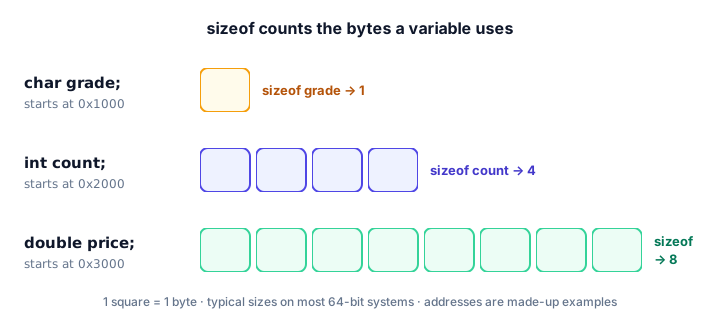
Why do sizes differ between systems?
The C standard only sets minimum sizes. For example, an int must be at least 2 bytes and a long at least 4. Each compiler and operating system then picks sizes that suit its processor. That's why long is 8 bytes on 64-bit Linux and macOS but 4 bytes on 64-bit Windows. Never assume a size; when it matters, ask sizeof.
📝 Note
Why %zu and not %d? sizeof returns a size_t, which is unsigned and often 8 bytes, while %d expects a 4-byte signed int. The z means "size_t" and the u means "unsigned". GCC with -Wall warns if you use %d.
sizeof with arrays and text
An array is a row of values of the same type, stored side by side (you'll learn them properly in C arrays). sizeof on an array gives the size of the whole row. For char arrays, that's simply the number of characters:
#include <stdio.h>

int main(void) {
    char buffer[50];
    char word[] = "cat";

    printf("buffer: %zu bytes\n", sizeof buffer);
    printf("word: %zu bytes\n", sizeof word);
    return 0;
}
buffer: 50 bytes
word: 4 bytesWhy is "cat" 4 bytes, not 3? Every C string ends with a hidden end marker, '\0', which takes one extra byte. More on that in C strings.
How do you count the elements in an array?
Divide the size of the whole array by the size of one element. This classic trick works on every system, because both sizes change together:
#include <stdio.h>

int main(void) {
    int scores[] = {90, 75, 88, 62, 100};

    size_t count = sizeof scores / sizeof scores[0];

    printf("The array holds %zu scores\n", count);
    return 0;
}
The array holds 5 scoresIf int is 4 bytes, the array is 20 bytes, and 20 / 4 = 5. If int were 2 bytes, it'd be 10 / 2 = 5. Same answer either way. scores[0] means "the first element"; you'll learn this notation in the arrays lesson.
⚠️ Watch out
This trick only works where the array was declared. Once an array is passed to a function, sizeof gives the size of an address instead. You'll see why in arrays and functions.
Real-world example: planning memory for sensor readings
A weather station records one double temperature every minute for a whole day. How much memory does a day of readings need?
#include <stdio.h>

int main(void) {
    size_t readings_per_day = 24 * 60;
    size_t bytes_per_reading = sizeof(double);
    size_t bytes_per_day = readings_per_day * bytes_per_reading;

    printf("Readings per day: %zu\n", readings_per_day);
    printf("Bytes per reading: %zu\n", bytes_per_reading);
    printf("Bytes per day: %zu\n", bytes_per_day);
    return 0;
}
On most systems a double is 8 bytes, so this prints 1440 readings per day, 8 bytes per reading and 11520 bytes per day: about 11 KB. That kind of estimate matters a lot on small devices like smart thermostats, which may have only a few kilobytes to spare. You'll use sizeof this way all the time with malloc().
Common mistakes with sizeof
1. Printing sizeof with %d
printf("%d", sizeof(int)); mismatches the type. GCC warns: format '%d' expects argument of type 'int', but argument 2 has type 'long unsigned int'. Use %zu.
2. Assuming a fixed size
Writing 4 where you mean "the size of an int" breaks on systems where that's not true. Write sizeof(int) and let the compiler fill in the right number.
3. Forgetting parentheses around a type
sizeof int is a syntax error. Type names need parentheses: sizeof(int).
4. Confusing bytes with elements
sizeof scores gives bytes (20 on most systems), not the number of scores (5). Divide by sizeof scores[0] to get the count.
Practice exercise
🏋️ Try it yourself
A playlist stores song lengths in seconds: int lengths[] = {215, 187, 242, 199, 230, 176}; Use sizeof to print how many songs the playlist has. Bonus: also declare char title[] = "Road Trip"; and print its size in bytes.
Show solution
#include <stdio.h>

int main(void) {
    int lengths[] = {215, 187, 242, 199, 230, 176};
    char title[] = "Road Trip";

    size_t songs = sizeof lengths / sizeof lengths[0];

    printf("Songs in playlist: %zu\n", songs);
    printf("Title size: %zu bytes\n", sizeof title);
    return 0;
}
Songs in playlist: 6
Title size: 10 bytes"Road Trip" has 9 characters (including the space) plus the hidden '\0', so it uses 10 bytes.
What's next?
That wraps up variables and data types. Now it's time to calculate with them: adding, subtracting, dividing and finding remainders in C arithmetic operators.
Key takeaways
- sizeof is an operator that returns how many bytes a type or variable uses.
- Its result has type size_t and is printed with %zu.
- sizeof(char) is always 1; other sizes vary by system, so never hard-code them.
- Type names need parentheses, as in sizeof(int); variables do not, as in sizeof price.
- sizeof on an array gives the whole array's size, and sizeof arr / sizeof arr[0] gives the number of elements.
- A string literal like "cat" takes one extra byte for its hidden '\0' end marker.
Frequently asked questions
What does sizeof do in C?
sizeof returns the number of bytes that a type or variable occupies in memory. For example, sizeof(int) is 4 on most modern systems.
Is sizeof a function in C?
No. sizeof is an operator that the compiler usually evaluates at compile time. That is why parentheses are optional for variables, as in sizeof price.
Which format specifier is used for sizeof in C?
Use %zu, because sizeof returns a value of type size_t, which is unsigned. Using %d can trigger compiler warnings and wrong output.
How do you find the length of an array in C?
Divide the total size of the array by the size of one element: sizeof arr / sizeof arr[0]. This works only in the scope where the array was declared.
Why is sizeof(long) different on Windows and Linux?
The C standard only sets minimum sizes. On 64-bit Linux and macOS, long is 8 bytes, while 64-bit Windows keeps long at 4 bytes for compatibility.