Header Files in C
Updated 8 min read Aimerscrew
Since your very first program, you've written #include <stdio.h> without knowing exactly what it does. In this lesson, you'll find out. Header files in C are how code is shared: they list what a set of functions looks like so other files can use them. You'll learn what goes inside a .h file, the difference between <...> and "...", how to write your own header, and how include guards stop the same header from being pasted twice.
🌍 Real-life example
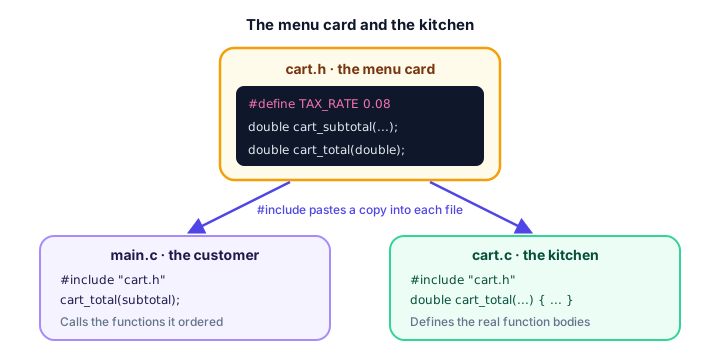
At a restaurant, the menu card lists every dish with a short description and a price. You order from it without ever seeing the kitchen. The kitchen is where the real cooking happens. A header file is the menu card: it lists the functions you can "order" and what you need to give them. The .c file is the kitchen, with the actual code.
What is a header file in C?
A header file is a file ending in .h that contains declarations: function prototypes, macros, and type definitions such as structs. It usually contains no function bodies. Its job is to tell the compiler "these things exist, and this is how to use them".
When the preprocessor meets #include "file.h", it replaces that line with the entire text of file.h. Nothing more magical happens. It's a copy and paste.
That's why #include <stdio.h> lets you call printf: stdio.h contains the prototype of printf, so the compiler can check your calls. The actual code for printf lives in the C library, which the linker adds later.
Common standard header files
The C standard library is split into headers by topic. Include only the ones you need:
| Header | What it declares | Examples |
|---|---|---|
stdio.h | Input and output | printf, scanf, fopen |
stdlib.h | Memory, conversions, utilities | malloc, free, atoi, exit |
string.h | String and memory functions | strlen, strcpy, strcmp |
math.h | Math functions | sqrt, pow, round |
ctype.h | Character tests | isdigit, toupper |
stdbool.h | The bool type | bool, true, false |
#include <...> vs #include "..."
There are two ways to write #include, and they differ in where the preprocessor looks for the file:
#include <stdio.h>    /* angle brackets: system and library headers */
#include "cart.h" /* quotes: your own headers */- Angle brackets
<...>search only the compiler's system folders, where standard headers likestdio.hare installed. - Quotes
"..."search the folder of the file doing the including first, then the system folders.
Simple rule: brackets for headers that come with the compiler or a library, quotes for headers you wrote.
How to write your own header file
Let's build a tiny shopping cart module in three files. First, the header cart.h. It's the menu card: a macro and two prototypes.
#ifndef CART_H
#define CART_H

#define TAX_RATE 0.08

double cart_subtotal(double prices[], int count);
double cart_total(double subtotal);

#endif
Ignore the #ifndef, #define CART_H and #endif lines for a moment; they're the include guard, explained below. Next, the kitchen: cart.c contains the function bodies. It includes its own header so the compiler can check that the definitions match the prototypes.
#include "cart.h"

double cart_subtotal(double prices[], int count) {
    double sum = 0.0;
    for (int i = 0; i < count; i++) {
        sum += prices[i];
    }
    return sum;
}

double cart_total(double subtotal) {
    return subtotal + subtotal * TAX_RATE;
}
Finally, main.c is the customer. It includes cart.h and calls the functions without knowing how they work:
#include <stdio.h>
#include "cart.h"

int main(void) {
    double prices[] = {12.50, 7.25, 30.00};
    double subtotal = cart_subtotal(prices, 3);

    printf("Subtotal: $%.2f\n", subtotal);
    printf("Total with tax: $%.2f\n", cart_total(subtotal));
    return 0;
}
Compile both .c files together and run the program. (Never list the .h file in the command; it's pulled in by #include.)
gcc main.c cart.c -o shop
./shop
Subtotal: $49.75
Total with tax: $53.73You'll learn more about compiling several files, and why it speeds up big projects, in splitting a C program into multiple files.
What are include guards?
Headers often include other headers. In a bigger project, the same header can easily end up included twice in one file. For prototypes that's harmless, but a struct definition pasted twice is an error. Imagine point.h without a guard:
/* point.h (no include guard) */
struct point {
    int x;
    int y;
};
If shapes.h includes point.h, and main.c includes both point.h and shapes.h, the struct appears twice, and GCC stops with an error like this:
point.h:2:8: error: redefinition of 'struct point'An include guard is a wrapper made from conditional compilation that makes a header's content count only once per file:
#ifndef POINT_H
#define POINT_H

struct point {
    int x;
    int y;
};

#endif
Here's how it works. The first time point.h is pasted, POINT_H isn't defined, so the preprocessor keeps the content and defines POINT_H. The second time, POINT_H already exists, so #ifndef skips everything up to #endif. The guard name is usually the file name in capitals with _H at the end.
Is #pragma once better than include guards?
Most compilers, including GCC, Clang and Microsoft's MSVC, also accept a one-line alternative at the top of the header:
#pragma once

struct point {
    int x;
    int y;
};
#pragma once is shorter and you can't mistype a guard name. However, it isn't part of the official C standard, while #ifndef guards work with every compiler. Both are fine for your own projects; just pick one style and use it everywhere. This tutorial uses classic guards.
What should go in a header file vs a .c file?
Put things in the header that other files need to know about. Put the actual work, and anything that creates storage, in the .c file.
Header file (.h): the menu | Source file (.c): the kitchen |
|---|---|
| Function prototypes | Function definitions (bodies) |
| Macros and constants shared by several files | Global variable definitions, such as int count = 0; |
| Struct, enum and typedef definitions | Helper functions used only inside that file |
extern declarations of shared globals | #include of its own header, to check that everything matches |
⚠️ Be careful
Never put a function body or a variable definition like int total = 0; in a header. If two .c files include that header, each gets its own copy, and the linker fails with a multiple definition error. Include guards don't help here, because they only work within one .c file at a time.
Common mistakes with header files
1. Forgetting the include guard
Everything works until two headers include the same third header, then you get "redefinition" errors. Add a guard to every header you write, from the start.
2. Using angle brackets for your own header
#include <cart.h> /* wrong: only system folders are searched */GCC reports cart.h: No such file or directory. Use quotes: #include "cart.h".
3. Including a .c file
#include "cart.c" /* don't do this */It may seem to work at first, but if you also compile cart.c separately, every function is defined twice. Include headers, compile .c files.
4. A header that doesn't include what it needs
If a header uses bool or size_t in a prototype, it should include stdbool.h or stddef.h itself. Otherwise it only works when the including file happens to have included them first.
Practice exercise
🏋️ Try it yourself
Create a header grades.h with an include guard and the prototype char letter_grade(int score);. In grades.c, return 'A' for 90 and above, 'B' for 80 to 89, 'C' for 70 to 79, 'D' for 60 to 69, and 'F' otherwise. In main.c, print the grade for the scores 95, 82 and 67.
Show solution
The header, grades.h:
#ifndef GRADES_H
#define GRADES_H

char letter_grade(int score);

#endif
The definitions, grades.c:
#include "grades.h"

char letter_grade(int score) {
    if (score >= 90) {
        return 'A';
    } else if (score >= 80) {
        return 'B';
    } else if (score >= 70) {
        return 'C';
    } else if (score >= 60) {
        return 'D';
    }
    return 'F';
}
The program, main.c:
#include <stdio.h>
#include "grades.h"

int main(void) {
    int scores[] = {95, 82, 67};

    for (int i = 0; i < 3; i++) {
        printf("%d -> %c\n", scores[i], letter_grade(scores[i]));
    }
    return 0;
}
Compile and run:
gcc main.c grades.c -o grades
./grades
95 -> A
82 -> B
67 -> DWhat's next?
You can now write a header and share it between files. Next, learn how to organize a whole project across several source files, compile them separately and link them, in splitting a C program into multiple files.
Key takeaways
- A header file (.h) contains declarations such as function prototypes, macros and struct types that several files share.
- #include pastes the whole text of a header into your file before compiling.
- Use #include <...> for system and library headers and #include "..." for your own headers.
- Include guards (#ifndef NAME_H, #define NAME_H, #endif) stop a header from being pasted twice into the same file.
- #pragma once does the same job in one line and works in all major compilers, but is not part of the C standard.
- Put function bodies and variable definitions in .c files, never in headers, to avoid multiple definition errors.
- Each .c file should include its own header so the compiler checks that prototypes and definitions match.
Frequently asked questions
What is a header file in C?
A header file is a .h file containing declarations, such as function prototypes, macros and struct definitions, that other files can include. It describes what is available without containing the actual function code.
What is the difference between #include <file.h> and #include "file.h"?
Angle brackets search only the compiler's system folders and are used for standard headers like stdio.h. Quotes search the current file's folder first and are used for headers you write yourself.
What are include guards in C?
Include guards are #ifndef, #define and #endif lines around a header's content. They make sure the content is only processed once per source file, even if the header is included several times.
Should I use #pragma once or include guards?
Both work with GCC, Clang and MSVC. #pragma once is shorter, while #ifndef guards are part of the C standard and work with every compiler. Choose one and use it consistently.
Can I put function definitions in a header file?
You should not. If two .c files include that header, the function is defined twice and the linker reports a multiple definition error. Put only the prototype in the header and the body in a .c file.
Do I need to compile header files?
No. You only pass .c files to the compiler, for example gcc main.c cart.c -o shop. Headers are pulled in automatically by the #include lines.