C Math Functions (math.h)
Updated 8 min read Aimerscrew
Square roots, powers, rounding a price to the nearest cent: you don't have to write these yourself. C comes with a library of ready-made C math functions in the header math.h. In this lesson, you'll learn the ones you'll use most, how to print their results neatly with %f, why GCC on Linux needs the -lm flag, and how to use them in real programs like a distance calculator and a savings calculator.
🌍 Real-life example
A map app finds the straight-line distance between you and a coffee shop with a square root. A bank app grows your savings with a power. A checkout rounds a total to the nearest cent. Every one of those is a single call to a math function you're about to learn.
How do you use math functions in C?
Add #include <math.h> at the top of your file. It contains the function prototypes for the math library, so the compiler knows each function's parameters and return type. Almost all of these functions take double values and return a double, so print the result with %f.
#include <math.h>
#include <stdio.h>

int main(void) {
    printf("sqrt(49) = %f\n", sqrt(49));
    printf("pow(2, 10) = %f\n", pow(2, 10));
    printf("pow(9, 0.5) = %.1f\n", pow(9, 0.5));
    return 0;
}
sqrt(49) = 7.000000
pow(2, 10) = 1024.000000
pow(9, 0.5) = 3.0sqrt(x) returns the square root of x. pow(base, exponent) returns base raised to exponent. You can pass whole numbers like 49; because of the prototype, C converts them to double for you.
⚠️ ^ is not "power" in C
2 ^ 3 is the bitwise XOR operator and gives 1, not 8. For powers, use pow(2, 3), or just x * x for a square.
Compiling math programs: the -lm flag
The prototypes are in math.h, but the actual code of the functions lives in a separate math library called libm. On Linux, GCC doesn't link it automatically, so add -lm (short for "link with library m") at the end of the command:
gcc distance.c -o distance -lmIf you forget it, the linking step fails with an error like undefined reference to `sqrt'. On Windows (MinGW) and macOS, the math functions are part of the standard library, so the flag isn't required, but adding it does no harm. Sometimes a program works without -lm because GCC calculated a constant like sqrt(49) at compile time; as soon as you pass a variable, the library is needed.
Absolute value: fabs() and abs()
The absolute value is a number without its minus sign: the distance from zero. Use fabs() from math.h for decimals and abs() from stdlib.h for int values.
#include <math.h>
#include <stdio.h>
#include <stdlib.h>

int main(void) {
    int balance_change = -45;
    double temperature_drop = -3.75;

    printf("abs(%d) = %d\n", balance_change, abs(balance_change));
    printf("fabs(%.2f) = %.2f\n", temperature_drop, fabs(temperature_drop));
    return 0;
}
abs(-45) = 45
fabs(-3.75) = 3.75Rounding: ceil(), floor() and round()
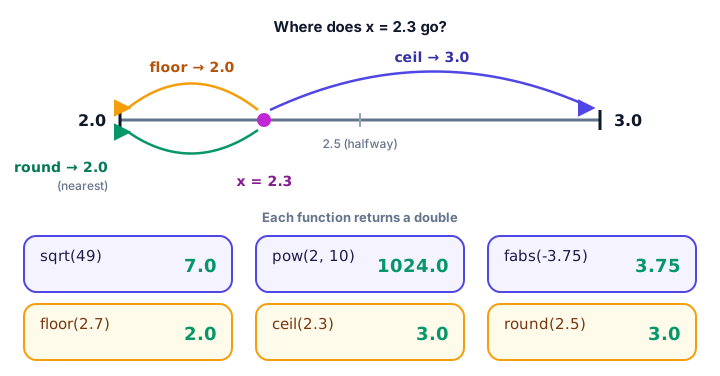
These three turn a decimal into a whole number, but they still return a double (like 3.0):
floor(x)rounds down to the whole number below (toward minus infinity).ceil(x)rounds up to the whole number above ("ceiling").round(x)rounds to the nearest whole number; halves (like 2.5) go away from zero.
#include <math.h>
#include <stdio.h>

void show(double x) {
    printf("%5.1f | %5.1f | %5.1f | %5.1f\n", x, floor(x), ceil(x), round(x));
}

int main(void) {
    printf("    x | floor |  ceil | round\n");
    show(2.3);
    show(2.5);
    show(2.7);
    show(-2.5);
    return 0;
}
x | floor | ceil | round
2.3 | 2.0 | 3.0 | 2.0
2.5 | 2.0 | 3.0 | 3.0
2.7 | 2.0 | 3.0 | 3.0
-2.5 | -3.0 | -2.0 | -3.0Look at the last row: floor(-2.5) is -3, because -3 is below -2.5 on the number line. %5.1f means "at least 5 characters wide, 1 decimal place", which lines the columns up.
Smaller and larger: fmin() and fmax()
fmin(a, b) returns the smaller of two values and fmax(a, b) the larger. Together they can clamp a value into a range, like a thermostat that only accepts 15 to 28 degrees:
#include <math.h>
#include <stdio.h>

const double MIN_TEMP = 15.0;
const double MAX_TEMP = 28.0;

double clamp_temperature(double requested) {
    return fmax(MIN_TEMP, fmin(requested, MAX_TEMP));
}

int main(void) {
    printf("Requested 31.5 -> set to %.1f\n", clamp_temperature(31.5));
    printf("Requested 12.0 -> set to %.1f\n", clamp_temperature(12.0));
    printf("Requested 21.5 -> set to %.1f\n", clamp_temperature(21.5));
    return 0;
}
Requested 31.5 -> set to 28.0
Requested 12.0 -> set to 15.0
Requested 21.5 -> set to 21.5sin(), cos() and defining your own PI
The trigonometry functions sin(), cos() and tan() work in radians, not degrees. To convert, multiply degrees by π / 180. Many tutorials use M_PI for π, but it is not part of standard C: compile with gcc -std=c17 and you'll get error: 'M_PI' undeclared. Define your own constant instead (see C constants):
#include <math.h>
#include <stdio.h>

#define PI 3.14159265358979323846

int main(void) {
    double radius = 2.5;

    printf("Circle area: %.2f\n", PI * radius * radius);
    printf("sin(30 degrees) = %.4f\n", sin(30 * PI / 180));
    printf("cos(60 degrees) = %.4f\n", cos(60 * PI / 180));
    return 0;
}
Circle area: 19.63
sin(30 degrees) = 0.5000
cos(60 degrees) = 0.5000Decimal math is rarely exact. sin(30 * PI / 180) is really 0.49999999999999994, which is why we print a limited number of decimals.
Formatting math results with %f
By default, %f prints 6 digits after the decimal point. Add a precision and width to control it (more in C format specifiers):
#include <math.h>
#include <stdio.h>

int main(void) {
    double root = sqrt(2);

    printf("[%f]\n", root);
    printf("[%.2f]\n", root);
    printf("[%8.2f]\n", root);
    printf("[%.10f]\n", root);
    return 0;
}
[1.414214]
[1.41]
[ 1.41]
[1.4142135624]The brackets show the exact width: %8.2f pads 1.41 with four spaces to make 8 characters. Remember: printf uses %f for a double, but scanf needs %lf to read one.
Real-world examples of C math functions
Distance between two points
The straight-line distance between points (x1, y1) and (x2, y2) is the square root of dx² + dy². Here, a delivery app measures from a warehouse at (1, 2) to a customer at (4, 6), and from home at (0, 0) to a café at (2, 3):
#include <math.h>
#include <stdio.h>

double distance(double x1, double y1, double x2, double y2) {
    double dx = x2 - x1;
    double dy = y2 - y1;
    return sqrt(dx * dx + dy * dy);
}

int main(void) {
    printf("Warehouse to customer: %.2f km\n", distance(1, 2, 4, 6));
    printf("Home to cafe: %.2f km\n", distance(0, 0, 2, 3));
    return 0;
}
Warehouse to customer: 5.00 km
Home to cafe: 3.61 kmCompound interest
Savings that earn interest on interest grow by the formula amount = principal × (1 + rate / n)^(n × years), where n is how many times per year interest is added. pow() does the hard part:
#include <math.h>
#include <stdio.h>

double grow(double principal, double rate, int times_per_year, int years) {
    return principal * pow(1 + rate / times_per_year, times_per_year * years);
}

int main(void) {
    printf("Yearly:  $%.2f\n", grow(1000, 0.05, 1, 10));
    printf("Monthly: $%.2f\n", grow(1000, 0.05, 12, 10));
    return 0;
}
Yearly: $1628.89
Monthly: $1647.01$1,000 at 5% for 10 years earns about $18 more when interest is added monthly instead of yearly.
Rounding prices
A $19.99 item with 8.25% sales tax costs 21.639175 dollars, which isn't a real price. To round to cents, multiply by 100, round, and divide by 100. ceil and floor give whole dollars up or down:
#include <math.h>
#include <stdio.h>

int main(void) {
    double total = 19.99 * 1.0825;

    printf("Exact:         %f\n", total);
    printf("To the cent:   %.2f\n", round(total * 100) / 100);
    printf("Whole dollars: %.0f up, %.0f down\n", ceil(total), floor(total));
    return 0;
}
Exact: 21.639175
To the cent: 21.64
Whole dollars: 22 up, 21 downQuick reference: common math.h functions
| Function | What it does | Example | Result |
|---|---|---|---|
sqrt(x) | Square root | sqrt(81) | 9.0 |
pow(x, y) | x to the power y | pow(3, 2) | 9.0 |
fabs(x) | Absolute value (decimal) | fabs(-1.5) | 1.5 |
abs(n) | Absolute value (int, stdlib.h) | abs(-7) | 7 |
ceil(x) | Round up | ceil(4.1) | 5.0 |
floor(x) | Round down | floor(4.9) | 4.0 |
round(x) | Round to nearest | round(4.5) | 5.0 |
fmin(a, b) / fmax(a, b) | Smaller / larger value | fmax(2.5, 7.0) | 7.0 |
sin(x) / cos(x) | Trigonometry (radians) | cos(0) | 1.0 |
Common mistakes
1. Forgetting #include <math.h>
Modern GCC stops with an error such as implicit declaration of function 'sqrt', or gives wrong results with older settings. Always include the header.
2. Forgetting -lm on Linux
The error undefined reference to `pow' comes from the linker, not your code. Add -lm at the end of the gcc command.
3. Integer division inside the arguments
double half_power = pow(16, 1 / 2); /* 1 / 2 is 0, so this is pow(16, 0) = 1 */Both 1 and 2 are integers, so 1 / 2 is 0. Write 1.0 / 2, or simply sqrt(16).
4. Printing a double with %d
printf("%d\n", sqrt(49)); doesn't print 7: the format and the value don't match, so you get a garbage number (GCC warns about it). Use %f, or convert first: (int) sqrt(49).
5. Using abs() on a decimal
abs(-2.7) converts -2.7 to the int -2 first and returns 2. Use fabs() for decimals.
Practice exercise
🏋️ Try it yourself
A pizza shop sells a round pizza with a 30 cm diameter. Write a program that defines PI, calculates the area (π × r², use pow for r²), and prints the area with 1 decimal place and rounded up to the next whole square centimeter.
Show solution
#include <math.h>
#include <stdio.h>

#define PI 3.14159265358979323846

int main(void) {
    double radius = 30 / 2.0;
    double area = PI * pow(radius, 2);

    printf("Area: %.1f cm2\n", area);
    printf("Rounded up: %.0f cm2\n", ceil(area));
    return 0;
}
Area: 706.9 cm2
Rounded up: 707 cm2What's next?
Congratulations, you've finished the Functions chapter! So far, every variable has held one value. Next, learn to store a whole list of values, like a week of temperatures or a class of test scores, with C arrays.
Key takeaways
- C math functions live in math.h; include it at the top of your file.
- Most math.h functions take and return double, so print results with %f or %.2f.
- On Linux, compile with -lm at the end of the gcc command to link the math library.
- Use sqrt for square roots and pow for powers; ^ is bitwise XOR, not power.
- floor rounds down, ceil rounds up and round goes to the nearest whole number; all return a double.
- Use fabs for decimals and abs (from stdlib.h) for int values.
- M_PI is not standard C, so define your own PI constant.
Frequently asked questions
Which header file contains math functions in C?
The math.h header declares functions such as sqrt, pow, fabs, ceil, floor, round, fmin, fmax, sin and cos. The integer absolute value function abs is declared in stdlib.h instead.
Why do I get undefined reference to sqrt or pow in C?
Your program was not linked with the math library. On Linux with GCC, add -lm at the end of the command, for example: gcc main.c -o main -lm.
How do you calculate a power in C?
Use pow(base, exponent) from math.h, which returns a double. For example, pow(2, 10) returns 1024.0. The ^ symbol in C is bitwise XOR, not exponentiation.
What is the difference between floor, ceil and round in C?
floor rounds down to the whole number below, ceil rounds up to the whole number above, and round goes to the nearest whole number, with halves rounded away from zero. For 2.5 they give 2.0, 3.0 and 3.0.
Is M_PI available in standard C?
No. M_PI is an extension provided by some systems and is hidden when you compile in strict standard mode such as gcc -std=c17. Define your own constant, for example #define PI 3.14159265358979323846.