How to Install a C Compiler (GCC)
Updated 7 min read Aimerscrew
Before you can run a C program, you need a compiler: the tool that turns your C code into a program your computer can run. In this lesson, you'll install GCC, the most popular free C compiler, on Windows, macOS or Linux, check that it works, and set up a comfortable code editor. It takes about 10 to 15 minutes.
🌍 Real-life example
Installing a compiler is like buying a bread maker before you bake. Your recipe (the C code) is useless until you have the machine that turns ingredients into bread. You set the machine up once, and then you can bake as many loaves as you like.
What is GCC?
GCC (the GNU Compiler Collection) is a free, open-source compiler that translates C source code into machine code. It runs on Windows, macOS and Linux, and it's the compiler used throughout this tutorial. You run it from a terminal (also called the command line): a window where you type commands instead of clicking buttons.
On macOS you'll actually get Clang, a different free compiler. Apple sets things up so that typing gcc runs Clang, and for learning C the two behave almost identically.
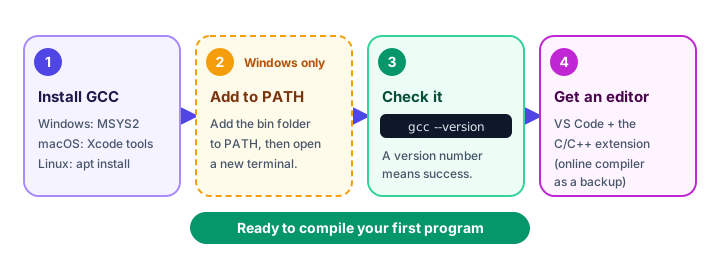
How to install GCC on Windows
Windows doesn't come with a C compiler. The most reliable way to get GCC is MSYS2, a free package that brings GCC and other tools to Windows.
- Go to msys2.org, download the installer and run it. Keep the default folder,
C:\msys64. - When it finishes, open MSYS2 UCRT64 from the Start menu. A terminal window appears.
- Type this command and press Enter, then press Y when asked to confirm:
pacman -S mingw-w64-ucrt-x86_64-gcc- Add GCC to your PATH so every terminal can find it. Open the Start menu, search for Edit the system environment variables, click Environment Variables, select Path under your user variables, click Edit, then New, and paste
C:\msys64\ucrt64\bin. Click OK on every window. - Close any open terminals and open a new PowerShell or Command Prompt window. Terminals only read PATH when they start.
PATH is a list of folders Windows searches when you type a command. Adding GCC's bin folder (short for "binaries", meaning programs) is what lets you type gcc from anywhere.
📝 Note
Prefer not to install a package manager? WinLibs (winlibs.com) offers GCC as a plain zip file. Download a UCRT release, extract it to a simple folder such as C:\mingw64, and add C:\mingw64\bin to your PATH using step 4 above.
How to install a C compiler on macOS
Apple provides a free set of developer tools that includes a C compiler. Open the Terminal app (press Cmd + Space and type "Terminal") and run:
xcode-select --installA window pops up asking to install the command line developer tools. Click Install and wait a few minutes. You don't need the full Xcode app. If you see a message saying the tools are already installed, you're all set.
How to install GCC on Linux
Many Linux systems already have GCC. If not, one command installs it. On Ubuntu, Debian or Linux Mint:
sudo apt update
sudo apt install build-essential
The build-essential package includes GCC plus the C library files it needs. The word sudo runs the command as an administrator, so you'll be asked for your password. On Fedora, use sudo dnf install gcc, and on Arch, use sudo pacman -S gcc.
How do you check that GCC is installed?
Open a new terminal on any system and type:
gcc --versionOn Windows with MSYS2, you'll see something like this (your version will differ):
gcc.exe (Rev2, Built by MSYS2 project) 14.2.0
Copyright (C) 2024 Free Software Foundation, Inc.
On Ubuntu, the first line looks like gcc (Ubuntu 13.3.0-6ubuntu2~24.04) 13.3.0. On macOS, it mentions Apple clang version followed by a number. Any version number means success. A message like "command not found" or "not recognized" means the compiler isn't installed or isn't on your PATH yet.
Compile a test program
A version number is good; a working program is better. Create a folder for your C work, and inside it save this code in a file named check.c:
#include <stdio.h>

int main(void) {
    printf("The compiler works!\n");
    return 0;
}
In your terminal, move into that folder with cd, then compile and run the program. On macOS and Linux:
gcc check.c -o check
./check
On Windows (PowerShell):
gcc check.c -o check
.\check.exe
The compiler works!The first command tells GCC to compile check.c and save the program (-o means "output") as check, or check.exe on Windows. The second command runs it. You'll see exactly how this works in Your First C Program.
💡 Tip
Turn on extra warnings from day one: gcc -Wall -Wextra check.c -o check. Warnings point out code that compiles but is probably a mistake, and they'll save you hours of debugging.
Which code editor should you use for C?
You can write C in any plain text editor, but a code editor adds colors, auto-indenting and error hints.
| Editor | Best for | Notes |
|---|---|---|
| VS Code + C/C++ extension | Most learners | Free on every system. Install the "C/C++" extension by Microsoft from the Extensions panel. It has a built-in terminal for running gcc. |
| CLion, Code::Blocks | An all-in-one IDE | Bigger tools with a Build button and a debugger. |
| Online C compilers | School or work computers | Run C in your browser with nothing to install. Great as a backup, but save your code somewhere else too. |
This tutorial uses VS Code with its built-in terminal (View → Terminal), so you write and compile in one window.
⚠️ Be careful
Online compilers are handy, but never paste passwords, private keys or company code into them. Your code is sent to someone else's server.
Common mistakes when installing GCC
1. "gcc is not recognized" on Windows
If Windows says 'gcc' is not recognized as an internal or external command, the compiler's folder isn't on your PATH. Check that you added the folder that actually contains gcc.exe (for MSYS2, C:\msys64\ucrt64\bin), then close and reopen the terminal. Restarting VS Code is needed too if you use its terminal.
2. Installing the wrong MSYS2 package
Typing just pacman -S gcc installs a version meant for the MSYS2 terminal itself, not for normal Windows programs. Use the full name mingw-w64-ucrt-x86_64-gcc.
3. Forgetting ./ on macOS and Linux
Typing just check gives "command not found", because the terminal doesn't look in the current folder for programs. Type ./check, where ./ means "in this folder".
4. Running gcc in the wrong folder
If GCC says check.c: No such file or directory, your terminal is in a different folder from your file. Use cd to move to the folder where you saved check.c.
Practice exercise
🏋️ Try it yourself
Install GCC on your computer and confirm it with gcc --version. Then create setup.c that prints two lines, Compiler: ready and Editor: ready. Compile it with warnings turned on and run it.
Show solution
#include <stdio.h>

int main(void) {
    printf("Compiler: ready\n");
    printf("Editor: ready\n");
    return 0;
}
Compiler: ready
Editor: readyCompile and run it with gcc -Wall -Wextra setup.c -o setup, followed by ./setup (macOS and Linux) or .\setup.exe (Windows).
What's next?
Your computer is ready for C. Next, write and understand every line of your first C program: Hello, World!
Key takeaways
- A compiler such as GCC turns C source code into a program you can run.
- On Windows, install GCC with MSYS2 or WinLibs and add its bin folder to your PATH.
- On macOS, run xcode-select --install; the gcc command then runs Apple Clang.
- On Ubuntu or Debian Linux, run sudo apt install build-essential.
- Type gcc --version in a new terminal to confirm the compiler is installed.
- Compile with gcc file.c -o name and run with ./name (or .\name.exe on Windows).
- VS Code with the C/C++ extension is a great free editor; online compilers are a handy backup.
Frequently asked questions
How do I install GCC on Windows?
Install MSYS2 from msys2.org, open the MSYS2 UCRT64 terminal, run pacman -S mingw-w64-ucrt-x86_64-gcc, then add C:\msys64\ucrt64\bin to your user PATH and open a new terminal. Check it with gcc --version.
Why does gcc --version show clang on my Mac?
Apple ships the Clang compiler and makes the gcc command point to it. Clang compiles standard C just like GCC, so everything in this tutorial works the same.
Is GCC free?
Yes. GCC is free and open-source software from the GNU project, and it runs on Windows, macOS and Linux.
Do I need Visual Studio to write C?
No. A compiler like GCC plus any code editor is enough. VS Code with the Microsoft C/C++ extension is a popular free choice.
Can I learn C without installing anything?
Yes, online C compilers let you write and run C in a browser. They are great for quick tests, but installing GCC locally is better for real projects.