C Arithmetic Operators
Updated 7 min read Aimerscrew
Programs calculate things all the time: a cart total, the time left on a timer, how many buses a school trip needs. In C, you do this math with C arithmetic operators. In this lesson, you'll learn all five of them, why 7 / 2 gives 3 in C, and how the remainder operator % solves everyday problems in a single line.
🌍 Real-life example
You have 17 cookies and bags that hold 5 each. You can fill 3 bags, and 2 cookies are left on the plate. In C, the number of full bags is 17 / 5 and the cookies left over are 17 % 5. Those two operators answer "how many full groups?" and "how many left over?"
What are arithmetic operators in C?
An operator is a symbol that tells C to do something with one or more values. The values it works on are called operands. In price * 3, the operator is * and the operands are price and 3.
C has five arithmetic operators:
| Operator | Name | Example | Result |
|---|---|---|---|
+ | Addition | 17 + 5 | 22 |
- | Subtraction | 17 - 5 | 12 |
* | Multiplication | 17 * 5 | 85 |
/ | Division | 17 / 5 | 3 (integers) |
% | Remainder (modulus) | 17 % 5 | 2 |
Here they are in a complete program:
#include <stdio.h>

int main(void) {
    int a = 17;
    int b = 5;

    printf("a + b = %d\n", a + b);
    printf("a - b = %d\n", a - b);
    printf("a * b = %d\n", a * b);
    printf("a / b = %d\n", a / b);
    printf("a %% b = %d\n", a % b);

    return 0;
}
a + b = 22
a - b = 12
a * b = 85
a / b = 3
a % b = 2Notice the %% inside the last printf(). Because % starts a format specifier, you write %% to print a single percent sign.
How does division work in C?
This is the part that surprises most beginners. When both operands are integers, C does integer division: it divides and then throws away everything after the decimal point. It does not round. 7 / 2 is 3, and even 9 / 10 is 0.
If at least one operand is a floating-point number (like 7.0 or a double variable), C does normal decimal division instead:
#include <stdio.h>

int main(void) {
    int slices = 7;
    int friends = 2;

    printf("Each friend gets %d slices\n", slices / friends);
    printf("Exact share: %.2f slices\n", 7.0 / 2);
    printf("Exact share: %.2f slices\n", (double) slices / friends);

    return 0;
}
Each friend gets 3 slices
Exact share: 3.50 slices
Exact share: 3.50 slicesThe last line uses a cast, (double), to turn slices into a double before dividing. You met casts in the type conversion lesson.
| Expression | Operand types | Result |
|---|---|---|
7 / 2 | int / int | 3 |
7.0 / 2 | double / int | 3.5 |
7 / 2.0 | int / double | 3.5 |
(double) 7 / 2 | double / int | 3.5 |
(double) (7 / 2) | cast after int division | 3.0 |
💡 Tip
Ask yourself: "Do I want whole groups or an exact amount?" Whole buses, whole boxes, whole pages: integer division is perfect. Average speed, price per kilo, temperature: make sure at least one operand is a double.
What does the % (modulus) operator do?
The % operator, often called modulus or mod, gives the remainder after integer division. It answers "what's left over?"
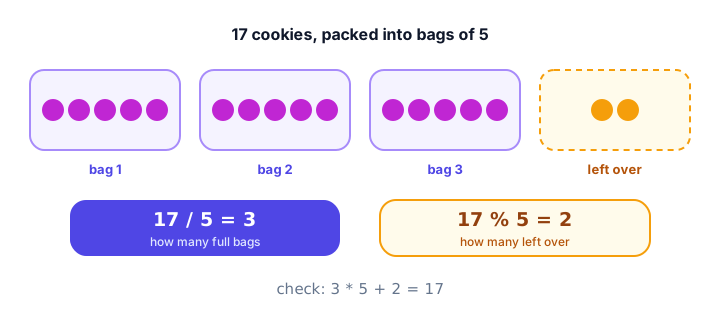
There is a neat rule that always holds for integers: (a / b) * b + a % b equals a. For 17 and 5: 3 * 5 + 2 = 17.
Two important limits:
%works only with integers.7.5 % 2is a compile error. For decimals, usefmod()from<math.h>(covered in C math functions).- Like division,
% 0is not allowed. Never use zero as the right operand.
Division and remainder with negative numbers
In C, integer division always truncates toward zero: it simply chops off the decimal part. So -7 / 3 is -2 (not -3). The remainder then follows from the rule above, which means the result of % takes the sign of the left operand.
#include <stdio.h>

int main(void) {
    printf("-7 / 3 = %d\n", -7 / 3);
    printf("-7 %% 3 = %d\n", -7 % 3);
    printf("7 %% -3 = %d\n", 7 % -3);
    printf("-7 %% -3 = %d\n", -7 % -3);

    return 0;
}
-7 / 3 = -2
-7 % 3 = -1
7 % -3 = 1
-7 % -3 = -1Check the second line with the rule: (-2) * 3 + (-1) = -7. If you've used Python, note that Python gives 2 for -7 % 3, so code ported between the two languages can behave differently.
Practical uses of the % operator
Remainders show up everywhere once you start looking:
- Even or odd:
n % 2is0for even numbers. - Converting units: 135 minutes is
135 / 60hours and135 % 60minutes. - Taking turns: with 4 players,
turn % 4cycles 0, 1, 2, 3, 0, 1, ... - Last digit:
n % 10gives the last digit of a positive number.
#include <stdio.h>

int main(void) {
    int minutes = 135;
    printf("%d minutes = %d h %d min\n", minutes, minutes / 60, minutes % 60);

    int first = 14;
    int second = 9;
    printf("%d %% 2 = %d (0 means even)\n", first, first % 2);
    printf("%d %% 2 = %d (1 means odd)\n", second, second % 2);

    int order_number = 50473;
    printf("Last digit: %d\n", order_number % 10);

    return 0;
}
135 minutes = 2 h 15 min
14 % 2 = 0 (0 means even)
9 % 2 = 1 (1 means odd)
Last digit: 3📝 Note
Because the sign follows the left operand, -9 % 2 is -1, not 1. To test for odd numbers safely, check "remainder is not 0" rather than "remainder is 1". You'll write such checks in the if...else lesson.
Mixing integers and decimals
When an operator gets an int and a double, C converts the int to double first, and the result is a double. This happens for +, -, * and / alike.
#include <stdio.h>

int main(void) {
    int quantity = 3;
    double price = 2.49;
    double total = quantity * price;

    printf("Total: %.2f\n", total);
    printf("Negated: %.2f\n", -total);

    return 0;
}
Total: 7.47
Negated: -7.47The minus in -total is the unary minus operator: it works on a single operand and flips its sign. There is also a unary plus (+x), which changes nothing and is rarely used.
Real-world example: splitting a bill and packing boxes
Money is safest stored as whole cents in an int, which also makes / and % very handy. Here, three friends split a $100.00 restaurant bill, and a shop packs 50 eggs into cartons of 12.
#include <stdio.h>

int main(void) {
    int bill_cents = 10000;     /* $100.00 */
    int people = 3;

    int share = bill_cents / people;
    int leftover = bill_cents % people;

    printf("Each person pays $%d.%02d\n", share / 100, share % 100);
    printf("Leftover: %d cent\n", leftover);

    int eggs = 50;
    int per_carton = 12;

    printf("Full cartons: %d\n", eggs / per_carton);
    printf("Loose eggs: %d\n", eggs % per_carton);
    printf("Cartons needed: %d\n", (eggs + per_carton - 1) / per_carton);

    return 0;
}
Each person pays $33.33
Leftover: 1 cent
Full cartons: 4
Loose eggs: 2
Cartons needed: 5The last line is a classic trick for rounding up with integers: adding per_carton - 1 before dividing pushes any partial carton up to a full one. 50 eggs need 5 cartons, even though only 4 are full.
Common mistakes with arithmetic operators
1. Expecting a decimal from integer division
#include <stdio.h>

int main(void) {
    double average = 7 / 2;
    printf("%f\n", average);

    return 0;
}3.000000Storing the result in a double is too late: 7 / 2 was already computed as the integer 3. Write 7.0 / 2 or cast one operand.
2. Dividing by zero
Integer division or remainder by zero (x / 0, x % 0) is undefined behavior: C makes no promise about what happens. On many systems the program simply crashes (on Linux you'll often see "Floating point exception"). Make sure the right operand can never be zero.
3. Using % with decimal numbers
double hours = 7.5;
double rest = hours % 2;   /* error */
GCC refuses with error: invalid operands to binary %. Use fmod(hours, 2) from <math.h> instead.
4. Writing a single % in printf()
printf("50% off\n"); confuses printf(), because % o looks like the start of a format specifier. Write printf("50%% off\n");.
Practice exercise
🏋️ Try it yourself
A video is 3725 seconds long. Use / and % to print it as hours, minutes and seconds, like 1 h 2 min 5 s.
Show solution
#include <stdio.h>

int main(void) {
    int total_seconds = 3725;

    int hours = total_seconds / 3600;
    int remaining = total_seconds % 3600;
    int minutes = remaining / 60;
    int seconds = remaining % 60;

    printf("%d h %d min %d s\n", hours, minutes, seconds);

    return 0;
}
1 h 2 min 5 s3725 / 3600 is 1 hour with 125 seconds left. 125 / 60 is 2 minutes, and 125 % 60 is 5 seconds.
What's next?
You can now calculate with C. Next, learn shortcuts like += and *= for updating a variable in place in C assignment operators.
Key takeaways
- C has five arithmetic operators: + (add), - (subtract), * (multiply), / (divide) and % (remainder).
- When both operands are integers, / drops the decimal part: 7 / 2 is 3.
- Make at least one operand a double (7.0 / 2 or a cast) to get a decimal result.
- % gives the remainder of integer division and only works with integers.
- C truncates toward zero, so -7 / 3 is -2 and -7 % 3 is -1; the remainder takes the sign of the left operand.
- Dividing by zero is undefined behavior and often crashes the program.
- Use / and % together to split totals into whole groups and leftovers, such as hours and minutes.
Frequently asked questions
Why does 7 / 2 give 3 in C?
Both 7 and 2 are integers, so C performs integer division and discards the fractional part. Write 7.0 / 2, or cast one operand to double, to get 3.5.
What is the % operator in C?
It is the remainder (modulus) operator. a % b gives what is left over after dividing a by b as integers, so 17 % 5 is 2. It only works with integer types.
What is -7 % 3 in C?
It is -1. C division truncates toward zero, so -7 / 3 is -2, and the remainder is -7 - (-2 * 3) = -1. The sign of the result follows the left operand.
Can you use % with float or double in C?
No, the compiler reports an error. Use the fmod() function from math.h to get the remainder of floating-point numbers.
How do I round up an integer division in C?
For positive numbers, use (a + b - 1) / b. For example, (50 + 12 - 1) / 12 is 5, the number of cartons needed for 50 eggs.