Structures (struct) in C
Updated 8 min read Aimerscrew
Real things have many details. A student has a name, an age and a grade average. A product has a name, a price and a stock count. Structures in C let you bundle those details into one variable, so you can store, copy and pass a whole record around at once. In this lesson, you'll learn how to define a struct, create and initialize struct variables, use the dot operator, and build arrays of structs and structs inside structs.
🌍 Real-life example
Think of a boarding pass. It isn't just one value: it has your name, the flight number, the seat and the departure date, all printed on one card. You hand the whole card to the gate agent, not four loose slips of paper. A struct is that card: one package that holds several related pieces of information.
What is a structure in C?
A structure (or struct) is a user-defined data type that groups variables of possibly different types under one name. Each variable inside it is called a member (or field). Unlike an array, where every element has the same type, a struct can mix an int, a float and a string in one record.
Without structs, keeping track of three students means juggling parallel arrays like names[3], ages[3] and gpas[3], and hoping the indexes always line up. With a struct, each student's data lives together.
How to define a struct in C
You define a struct with the struct keyword, a name (called the tag), and a list of members inside braces. Note the semicolon after the closing brace:
struct Student {
    char name[30];
    int age;
    float gpa;
};
This creates a new type called struct Student. It doesn't create any variable yet, just like a blueprint isn't a house. Struct definitions usually go near the top of the file, above main(), so every function can use them.
Declaring and initializing struct variables
Once the type exists, you declare variables of it like any other type. You can give the members starting values in braces, in the same order they were defined:
#include <stdio.h>

struct Student {
    char name[30];
    int age;
    float gpa;
};

int main(void) {
    struct Student s1 = {"Maya", 20, 3.8f};

    printf("Name: %s\n", s1.name);
    printf("Age: %d\n", s1.age);
    printf("GPA: %.1f\n", s1.gpa);
    return 0;
}
Name: Maya
Age: 20
GPA: 3.8The type of s1 is struct Student. In C, you must write the word struct every time you use the type. (You'll learn how to shorten this in the typedef lesson.)
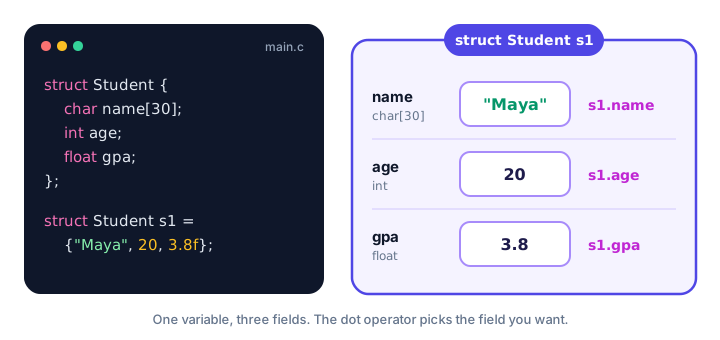
Accessing members with the dot operator
The dot operator (.) reaches a member of a struct variable: variable.member. You can read a member, assign to it, or use it in calculations, exactly like a normal variable.
#include <stdio.h>
#include <string.h>

struct Product {
    char name[40];
    double price;
    int stock;
};

int main(void) {
    struct Product p;

    strcpy(p.name, "Desk lamp");
    p.price = 24.50;
    p.stock = 12;

    p.stock = p.stock - 3;   /* three lamps sold */

    printf("%s: $%.2f (%d left)\n", p.name, p.price, p.stock);
    return 0;
}
Desk lamp: $24.50 (9 left)Notice strcpy(p.name, "Desk lamp"). The member name is a char array, and you can't assign to an array with =. You copy text into it with strcpy(), as you saw in string functions.
Designated initializers: .name = value
Remembering the order of every member gets hard when a struct grows. Designated initializers (added in C99) let you name each member as you set it. The order no longer matters, and any member you skip is set to zero.
#include <stdio.h>

struct Flight {
    char code[8];
    int seat_row;
    char seat_letter;
    int checked_bags;
};

int main(void) {
    struct Flight f = { .seat_letter = 'C', .code = "BA117", .seat_row = 14 };

    printf("Flight %s, seat %d%c, bags: %d\n", f.code, f.seat_row, f.seat_letter, f.checked_bags);
    return 0;
}
Flight BA117, seat 14C, bags: 0We never set checked_bags, but it prints 0 because members left out of an initializer are zeroed. A quick way to zero a whole struct is struct Flight f = {0};.
💡 Tip
Prefer designated initializers for structs with more than two or three members. They read like a form ("seat_row is 14") and keep working even if someone later reorders the members in the definition.
Arrays of structs
An array can hold structs just like it holds numbers. Each element is a full record, and you combine the index and the dot: cart[i].price. Here's a small shopping cart:
#include <stdio.h>

struct Item {
    char name[20];
    double price;
    int qty;
};

int main(void) {
    struct Item cart[3] = {
        {"Notebook", 3.25, 4},
        {"Pen", 1.10, 10},
        {"Backpack", 39.99, 1}
    };
    double total = 0.0;

    for (int i = 0; i < 3; i++) {
        double line = cart[i].price * cart[i].qty;
        printf("%s: %d x $%.2f = $%.2f\n", cart[i].name, cart[i].qty, cart[i].price, line);
        total += line;
    }
    printf("Total: $%.2f\n", total);
    return 0;
}
Notebook: 4 x $3.25 = $13.00
Pen: 10 x $1.10 = $11.00
Backpack: 1 x $39.99 = $39.99
Total: $63.99Passing a struct to a function
You can pass a struct to a function like any other value. By default, C passes it by value: the function gets a complete copy, so changes inside the function don't affect the original.
#include <stdio.h>

struct Point {
    int x;
    int y;
};

void move_right(struct Point p) {
    p.x = p.x + 5;
    printf("Inside function: (%d, %d)\n", p.x, p.y);
}

int main(void) {
    struct Point a = {2, 3};

    move_right(a);
    printf("Back in main: (%d, %d)\n", a.x, a.y);
    return 0;
}
Inside function: (7, 3)
Back in main: (2, 3)This is the same pass-by-value rule you met in function parameters. To let a function change the caller's struct (and to avoid copying big structs), you pass a pointer instead. That's the topic of the next lesson.
Copying structs with =
Arrays can't be copied with =, but structs can. Assigning one struct to another copies every member, even arrays inside it. The two variables are then completely independent:
#include <stdio.h>

struct Point {
    int x;
    int y;
};

int main(void) {
    struct Point a = {2, 3};
    struct Point b = a;   /* copies x and y */

    b.x = 100;

    printf("a = (%d, %d)\n", a.x, a.y);
    printf("b = (%d, %d)\n", b.x, b.y);
    return 0;
}
a = (2, 3)
b = (100, 3)Nested structs: a struct inside a struct
A member can itself be a struct. This keeps related details grouped even inside a bigger record. A flight booking, for example, contains a date:
#include <stdio.h>

struct Date {
    int year;
    int month;
    int day;
};

struct Booking {
    char passenger[30];
    char flight[8];
    struct Date departure;
};

int main(void) {
    struct Booking b = {
        .passenger = "Liam Chen",
        .flight = "QF12",
        .departure = { .year = 2026, .month = 11, .day = 3 }
    };

    printf("%s flies %s on %d-%02d-%02d\n", b.passenger, b.flight,
           b.departure.year, b.departure.month, b.departure.day);
    return 0;
}
Liam Chen flies QF12 on 2026-11-03To reach a nested member, chain the dots from the outside in: b.departure.month means "the month of the departure of booking b".
Common mistakes with structs
1. Forgetting the semicolon after the definition
A struct definition ends with };, not just }. Leaving the semicolon out produces a confusing "expected ';'" style error that points at the next line of code, not at the struct itself. When an error makes no sense, check the line above it.
2. Assigning a string with =
p.name = "Desk lamp"; /* error: name is an array */GCC reports error: assignment to expression with array type. Use strcpy(p.name, "Desk lamp"); or set the name in the initializer.
3. Comparing structs with ==
C does not let you write if (a == b) for two structs; it's a compile error. Compare the members one by one instead: a.x == b.x && a.y == b.y.
4. Leaving out the word struct
Writing Student s1; instead of struct Student s1; fails with "unknown type name 'Student'". The tag alone isn't a type name unless you use typedef.
Practice exercise
🏋️ Try it yourself
Create a struct Book with a title and a page count. Store three books in an array: "Rocket Basics" (280 pages), "Ocean Tales" (352 pages) and "Garden Guide" (198 pages). Loop through the array, find the book with the most pages, and print Longest book: Ocean Tales (352 pages).
Show solution
#include <stdio.h>

struct Book {
    char title[40];
    int pages;
};

int main(void) {
    struct Book shelf[3] = {
        {"Rocket Basics", 280},
        {"Ocean Tales", 352},
        {"Garden Guide", 198}
    };
    int longest = 0;

    for (int i = 1; i < 3; i++) {
        if (shelf[i].pages > shelf[longest].pages) {
            longest = i;
        }
    }

    printf("Longest book: %s (%d pages)\n", shelf[longest].title, shelf[longest].pages);
    return 0;
}
Longest book: Ocean Tales (352 pages)What's next?
You can now group data into structs and pass them around. Next, learn about pointers to structures in C, so functions can update a struct directly and you can create structs on the heap.
Key takeaways
- A struct groups related variables of different types, called members, into one new type.
- Define it with struct Tag { members };, and remember the semicolon after the closing brace.
- Use the dot operator to read or change a member, for example s1.age = 21.
- Designated initializers like { .seat_row = 14 } set members by name; any member you skip becomes zero.
- Structs are passed to functions by value and can be copied with =, but cannot be compared with ==.
- Arrays of structs and nested structs let you model real records such as shopping carts and bookings.
Frequently asked questions
What is a structure in C?
A structure is a user-defined type that groups several variables, possibly of different types, under one name. For example, struct Student can hold a name, an age and a GPA together.
What is the difference between a struct and an array in C?
An array holds many values of the same type, reached by index. A struct holds a fixed set of members that can have different types, reached by name with the dot operator.
Can you assign one struct to another in C?
Yes. Writing b = a copies every member of a into b, including arrays inside the struct. After the copy, the two structs are independent.
Can you compare two structs with == in C?
No, that is a compile error. Compare the members individually, or write a small function that returns 1 when all members match.
What are designated initializers in C?
They let you initialize struct members by name, such as { .code = "BA117", .seat_row = 14 }. The order does not matter, and members you leave out are set to zero.