C Project: Student Records Manager (structs + files)
Updated 14 min read Aimerscrew
A student record system in C is the perfect project for practicing structures and file handling together. Each student becomes a struct, the whole class lives in an array of structs, and a simple menu lets you add, list, search and average the records. Best of all, the program saves everything to a text file, so your data is still there the next time you run it.
🌍 Real-life example
A sports coach keeps a clipboard with each player's number, name and fitness score. At the end of practice, the sheet goes into a folder; next week, it comes out again. Your program does the same: records live in memory while it runs (the clipboard), and a file on disk (the folder) keeps them between runs.
What you'll build
A menu-driven program that:
- loads saved students from
students.txtwhen it starts, - adds a student with an ID, a one-word name and a grade from 0 to 100,
- refuses duplicate IDs and invalid grades,
- lists all students in a neat table, searches by ID and shows the class average,
- saves everything back to the file when you quit.
A short session (the user typed the values after each colon):
=== Student Records ===
Loaded 3 student(s) from students.txt.

1) Add  2) List  3) Search  4) Average  5) Save and quit
Choice: 4
Class average: 85.33 (3 students)

1) Add  2) List  3) Search  4) Average  5) Save and quit
Choice: 5
Saved 3 student(s) to students.txt. Bye!
Concepts used in this project
| Concept | Where it's used | Lesson |
|---|---|---|
struct and arrays of structs | Storing each student and the whole class | structs |
Struct pointers and -> | print_student() | struct pointers |
| Arrays passed to functions | Every function receives the array | arrays and functions |
| Pointer parameters | add_student() updates count | pass by reference |
fprintf() | Saving to students.txt | write files |
fscanf() | Loading from students.txt | read files |
switch menu | Choosing an action | switch |
How the data moves (memory and file)
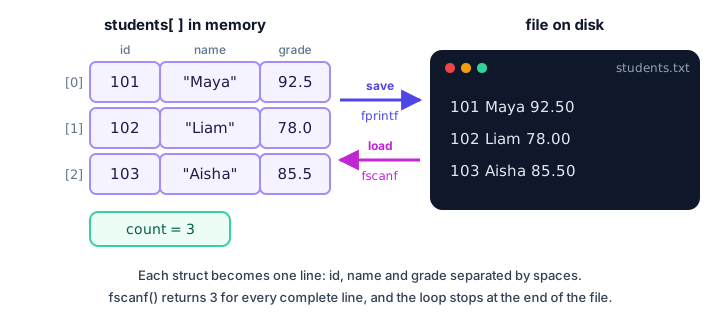
While the program runs, the records sit in an array in memory. Memory is wiped when the program ends, so we copy the array into a text file, one line per student, and read it back on the next start.
Step 1: Design the Student struct and print a table
Start by deciding what one record holds. A struct Student groups an ID, a name and a grade. An array of 50 of them is our "class list", and a separate count variable tracks how many slots are actually used:
#include <stdio.h>

#define MAX_STUDENTS 50
#define NAME_LEN 30

struct Student {
    int id;
    char name[NAME_LEN];
    double grade;
};

void print_header(void) {
    printf("%-6s %-12s %6s\n", "ID", "Name", "Grade");
}

void print_student(const struct Student *s) {
    printf("%-6d %-12s %6.1f\n", s->id, s->name, s->grade);
}

int main(void) {
    struct Student students[MAX_STUDENTS] = {
        {101, "Maya", 92.5},
        {102, "Liam", 78.0}
    };
    int count = 2;
    double total = 0.0;

    print_header();
    for (int i = 0; i < count; i++) {
        print_student(&students[i]);
        total += students[i].grade;
    }
    printf("Class average: %.2f\n", total / count);
    return 0;
}
ID Name Grade
101 Maya 92.5
102 Liam 78.0
Class average: 85.25The widths in the format strings line the columns up: %-6d prints the ID left-aligned in 6 characters, %-12s does the same for the name, and %6.1f right-aligns the grade with one decimal. print_student() takes a const pointer, so it reads the struct without copying it and can't change it by accident.
Step 2: Add a student (with validation)
Adding a student must change count in main(), so the function receives a pointer to it, int *count. A helper, find_student(), returns the index of an ID or -1 if it isn't there; we use it to block duplicates:
/* Returns the index of the student with this id, or -1. */
int find_student(const struct Student list[], int count, int id) {
    for (int i = 0; i < count; i++) {
        if (list[i].id == id) {
            return i;
        }
    }
    return -1;
}

void add_student(struct Student list[], int *count) {
    struct Student s;

    if (*count >= MAX_STUDENTS) {
        printf("The list is full.\n");
        return;
    }

    printf("Student ID: ");
    if (scanf("%d", &s.id) != 1 || s.id <= 0) {
        printf("The ID must be a positive whole number.\n");
        clear_input();
        return;
    }
    if (find_student(list, *count, s.id) != -1) {
        printf("ID %d is already taken.\n", s.id);
        clear_input();
        return;
    }

    printf("Name (one word): ");
    if (scanf("%29s", s.name) != 1) {
        return;
    }

    printf("Grade (0-100): ");
    if (scanf("%lf", &s.grade) != 1 || s.grade < 0 || s.grade > 100) {
        printf("The grade must be a number from 0 to 100.\n");
        clear_input();
        return;
    }
    clear_input();

    list[*count] = s;
    (*count)++;
    printf("Added %s.\n", s.name);
}
Key points:
- The student is built in a local struct
sfirst and only copied into the array once every check has passed, so a bad grade never leaves a half-filled record behind. %29sreads at most 29 characters, leaving room for the'\0'in the 30-bytenamearray (see strings). It stops at the first space, which is why names are one word.- Because
||stops early,s.grade < 0is only checked ifscanf()actually read a number. (*count)++needs the parentheses.*count++would move the pointer instead of increasing the value.
Step 3: Search by ID and calculate the average
Searching reuses find_student(). The average adds up every grade and divides by count, after checking that the list isn't empty, since dividing by zero students makes no sense:
void search_student(const struct Student list[], int count) {
    int id;
    int index;

    printf("Student ID to find: ");
    if (scanf("%d", &id) != 1) {
        printf("Please type a whole number.\n");
        clear_input();
        return;
    }
    clear_input();

    index = find_student(list, count, id);
    if (index == -1) {
        printf("No student with ID %d.\n", id);
    } else {
        print_header();
        print_student(&list[index]);
    }
}

void show_average(const struct Student list[], int count) {
    double total = 0.0;

    if (count == 0) {
        printf("No students yet.\n");
        return;
    }
    for (int i = 0; i < count; i++) {
        total += list[i].grade;
    }
    printf("Class average: %.2f (%d students)\n", total / count, count);
}
Step 4: How do you save structs to a file in C?
To save, open the file in "w" mode and write each struct as one line with fprintf(). To load, open it in "r" mode and read with fscanf(), which returns how many values it filled. A complete line gives 3; the end of the file gives EOF, so the loop stops by itself. This test program saves two students, loads them into a different array, and prints what came back:
#include <stdio.h>

#define MAX_STUDENTS 50
#define NAME_LEN 30
#define FILE_NAME "students.txt"

struct Student {
    int id;
    char name[NAME_LEN];
    double grade;
};

int save_students(const struct Student list[], int count) {
    FILE *fp = fopen(FILE_NAME, "w");
    if (fp == NULL) {
        return 0;
    }
    for (int i = 0; i < count; i++) {
        fprintf(fp, "%d %s %.2f\n", list[i].id, list[i].name, list[i].grade);
    }
    fclose(fp);
    return 1;
}

int load_students(struct Student list[], int max) {
    FILE *fp = fopen(FILE_NAME, "r");
    int count = 0;

    if (fp == NULL) {
        return 0;    /* no file yet: start with an empty list */
    }
    while (count < max &&
           fscanf(fp, "%d %29s %lf", &list[count].id, list[count].name,
                  &list[count].grade) == 3) {
        count++;
    }
    fclose(fp);
    return count;
}

int main(void) {
    struct Student original[2] = {
        {101, "Maya", 92.5},
        {102, "Liam", 78.0}
    };
    struct Student loaded[MAX_STUDENTS];
    int count;

    if (!save_students(original, 2)) {
        printf("Could not save.\n");
        return 1;
    }
    count = load_students(loaded, MAX_STUDENTS);

    printf("Loaded %d student(s):\n", count);
    for (int i = 0; i < count; i++) {
        printf("%d %s %.1f\n", loaded[i].id, loaded[i].name, loaded[i].grade);
    }
    return 0;
}
Loaded 2 student(s):
101 Maya 92.5
102 Liam 78.0After running it, students.txt in the same folder contains:
101 Maya 92.50
102 Liam 78.00
A few details matter here. list[count].name has no &, because an array name already acts as an address. The count < max check comes first, so a huge file can never overflow the array. And a missing file isn't an error on the very first run; it just means "no students yet".
⚠️ "w" mode erases the file
Opening a file with "w" empties it immediately. That's what we want here, because we rewrite the whole list. But if load_students() ever failed silently and you then saved, you'd overwrite good data with an empty list. Always load before you save.
The complete student record system in C
Here's the whole program. main() loads the file, then runs the menu in a loop until the user chooses 5. If the input ends unexpectedly (scanf() returns EOF), it saves and quits too, so nothing is lost.
#include <stdio.h>

#define MAX_STUDENTS 50
#define NAME_LEN 30
#define FILE_NAME "students.txt"

struct Student {
    int id;
    char name[NAME_LEN];
    double grade;
};

/* Throw away the rest of the current input line. */
void clear_input(void) {
    int ch;
    while ((ch = getchar()) != '\n' && ch != EOF) {
    }
}

/* Returns the index of the student with this id, or -1. */
int find_student(const struct Student list[], int count, int id) {
    for (int i = 0; i < count; i++) {
        if (list[i].id == id) {
            return i;
        }
    }
    return -1;
}

void print_header(void) {
    printf("%-6s %-12s %6s\n", "ID", "Name", "Grade");
}

void print_student(const struct Student *s) {
    printf("%-6d %-12s %6.1f\n", s->id, s->name, s->grade);
}

void add_student(struct Student list[], int *count) {
    struct Student s;

    if (*count >= MAX_STUDENTS) {
        printf("The list is full.\n");
        return;
    }

    printf("Student ID: ");
    if (scanf("%d", &s.id) != 1 || s.id <= 0) {
        printf("The ID must be a positive whole number.\n");
        clear_input();
        return;
    }
    if (find_student(list, *count, s.id) != -1) {
        printf("ID %d is already taken.\n", s.id);
        clear_input();
        return;
    }

    printf("Name (one word): ");
    if (scanf("%29s", s.name) != 1) {
        return;
    }

    printf("Grade (0-100): ");
    if (scanf("%lf", &s.grade) != 1 || s.grade < 0 || s.grade > 100) {
        printf("The grade must be a number from 0 to 100.\n");
        clear_input();
        return;
    }
    clear_input();

    list[*count] = s;
    (*count)++;
    printf("Added %s.\n", s.name);
}

void list_students(const struct Student list[], int count) {
    if (count == 0) {
        printf("No students yet.\n");
        return;
    }
    print_header();
    for (int i = 0; i < count; i++) {
        print_student(&list[i]);
    }
}

void search_student(const struct Student list[], int count) {
    int id;
    int index;

    printf("Student ID to find: ");
    if (scanf("%d", &id) != 1) {
        printf("Please type a whole number.\n");
        clear_input();
        return;
    }
    clear_input();

    index = find_student(list, count, id);
    if (index == -1) {
        printf("No student with ID %d.\n", id);
    } else {
        print_header();
        print_student(&list[index]);
    }
}

void show_average(const struct Student list[], int count) {
    double total = 0.0;

    if (count == 0) {
        printf("No students yet.\n");
        return;
    }
    for (int i = 0; i < count; i++) {
        total += list[i].grade;
    }
    printf("Class average: %.2f (%d students)\n", total / count, count);
}

int save_students(const struct Student list[], int count) {
    FILE *fp = fopen(FILE_NAME, "w");
    if (fp == NULL) {
        return 0;
    }
    for (int i = 0; i < count; i++) {
        fprintf(fp, "%d %s %.2f\n", list[i].id, list[i].name, list[i].grade);
    }
    fclose(fp);
    return 1;
}

int load_students(struct Student list[], int max) {
    FILE *fp = fopen(FILE_NAME, "r");
    int count = 0;

    if (fp == NULL) {
        return 0;    /* no file yet: start with an empty list */
    }
    while (count < max &&
           fscanf(fp, "%d %29s %lf", &list[count].id, list[count].name,
                  &list[count].grade) == 3) {
        count++;
    }
    fclose(fp);
    return count;
}

int main(void) {
    struct Student students[MAX_STUDENTS];
    int count = load_students(students, MAX_STUDENTS);
    int choice = 0;
    int status;
    int running = 1;

    printf("=== Student Records ===\n");
    printf("Loaded %d student(s) from %s.\n", count, FILE_NAME);

    while (running) {
        printf("\n1) Add  2) List  3) Search  4) Average  5) Save and quit\n");
        printf("Choice: ");
        status = scanf("%d", &choice);
        if (status == EOF) {
            choice = 5;          /* input ended: save and stop */
        } else {
            clear_input();
            if (status != 1) {
                choice = 0;      /* not a number: show the error below */
            }
        }

        switch (choice) {
            case 1:
                add_student(students, &count);
                break;
            case 2:
                list_students(students, count);
                break;
            case 3:
                search_student(students, count);
                break;
            case 4:
                show_average(students, count);
                break;
            case 5:
                if (save_students(students, count)) {
                    printf("Saved %d student(s) to %s. Bye!\n", count, FILE_NAME);
                } else {
                    printf("Error: could not save to %s.\n", FILE_NAME);
                }
                running = 0;
                break;
            default:
                printf("Please choose a number from 1 to 5.\n");
                break;
        }
    }
    return 0;
}
Sample runs
First run, with no students.txt yet. Everything after a colon was typed by the user: menu choices, IDs, names and grades. Notice the duplicate ID 102 being refused and the invalid menu choice 9.
=== Student Records ===
Loaded 0 student(s) from students.txt.

1) Add  2) List  3) Search  4) Average  5) Save and quit
Choice: 1
Student ID: 101
Name (one word): Maya
Grade (0-100): 92.5
Added Maya.

1) Add  2) List  3) Search  4) Average  5) Save and quit
Choice: 1
Student ID: 102
Name (one word): Liam
Grade (0-100): 78
Added Liam.

1) Add  2) List  3) Search  4) Average  5) Save and quit
Choice: 1
Student ID: 102
ID 102 is already taken.

1) Add  2) List  3) Search  4) Average  5) Save and quit
Choice: 1
Student ID: 103
Name (one word): Aisha
Grade (0-100): 85.5
Added Aisha.

1) Add  2) List  3) Search  4) Average  5) Save and quit
Choice: 9
Please choose a number from 1 to 5.

1) Add  2) List  3) Search  4) Average  5) Save and quit
Choice: 2
ID     Name          Grade
101    Maya           92.5
102    Liam           78.0
103    Aisha          85.5

1) Add  2) List  3) Search  4) Average  5) Save and quit
Choice: 3
Student ID to find: 103
ID     Name          Grade
103    Aisha          85.5

1) Add  2) List  3) Search  4) Average  5) Save and quit
Choice: 5
Saved 3 student(s) to students.txt. Bye!
The file now holds:
101 Maya 92.50
102 Liam 78.00
103 Aisha 85.50
Second run. The records come back from the file. The user typed 2, 4 and 5:
=== Student Records ===
Loaded 3 student(s) from students.txt.

1) Add  2) List  3) Search  4) Average  5) Save and quit
Choice: 2
ID     Name          Grade
101    Maya           92.5
102    Liam           78.0
103    Aisha          85.5

1) Add  2) List  3) Search  4) Average  5) Save and quit
Choice: 4
Class average: 85.33 (3 students)

1) Add  2) List  3) Search  4) Average  5) Save and quit
Choice: 5
Saved 3 student(s) to students.txt. Bye!
The average is (92.5 + 78 + 85.5) / 3 = 256 / 3 = 85.333..., which %.2f rounds to 85.33.
Common mistakes in this project
1. Writing & before a string in scanf()
scanf("%29s", &s.name) passes a pointer to the whole array, which has the wrong type. GCC warns about it. Write s.name, without &.
2. Using %s without a width
Plain %s copies as many characters as the user types. A 40-letter name overflows the 30-byte array and corrupts nearby memory. Always give a width one less than the array size.
3. Looping with while (!feof(fp))
feof() only becomes true after a read fails, so this loop runs one extra time and usually counts a garbage "student". Loop on the return value of fscanf() instead, as shown in reading files.
4. Forgetting fclose()
Data written with fprintf() is buffered in memory. If the file is never closed, the last lines may not reach the disk. Close every file you open.
5. Writing *count++ instead of (*count)++
++ binds tighter than *, so *count++ moves the pointer and leaves the real count unchanged. Your new student is "added" but never shows up in the list.
Ideas to extend it
🏋️ Challenges
- Delete a student. Find the index, then shift every later element one place to the left and decrease
count. - Full names. Read names with
fgets()so they can contain spaces. In the file, put the name last on each line and read it with%29[^\n]. - Top student. Add a menu option that prints the student with the highest grade.
- Sort the list. Sort by grade or by name before listing, using the ideas from sorting algorithms.
- Letter grades. Show A, B, C, D or F next to each grade with a small function and an
if...else ifchain.
Show a hint for challenge 1
#include <stdio.h>

int main(void) {
    int ids[5] = {101, 102, 103, 104, 105};
    int count = 5;
    int remove_at = 1;    /* delete ID 102 */

    for (int i = remove_at; i < count - 1; i++) {
        ids[i] = ids[i + 1];
    }
    count--;

    for (int i = 0; i < count; i++) {
        printf("%d ", ids[i]);
    }
    printf("\n");
    return 0;
}
101 103 104 105 The same shifting works for an array of structs, because struct assignment copies every member.
What's next?
You've combined structs, arrays and files into a real tool. Next, you'll lean harder on pointers to structs and build a bank account system with deposits, withdrawals and a transaction history for each account.
Key takeaways
- A student record system in C stores each student in a struct and the whole class in an array of structs plus a count.
- Pass a pointer to count (int *count) so add_student() can update the caller's variable, and write (*count)++ with parentheses.
- Build a new record in a local struct and copy it into the array only after every check passes.
- Save with fopen(..., "w") and fprintf(), one line per struct; load with fopen(..., "r") and fscanf().
- Loop on fscanf() returning the expected number of values, never on while (!feof(fp)).
- Use a width such as %29s when reading strings, so a long name cannot overflow the array.
Frequently asked questions
How do you make a student record system in C?
Define a struct Student with fields such as id, name and grade, keep the records in an array of structs with a count, and write functions to add, list, search and average them. A menu loop with switch calls the right function, and fprintf() and fscanf() save and load the data.
How do you save an array of structs to a text file in C?
Open the file with fopen(name, "w"), loop over the array, write each struct with fprintf() using one line per record, then call fclose(). Read it back with fopen(name, "r") and fscanf() in a loop that continues while fscanf() returns the number of fields.
Why does my program read one extra garbage record from the file?
You are probably looping with while (!feof(fp)). feof() becomes true only after a read has already failed, so the loop body runs once more with invalid data. Use the return value of fscanf() as the loop condition instead.
How can I store names with spaces in a C student record program?
Read the name with fgets() instead of scanf("%s"), and remove the trailing newline. In the file, place the name at the end of each line and read it with the scanset %29[^\n], which reads everything up to the newline.
Should I use a text file or a binary file for records?
A text file is easier for beginners: you can open it in any editor to check the data. Binary files with fwrite() and fread() are faster and keep exact values, but they are not human-readable. Both are covered in the file handling chapter.