Strings in C
Updated 8 min read Aimerscrew
Names, passwords, messages, file names: almost every program works with text. Many languages have a built-in string type, but C keeps things close to the hardware. Strings in C are simply arrays of characters with a special marker at the end. In this lesson, you'll learn what that marker is, how to size a string correctly, how to print and read strings, and why some code that looks perfectly reasonable doesn't compile.
🌍 Real-life example
Think of a sign-up form that asks for a username. On screen you just see pixel_fox. Inside a C program, that username lives in a row of char boxes, one letter per box, followed by an invisible "the end" box. Every function that reads the username walks along the boxes until it reaches that end marker.
What is a string in C?
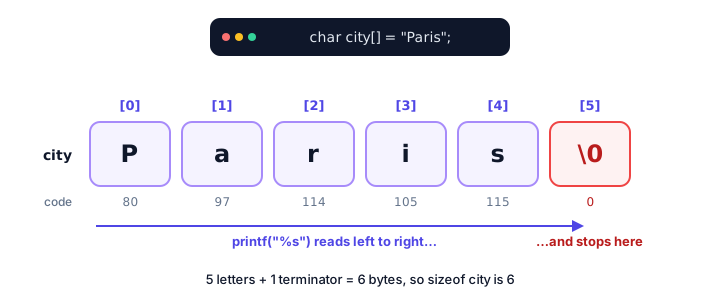
A string in C is a char array whose last used element is the null terminator, written '\0'. The null terminator is a character with the numeric value 0. It isn't printed; it just marks where the text ends.
#include <stdio.h>

int main(void) {
    char city[] = "Paris";

    printf("City: %s\n", city);
    printf("Size in memory: %zu bytes\n", sizeof city);
    printf("First letter: %c\n", city[0]);
    return 0;
}
City: Paris
Size in memory: 6 bytes
First letter: P"Paris" has 5 letters, yet the array is 6 bytes. When you write text in double quotes, called a string literal, C adds the '\0' for you. %s prints a whole string, and %c prints a single character.
What is the null terminator '\0'?
An array doesn't remember how much text you put in it. So C needs another way to know where the text stops, and that's the job of '\0'. Every string function walks the characters one by one until it finds the byte with value 0.
You can even build a string character by character, as long as you add the terminator yourself:
#include <stdio.h>

int main(void) {
    char word[4] = {'C', 'a', 't', '\0'};

    printf("%s\n", word);
    return 0;
}CatDon't confuse '\0' (the null character, value 0) with '0' (the digit zero, value 48). They are completely different characters.
How big should a string array be?
The golden rule: size = number of characters + 1. The extra byte is for '\0'. If you're going to store different text later, make the array big enough for the longest text you expect, plus 1:
char code[4] = "AB1";     /* 3 chars + '\0' = 4: exact fit */
char name[20] = "Sam";    /* room for up to 19 chars; the rest are '\0' */
char auto_size[] = "Hi";  /* compiler picks 3 */
Leaving the size empty, as in auto_size[], is the safest choice when the text never grows, because the compiler always counts the terminator correctly.
Reading a string character by character
Since a string is an array, you can use indexes and loops. A loop that stops at '\0' doesn't need to know the length in advance:
#include <stdio.h>

int main(void) {
    char code[] = "AB12";
    int i = 0;

    while (code[i] != '\0') {
        printf("code[%d] = '%c'\n", i, code[i]);
        i++;
    }
    printf("The '\\0' is at index %d\n", i);
    return 0;
}
code[0] = 'A'
code[1] = 'B'
code[2] = '1'
code[3] = '2'
The '\0' is at index 4Inside a string literal, a backslash starts an escape sequence, so printing a real backslash needs \\. You can also change single characters:
#include <stdio.h>

int main(void) {
    char greeting[] = "Hello";

    greeting[0] = 'J';
    printf("%s\n", greeting);
    return 0;
}JelloHow do you read a string with spaces in C?
You may remember scanf from user input in C. With %s, it reads only one word, because it stops at the first space:
#include <stdio.h>

int main(void) {
    char name[50];

    printf("Enter your full name: ");
    scanf("%49s", name);
    printf("Hello, %s!\n", name);
    return 0;
}
If the user types Ada Lovelace and presses Enter, the program prints:
Enter your full name: Ada Lovelace
Hello, Ada!
"Lovelace" is left waiting in the input. (The 49 limits scanf to 49 characters, leaving room for '\0'.) To read a whole line, use fgets(). It takes the array, its size, and where to read from (stdin, the keyboard):
#include <stdio.h>
#include <string.h>

int main(void) {
    char name[50];

    printf("Enter your full name: ");
    if (fgets(name, sizeof name, stdin) != NULL) {
        name[strcspn(name, "\n")] = '\0';
        printf("Hello, %s!\n", name);
    }
    return 0;
}
Again, the user types Ada Lovelace and presses Enter:
Enter your full name: Ada Lovelace
Hello, Ada Lovelace!
fgets never writes more than sizeof name bytes, so it can't overflow the array. But it also keeps the newline ('\n') from the Enter key. The line name[strcspn(name, "\n")] = '\0'; fixes that: strcspn returns the position of the first '\n', and we replace it with the terminator. Without that line, the ! would appear on the next line of output. You'll meet more functions from string.h in C string functions.
💡 Tip
Use fgets for any text a person types. It handles spaces, and you control the maximum length. fgets returns NULL if nothing could be read, which is why we check it.
Why can't you assign a string with = ?
This looks natural, but it's a compile error:
char status[20];
status = "online";   /* error: assignment to expression with array type */
A string is an array, and C never lets you assign a whole array with =. The = with quotes only works in the declaration, as an initializer. To change the text later, copy it in with strcpy() from string.h:
#include <stdio.h>
#include <string.h>

int main(void) {
    char status[20] = "offline";

    strcpy(status, "online");
    printf("Status: %s\n", status);
    return 0;
}
Status: onlineFor the same reason, comparing two strings with == doesn't compare the text. You'll use strcmp() for that in the next lesson.
📝 Note
You'll also see strings written as const char *greeting = "Hi";. That's a pointer to a read-only string literal, not an array you can edit. For now, stick with char name[] = "..."; when you need text you can change.
Real-world example: checking a username's length
Many sites require a username of 3 to 12 characters. Counting characters is just counting boxes until '\0':
#include <stdio.h>

int main(void) {
    char username[] = "pixel_fox";
    int length = 0;

    while (username[length] != '\0') {
        length++;
    }

    printf("Username: %s\n", username);
    printf("Length: %d characters\n", length);

    if (length >= 3 && length <= 12) {
        printf("Username length is OK\n");
    } else {
        printf("Username must be 3 to 12 characters\n");
    }
    return 0;
}
Username: pixel_fox
Length: 9 characters
Username length is OKReal-world example: printing a name tag
Conference name tags need neat edges. %-16s prints a string left-aligned in a field 16 characters wide, padding the rest with spaces:
#include <stdio.h>

int main(void) {
    char name[] = "Lena";
    char role[] = "Speaker";

    printf("+------------------+\n");
    printf("| %-16s |\n", "HELLO, I AM");
    printf("| %-16s |\n", name);
    printf("| %-16s |\n", role);
    printf("+------------------+\n");
    return 0;
}
+------------------+
| HELLO, I AM |
| Lena |
| Speaker |
+------------------+As the example shows, %s works with both a string literal and a char array.
Common mistakes with strings in C
1. No room for '\0'
char name[5] = "Alexa"; fits the 5 letters but not the terminator, and C won't add it. Printing name then keeps reading past the array: you may see strange extra characters, or the program may crash. Size it as 6, or write char name[] = "Alexa";.
2. Using single quotes for strings
'A' is one character; "A" is a string of two bytes ('A' and '\0'). Writing char word[] = 'Hi'; is wrong; use double quotes.
3. Assigning or comparing with = and ==
name = "Bob"; doesn't compile, and if (name == "Bob") compares memory locations, not letters. Use strcpy and strcmp.
4. Reading text with scanf("%s") and no size limit
Plain scanf("%s", name) stops at spaces and writes as many characters as the user types, even past the end of the array. Prefer fgets, or at least use a width like %49s.
5. Forgetting the newline that fgets keeps
If you skip the strcspn line, the string ends with '\n', so comparisons like "is the answer yes?" fail mysteriously.
Practice exercise
🏋️ Try it yourself
Store the word "stressed" in a char array. Find its length with a loop that stops at '\0', then print the word backwards, one character at a time.
Show solution
#include <stdio.h>

int main(void) {
    char word[] = "stressed";
    int length = 0;

    while (word[length] != '\0') {
        length++;
    }

    printf("Reversed: ");
    for (int i = length - 1; i >= 0; i--) {
        printf("%c", word[i]);
    }
    printf("\n");
    return 0;
}
Reversed: dessertsThe last letter sits at index length - 1, not length, because index length holds the '\0'.
What's next?
Counting characters and copying text by hand gets tiring fast. C's standard library has ready-made tools for that. Next, learn C string functions like strlen, strcpy, strcat and strcmp.
Key takeaways
- A string in C is a char array that ends with the null terminator '\0' (value 0).
- A string literal like "Paris" gets its '\0' added automatically, so it needs one extra byte.
- Size a string array as the number of characters plus 1, or leave the size empty to let the compiler count.
- Print strings with %s; read a whole line with fgets() and remove the newline with strcspn().
- scanf("%s") stops at the first space, so it reads only one word.
- You cannot assign or compare strings with = and ==; use strcpy() and strcmp().
Frequently asked questions
How are strings stored in C?
As arrays of char. Each character takes one byte, and the text is followed by the null terminator '\0', a byte with value 0 that marks the end of the string.
Why do C strings need an extra byte?
The extra byte holds the null terminator. Without it, functions like printf and strlen cannot tell where the text ends and keep reading into other memory.
How do I read a string with spaces in C?
Use fgets(buffer, sizeof buffer, stdin). It reads a whole line including spaces and never writes past the buffer. Then remove the trailing newline with buffer[strcspn(buffer, "\n")] = '\0';.
Why does scanf("%s") only read the first word?
The %s conversion stops reading at the first whitespace character, such as a space or tab. The rest of the line stays in the input buffer.
Can I assign a string to a char array after declaring it?
Not with =. Arrays cannot be assigned in C. Copy the text into the array with strcpy() or snprintf() instead, making sure the array is big enough.