Writing to Files in C
Updated 8 min read Aimerscrew
Reading files lets a program use data from the past. Writing files lets it leave data for the future: a saved game, a settings file, a report your manager can open in a spreadsheet. In this lesson, you'll learn how to write to a file in C with fprintf(), fputs() and fputc(), see the exact difference between "w" and "a" mode, and build a small CSV sales report.
🌍 Real-life example
When you beat the high score in an arcade game, the machine has to remember it after it's switched off, so it writes the score to storage. A coffee shop's till does something different: at the end of every day it adds one line to a sales log and never touches the earlier days. The first job uses "w" (replace the old score) and the second uses "a" (append a new line).
How do you write to a file in C?
Writing always follows the pattern from File Handling in C: open, write, close. C gives you three main writing functions:
| Function | Writes | Example |
|---|---|---|
fprintf(fp, format, ...) | Formatted text, like printf() | fprintf(fp, "%s %d\n", name, score); |
fputs(text, fp) | A whole string, exactly as it is | fputs("Hello\n", fp); |
fputc(ch, fp) | One character | fputc('-', fp); |
Watch the argument order: fprintf() takes the file first, while fputs() and fputc() take it last.
Writing formatted text with fprintf()
fprintf() accepts the same format specifiers as printf(). The only difference is where the text goes. This program saves a game's new high score:
#include <stdio.h>

int main(void) {
    const char *player = "Rina";
    int score = 4820;

    FILE *fp = fopen("highscore.txt", "w");
    if (fp == NULL) {
        perror("highscore.txt");
        return 1;
    }

    fprintf(fp, "%s %d\n", player, score);
    fclose(fp);

    printf("New high score saved: %s with %d points\n", player, score);
    return 0;
}
New high score saved: Rina with 4820 pointsAfter it runs, highscore.txt contains one line:
Rina 4820The next time the game starts, it can read this back with fscanf(fp, "%19s %d", name, &score), as you saw in Reading Files in C. Because the program uses "w", a new record replaces the old one, which is exactly what a high score needs.
Writing strings and characters with fputs() and fputc()
When there's nothing to format, fputs() is simpler and slightly faster. Unlike puts(), it does not add a newline for you. fputc() writes a single character, which is handy inside loops. This program writes a café receipt using all three functions:
#include <stdio.h>

int main(void) {
    double latte = 3.75;
    double muffin = 2.50;

    FILE *fp = fopen("receipt.txt", "w");
    if (fp == NULL) {
        perror("receipt.txt");
        return 1;
    }

    fputs("CORNER CAFE\n", fp);
    for (int i = 0; i < 16; i++) {
        fputc('-', fp);
    }
    fputc('\n', fp);

    fprintf(fp, "Latte     %6.2f\n", latte);
    fprintf(fp, "Muffin    %6.2f\n", muffin);
    fprintf(fp, "Total     %6.2f\n", latte + muffin);
    fclose(fp);

    printf("Receipt saved to receipt.txt\n");
    return 0;
}
Receipt saved to receipt.txtContents of receipt.txt:
CORNER CAFE
----------------
Latte       3.75
Muffin      2.50
Total       6.25
%6.2f prints each price 6 characters wide with 2 decimals, so the numbers line up in a neat column.
What is the difference between "w" and "a" mode?
This is the single most important choice when writing files:
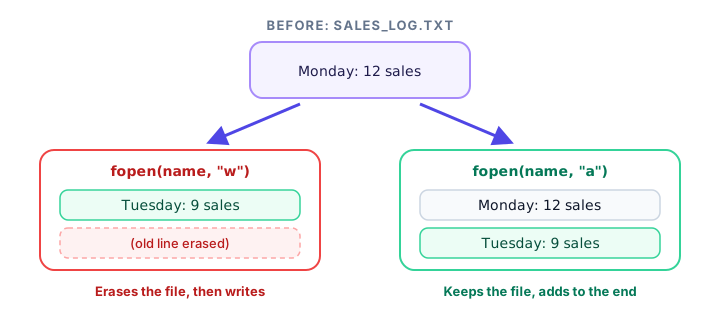
"w"(write) erases the file as soon as it's opened, then writes from the beginning."a"(append) keeps everything and adds new data to the end.
Both create the file if it doesn't exist yet. The program below proves the difference. It writes Monday's sales to two files, then opens each file a second time and writes Tuesday's sales, once with "w" and once with "a". Two small functions keep the code short.
#include <stdio.h>

void save(const char *filename, const char *mode, const char *text) {
    FILE *fp = fopen(filename, mode);
    if (fp == NULL) {
        perror(filename);
        return;
    }
    fputs(text, fp);
    fclose(fp);
}

void show_file(const char *filename) {
    char line[100];
    FILE *fp = fopen(filename, "r");
    if (fp == NULL) {
        perror(filename);
        return;
    }
    while (fgets(line, sizeof line, fp) != NULL) {
        printf("  %s", line);
    }
    fclose(fp);
}

int main(void) {
    save("log_w.txt", "w", "Monday: 12 sales\n");
    save("log_w.txt", "w", "Tuesday: 9 sales\n");
    printf("With \"w\":\n");
    show_file("log_w.txt");

    save("log_a.txt", "w", "Monday: 12 sales\n");
    save("log_a.txt", "a", "Tuesday: 9 sales\n");
    printf("With \"a\":\n");
    show_file("log_a.txt");

    return 0;
}
With "w":
Tuesday: 9 sales
With "a":
Monday: 12 sales
Tuesday: 9 salesWith "w", Monday's line vanished the moment the file was opened the second time. With "a", it survived. (The first save() for log_a.txt uses "w" on purpose, so each run of the demo starts from a clean file.)
Real-world example: writing a CSV report
A CSV (comma-separated values) file is plain text where each line is a row and commas separate the columns. Excel, Google Sheets and LibreOffice all open CSV files directly, which makes them a great way to hand data from a C program to people. This program uses an array of structs to write a small sales report:
#include <stdio.h>

struct Sale {
    char product[20];
    int quantity;
    double price;
};

int main(void) {
    struct Sale sales[] = {
        {"Notebook", 4, 2.50},
        {"Pen", 10, 1.20},
        {"Backpack", 1, 34.99}
    };
    size_t count = sizeof sales / sizeof sales[0];
    double grand_total = 0.0;

    FILE *fp = fopen("sales.csv", "w");
    if (fp == NULL) {
        perror("sales.csv");
        return 1;
    }

    fprintf(fp, "product,quantity,price,total\n");
    for (size_t i = 0; i < count; i++) {
        double line_total = sales[i].quantity * sales[i].price;
        fprintf(fp, "%s,%d,%.2f,%.2f\n",
                sales[i].product, sales[i].quantity, sales[i].price, line_total);
        grand_total += line_total;
    }
    fclose(fp);

    printf("Wrote %zu rows to sales.csv\n", count);
    printf("Grand total: %.2f\n", grand_total);
    return 0;
}
Wrote 3 rows to sales.csv
Grand total: 56.99Contents of sales.csv:
product,quantity,price,total
Notebook,4,2.50,10.00
Pen,10,1.20,12.00
Backpack,1,34.99,34.99
The first line is the header row with column names. Open the file in a spreadsheet app and you'll see four neat columns.
💡 Tip
For a daily log, open the CSV in "a" mode and only write the header when the file is new. One simple way: open with "a", call fseek(fp, 0, SEEK_END) and check whether ftell(fp) is 0. You'll meet fseek() and ftell() in Binary Files in C.
What does fflush() do?
As you learned in the previous lessons, written data first goes into a buffer in memory and is sent to the disk in bigger chunks. That's fast, but if the program crashes, whatever is still in the buffer is lost. fflush(fp) pushes the buffer to the operating system right now, without closing the file:
fprintf(log_file, "Order #1042 paid\n");
fflush(log_file);   /* make sure this line is saved even if we crash later */
You rarely need it, because fclose() flushes automatically. It's useful for long-running programs, such as a server writing a log file for hours, where you want each line saved promptly.
Always close the file (and check for errors)
Calling fclose() is what guarantees your data is written. It returns 0 on success and EOF if something went wrong, for example if the disk filled up while the last buffer was being saved. For important files, check it:
if (fclose(fp) != 0) {
    perror("Saving failed");
}
Similarly, fprintf() returns a negative number and fputs() and fputc() return EOF when a write fails.
Common mistakes when writing files
1. Using "w" for a log
Each run erases the previous entries, so the log only ever holds one day. Use "a" for anything that should grow over time.
2. Mixing up the argument order
fputs(fp, "Hello\n");     /* wrong: the file goes last */
fprintf("Hello\n", fp);   /* wrong: the file goes first */
GCC reports an incompatible pointer type for both lines. Remember: fprintf(fp, ...), but fputs(text, fp) and fputc(ch, fp).
3. Forgetting the newline
fputs("Monday", fp); fputs("Tuesday", fp); writes MondayTuesday on one line. Neither fputs() nor fprintf() adds \n for you.
4. Writing to a file opened with "r"
A file opened in "r" mode is read-only. Writes to it fail (fputs() returns EOF) and nothing is saved. Open it with "w", "a" or "r+" to write.
Practice exercise
🏋️ Try it yourself
Write a program that creates table.txt containing the 7 times table from 7 × 1 to 7 × 5, one line each in the form 7 x 1 = 7. Then print Wrote 5 lines. on the screen.
Show solution
#include <stdio.h>

int main(void) {
    FILE *fp = fopen("table.txt", "w");
    if (fp == NULL) {
        perror("table.txt");
        return 1;
    }

    int lines = 0;
    for (int i = 1; i <= 5; i++) {
        fprintf(fp, "7 x %d = %d\n", i, 7 * i);
        lines++;
    }
    fclose(fp);

    printf("Wrote %d lines.\n", lines);
    return 0;
}
Wrote 5 lines.Contents of table.txt:
7 x 1 = 7
7 x 2 = 14
7 x 3 = 21
7 x 4 = 28
7 x 5 = 35
What's next?
Text files are easy for people to read, but they aren't always the best choice for a program's own data. Next, learn how to save whole arrays and structs byte for byte, and jump straight to any record, in Binary Files in C: fwrite() and fread().
Key takeaways
- Open a file with "w" to start fresh or "a" to add to the end; both create the file if it does not exist.
- "w" erases the existing contents the moment fopen() succeeds.
- fprintf(fp, format, ...) writes formatted text; fputs(text, fp) writes a string; fputc(ch, fp) writes one character.
- None of the writing functions add a newline automatically.
- A CSV file is plain text with a header row and comma-separated values that spreadsheets can open.
- fflush() saves buffered data immediately, and fclose() flushes and closes; check fclose() for important files.
Frequently asked questions
How do you write to a text file in C?
Open the file with fopen("name.txt", "w") or "a", check that the pointer is not NULL, write with fprintf(), fputs() or fputc(), and finish with fclose(fp) so the data is saved.
How do I append to a file in C without overwriting it?
Open it in "a" (append) mode. Everything you write is added after the existing contents, and the file is created if it does not exist yet.
What is the difference between fputs() and fprintf()?
fputs() writes a string exactly as it is. fprintf() takes a format string with specifiers like %d and %.2f, so it can turn numbers and other values into text. Both write to the file you pass in.
Does fputs() add a newline?
No. Unlike puts(), fputs() writes only the characters in the string. Include \n yourself if you want each piece of text on its own line.
When should I use fflush() in C?
Use fflush(fp) when data must be saved right away without closing the file, such as a log written by a long-running program. In most programs, fclose() is enough because it flushes automatically.