calloc() and realloc() in C
Updated 7 min read Aimerscrew
malloc() gives you a block of memory, but it doesn't clear it and it can't change its size later. That's where calloc and realloc in C come in. calloc() hands you memory that's already filled with zeros, and realloc() lets you grow or shrink a block while the program runs. In this lesson, you'll use both, learn the one safety pattern you must never skip, and build an array that grows on its own.
🌍 Real-life example
Think of an online shopping cart. It starts small, but shoppers keep adding items. A store doesn't reserve space for a thousand items per visitor; it starts with a few slots and makes the cart bigger only when it fills up. That "grow when needed" idea is exactly what realloc() does for your arrays.
What does calloc() do?
calloc() ("contiguous allocate" or "clear allocate") reserves memory for a number of items and sets every byte to zero. It takes two arguments: how many items, and the size of one item.
void *calloc(size_t count, size_t size);Like malloc(), it returns a pointer to the block or NULL on failure, and you release the block with free(). The zeroing makes it perfect for counters and tallies, where every slot must start at 0:
#include <stdio.h>
#include <stdlib.h>

int main(void) {
    int candidates = 5;
    int *votes = calloc(candidates, sizeof *votes);
    if (votes == NULL) {
        printf("Out of memory\n");
        return 1;
    }

    int ballots[] = {2, 0, 2, 4, 1, 2, 4};
    for (int i = 0; i < 7; i++) {
        votes[ballots[i]]++;
    }

    for (int i = 0; i < candidates; i++) {
        printf("Candidate %d: %d vote(s)\n", i, votes[i]);
    }

    free(votes);
    votes = NULL;
    return 0;
}
Candidate 0: 1 vote(s)
Candidate 1: 1 vote(s)
Candidate 2: 3 vote(s)
Candidate 3: 0 vote(s)
Candidate 4: 2 vote(s)Because every counter starts at 0, votes[ballots[i]]++ works right away. With malloc(), the counters would start with leftover garbage, and the totals would be wrong.
💡 Tip
Use calloc() when you need everything to start at zero. Use malloc() when you're about to overwrite every element anyway; skipping the zeroing step is slightly faster.
What does realloc() do?
realloc() ("re-allocate") changes the size of a block you got from malloc(), calloc() or an earlier realloc():
void *realloc(void *ptr, size_t new_size);It keeps your existing data. If there's free space right after the block, it simply extends it. If not, it finds a bigger block elsewhere, copies your data over, frees the old block, and returns the new address. That's why you must always use the pointer it returns, never the old one.
Two more facts worth knowing:
- When growing, the new part is not zeroed, even if the block came from
calloc(). realloc(NULL, size)behaves just likemalloc(size).
The safe way to call realloc()
If realloc() fails, it returns NULL but leaves your original block untouched. If you write p = realloc(p, ...) and it fails, you overwrite your only pointer with NULL and lose the original block forever. The fix is a temporary pointer:
#include <stdio.h>
#include <stdlib.h>

int main(void) {
    int *temps = malloc(3 * sizeof *temps);
    if (temps == NULL) {
        return 1;
    }
    temps[0] = 18;
    temps[1] = 21;
    temps[2] = 19;

    int *bigger = realloc(temps, 5 * sizeof *temps);
    if (bigger == NULL) {
        free(temps);   /* the old block is still valid, so free it */
        return 1;
    }
    temps = bigger;    /* only now replace the old pointer */

    temps[3] = 23;
    temps[4] = 20;

    for (int i = 0; i < 5; i++) {
        printf("Day %d: %d C\n", i + 1, temps[i]);
    }

    free(temps);
    temps = NULL;
    return 0;
}
Day 1: 18 C
Day 2: 21 C
Day 3: 19 C
Day 4: 23 C
Day 5: 20 CThe first three readings survived the resize, and the two new slots were filled afterward.
Shrinking a block with realloc()
realloc() can also make a block smaller, which hands the unused tail back to the system. Items beyond the new size are gone:
int *smaller = realloc(temps, 2 * sizeof *temps);   /* keep only 2 items */
if (smaller != NULL) {
    temps = smaller;
}
⚠️ Be careful
Don't use realloc(p, 0) to free memory. What it does has varied between systems, and the newest C standard (C23) makes it undefined. Call free(p) instead.
How do you build a dynamic array in C?
A dynamic array is an array that grows as you add items. It tracks two numbers: count (how many items are stored) and capacity (how many fit right now). When count reaches capacity, you realloc() to double the capacity.
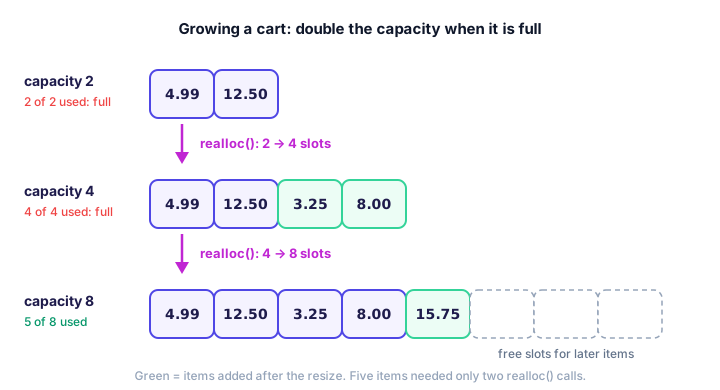
realloc() doubles its capacity, so resizes stay rare.Here's that shopping cart in code:
#include <stdio.h>
#include <stdlib.h>

int main(void) {
    double prices[] = {4.99, 12.50, 3.25, 8.00, 15.75};
    int capacity = 2;
    int count = 0;
    double *cart = malloc(capacity * sizeof *cart);
    if (cart == NULL) {
        return 1;
    }

    for (int i = 0; i < 5; i++) {
        if (count == capacity) {
            int new_capacity = capacity * 2;
            double *bigger = realloc(cart, new_capacity * sizeof *cart);
            if (bigger == NULL) {
                free(cart);
                return 1;
            }
            cart = bigger;
            capacity = new_capacity;
            printf("Cart full, grew to %d slots\n", capacity);
        }
        cart[count] = prices[i];
        count++;
        printf("Added $%.2f (%d of %d)\n", prices[i], count, capacity);
    }

    double total = 0.0;
    for (int i = 0; i < count; i++) {
        total += cart[i];
    }
    printf("Total: $%.2f\n", total);

    free(cart);
    cart = NULL;
    return 0;
}
Added $4.99 (1 of 2)
Added $12.50 (2 of 2)
Cart full, grew to 4 slots
Added $3.25 (3 of 4)
Added $8.00 (4 of 4)
Cart full, grew to 8 slots
Added $15.75 (5 of 8)
Total: $44.49Why double instead of adding one slot at a time? Each realloc() may copy the whole array. Growing by one would copy on every single add. Doubling means a cart of 1,000 items needs only about 10 resizes. Later, you'll wrap this idea in a struct to make a reusable list type.
malloc vs calloc vs realloc
malloc(size) | calloc(count, size) | realloc(ptr, size) | |
|---|---|---|---|
| Purpose | New block | New block, all zeros | Resize an existing block |
| Arguments | Total bytes | Item count and item size | Old pointer and new total bytes |
| Initial contents | Garbage | All zero | Old data kept; new part is garbage |
| On failure | Returns NULL | Returns NULL | Returns NULL, old block untouched |
| Typical use | You'll fill it right away | Counters, flags, tallies | Growing lists, trimming extra space |
All three come from <stdlib.h>, and every block they give you must be released exactly once with free().
Common mistakes with calloc and realloc
1. Writing p = realloc(p, ...)
If the call fails, p becomes NULL and the old block can never be freed. That's a memory leak. Always go through a temporary pointer.
2. Using the old pointer after realloc()
If realloc() moved the block, the old address now points to freed memory. Reading through it may print garbage or crash. Use only the pointer realloc() returned.
3. Expecting the new part to be zero
Growing a calloc() block with realloc() does not zero the extra slots. Set them yourself.
4. Forgetting to update the capacity
If you resize but don't update capacity, your program either resizes again and again, or believes it has room it doesn't have and writes past the end.
Practice exercise
🏋️ Try it yourself
A parking garage has 3 levels. Use calloc() to create a car count for each level (all empty). The owner then adds 2 more levels: use realloc() safely to grow the array to 5 and set the new levels to 0. Park 12 cars on level 1 and 4 cars on level 5, then print every level as Level 1: 12 cars.
Show solution
#include <stdio.h>
#include <stdlib.h>

int main(void) {
    int levels = 3;
    int *cars = calloc(levels, sizeof *cars);
    if (cars == NULL) {
        return 1;
    }

    int *bigger = realloc(cars, 5 * sizeof *cars);
    if (bigger == NULL) {
        free(cars);
        return 1;
    }
    cars = bigger;
    for (int i = levels; i < 5; i++) {
        cars[i] = 0;   /* realloc does not zero the new levels */
    }
    levels = 5;

    cars[0] = 12;
    cars[4] = 4;

    for (int i = 0; i < levels; i++) {
        printf("Level %d: %d cars\n", i + 1, cars[i]);
    }

    free(cars);
    cars = NULL;
    return 0;
}
Level 1: 12 cars
Level 2: 0 cars
Level 3: 0 cars
Level 4: 0 cars
Level 5: 4 carsWhat's next?
You can now allocate, resize and free memory. The last step is making sure nothing slips through the cracks. Next, learn about memory leaks in C and the tools that find them for you.
Key takeaways
- calloc(count, size) allocates memory for count items and sets every byte to zero.
- realloc(ptr, new_size) grows or shrinks a block, keeping the existing data, and may move it to a new address.
- Always store realloc()'s result in a temporary pointer so the old block is not lost if it fails.
- The extra space added by realloc() is not zeroed, even for a block that came from calloc().
- A dynamic array tracks count and capacity and doubles the capacity when it fills up.
- Every block from malloc(), calloc() or realloc() must be freed exactly once.
Frequently asked questions
What is the difference between malloc and calloc in C?
malloc(size) takes the total number of bytes and leaves the memory uninitialized. calloc(count, size) takes an item count and an item size, and sets every byte of the block to zero.
Does realloc keep the old data?
Yes. realloc() keeps the contents up to the smaller of the old and new sizes. If it has to move the block, it copies the data to the new location and frees the old block for you.
Why should I use a temporary pointer with realloc?
If realloc() fails it returns NULL and leaves the original block alone. Writing p = realloc(p, size) would overwrite your only pointer with NULL and leak the original block, so assign to a temporary pointer and replace p only after checking for NULL.
Does realloc zero the new memory?
No. When realloc() makes a block bigger, the extra bytes have unspecified contents. Set them yourself if they need a starting value.
Why do dynamic arrays double their capacity?
Each resize may copy the whole array. Doubling keeps the number of resizes small, so adding an item is fast on average, even for very large arrays.