C if, else if and else
Updated 8 min read Aimerscrew
Programs constantly make decisions: is the password correct, is the cart empty, is the player out of lives? In C, you make these decisions with the C if else statement. In this lesson, you'll learn how if, else if and else work, why C treats numbers as true or false, and the one brace-related trap that catches almost every beginner.
🌍 Real-life example
A cash machine makes a chain of decisions every time you ask for money. If the amount is zero or less, it refuses. Else if you ask for more than your balance, it says "insufficient funds". Else, it hands over the cash. You'll write exactly this logic in C later in this lesson.
What is an if statement in C?
An if statement runs a block of code only when a condition is true. The condition goes in parentheses, and the code to run goes inside curly braces { }:
if (condition) {
    // runs only when condition is true
}
The condition is usually a comparison built with the comparison operators such as >, <= or ==.
#include <stdio.h>

int main(void) {
    int temperature = 31;

    if (temperature > 30) {
        printf("It's hot. Turn on the fan.\n");
    }

    printf("Done checking.\n");
    return 0;
}
It's hot. Turn on the fan.
Done checking.Change temperature to 20 and only Done checking. is printed. The line after the closing brace always runs, because it is outside the if statement.
How does if else work?
Add an else block when you want something to happen in the other case. Exactly one of the two blocks runs, never both and never neither.
#include <stdio.h>

int main(void) {
    int freeSpots = 0;

    if (freeSpots > 0) {
        printf("Welcome! %d spots left.\n", freeSpots);
    } else {
        printf("Sorry, the parking lot is full.\n");
    }

    return 0;
}
Sorry, the parking lot is full.Checking several conditions with else if
When there are more than two possible outcomes, chain the tests with else if. C checks the conditions from top to bottom and runs the block of the first one that is true. Everything after it is skipped. The final else catches every case that didn't match.
Here is a grade calculator. A score of 83 fails the first test, passes the second, and the rest are never checked:
#include <stdio.h>

int main(void) {
    int score = 83;
    char grade;

    if (score >= 90) {
        grade = 'A';
    } else if (score >= 80) {
        grade = 'B';
    } else if (score >= 70) {
        grade = 'C';
    } else {
        grade = 'F';
    }

    printf("Grade: %c\n", grade);
    return 0;
}
Grade: B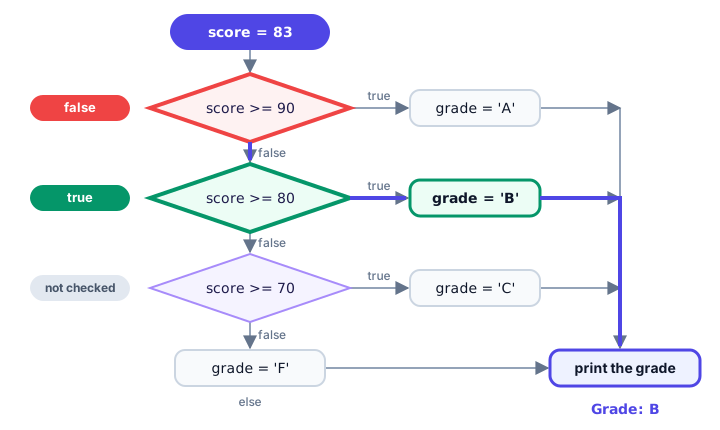
💡 Tip
Order matters. If you test score >= 70 first, a score of 95 would match it and get a C. When ranges overlap, put the strictest test at the top.
Is a condition true or false in C?
Older C has no separate true/false type. A condition is simply a number: 0 means false, and any non-zero value (1, 42, even -1) means true. Comparison operators give back 1 for true and 0 for false, which you can print:
#include <stdio.h>

int main(void) {
    int itemsInCart = 3;
    int isLoggedIn = 0;

    printf("5 > 2 gives %d\n", 5 > 2);
    printf("5 < 2 gives %d\n", 5 < 2);

    if (itemsInCart) {
        printf("You have %d items in your cart.\n", itemsInCart);
    }

    if (!isLoggedIn) {
        printf("Please log in to check out.\n");
    }

    return 0;
}
5 > 2 gives 1
5 < 2 gives 0
You have 3 items in your cart.
Please log in to check out.if (itemsInCart) is a short way of writing if (itemsInCart != 0), and !isLoggedIn uses the logical NOT operator to flip 0 into 1.
📝 Note
Since C99, you can #include <stdbool.h> and use the type bool with the values true and false. They are still the numbers 1 and 0 underneath, but they make your intent clearer.
Real-world example: an ATM withdrawal
Here's the cash machine from the start of the lesson. Each else if rules out one problem, and the final else only runs when every check has passed:
#include <stdio.h>

int main(void) {
    int balance = 250;
    int amount = 120;

    if (amount <= 0) {
        printf("Please enter an amount greater than zero.\n");
    } else if (amount % 20 != 0) {
        printf("This ATM only gives out $20 bills.\n");
    } else if (amount > balance) {
        printf("Insufficient funds. Your balance is $%d.\n", balance);
    } else {
        balance = balance - amount;
        printf("Please take your $%d.\n", amount);
        printf("Remaining balance: $%d\n", balance);
    }

    return 0;
}
Please take your $120.
Remaining balance: $130Try changing amount to 130 (not a multiple of 20) or 300 (more than the balance) and predict the message before you run it.
Nested if statements
An if statement can sit inside another one. This is called nesting, and it's useful when a second question only makes sense after the first one is answered. An online shop might ship big orders for free, and only check membership for smaller orders:
#include <stdio.h>

int main(void) {
    double orderTotal = 42.50;
    int isMember = 1;
    double shipping;

    if (orderTotal >= 50.0) {
        shipping = 0.0;
    } else {
        if (isMember) {
            shipping = 2.99;
        } else {
            shipping = 5.99;
        }
    }

    printf("Order: $%.2f\n", orderTotal);
    printf("Shipping: $%.2f\n", shipping);
    printf("Total: $%.2f\n", orderTotal + shipping);
    return 0;
}
Order: $42.50
Shipping: $2.99
Total: $45.49Keep nesting shallow. More than two or three levels deep is hard to follow, and an else if chain or the logical operators && and || can often flatten it.
Why should you always use braces?
C lets you leave out the braces when the body is a single statement: if (x > 0) printf("positive\n"); is legal. But skipping braces causes two classic bugs.
The dangling else problem
Look at this code. The indentation suggests the else belongs to the first if:
#include <stdio.h>

int main(void) {
    int hasTicket = 0;
    int isVip = 1;

    if (hasTicket)
        if (isVip)
            printf("Welcome to the VIP lounge.\n");
    else
        printf("Please buy a ticket first.\n");

    return 0;
}
This program prints nothing at all. C ignores indentation, and its rule is that an else always belongs to the nearest unmatched if, here if (isVip). Since hasTicket is 0, the whole inner if/else is skipped. GCC with -Wall warns: suggest explicit braces to avoid ambiguous 'else'. This is called the dangling else. Braces make the meaning clear to both you and the compiler:
#include <stdio.h>

int main(void) {
    int hasTicket = 0;
    int isVip = 1;

    if (hasTicket) {
        if (isVip) {
            printf("Welcome to the VIP lounge.\n");
        }
    } else {
        printf("Please buy a ticket first.\n");
    }

    return 0;
}
Please buy a ticket first.Adding a second line later
Without braces, only the first statement belongs to the if. If someone later adds a line underneath, it runs every time, no matter what the indentation says:
if (lives == 0)
    printf("Game over\n");
    resetGame();   // NOT part of the if: runs every time!
Using braces on every if, else if and else, even for one line, prevents both bugs. That's the style used throughout this tutorial.
Common mistakes with if else
1. Using = instead of ==
if (lives = 0) {   // assigns 0 to lives!
    printf("Game over\n");
}
A single = assigns 0 to lives, and the condition becomes 0 (false), so the message never prints and the player silently loses all their lives. Use == to compare. GCC warns with suggest parentheses around assignment used as truth value.
2. A semicolon after the condition
if (balance < 0); {
    printf("Your account is overdrawn.\n");
}
The ; ends the if statement with an empty body, so the block below runs every time, even with a positive balance.
3. Chaining comparisons like in math
if (1 <= month <= 12) does not check a range. C first works out 1 <= month (0 or 1), then checks whether that 0 or 1 is <= 12, which is always true. Write if (month >= 1 && month <= 12) instead.
4. Putting else if tests in the wrong order
As you saw with the grade calculator, a broad test placed first swallows cases meant for later branches. Order the tests from the most specific to the most general.
Practice exercise
🏋️ Try it yourself
Write a smart thermostat program. Store a room temperature in an int (try 16). If it's below 18, print 16 degrees: heating on. If it's above 24, print ... cooling on. Otherwise print ... comfortable, no change.
Show solution
#include <stdio.h>

int main(void) {
    int temperature = 16;

    if (temperature < 18) {
        printf("%d degrees: heating on\n", temperature);
    } else if (temperature > 24) {
        printf("%d degrees: cooling on\n", temperature);
    } else {
        printf("%d degrees: comfortable, no change\n", temperature);
    }

    return 0;
}
16 degrees: heating onWhat's next?
When you compare one variable against many fixed values, a long else if chain gets repetitive. Next, learn the C switch statement, which handles that case more neatly.
Key takeaways
- An if statement runs its block only when the condition in parentheses is true.
- else runs when the condition is false; else if lets you test several conditions in order.
- C stops at the first true condition in an else if chain, so put the strictest test first.
- In C, 0 means false and any non-zero value means true; comparisons give 1 or 0.
- An else belongs to the nearest unmatched if (the dangling else), so always use braces.
- Use == to compare; a single = assigns a value and is a common source of bugs.
Frequently asked questions
What is the syntax of if else in C?
Write if (condition) { ... } else { ... }. The first block runs when the condition is non-zero (true) and the else block runs when it is 0 (false). Add else if (condition) { ... } between them to test more conditions.
What is the difference between else if and a nested if in C?
An else if chain tests several alternatives one after another and runs only the first match. A nested if puts one if statement inside another, so the inner test is only checked when the outer condition is true.
Is any non-zero number true in C?
Yes. In a condition, 0 is false and every other value, including negative numbers such as -1, is true. Comparison and logical operators always produce exactly 1 or 0.
What is the dangling else problem?
When if statements are nested without braces, it can look as if an else belongs to the outer if. C always pairs an else with the nearest unmatched if, ignoring indentation. Using braces removes the ambiguity.
Do I need curly braces for a one-line if in C?
No, the compiler accepts a single statement without braces. However, braces are strongly recommended because they prevent the dangling else problem and bugs when more lines are added later.