Binary Files in C: fwrite() and fread()
Updated 10 min read Aimerscrew
Text files are perfect for things people read, like notes, reports and CSV files. But when a program saves its own data, such as a game's player list or a thousand sensor readings, converting every number to text and back is slow and wasteful. Binary files in C skip that conversion: they copy the bytes straight from memory to disk. In this lesson, you'll learn fwrite() and fread(), save whole arrays and structs, and use fseek() to jump straight to any record.
🌍 Real-life example
A video game's "Save game" button stores every player's name, level and coins. Nobody needs to read that file in Notepad; the game just needs to load it back quickly and exactly. Saving it in binary is like photocopying a page instead of rewriting it by hand: faster, and the copy is identical. And because every player record is the same size, the game can jump straight to player number 2 without reading the others.
What is a binary file?
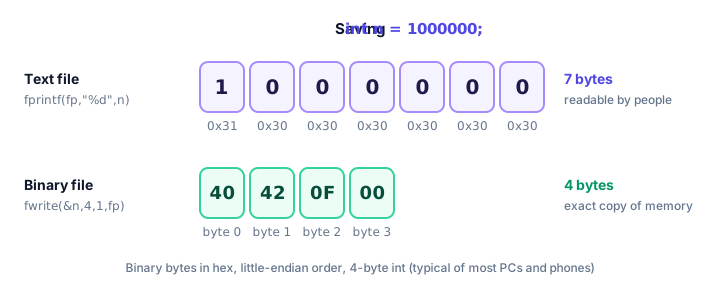
A binary file holds raw bytes exactly as they sit in memory, with no conversion to characters. A text file holds characters, so a number is stored as its digits.
Take int n = 1000000;. Written as text with fprintf(), it becomes seven characters, 1000000, one byte each. Written in binary with fwrite(), it's the same 4 bytes the int already uses in memory (on most systems).
Why use binary files?
- Exact: a
doublelike0.1is saved bit for bit. Printing it as text with%.2fwould round it. - Compact: every
inttakes the same 4 bytes, whether it's 7 or 2,000,000,000. - Fast: no formatting or parsing; a single call can save or load a whole array.
- Random access: fixed-size records mean you can calculate where record number 500 starts and jump there.
The trade-off is that you can't open the file in a text editor and read it, and (as you'll see later) it may not load correctly on a very different kind of computer.
How fwrite() and fread() work
Both functions take the same four arguments:
size_t fwrite(const void *data, size_t size, size_t count, FILE *fp);
size_t fread(void *data, size_t size, size_t count, FILE *fp);data: the address of the memory to save from, or load into.size: the size of one item in bytes, usually written withsizeof.count: how many items.fp: a file opened in binary mode ("wb","rb","ab","r+b","w+b"...).
Each returns the number of whole items it actually wrote or read. If that's less than count, you hit the end of the file or an error. The void * type means "a pointer to any kind of data", which is why the same functions work for ints, doubles and structs.
Writing and reading an array
This program saves five game scores in one fwrite() call and loads them back with one fread():
#include <stdio.h>

int main(void) {
    int scores[5] = {120, 340, 95, 410, 275};
    int loaded[5] = {0};

    FILE *fp = fopen("scores.bin", "wb");
    if (fp == NULL) {
        perror("scores.bin");
        return 1;
    }
    size_t written = fwrite(scores, sizeof scores[0], 5, fp);
    fclose(fp);
    printf("Wrote %zu numbers\n", written);

    fp = fopen("scores.bin", "rb");
    if (fp == NULL) {
        perror("scores.bin");
        return 1;
    }
    size_t read_count = fread(loaded, sizeof loaded[0], 5, fp);
    fclose(fp);

    printf("Read %zu numbers:", read_count);
    for (size_t i = 0; i < read_count; i++) {
        printf(" %d", loaded[i]);
    }
    printf("\n");
    return 0;
}
Wrote 5 numbers
Read 5 numbers: 120 340 95 410 275Because an array name turns into a pointer to its first element (see pointers and arrays), you pass scores directly. On a system with 4-byte ints, scores.bin is exactly 20 bytes long. Open it in a text editor and you'll see a few odd symbols, not the numbers.
How do you save a struct to a binary file?
Binary files really shine with structs. One fwrite() saves an entire array of records, every field included:
#include <stdio.h>

typedef struct {
    char name[16];
    int level;
    int coins;
} Player;

int main(void) {
    Player team[3] = {
        {"Nova", 12, 1500},
        {"Kai", 7, 820},
        {"Zara", 19, 3110}
    };
    Player loaded[10];

    FILE *fp = fopen("players.bin", "wb");
    if (fp == NULL) {
        perror("players.bin");
        return 1;
    }
    size_t saved = fwrite(team, sizeof(Player), 3, fp);
    fclose(fp);
    printf("Saved %zu players\n", saved);

    fp = fopen("players.bin", "rb");
    if (fp == NULL) {
        perror("players.bin");
        return 1;
    }
    size_t count = fread(loaded, sizeof(Player), 10, fp);
    fclose(fp);
    printf("Loaded %zu players\n", count);

    for (size_t i = 0; i < count; i++) {
        printf("%s: level %d, %d coins\n",
               loaded[i].name, loaded[i].level, loaded[i].coins);
    }
    return 0;
}
Saved 3 players
Loaded 3 players
Nova: level 12, 1500 coins
Kai: level 7, 820 coins
Zara: level 19, 3110 coinsNotice the fread() call asks for up to 10 players but the file only holds 3, so it returns 3. That's how you load a file when you don't know in advance how many records it has: give it room for plenty, then use the return value. (The Player name comes from typedef.)
⚠️ Be careful
Only save structs whose data lives inside the struct. If a field is a pointer, such as char *name, fwrite() saves the address, not the text it points to. When you load it later, that address means nothing. Use a fixed array like char name[16] instead.
Random access with fseek(), ftell() and rewind()
Every open file has a file position: the byte where the next read or write happens. Normally it moves forward as you go, but you can move it yourself:
| Function | What it does |
|---|---|
fseek(fp, offset, origin) | Moves the position offset bytes from origin: SEEK_SET (start of file), SEEK_CUR (current position) or SEEK_END (end of file). Returns 0 on success. |
ftell(fp) | Returns the current position as a long. |
rewind(fp) | Jumps back to the start of the file. |
Since every Player has the same size, record number i starts at byte i * sizeof(Player). On a typical system sizeof(Player) is 24 (16 + 4 + 4), so record 2 starts at byte 48:
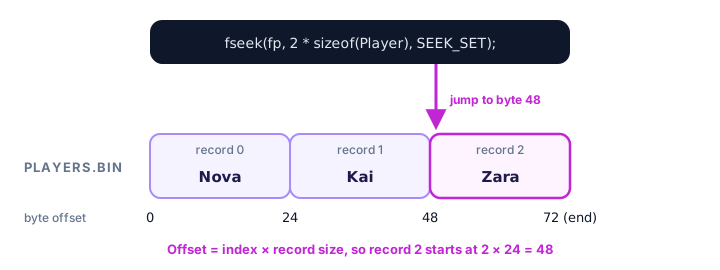
This program opens the file in "wb+" mode (create, write and read), saves the team, counts the records, reads record 2 directly, gives Kai 100 bonus coins in place, then reads everything again:
#include <stdio.h>

typedef struct {
    char name[16];
    int level;
    int coins;
} Player;

int main(void) {
    Player team[3] = {
        {"Nova", 12, 1500},
        {"Kai", 7, 820},
        {"Zara", 19, 3110}
    };
    Player p;
    long record_size = (long) sizeof(Player);

    FILE *fp = fopen("players.bin", "wb+");
    if (fp == NULL) {
        perror("players.bin");
        return 1;
    }
    fwrite(team, sizeof(Player), 3, fp);

    /* How many records? Jump to the end and ask where we are. */
    fseek(fp, 0, SEEK_END);
    long size = ftell(fp);
    printf("Records in file: %ld\n", size / record_size);

    /* Read record 2 directly. */
    fseek(fp, 2 * record_size, SEEK_SET);
    if (fread(&p, sizeof p, 1, fp) == 1) {
        printf("Record 2: %s\n", p.name);
    }

    /* Update record 1 in place. */
    fseek(fp, 1 * record_size, SEEK_SET);
    if (fread(&p, sizeof p, 1, fp) == 1) {
        p.coins += 100;
        fseek(fp, 1 * record_size, SEEK_SET);   /* go back before writing */
        fwrite(&p, sizeof p, 1, fp);
        printf("%s now has %d coins\n", p.name, p.coins);
    }

    /* Read everything again from the start. */
    rewind(fp);
    Player all[3];
    size_t count = fread(all, sizeof(Player), 3, fp);
    fclose(fp);

    printf("After the update:\n");
    for (size_t i = 0; i < count; i++) {
        printf("%s: level %d, %d coins\n", all[i].name, all[i].level, all[i].coins);
    }
    return 0;
}
Records in file: 3
Record 2: Zara
Kai now has 920 coins
After the update:
Nova: level 12, 1500 coins
Kai: level 7, 920 coins
Zara: level 19, 3110 coinsReading Kai moved the position to the start of record 2, so the program seeks back to record 1 before writing. C also requires a fseek(), rewind() or fflush() whenever a + mode file switches between reading and writing.
Portability: endianness and padding
A binary file is a snapshot of memory, and memory layout isn't the same on every computer. Two things can differ:
- Endianness is the order of the bytes inside a number. Most PCs and phones are little-endian: they store the smallest byte first, so 1000000 (hex
000F4240) is saved as40 42 0F 00. Some other machines are big-endian and would read those bytes as a completely different number. It's like writing a date as day/month or month/day: the same digits mean different things. - Padding is unused space the compiler may add inside a struct so each field starts at an address the processor handles efficiently. For
struct { char code; int amount; },sizeofis usually 8, not 5: three empty bytes sit aftercode. A different compiler or setting may pad differently, so itssizeofand file layout won't match.
Sizes vary too: long is 8 bytes on 64-bit Linux and macOS but 4 bytes on Windows. In practice, a binary file is safe to load with the same program on the same kind of system that wrote it. To share data between different machines, use a text format like CSV, or write each field separately using fixed-size types such as int32_t from <stdint.h> in an agreed byte order.
Text files vs binary files
| Text file | Binary file | |
|---|---|---|
| Stores | Characters (digits, letters, newlines) | Raw bytes copied from memory |
| Modes | "r", "w", "a" | "rb", "wb", "ab" |
| Functions | fprintf, fscanf, fgets, fputs | fwrite, fread |
| Readable in an editor? | Yes | No |
| Size of a number | Depends on how many digits | Fixed (sizeof the type) |
| Precision | Can lose decimals when printed | Exact |
| Jump to record n | Hard (lines vary in length) | Easy with fseek() |
| Portable between systems | Yes | Only if layout matches |
| Typical use | Logs, settings, CSV reports | Save games, images, large data sets |
Common mistakes with binary files
1. Forgetting the b in the mode on Windows
In text mode on Windows, any byte with value 10 (the newline code) is changed to two bytes when writing, and a byte with value 26 can be treated as the end of the file when reading. Your numbers get silently corrupted. Always use "wb" and "rb" for binary data; on Linux and macOS it does no harm.
2. Ignoring the return value of fread()
If the file is shorter than you expected, fread() fills only part of your array and the rest holds garbage. Always use the returned count, as the examples above do.
3. Using the size of a pointer instead of the data
Player *team = malloc(3 * sizeof(Player));
fwrite(team, sizeof team, 3, fp);   /* wrong: sizeof a pointer, usually 8 */
sizeof team is the size of the pointer, not of a Player, so the wrong number of bytes is saved. Write sizeof(Player) or sizeof *team.
4. Saving structs that contain pointers
As the warning above explains, a pointer field saves an address, which is meaningless the next time the program runs. Keep text in fixed-size arrays inside the struct.
Practice exercise
🏋️ Try it yourself
A thermostat records four temperatures: 18.5, 20.25, 22.0 and 19.75. Save them as an array of double in temps.bin using "wb+" mode, then use fseek() to read only reading number 2 (counting from 0) and print Reading 2: 22.00.
Show solution
#include <stdio.h>

int main(void) {
    double temps[4] = {18.5, 20.25, 22.0, 19.75};
    double value;

    FILE *fp = fopen("temps.bin", "wb+");
    if (fp == NULL) {
        perror("temps.bin");
        return 1;
    }
    fwrite(temps, sizeof temps[0], 4, fp);

    fseek(fp, 2 * (long) sizeof(double), SEEK_SET);
    if (fread(&value, sizeof value, 1, fp) == 1) {
        printf("Reading 2: %.2f\n", value);
    }
    fclose(fp);
    return 0;
}
Reading 2: 22.00What's next?
That completes file handling: you can open, read, write and randomly access both text and binary files. Next, you'll step back to see what happens before your code is compiled, in C Preprocessor and Macros, where you'll learn how #include and #define really work.
Key takeaways
- Binary files store data as the exact bytes it uses in memory; text files store characters.
- Open binary files with a b in the mode, such as "wb", "rb" or "wb+".
- fwrite(data, size, count, fp) and fread(data, size, count, fp) return the number of whole items written or read.
- One fwrite() can save a whole array or array of structs; avoid saving structs that contain pointers.
- fseek(), ftell() and rewind() move and report the file position, so record i starts at i * sizeof(record).
- Binary files may not load correctly on systems with different endianness, padding or type sizes; use text for sharing.
Frequently asked questions
What is the difference between a text file and a binary file in C?
A text file stores characters, so the number 1000000 takes seven bytes as digits. A binary file stores the raw bytes from memory, so the same int takes sizeof(int) bytes, usually 4. Binary files are exact and fast but not human-readable.
How do I write a struct to a file in C?
Open the file in "wb" mode and call fwrite(&record, sizeof record, 1, fp), or pass an array and a count to save many at once. Read it back with fread() using the same size after opening the file in "rb" mode.
What do fwrite() and fread() return?
They return the number of complete items written or read, not the number of bytes. A result smaller than the count you asked for means the end of the file was reached or an error occurred.
How do I find the size of a file in C?
Open it in binary mode, call fseek(fp, 0, SEEK_END), then ftell(fp) returns the position at the end, which is the size in bytes. Call rewind(fp) afterwards if you want to read from the start.
Are binary files portable between computers?
Not always. Byte order (endianness), struct padding and type sizes can differ between systems and compilers. A binary file is reliable when the same program on the same kind of system reads it; for sharing, prefer text formats.