Common Pointer Mistakes in C (and How to Avoid Them)
Updated 9 min read Aimerscrew
Pointers give C its power, and they're also where most C bugs live. The good news is that pointer mistakes in C follow a handful of patterns. Once you can recognize them, you'll spot them in seconds. In this lesson, you'll see each classic mistake as a short buggy fragment, learn why it's wrong, and then see a fixed, complete program. You'll finish with a checklist and the tools that catch these bugs for you.
🌍 Real-life example
Imagine you keep the address of a friend's apartment in your phone. If you never saved an address and just walk to a random door, that's a wild pointer. If your friend moved out and you still visit the old address, a stranger now lives there: that's a dangling pointer. If your phone says "no address saved" and you go anyway, that's dereferencing NULL. In each case the problem isn't the door; it's the address you trusted.
Why are pointer bugs so dangerous?
Most pointer mistakes cause undefined behavior: the C standard makes no promise about what happens. The program might crash with a "segmentation fault" (an attempt to touch memory it doesn't own), print a garbage value, or seem to work perfectly on your computer and fail on someone else's. That's why the buggy fragments below have no output block: there is no single "correct" wrong output.
1. Uninitialized (wild) pointers
int *p;
*p = 10;   /* p points to a random address */
A local pointer that hasn't been given a value holds whatever bits were left in that memory. This is called a wild pointer. Writing through it stores 10 at some unknown address: it may crash immediately or silently overwrite another variable. GCC with -Wall often warns that p "is used uninitialized", but it can't catch every case.
Fix: make every pointer point somewhere valid, or set it to NULL, the moment you declare it.
#include <stdio.h>

int main(void) {
    int count = 0;
    int *p = &count;   /* point at a real variable first */

    *p = 10;
    printf("count = %d\n", count);
    return 0;
}
count = 102. Dereferencing a NULL pointer
int *room = find_value(room_numbers, 4, 404);
printf("Found room %d\n", *room);   /* room may be NULL */
NULL means "points to nothing". Functions often return it to say "not found". Dereferencing it on most systems crashes the program with a segmentation fault. The fix is a simple check before every use of a pointer that might be NULL:
#include <stdio.h>

int *find_value(int values[], int count, int target) {
    for (int i = 0; i < count; i++) {
        if (values[i] == target) {
            return &values[i];
        }
    }
    return NULL;
}

int main(void) {
    int room_numbers[4] = {101, 102, 205, 310};
    int *room = find_value(room_numbers, 4, 404);

    if (room == NULL) {
        printf("Room 404 not found\n");
    } else {
        printf("Found room %d\n", *room);
    }
    return 0;
}
Room 404 not found3. Dangling pointers
A dangling pointer still holds an address, but the memory at that address is no longer yours. There are two common ways to create one.
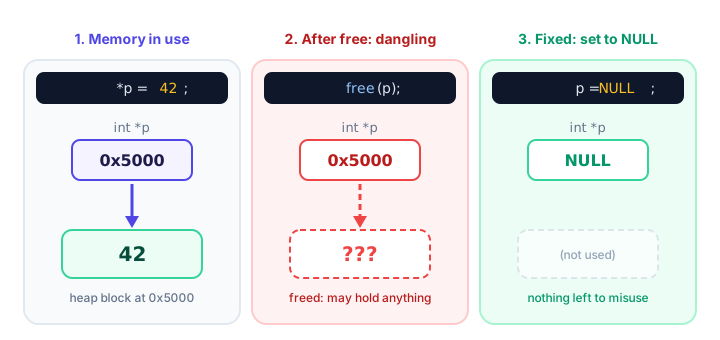
free(p), p still holds the old address. Setting it to NULL removes the trap. (Addresses are made-up examples.)Returning the address of a local variable
int *make_total(void) {
    int total = 40 + 59;
    return &total;   /* total disappears when the function returns */
}
Local variables live only while their function runs. Once make_total returns, total's memory is reused by the next function call, so the caller's pointer dangles. GCC warns "function returns address of local variable", and recent GCC versions may even replace the returned address with NULL, so using the result can crash. Fix: return the value itself, or let the caller provide the storage, as you did in pass by reference:
#include <stdio.h>

void make_total(int *result) {
    *result = 40 + 59;
}

int main(void) {
    int total = 0;

    make_total(&total);
    printf("Total: %d\n", total);
    return 0;
}
Total: 99Using memory after free
malloc asks for memory while the program runs, and free gives it back. You'll learn both properly in malloc and free; here's the mistake to avoid:
int *balance = malloc(sizeof *balance);
*balance = 500;
free(balance);
printf("%d\n", *balance);   /* use after free */
After free, that memory can be handed to another part of the program at any moment. Reading it may print 500, a garbage value, or crash. Writing to it can corrupt unrelated data, which is one of the hardest bugs to track down. Fix: finish using the memory first, then free it and set the pointer to NULL.
#include <stdio.h>
#include <stdlib.h>

int main(void) {
    int *balance = malloc(sizeof *balance);
    if (balance == NULL) {
        return 1;
    }

    *balance = 500;
    printf("Balance: %d\n", *balance);

    free(balance);
    balance = NULL;   /* no dangling pointer left behind */

    if (balance == NULL) {
        printf("Balance memory released\n");
    }
    return 0;
}
Balance: 500
Balance memory released4. Off-by-one errors with pointers
int temps[5] = {18, 21, 19, 23, 20};
for (int *p = temps; p <= temps + 5; p++) {   /* <= goes one too far */
    total += *p;
}
temps + 5 is the address just past the last element. You're allowed to compute it and compare with it, but not to read from it. With <=, the loop reads a sixth "element" that doesn't exist, so the total includes a garbage value. Use <:
#include <stdio.h>

int main(void) {
    int temps[5] = {18, 21, 19, 23, 20};
    int total = 0;

    for (int *p = temps; p < temps + 5; p++) {
        total += *p;
    }
    printf("Total: %d\n", total);
    printf("Average: %.1f\n", total / 5.0);
    return 0;
}
Total: 101
Average: 20.25. Forgetting & in scanf
int age;
scanf("%d", age);   /* passes the value, not the address */
scanf needs to know where to store the number, so it needs an address. Passing age hands it a garbage number that scanf treats as an address, which usually crashes. GCC warns: "format '%d' expects argument of type 'int *', but argument 2 has type 'int'". The fix is one character:
#include <stdio.h>

int main(void) {
    int age;

    printf("Enter your age: ");
    if (scanf("%d", &age) != 1) {
        printf("That was not a number\n");
        return 1;
    }
    printf("In 5 years you will be %d\n", age + 5);
    return 0;
}
Sample run, where the user typed 30:
Enter your age: 30
In 5 years you will be 35
📝 Note
A char array is the exception: in scanf("%19s", name), the array name already turns into an address, so no & is needed.
6. Misreading * in declarations
int* first, second; /* only first is a pointer! */The star belongs to the name, not the type. This line makes first an int * and second a plain int. Writing second = &height; afterwards triggers a GCC diagnostic about making an integer from a pointer. Put a star in front of each pointer name, or declare one per line:
#include <stdio.h>

int main(void) {
    int width = 8;
    int height = 5;
    int *first = &width, *second = &height;

    printf("Area: %d\n", (*first) * (*second));
    return 0;
}
Area: 407. Comparing strings with ==
char username[20] = "admin";
if (username == "admin") {   /* compares addresses, not text */
    printf("Welcome!\n");
}
A string in C is reached through a pointer to its first character. == compares the two addresses, and the array username and the literal "admin" live in different places, so the test is false and "Welcome!" never prints. GCC warns that "comparison with string literal results in unspecified behavior". Compare the characters with strcmp, which returns 0 when the strings match:
#include <stdio.h>
#include <string.h>

int main(void) {
    char username[20] = "admin";

    if (strcmp(username, "admin") == 0) {
        printf("Welcome, admin!\n");
    } else {
        printf("Unknown user\n");
    }
    return 0;
}
Welcome, admin!Pointer safety checklist
| Before you… | Ask yourself |
|---|---|
| Declare a pointer | Did I give it a valid address or NULL right away? |
| Dereference a pointer | Could it be NULL? Have I checked? |
| Return a pointer | Does it point to something that outlives the function? |
Call free | Am I done with it? Do I set the pointer to NULL afterwards? |
| Loop with a pointer | Do I stop with < at array + count, not <=? |
Call scanf | Did I pass &variable (except for char arrays)? |
| Declare several pointers | Does each name have its own *? |
| Compare strings | Am I using strcmp, not ==? |
Tools that catch pointer bugs for you
Compiler warnings. Always compile with warnings on. They catch several mistakes from this lesson (missing &, returning a local's address, string comparison with ==, some uninitialized pointers) before the program even runs:
gcc -std=c17 -Wall -Wextra -g program.c -o programAddressSanitizer. Adding -fsanitize=address builds extra checks into your program. When it reads past an array or uses freed memory, it stops and prints exactly which line did it. It works with GCC and Clang on Linux and macOS (on Windows, use WSL or a compiler that supports it).
gcc -std=c17 -Wall -Wextra -g -fsanitize=address program.c -o program
./program
Valgrind. On Linux, Valgrind runs your normal program and reports invalid reads and writes, use-after-free and memory that was never freed:
valgrind ./program💡 Tip
Treat every warning as a bug until you've proven it isn't. Adding -Werror turns warnings into errors, so you can't accidentally ignore them.
Practice exercise
🏋️ Try it yourself
This program should print Ana's total: 15, but it contains three pointer mistakes from this lesson. Find and fix them all.
#include <stdio.h>

int main(void) {
    int *total;
    char name[10] = "Ana";
    int prices[3] = {4, 6, 5};

    for (int i = 0; i <= 3; i++) {
        *total += prices[i];
    }
    if (name == "Ana") {
        printf("Ana's total: %d\n", *total);
    }
    return 0;
}
Show solution
The three bugs: total is a wild pointer, the loop reads one element past the end with <=, and the names are compared with ==.
#include <stdio.h>
#include <string.h>
int main(void) {
int sum = 0;
int *total = ∑
char name[10] = "Ana";
int prices[3] = {4, 6, 5};
for (int i = 0; i < 3; i++) {
*total += prices[i];
}
if (strcmp(name, "Ana") == 0) {
printf("Ana's total: %d\n", *total);
}
return 0;
}Ana's total: 15What's next?
Many of these bugs come down to one question: where does this memory live, and for how long? Next, you'll answer that by exploring the memory layout of a C program: the stack, the heap and the other regions your variables live in.
Key takeaways
- Most pointer mistakes cause undefined behavior: a crash, a garbage value or code that seems to work.
- Initialize every pointer to a valid address or NULL, and check for NULL before dereferencing.
- Never return the address of a local variable, and never use memory after calling free.
- After free(p), set p = NULL so it cannot dangle.
- Loop with p < array + count; the address one past the end may be compared but never read.
- In int* a, b; only a is a pointer, and strings must be compared with strcmp, not ==.
- Compile with -Wall -Wextra, and use -fsanitize=address or Valgrind to find memory bugs.
Frequently asked questions
What is a wild pointer in C?
A wild pointer is a pointer that was declared but never given a value, so it holds a random address. Using it can crash the program or corrupt memory. Initialize pointers to a real address or NULL.
What is a dangling pointer in C?
A dangling pointer holds the address of memory that is no longer valid, for example after free or after the function that owned a local variable has returned. Using it is undefined behavior.
What happens if you dereference a NULL pointer?
It is undefined behavior. On most operating systems the program stops with a segmentation fault. Always check whether a pointer is NULL before using it.
Why can't I compare strings with == in C?
Because == compares the addresses of the strings, not their characters. Two strings with the same text usually live at different addresses. Use strcmp, which returns 0 when the text matches.
How do I find pointer bugs in C?
Compile with -Wall -Wextra and fix every warning, then run your program built with -fsanitize=address or under Valgrind. Both report invalid memory accesses and the line that caused them.