Arrays in C
Updated 9 min read Aimerscrew
So far, every variable you've made holds a single value. But what if you need to store the temperature for every day of the week, or the scores of 30 players? Creating 30 separate variables would be painful. Arrays in C solve this: one name holds a whole row of values of the same type. In this lesson, you'll declare and initialize arrays, read and change elements, loop over them, and learn the one rule about array boundaries you must never break.
🌍 Real-life example
Picture a row of seats in a theater: seat 1, seat 2, seat 3, all the same kind, all next to each other. You don't give each seat its own street address; you say "row F, seat 4". An array works the same way. The array is the row, and the index is the seat number, so row[4] means "the seat at position 4 in this row".
What is an array in C?
An array is a collection of values of the same type, stored one after another in memory under a single name. Each value is called an element, and you reach it with an index (its position number) inside square brackets.
#include <stdio.h>

int main(void) {
    int temps[7] = {18, 21, 19, 24, 22, 17, 20};

    printf("Monday: %d\n", temps[0]);
    printf("Thursday: %d\n", temps[3]);
    printf("Sunday: %d\n", temps[6]);
    return 0;
}
Monday: 18
Thursday: 24
Sunday: 20The array temps holds seven int values, one per day. temps[0] is the first element, and temps[6] is the seventh and last.
Why do array indexes start at 0?
In C, the index is really an offset: "how many elements to skip from the start". The first element is 0 steps from the start, so its index is 0. That means an array of size N has valid indexes from 0 to N - 1. For temps[7], that's 0 to 6.
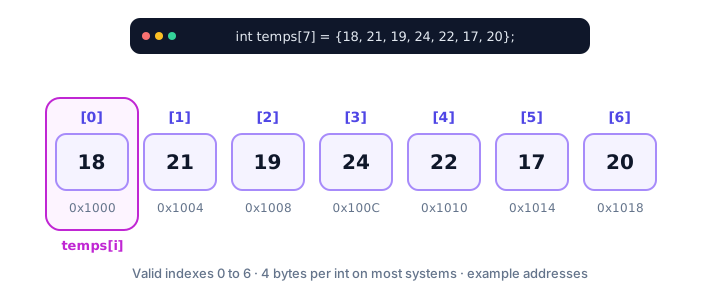
Because every int has the same size (4 bytes on most systems), the computer can jump straight to any element: the address of temps[i] is the start address plus i × 4. That's why reading temps[6] is just as fast as reading temps[0].
How to declare an array in C
A declaration has three parts: the element type, the array name, and the size in square brackets.
int scores[30];        /* room for 30 ints */
double prices[5];      /* room for 5 doubles */
char grades[12];       /* room for 12 chars */
The size must be known when you write the array, and it can never change later. An array of 30 scores always has exactly 30 slots. (If you need a size chosen while the program runs, you'll learn about malloc() later.)
⚠️ Be careful
A local array declared without initial values, like int scores[30];, is not filled with zeros. Its slots hold whatever leftover bits were in that memory, often called garbage values. Always give elements a value before you read them.
How to initialize an array in C
You can fill an array when you create it by listing values inside curly braces. There are a few handy variations:
int primes[5] = {2, 3, 5, 7, 11};   /* size and values */
int odds[] = {1, 3, 5, 7};          /* size worked out: 4 */
int counts[100] = {0};              /* all 100 elements set to 0 */
If you leave the size out, the compiler counts the values for you. And if you give fewer values than the size, C fills every remaining element with zero. This is called partial initialization:
#include <stdio.h>

int main(void) {
    int scores[6] = {95, 80};

    for (int i = 0; i < 6; i++) {
        printf("scores[%d] = %d\n", i, scores[i]);
    }
    return 0;
}
scores[0] = 95
scores[1] = 80
scores[2] = 0
scores[3] = 0
scores[4] = 0
scores[5] = 0That's why = {0} is the classic way to start an array with all zeros: the first element is set to 0 explicitly, and the rest are zero-filled automatically.
Changing array elements
An element works just like a normal variable. You can assign to it, add to it or use it in a condition. Here, a small venue tracks which seats in a row are booked (1) or free (0):
#include <stdio.h>

int main(void) {
    int seats[5] = {0, 0, 0, 0, 0};

    seats[2] = 1;   /* someone books the third seat */
    seats[4] = 1;   /* and the fifth */

    for (int i = 0; i < 5; i++) {
        printf("Seat %d: %s\n", i + 1, seats[i] ? "taken" : "free");
    }
    return 0;
}
Seat 1: free
Seat 2: free
Seat 3: taken
Seat 4: free
Seat 5: takenNotice the i + 1: people count seats from 1, but C counts indexes from 0. Converting between the two is something you'll do often. The ? : part is the ternary operator.
How do you loop over an array in C?
A for loop is the natural partner of an array. The loop counter starts at 0, stops before the length, and serves as the index:
for (int i = 0; i < LENGTH; i++) {
    /* use array[i] here */
}
Notice the condition is i < LENGTH, not i <= LENGTH. With 7 elements, the last valid index is 6, so the loop must stop when i reaches 7.
How do you count the elements in an array?
Typing the length by hand is risky: if you add a value to the array and forget to update the number, your loop is wrong. Instead, let sizeof do the math. sizeof(arr) is the size of the whole array in bytes, and sizeof(arr[0]) is the size of one element, so dividing them gives the number of elements:
#include <stdio.h>

int main(void) {
    double temps[] = {18.5, 21.0, 19.5, 24.0, 22.5, 17.0, 20.5};
    size_t count = sizeof(temps) / sizeof(temps[0]);

    double sum = 0.0;
    double highest = temps[0];

    for (size_t i = 0; i < count; i++) {
        sum += temps[i];
        if (temps[i] > highest) {
            highest = temps[i];
        }
    }

    printf("Days recorded: %zu\n", count);
    printf("Average: %.1f\n", sum / count);
    printf("Highest: %.1f\n", highest);
    return 0;
}
Days recorded: 7
Average: 20.4
Highest: 24.0The sum is 143.0, and 143.0 / 7 is about 20.43, which %.1f rounds to 20.4. The counter i is a size_t to match count, so the compiler doesn't warn about comparing signed and unsigned numbers.
💡 Tip
The sizeof trick only works in the function where the array was declared. Once you pass an array to another function, you must pass its length too. You'll see why in passing arrays to functions.
What happens if you go out of bounds?
C does not check whether an index is valid. If you write temps[7] on a 7-element array, or temps[-1], C simply calculates an address outside the array and uses whatever memory is there. This is called undefined behavior: the C standard makes no promise about what happens.
In practice, reading out of bounds might print a random-looking number, and writing out of bounds might silently change another variable, crash the program, or seem to work today and fail tomorrow. Many real security holes started exactly this way. The fix is simple discipline: keep every index between 0 and length − 1.
Can you copy an array with = ?
No. In C you can't assign a whole array to another with =. Writing copy = original; is a compile error ("assignment to expression with array type"). Copy element by element instead:
#include <stdio.h>

int main(void) {
    int original[4] = {5, 10, 15, 20};
    int copy[4];

    for (int i = 0; i < 4; i++) {
        copy[i] = original[i];
    }

    copy[0] = 99;   /* only the copy changes */

    printf("original[0] = %d\n", original[0]);
    printf("copy[0] = %d\n", copy[0]);
    return 0;
}
original[0] = 5
copy[0] = 99Real-world example: a shopping cart
Two arrays of the same length can work as a team: prices[i] and quantities[i] describe the same item. This pattern is called parallel arrays.
#include <stdio.h>

int main(void) {
    double prices[] = {3.49, 12.99, 0.89, 5.25};
    int quantities[] = {2, 1, 6, 3};
    size_t items = sizeof(prices) / sizeof(prices[0]);

    double total = 0.0;
    for (size_t i = 0; i < items; i++) {
        double line = prices[i] * quantities[i];
        printf("Item %zu: %d x %.2f = %.2f\n", i + 1, quantities[i], prices[i], line);
        total += line;
    }

    printf("Total: %.2f\n", total);
    return 0;
}
Item 1: 2 x 3.49 = 6.98
Item 2: 1 x 12.99 = 12.99
Item 3: 6 x 0.89 = 5.34
Item 4: 3 x 5.25 = 15.75
Total: 41.06Add a fifth product to both arrays and the loop picks it up automatically, because items is calculated, not typed.
Common mistakes with arrays in C
1. Off-by-one loops
Writing for (int i = 0; i <= 5; i++) on a 5-element array reads arr[5], one slot past the end. That's out of bounds: you might see a garbage value, or the program might crash. Use i < 5.
2. Forgetting that the first index is 0
Beginners often write temps[7] to mean "the seventh day". The seventh element is temps[6].
3. Reading elements that were never set
After int totals[10];, the elements hold garbage. Printing them shows unpredictable numbers. Initialize with = {0} or fill them in a loop first.
4. Trying to copy or compare arrays with = and ==
a = b; doesn't compile, and a == b compiles but doesn't compare the elements (it compares where the arrays live in memory). Use a loop for both.
5. Hard-coding the length in many places
If the number 7 appears in five loops and you add an eighth day, you must find and change all five. Calculate the length once with sizeof, or use a named constant.
Practice exercise
🏋️ Try it yourself
A step-counter app saved your steps for 5 days: 8200, 10450, 6300, 12000, 9050. Store them in an array, then print the total, the lowest day (as a day number from 1 to 5) and how many days reached the 10,000-step goal.
Show solution
#include <stdio.h>

int main(void) {
    int steps[] = {8200, 10450, 6300, 12000, 9050};
    size_t days = sizeof(steps) / sizeof(steps[0]);

    int total = 0;
    size_t lowest_day = 0;
    int goal_days = 0;

    for (size_t i = 0; i < days; i++) {
        total += steps[i];
        if (steps[i] < steps[lowest_day]) {
            lowest_day = i;
        }
        if (steps[i] >= 10000) {
            goal_days++;
        }
    }

    printf("Total steps: %d\n", total);
    printf("Lowest day: day %zu (%d steps)\n", lowest_day + 1, steps[lowest_day]);
    printf("Goal reached on %d days\n", goal_days);
    return 0;
}
Total steps: 46000
Lowest day: day 3 (6300 steps)
Goal reached on 2 daysStoring the index of the lowest day (instead of the value) lets you print both the day number and the step count.
What's next?
A single row is great for a week of temperatures, but what about a whole month laid out as a calendar, or a game board? Next, learn 2D arrays in C, which store data in rows and columns.
Key takeaways
- An array stores a fixed number of values of the same type, side by side in memory, under one name.
- Indexes start at 0, so an array of size N has valid indexes 0 to N - 1.
- Initialize with braces, like int primes[] = {2, 3, 5}; missing values in a partial list are set to 0.
- Loop over an array with for (i = 0; i < length; i++), using < and not <=.
- sizeof(arr) / sizeof(arr[0]) gives the number of elements, but only where the array was declared.
- C does not check bounds: using an index outside the array is undefined behavior.
- You cannot copy an array with =; copy it element by element.
Frequently asked questions
What is an array in C?
An array is a fixed-size collection of values of the same type stored next to each other in memory. You access each value with an index in square brackets, starting from 0.
Why do arrays in C start at index 0?
The index is an offset from the start of the array. The first element is zero elements away from the start, so its index is 0, and the last element of an N-element array is at index N - 1.
How do I find the length of an array in C?
Use sizeof(arr) / sizeof(arr[0]). It divides the total bytes of the array by the bytes of one element. It only works in the function where the array was declared, not on an array parameter.
What happens if I access an array out of bounds in C?
It is undefined behavior. C does not check indexes, so the program may read a garbage value, overwrite another variable, crash, or appear to work. Always keep indexes between 0 and length - 1.
Can the size of a C array change after it is created?
No. A normal array has a fixed size for its whole life. If you need memory that can grow, use dynamic memory with malloc() and realloc().
How do I set all elements of an array to zero?
Initialize it with = {0}, for example int counts[50] = {0};. The first element is set to 0 and C zero-fills all remaining elements automatically.